What's new

[ 3006.102.8 alpha Build(s) ] available build(s)

Hi there
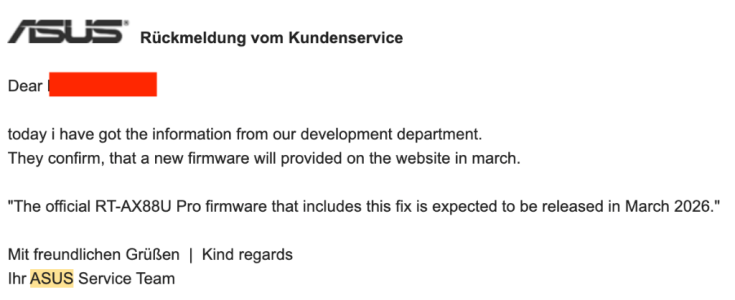
Any chance we can include the new GPL's, esp. for the RT-AX88U Pro. I was working with Asus for about 5 months on this update because there is a serious flaw in the way DHCP leases were being issued when Guest Network Pro is active. This causes a lot of devices to disconnect as soon as Guest Network Pro is active and they do not reconnect until it is switched off. This is especially true for Sonos devices, devices such as Fitbit scales, Lifx bulbs and more IOT devices.


Attachments

  • Screenshot 2026-04-09 at 09.56.32.png
    Screenshot 2026-04-09 at 09.56.32.png
    18.9 KB · Views: 23
  • Screenshot 2026-04-09 at 09.56.07.png
    Screenshot 2026-04-09 at 09.56.07.png
    89.1 KB · Views: 23
Any chance we can include the new GPL's, esp. for the RT-AX88U Pro.
From post #6 earlier in the discussion:

RMerlin's response on GPL expectation in the 3006.102.7 release thread.
There are no GPL changes in 3006.102.7 beside the GT-BE19000AI (because my previous release was based on much earlier code for that model) and the RT-BE92U in 102.7_2 (because of the stability issues in the previous GPL for that model). I won't be getting updated GPLs until late April or early May.
 
Hi there
Any chance we can include the new GPL's, esp. for the RT-AX88U Pro. I was working with Asus for about 5 months on this update because there is a serious flaw in the way DHCP leases were being issued when Guest Network Pro is active. This causes a lot of devices to disconnect as soon as Guest Network Pro is active and they do not reconnect until it is switched off. This is especially true for Sonos devices, devices such as Fitbit scales, Lifx bulbs and more IOT devices.

Since you have been working with ASUS on this matter. why dont you ask them about it? As usual, this has been touched on a few times and merlin has been explaining himself that he also need to wait for the GPL from ASUS as well.
 
Some experiences with GT-BE19000AI.
Checking the page caching, it has disappeared in some places. Where I looked before, when turning SSH on/off, the good setting appears after apply now. However, for example, in Settings->LAN->DHCP Server, if I change the client name in the "Client Name (MAC Address)" field in the pop-up window, after "apply" it shows the modified name. But after "apply" at the bottom of the page, the old name appears again until I manually refresh the page.Sometimes you have to press the buttons twice (apply, cancel,...), because it does nothing at first. There is a delay in entering data, (passwords, other input fields,...) You have to check again, because characters are randomly missing.

I tried OpenVPN in several configurations, only LAN access worked, there was no internet through it, even though "Client will use VPN to access" was set to "both". A small typo, in the generated .ovpn file the Asuswrt-Merlin and OpenVPN version numbers are swapped: # Config generated by Asuswrt-Merlin 2.5.0, requires OpenVPN 102.8 or newer.

I created a VPN client configuration (NordVPN/OpenVPN). I set the "Redirect Internet traffic through tunnel" to "VPN director / Guest network". I assigned it to a created Guest network, but it did not use it. If I added the client to the VPN director, it did. In both cases, the own provider's ipv6 was leaked, not only ipv4 was used (which was correctly the vpn provider's ip). It works fine using the NordVPN desktop app or the browser plugin, with those only having an IPv4 connection.

It seems that the enabled Ai protection does not work. "Malicious sites and infected device blocking" shows 0 results, but there were results with the factory fw, and there is a page that it did not load with, but now it does.

The wifi insight on the dashboard does not work, although it is good in the newer factory one, with a newer gpl. Hopefully they will make it available soon and manage to merge the code.
 
Since you have been working with ASUS on this matter. why dont you ask them about it? As usual, this has been touched on a few times and merlin has been explaining himself that he also need to wait for the GPL from ASUS as well.
He's just saying the fix he's been working with Asus on has been released in the official firmware in March update releases, so he's just looking for this to be implemented in the next Merlin release too.
 
You could do that. After decrypting it, write the decrypted key through the webui in the "Server Key" field. The PEM header should NOT mention "encrypted".
I manage to decrypt server.key and seems to working now
Q: when first time start server is all key generated automatic?
and what happens if there is already keyset after updating software?

-----BEGIN RSA PRIVATE KEY-----
Proc-Type: 4,ENCRYPTED
DEK-Info: AES-256-CBC,ABABABABABABABABABABABABABABABABA
<server.key>
-----END RSA PRIVATE KEY-----

-----BEGIN RSA PRIVATE KEY-----
<server.key>
-----END RSA PRIVATE KEY-----
 
when first time start server is all key generated automatic?
Key/certs that are required will be. The static key will only be generated if :

1) You enable a mode that requires one (tls-auth/tls-crypt/tls-crypt-v2
2) There isn't already an existing static key of the correct type

Key/certs are generated at server start. That's why the server must already be up and running in tls-crypt v2 mode before you can generate client keys from the webui.
 

Similar threads

Latest threads

Support SNBForums w/ Amazon

If you'd like to support SNBForums, just use this link and buy anything on Amazon. Thanks!

Sign Up For SNBForums Daily Digest

Get an update of what's new every day delivered to your mailbox. Sign up here!
Back
Top