What's new
  • SNBForums Code of Conduct

    SNBForums is a community for everyone, no matter what their level of experience.

    Please be tolerant and patient of others, especially newcomers. We are all here to share and learn!

    The rules are simple: Be patient, be nice, be helpful or be gone!

Asus Firmware Update

Robert57

Occasional Visitor
I received the following message in my email:
"WARNING

Backup failed during the F/W Update process to version 3006.102.6.0 on the RT-BE88U router.
Flashing the F/W Update on the RT-BE88U router is now canceled.

Please check backupmon.sh configuration and retry F/W Update from current version:
3006.102.5.0

Sent by the “MerlinAU” utility.
From the “Asus-Merlin” router."

I cannot find a setting in AMTM to 1. suppress the notification of an Asus firmware update and 2. stop receiving such email notifications.

Can anyone help me resolve this issue?
 
I received the following message in my email:
"WARNING

Backup failed during the F/W Update process to version 3006.102.6.0 on the RT-BE88U router.
Flashing the F/W Update on the RT-BE88U router is now canceled.

Please check backupmon.sh configuration and retry F/W Update from current version:
3006.102.5.0

Sent by the “MerlinAU” utility.
From the “Asus-Merlin” router."

I cannot find a setting in AMTM to 1. suppress the notification of an Asus firmware update and 2. stop receiving such email notifications.

Can anyone help me resolve this issue?
Have you tried a manual update?
What are your MerlinAU settings (redact server info)?
 
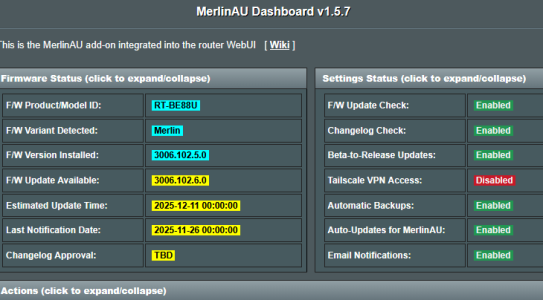
A new F/W update is displayed in the Merlin Dashboard. However, I have activated Auro Update Merlin AU.I assume that version 3006.102.6.0 is the new firmware for Asus and has nothing to do with Merlin.Am I wrong in this assumption?
 

Attachments

  • Screenshot 2025-12-11 100357.png
    Screenshot 2025-12-11 100357.png
    40.1 KB · Views: 42
A new F/W update is displayed in the Merlin Dashboard. However, I have activated Auro Update Merlin AU.I assume that version 3006.102.6 is the new firmware for Asus and has nothing to do with Merlin.Am I wrong in this assumption?
3006.102.6.0 is the latest Merlin firmware, released 16 days ago. This would indicate you still have default settings in MerlinAU(?).
 
Am I wrong in this assumption?

Yes you are wrong with that assumption. As others have said, 3006.102.6.0 is the latest Merlin firmware (ASUS does not use this numbering/version format)
You need to review your MerlinAU settings, and specifically your backupmon settings. (As the warning is telling you...)

Please share your MerlinAU and Backupmon settings for assistance.
 
Yes, I've become more aware of that now (because of reading).....
This is the error message that appeared:
Dec 11 2025 00:00:55 RT-BE88U-30E0 BACKUPMON[30762] - **ERROR**: Unable to mount to external network drive. Please check your configuration!
 
Reset your router to factory defaults and start over clean. Don't touch SSH and AMTM before you need something you don't find in Asuswrt-Merlin available options. All add-ons are optional and when needed.
 
When we have no idea how many "apps" you have installed, for what reason and with what settings - Yes. I asked you what firmware is your router running in previous thread. You never bothered to reply...
 
It would be very helpful, of course, if you could advertise Asus Merlin and warn people not to use any AMTM functions....
 
1 open Diversion 5.4.6
2 open Skynet 8.0.7

8 open MerlinAU 1.5.7

j1 open connmon 3.0.9
bm open BACKUPMON 1.9.1

j2 open ntpMerlin 3.4.12
j4 open spdMerlin 4.4.16
wx open WXMON 2.1.1

j5 open uiDivStats 4.0.13

ep manage Entware packages

em open Email settings

dc manage Disk check script dcl show log
fd run Format disk fdl show log

sw manage Swap file /mnt/SwapFile 2.0G

cj show all cron jobs
i show available scripts

amtm options
u update rr reboot
e exit t theme r reset a about
 
Do what the message says - Please check your configuration! 🤷‍♂️

Or alternatively, disable Backupmon backups from MerlinAU.
 
It would be very helpful, of course, if you could advertise Asus Merlin and warn people not to use any AMTM functions....
Why should the developer of Asus-Merlin firmware need to warn people about using AMTM functions? The router will operate normally without using any of the AMTM provided addon scripts. No one is forcing the end user to run AMTM or install the scripts listed under AMTM. Is it not the end user's responsibility to investigate, and understand, what each of the AMTM listed scripts do BEFORE installing them?

Generally when updating Asus-Merlin firmware any addon scripts should operate as they did previously unless there is a change in the firmware (like moving from 3004.388.x to 3006.102.x firmware) that breaks addon scripts. Quite often the developer of Asus-Merlin will inform addon script developers of changes in the firmware that may impact addon scripts. Sometimes those addon scripts will break with updating the Asus-Merlin firmware. When that happens, see the specific Addon subforum thread discussion for the specific Addon for help and for suggestions on how to fix. Sometimes a simple reinstall of the addon will correct the issue, other times the addon script developer will need to fix the addon script.

PS: In your case your intial post held the answer.
Please check backupmon.sh configuration and retry F/W Update from current version:
3006.102.5.0
So, check your Backupmon addon script configuration to see if there are any issues. Then try updating the firmware to the current Asus-Merlin version (3006.102.6).
 
Last edited:

Similar threads

Support SNBForums w/ Amazon

If you'd like to support SNBForums, just use this link and buy anything on Amazon. Thanks!

Sign Up For SNBForums Daily Digest

Get an update of what's new every day delivered to your mailbox. Sign up here!

Members online

Back
Top