What's new

Asus ROG Rapture GT-BE19000: Most stable firmware and features to disable?

caisersouze

New Around Here
Hi everyone, I’m new here.
I live in Italy, I’ve requested an upgrade to FTTH 2.5 Gbit/s, and I’ve just ordered an Asus ROG Rapture GT-BE19000, which should arrive early next week.
I’d like to ask owners what the best firmware version to install is, which might not necessarily be the latest one. I’ve read that when it first came out it had several “early bugs,” and from what I understand most of them have been fixed in the latest releases, but I’d like to be sure it’s worth installing the newest version—or whether it’s better to update only up to a specific version, since firmware downgrading isn’t always possible.
Lastly, I wanted to ask if there are any features you recommend disabling because they’re currently affected by bugs.

Thanks a lot in advance for your help.

GLDB
 
1) Update to the latest firmware then factory reset again and configure it from scratch
2) Do not enable AiProtection
3) Do not enable QoS
4) Optional, works perfectly for me but your situation may vary. I enabled MLO / Smart Connect. Other users here recommend not to enable them but they work fine for me.
 
1) Update to the latest firmware then factory reset again and configure it from scratch
2) Do not enable AiProtection
3) Do not enable QoS
4) Optional, works perfectly for me but your situation may vary. I enabled MLO / Smart Connect. Other users here recommend not to enable them but they work fine for me.
Great recommendations. I second all of those. Exact same settings on my router as well.
 
1) Update to the latest firmware then factory reset again and configure it from scratch
2) Do not enable AiProtection
3) Do not enable QoS
4) Optional, works perfectly for me but your situation may vary. I enabled MLO / Smart Connect. Other users here recommend not to enable them but they work fine for me.
Thanks a lot for the clear recommendations — really helpful.
I’ll update to the latest firmware (3.0.0.6.102_39197), do a full factory reset, and set it up from scratch as suggested. I’ll also keep AiProtection and QoS disabled for now.
As for MLO / Smart Connect, I’ll probably test them later once everything is stable and see how it behaves in my setup.

Appreciate your help!
 
Thanks a lot for the clear recommendations — really helpful.
I’ll update to the latest firmware (3.0.0.6.102_39197), do a full factory reset, and set it up from scratch as suggested. I’ll also keep AiProtection and QoS disabled for now.
As for MLO / Smart Connect, I’ll probably test them later once everything is stable and see how it behaves in my setup.

Appreciate your help!
Here are the steps to enable MLO (I have Smart Connect enabled, single SSID)

1.png


2.png
 
2) Do not enable AiProtection
3) Do not enable QoS

Adaptive QoS is broken on ASUS BE-class routers and keeping it disabled is a sound advice, but AiProtection can still do URL-based filtering even if broken Trend Micro engine affects in some way other functionality. Parental Controls may be affected as well as Traffic Analyzer, but AiProtection enabled won't hurt. It's not very useful with monthly signatures updates, but still can do something for the obvious.
 
Adaptive QoS is broken on ASUS BE-class routers and keeping it disabled is a sound advice, but AiProtection can still do URL-based filtering even if broken Trend Micro engine affects in some way other functionality. Parental Controls may be affected as well as Traffic Analyzer, but AiProtection enabled won't hurt. It's not very useful with monthly signatures updates, but still can do something for the obvious.
On the BE19000ai router - AiProtection is broken and when enabled it will severly cripple/degrade your wireless speeds. In my case it’s by 75-80%.
 
This must be model specific bonus bug. 🫨
 
On the BE19000ai router - AiProtection is broken and when enabled it will severly cripple/degrade your wireless speeds. In my case it’s by 75-80%.
Many websites and apps won't work at all when Advertisement and Tracker Blocking are enabled. Overall functionality improves without any AI Protection enabled.

Yet AI Protection works fine on my BQ16 Pro.
 
On the BE19000ai router - AiProtection is broken and when enabled it will severly cripple/degrade your wireless speeds. In my case it’s by 75-80%.

Hmm, I have it enabled......
 
How are your wireless speeds? Same as when AiP is not enabled?
Darn, I just came to do a speed test and realized it is off because I have it in AP mode. Gonna have to rearrange them and put back on router mode...

But on to why I came to this thread: this 3.0.0.6.102_39197 firmware was reported on the ROG Networking forum, after factory reset and configure, to broadcast an accessible open network ASUS_XX. XX being 2 of the characters of the MAC I forget which....
 
It is. Never had it before on my 98 Pro.
The AiProtection of the Ai router seems different. It allows you to try to block advertisements and tracking separate from others. I disabled blocking advertisement option...
Speeds are excellent, about 5 ft from router clear line of sight.
2688.jpg
 
This thread is for the non-Ai GT-BE19000 model.... We unfortunately jacked it...
 
@Spartan Do you have non-WiFi 7 devices connect to your main SSID? or WiFi 5? WPA-2 is for backwards compatibility to WiFi 5. Can't see your AES setting to comment...
 
@Spartan Do you have non-WiFi 7 devices connect to your main SSID? or WiFi 5? WPA-2 is for backwards compatibility to WiFi 5. Can't see your AES setting to comment...
Yes I do. As for the AES, it is

2026-01-17_041919.jpg
 
This thread is for the non-Ai GT-BE19000 model.... We unfortunately jacked it...
Exactly — this is a thread about the ASUS (GT-)BE19000, not the BE19000AI.

I’d like to take the opportunity to ask whether any of you are also experiencing odd behavior with the VPN.
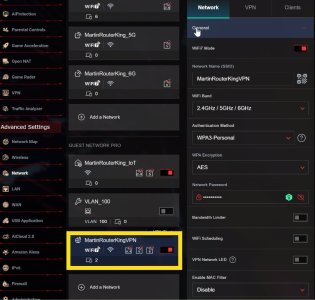
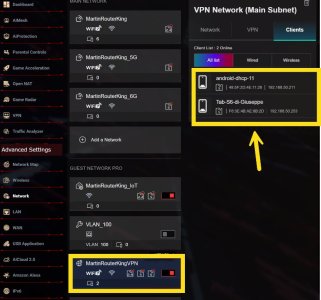
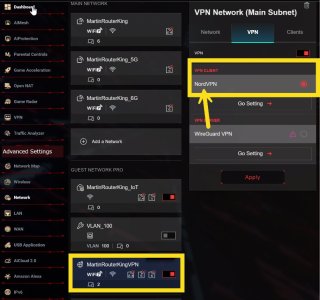
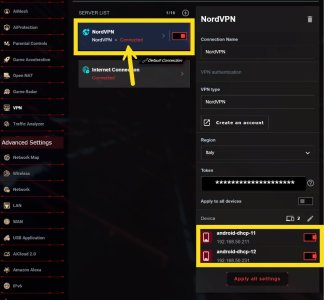
I created a dedicated Wi-Fi network (Guest Network Pro) with SSID “MartinRouterKingVPN”, and earlier under VPN Network / VPN Fusion I added a VPN Client profile using NordVPN’s connection parameters (they provided me a token, which I masked with asterisks in the screenshots). I then associated the NordVPN profile with the “MartinRouterKingVPN” network.
Since connecting clients to “MartinRouterKingVPN” didn’t give me any IP masking via VPN Fusion, I also tried forcing the NordVPN connection to only some clients (device toggles). Nothing changed in that case either: if I open a “what is my IP” / geo-location website, I always see my ISP public IP (so it looks like the traffic is not going through the VPN).
Of course, I also rebooted the router, and NordVPN still shows as “Connected.”
I’m attaching screenshots of the settings (Guest Network Pro / VPN Network / VPN Fusion and client list). If I’m doing something wrong or I’m missing a setting, I’d really appreciate any tips.
Thanks a lot!
 

Attachments

  • Network-GuestNetworkPRO.jpg
    Network-GuestNetworkPRO.jpg
    84.8 KB · Views: 23
  • Network-GuestNetworkPRO-Clients.jpg
    Network-GuestNetworkPRO-Clients.jpg
    82.1 KB · Views: 24
  • Network-GuestNetworkPRO-VPN.jpg
    Network-GuestNetworkPRO-VPN.jpg
    79.9 KB · Views: 21
  • VPN-VPNFusion.jpg
    VPN-VPNFusion.jpg
    71.1 KB · Views: 21
In the left screenshot, towards the right side there should be a -> More Config

Use same subnet as main network should be toggled off, creating a VLAN. If this doesn't help or it is already toggled off someone more knowledgeable is going to need to chime in...
 

Latest threads

Support SNBForums w/ Amazon

If you'd like to support SNBForums, just use this link and buy anything on Amazon. Thanks!

Sign Up For SNBForums Daily Digest

Get an update of what's new every day delivered to your mailbox. Sign up here!
Back
Top