@radar2000, after flashing to 388.1_0, did you do a full reset? Did you use any saved backup config files on the new router?
Did you power down the entire network (physically unplug all devices from the AC wall plugs) for at least a few minutes, before powering on the router, switches (if you have any), and then all the wired client devices (one, by one)? Or at least, do so on the problem device.
Have you tried changing to a fixed Control Channel?
Control Channel Setup 2021
Reset Mini Guide + Control Channel Setup Details
Control Channel Setup (more)
If you haven't done the above, you may want to do that now (in addition to re-flashing the 388.1_0 firmware again too, yes, even if it's already installed on the router).
Running stock firmware when your intention is to run RMerlin firmware isn't a good idea, IMO. That is like learning to water ski when you want to become a swimming athlete.
If the above suggestions don't work, and, a full reset, a minimal and manual configuration (without using a saved backup file at all), and one or more full network reboots still doesn't fix the issue you're seeing with that one client, it
may be a hardware issue, or it might only be a setting or two that needs to be adjusted.
Keep good notes on what you've changed past defaults after that full reset. Keep good notes on what your network experience is afterward. Come back with that info if you still need help.
[Wireless] ASUS router Hard Factory Reset | Official Support | ASUS Global
Fully Reset / Best Practice Setup / More
About L&LD
Almost all L&LD Links
Hope this helps.



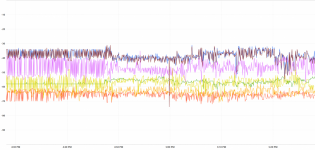


 I'm seeing drops of several seconds on the 2.4Ghz radios, more frequently on the GT-AC2900, less so on the RT-AX58U and RT-AC66U. Since the drops are below 5 seconds (the sampling rate of NetSpot),it may be happening more frequently. When the signal drops for less than 5 seconds, the active web page/stream has just a bit of hesitation...it's not enough to trigger a network error. See the diagram below... The purple, violet and green lines are all 2.4GHz radios. You may not even notice it, or may attribute it to an internet hiccup. I notice it because all my IOT devices are on 2.4GHz and are more sensitive to network outages...I've got a Google Home display which constantly loses the network then magically reconnects. Try googling "asus router keeps dropping"...


