What's new
  • SNBForums Code of Conduct

    SNBForums is a community for everyone, no matter what their level of experience.

    Please be tolerant and patient of others, especially newcomers. We are all here to share and learn!

    The rules are simple: Be patient, be nice, be helpful or be gone!

Release ASUS RT-AX86U Pro Firmware version 3.0.0.6.102_34406 2025/10/28

It does when you first setup a Guest Network Pro: Customized Network.

I never felt like I knew what the built-in GNPs were doing so I only us the custom VLANs and live with the settings they expose... and still learning what some settings are about.

OE
 
Yeah, stock firmware does not have "Use same subnet as main network". (I thought it used to ...) Either way, it worked in the last build.
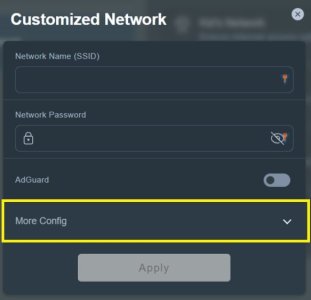
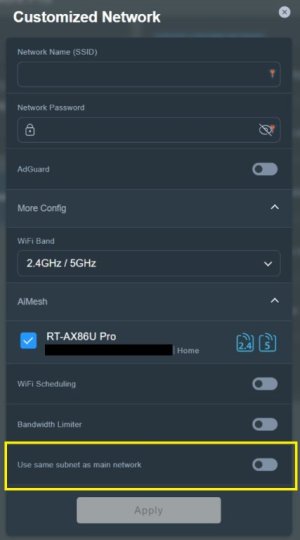
Yes it does. Typically the option is only available when one selects the Guest Network Pro profile they're going to initially create. For the Customized Network profile the option is under More Config which isn't expanded (at least for me) until it is manually selected/expanded. Example from Asus-Merlin firmware attached, from what I remember it was the same on stock firmware. For what ever reason Asus apparently coded it such that the option cannot be changed once the profile has been created. It appears one has to delete the profile and create a new one if they want to change the Use same subnet as main network option.

Edit to add: Looking through the other Guest Network Pro profile options (on Asus-Merlin 3006.102.5, should be same on stock Asus 3006 firmware from what I remember) the Use same subnet as main network option varies where it is displayed when initially selecting the preset Guest Network Pro profiles Asus has created.

Guest Portal the option doesn't appear to be available.
Guest Network the option is under More Config (default: disabled).
Kid's Network the option is under More Config (default: disabled).
IoT Network the option is on initial profile dialog panel (default: enabled).
VPN Network the option is under More Config (default: disabled).
Customized Network the option is under More Config (default: disabled).

Because Asus hasn't provided detailed documentation on the Guest Network Pro feature it's left to users to try and figure out how exactly certain things work, where the boundaries are, and how to tailor things for one's specific use case. As such it has caused much confusion on how Guest Network Pro profile features work or don't work. Spent significant time with the initial RT-AX86U Pro 3006 firmware releases trying to figure out how Guest Network Pro worked, especially the Use same subnet as main network option since it sometimes didn't operate as one expected. Documented some commentary in this post and this post.

 

Attachments

  • Customized Network.jpg
    Customized Network.jpg
    22.1 KB · Views: 24
  • Customized Network - More Config.jpg
    Customized Network - More Config.jpg
    27.6 KB · Views: 26
Last edited:
I had not reset my router since the upgrade to this firmware. The mesh network was working fine but I had some time so I figured a system reset and reconfigure would not hurt since Asus had been recommending a reset. I did a System Reset to Factory Defaults from AiMesh/System Settings. The reset seemed to work and I was able to manually configure the router and add the AiMesh node with no problems.
However, I discovered that all the router settings had not reset! The Traffic Analyzer/Statistic still retained data from before the reset. I was able to view data back to the last time I had Factory Reset with an additional Hard Factory reset. I was able to delete the old data from the GUI but I wonder what other data is not being deleted? This has been reported to Asus.
 
I did a System Reset to Factory Defaults from AiMesh/System Settings. The reset seemed to work and I was able to manually configure the router and add the AiMesh node with no problems.
However, I discovered that all the router settings had not reset! The Traffic Analyzer/Statistic still retained data from before the reset. I was able to view data back to the last time I had Factory Reset with an additional Hard Factory reset. I was able to delete the old data from the GUI but I wonder what other data is not being deleted? This has been reported to Asus.
You may have needed to reset the main router by using the factory default reset option in the Administration section, and checking the "Initialize all the settings, and clear all the data log for AiProtection, Traffic Analyzer, and Web History." option prior to performing the main router reset.
 
You may have needed to reset the main router by using the factory default reset option in the Administration section, and checking the "Initialize all the settings, and clear all the data log for AiProtection, Traffic Analyzer, and Web History." option prior to performing the main router reset.
Should not have to do that. A Factory Reset should wipe everything! It is documented that a Hard Factory Reset does not always work....
 
Should not have to do that. A Factory Reset should wipe everything! It is documented that a Hard Factory Reset does not always work....
Shouldn't have to, but could be another one of those things that isn't properly explained by Asus. Perhaps when doing the AiMesh reset it is really only doing a "router restore". Asus may be mix terminology. They talk about; factory reset, hard factory reset, router restore and router initialize across several of their support links.
[Wireless Router] What is the difference between Restore and Initialize ?

From the link:
Step 4. Reset your router by one of these options:
Restore: Erases the Log / NVRAM
Initialize: Erases the Log / NVRAM / Database

The following explains what each area contains:
【Log】: System log , Offline client list, AiCloud log
【NVRAM】: Basic Setting Information
【Database】: AiProtection Monitor Log ,Traffic Analyzer Log , Web History
.....
FAQ
1. Is Restoring on Web GUI the same as pressing the RESET button?

 
I always use the webUI resets unless I can't access the webUI... the button resets can be mechanically dodgy. I would not rely on any AiMesh "System" resets since AiMesh is barely a "system".

OE
 
I would not rely on any AiMesh "System" resets since AiMesh is barely a "system".

You need to upgrade your router. RT-BE92U as an example has "AI-boosted Smart AiMesh" and it is "Engineered for Always-On Connections". If your AiMesh feels dumb and you get cut-offs regularly - this is what you have paid for. 🤪
 

Similar threads

Support SNBForums w/ Amazon

If you'd like to support SNBForums, just use this link and buy anything on Amazon. Thanks!

Sign Up For SNBForums Daily Digest

Get an update of what's new every day delivered to your mailbox. Sign up here!
Back
Top