What's new

Release Asuswrt-Merlin 3004.388.11 is now available

Asuswrt-Merlin 3004.388.11 is now available. The focus of this release is merging a new GPL (largely security fixes), the removal of AiCloud due to repeated security issues, and the new Traffic Monitor redesign that was initially introduced in 3006.102.6.

Changes since 3004.388.10_2:

Code:
3004.388.11 (26-Dec-2025)
  - NOTE: AiCloud has been removed from Asuswrt-Merlin due
          to its poor security track record.  This also includes
          cloud syncing features such as Asuswebstorage or
          Dropbox syncing with USB folder.  Use a VPN if you
          need secure remote access to your data.

  - NOTE: For developers, the Tomato legacy files (tm*.*)
          are no longer included with the webui.  Please
          update your addon pages accordingly.

  - NEW: Redesigned Traffic Monitor pages.
         - Uses Chart.js for Realtime and Last24 pages
         - Removes legacy Tomato code
         - Last 24 can be zoomed in and panned (mouse wheel
           and pinch-to-zoom gestures are both supported)
         - Realtime and Last 24 now show as bits/s instead
           of bytes/s
         - Settings moved from the tab to the dropdown menu
         - Removed NVRAM database location option and added
           JFFS.  Also removed rarely used start-of-month
           setting.

  - UPDATED: Merged GPL 388_25575.
  - UPDATED: OpenVPN to 2.6.17.
  - UPDATED: libcap-ng to 0.8.4 (to be in sync with upstream)
  - UPDATED: Dropbear to 2025.89.
  - UPDATED: nettle to 3.10.2.
  - CHANGED: TrafficMonitor stats can now be saved to JFFS,
             and removed support for saving to NVRAM.
  - FIXED: IPv6 blocking of DoT servers (dave14305)
  - REMOVED: outdated setuprsa.sh script.
  - REMOVED: AiCloud support, due to security reasons.

Please keep discussions on this specific release.

Downloads are here.
Changelog is here.
As an owner on (2) AX86U's, I just want to say thank you for keeping us updated 🙏.
 
AX86U dirty upgrade from 388.10_2 with no issues. Thanks and Happy New Year 💥💥☃️to RMerlin and all of the members/contributors/lurkers.
 
Last edited:
Upgraded from second alpha to 11_0 and some devices (ring chime for example) are no longer able to get a dhcp lease on 2.4Ghz wifi. At first I thought it was just the guest network I use for IoT, but some Sonos devices (8f:22 and 3e:da in log ) are on regular 2.4Ghz wifi. Seems like devices with existing leases are working ok, but devices trying to reconnect and get new lease are not able. Log is full of dhcp discover / offers:

Code:
Dec 29 09:32:45 dnsmasq-dhcp[1748]: DHCPDISCOVER(br0) 192.168..xxx.xxx 78:28:ca:20:8f:22
Dec 29 09:32:45 dnsmasq-dhcp[1748]: DHCPOFFER(br0) 192.168..xxx.xxx 78:28:ca:20:8f:22
Dec 29 09:32:45 dnsmasq-dhcp[1748]: DHCPDISCOVER(br0) 192.168..xxx.xxx 78:28:ca:20:8f:22
Dec 29 09:32:45 dnsmasq-dhcp[1748]: DHCPOFFER(br0) 192.168..xxx.xxx 78:28:ca:20:8f:22
Dec 29 09:32:45 dnsmasq-dhcp[1748]: DHCPDISCOVER(br0) 192.168..xxx.xxx 78:28:ca:20:8f:22
Dec 29 09:32:45 dnsmasq-dhcp[1748]: DHCPOFFER(br0) 192.168..xxx.xxx 78:28:ca:20:8f:22
Dec 29 09:32:45 dnsmasq-dhcp[1748]: DHCPDISCOVER(br0) 192.168..xxx.xxx 78:28:ca:20:8f:22
Dec 29 09:32:45 dnsmasq-dhcp[1748]: DHCPOFFER(br0) 192.168..xxx.xxx 78:28:ca:20:8f:22
Dec 29 09:32:46 dnsmasq-dhcp[1748]: DHCPDISCOVER(br1) 34:3e:a4:35:03:36
Dec 29 09:32:46 dnsmasq-dhcp[1748]: DHCPOFFER(br1) 192.168.yyy.yyy 34:3e:a4:35:03:36
Dec 29 09:32:48 dnsmasq-dhcp[1748]: DHCPDISCOVER(br1) cc:f7:35:71:16:73
Dec 29 09:32:48 dnsmasq-dhcp[1748]: DHCPOFFER(br1) 192.168.yyy.yyy cc:f7:35:71:16:73
Dec 29 09:32:48 dnsmasq-dhcp[1748]: DHCPDISCOVER(br1) 34:3e:a4:35:03:36
Dec 29 09:32:48 dnsmasq-dhcp[1748]: DHCPOFFER(br1) 192.168.yyy.yyy 34:3e:a4:35:03:36
Dec 29 09:32:49 dnsmasq-dhcp[1748]: DHCPDISCOVER(br0) 192.168..xxx.xxx 78:28:ca:20:8f:22
Dec 29 09:32:49 dnsmasq-dhcp[1748]: DHCPOFFER(br0) 192.168..xxx.xxx 78:28:ca:20:8f:22
Dec 29 09:32:49 dnsmasq-dhcp[1748]: DHCPDISCOVER(br0) 192.168..xxx.xxx 78:28:ca:20:8f:22
Dec 29 09:32:49 dnsmasq-dhcp[1748]: DHCPOFFER(br0) 192.168..xxx.xxx 78:28:ca:20:8f:22
Dec 29 09:32:49 dnsmasq-dhcp[1748]: DHCPDISCOVER(br0) 192.168..xxx.xxx 78:28:ca:20:8f:22
Dec 29 09:32:49 dnsmasq-dhcp[1748]: DHCPOFFER(br0) 192.168..xxx.xxx 78:28:ca:20:8f:22
Dec 29 09:32:49 dnsmasq-dhcp[1748]: DHCPDISCOVER(br0) 192.168..xxx.xxx 78:28:ca:20:8f:22
Dec 29 09:32:49 dnsmasq-dhcp[1748]: DHCPOFFER(br0) 192.168..xxx.xxx 78:28:ca:20:8f:22
Dec 29 09:32:51 dnsmasq-dhcp[1748]: DHCPDISCOVER(br0) 192.168..xxx.xxx 78:28:ca:96:3e:da
Dec 29 09:32:51 dnsmasq-dhcp[1748]: DHCPOFFER(br0) 192.168..xxx.xxx 78:28:ca:96:3e:da
Dec 29 09:32:51 dnsmasq-dhcp[1748]: DHCPDISCOVER(br0) 192.168..xxx.xxx 78:28:ca:96:3e:da
Dec 29 09:32:51 dnsmasq-dhcp[1748]: DHCPOFFER(br0) 192.168..xxx.xxx 78:28:ca:96:3e:da
Dec 29 09:32:51 dnsmasq-dhcp[1748]: DHCPDISCOVER(br0) 192.168..xxx.xxx 78:28:ca:96:3e:da
Dec 29 09:32:51 dnsmasq-dhcp[1748]: DHCPOFFER(br0) 192.168..xxx.xxx 78:28:ca:96:3e:da
Dec 29 09:32:51 dnsmasq-dhcp[1748]: DHCPDISCOVER(br0) 192.168..xxx.xxx 78:28:ca:96:3e:da
Dec 29 09:32:51 dnsmasq-dhcp[1748]: DHCPOFFER(br0) 192.168..xxx.xxx 78:28:ca:96:3e:da
Dec 29 09:32:53 dnsmasq-dhcp[1748]: DHCPDISCOVER(br0) 192.168..xxx.xxx 78:28:ca:96:3e:da
Dec 29 09:32:53 dnsmasq-dhcp[1748]: DHCPOFFER(br0) 192.168..xxx.xxx 78:28:ca:96:3e:da
Dec 29 09:32:53 dnsmasq-dhcp[1748]: DHCPDISCOVER(br0) 192.168..xxx.xxx 78:28:ca:96:3e:da
Dec 29 09:32:53 dnsmasq-dhcp[1748]: DHCPOFFER(br0) 192.168..xxx.xxx 78:28:ca:96:3e:da
Dec 29 09:32:53 dnsmasq-dhcp[1748]: DHCPDISCOVER(br0) 192.168..xxx.xxx 78:28:ca:96:3e:da
Dec 29 09:32:53 dnsmasq-dhcp[1748]: DHCPOFFER(br0) 192.168..xxx.xxx 78:28:ca:96:3e:da
Dec 29 09:32:53 dnsmasq-dhcp[1748]: DHCPDISCOVER(br0) 192.168..xxx.xxx 78:28:ca:96:3e:da
Dec 29 09:32:53 dnsmasq-dhcp[1748]: DHCPOFFER(br0) 192.168..xxx.xxx 78:28:ca:96:3e:da

Periodically I see things like this:
Code:
Dec 29 09:17:55 kernel: Init chrdev /dev/idp with major 190
Dec 29 09:17:55 kernel: tdts: tcp_conn_max = 8000
Dec 29 09:17:55 kernel: tdts: tcp_conn_timeout = 300 sec
Dec 29 09:17:56 rc_service: cfg_server 1947:notify_rc stop_fw_check
Dec 29 09:17:57 rc_service: cfg_server 1947:notify_rc start_fw_check
Dec 29 09:17:57 kernel: SHN Release Version: 2.0.1 21224-01
Dec 29 09:17:57 kernel: UDB Core Version: 0.2.20
Dec 29 09:17:57 kernel: Init chrdev /dev/idpfw with major 191
Dec 29 09:17:57 kernel: Registered DNS Req parsing
Dec 29 09:17:57 kernel: IDPfw: flush fc
Dec 29 09:17:57 kernel: IDPfw: IDPfw is ready
Dec 29 09:17:57 kernel: sizeof forward pkt param = 280
Dec 29 09:17:57 BWDPI: fun bitmap = 3
<snip>
Dec 29 09:18:08 BWDPI: force to flush flowcache entries
Dec 29 09:18:08 kernel: IDPfw: Exit IDPfw
Dec 29 09:18:08 kernel: mod epilog takes 0 jiffies
Dec 29 09:18:08 kernel: IDPfw: Exit IDPfw
Dec 29 09:18:08 kernel: Exit chrdev /dev/idpfw with major 191
Dec 29 09:18:09 kernel: udb_core lock_num = 23
Dec 29 09:18:09 kernel: Exit chrdev /dev/idp with major 190
Dec 29 09:18:09 BWDPI: rollback fc

No idea if these things are related. No config changes during upgrade. Still using wpa2/wpa3 on all wifi networks and have been for months. Have rebooted router and aimesh node a couple of times since upgrade.

Anyone else seeing similar ? Thx for any insights.

 
Last edited:
Upgraded from second alpha to 11_0 and some devices (ring chime for example) are no longer able to get a dhcp reservation on 2.4Ghz wifi. At first I thought it was just the guest network I use for IoT, but some Sonos devices (8f:22 and 3e:da in log ) are on regular 2.4Ghz wifi. Seems like devices with existing leases are working ok, but devices trying to reconnect and get new lease are not able. Log is full of dhcp discover / offers:

Code:
Dec 29 09:32:45 dnsmasq-dhcp[1748]: DHCPDISCOVER(br0) 192.168..xxx.xxx 78:28:ca:20:8f:22
Dec 29 09:32:45 dnsmasq-dhcp[1748]: DHCPOFFER(br0) 192.168..xxx.xxx 78:28:ca:20:8f:22
Dec 29 09:32:45 dnsmasq-dhcp[1748]: DHCPDISCOVER(br0) 192.168..xxx.xxx 78:28:ca:20:8f:22
Dec 29 09:32:45 dnsmasq-dhcp[1748]: DHCPOFFER(br0) 192.168..xxx.xxx 78:28:ca:20:8f:22
Dec 29 09:32:45 dnsmasq-dhcp[1748]: DHCPDISCOVER(br0) 192.168..xxx.xxx 78:28:ca:20:8f:22
Dec 29 09:32:45 dnsmasq-dhcp[1748]: DHCPOFFER(br0) 192.168..xxx.xxx 78:28:ca:20:8f:22
Dec 29 09:32:45 dnsmasq-dhcp[1748]: DHCPDISCOVER(br0) 192.168..xxx.xxx 78:28:ca:20:8f:22
Dec 29 09:32:45 dnsmasq-dhcp[1748]: DHCPOFFER(br0) 192.168..xxx.xxx 78:28:ca:20:8f:22
Dec 29 09:32:46 dnsmasq-dhcp[1748]: DHCPDISCOVER(br1) 34:3e:a4:35:03:36
Dec 29 09:32:46 dnsmasq-dhcp[1748]: DHCPOFFER(br1) 192.168.yyy.yyy 34:3e:a4:35:03:36
Dec 29 09:32:48 dnsmasq-dhcp[1748]: DHCPDISCOVER(br1) cc:f7:35:71:16:73
Dec 29 09:32:48 dnsmasq-dhcp[1748]: DHCPOFFER(br1) 192.168.yyy.yyy cc:f7:35:71:16:73
Dec 29 09:32:48 dnsmasq-dhcp[1748]: DHCPDISCOVER(br1) 34:3e:a4:35:03:36
Dec 29 09:32:48 dnsmasq-dhcp[1748]: DHCPOFFER(br1) 192.168.yyy.yyy 34:3e:a4:35:03:36
Dec 29 09:32:49 dnsmasq-dhcp[1748]: DHCPDISCOVER(br0) 192.168..xxx.xxx 78:28:ca:20:8f:22
Dec 29 09:32:49 dnsmasq-dhcp[1748]: DHCPOFFER(br0) 192.168..xxx.xxx 78:28:ca:20:8f:22
Dec 29 09:32:49 dnsmasq-dhcp[1748]: DHCPDISCOVER(br0) 192.168..xxx.xxx 78:28:ca:20:8f:22
Dec 29 09:32:49 dnsmasq-dhcp[1748]: DHCPOFFER(br0) 192.168..xxx.xxx 78:28:ca:20:8f:22
Dec 29 09:32:49 dnsmasq-dhcp[1748]: DHCPDISCOVER(br0) 192.168..xxx.xxx 78:28:ca:20:8f:22
Dec 29 09:32:49 dnsmasq-dhcp[1748]: DHCPOFFER(br0) 192.168..xxx.xxx 78:28:ca:20:8f:22
Dec 29 09:32:49 dnsmasq-dhcp[1748]: DHCPDISCOVER(br0) 192.168..xxx.xxx 78:28:ca:20:8f:22
Dec 29 09:32:49 dnsmasq-dhcp[1748]: DHCPOFFER(br0) 192.168..xxx.xxx 78:28:ca:20:8f:22
Dec 29 09:32:51 dnsmasq-dhcp[1748]: DHCPDISCOVER(br0) 192.168..xxx.xxx 78:28:ca:96:3e:da
Dec 29 09:32:51 dnsmasq-dhcp[1748]: DHCPOFFER(br0) 192.168..xxx.xxx 78:28:ca:96:3e:da
Dec 29 09:32:51 dnsmasq-dhcp[1748]: DHCPDISCOVER(br0) 192.168..xxx.xxx 78:28:ca:96:3e:da
Dec 29 09:32:51 dnsmasq-dhcp[1748]: DHCPOFFER(br0) 192.168..xxx.xxx 78:28:ca:96:3e:da
Dec 29 09:32:51 dnsmasq-dhcp[1748]: DHCPDISCOVER(br0) 192.168..xxx.xxx 78:28:ca:96:3e:da
Dec 29 09:32:51 dnsmasq-dhcp[1748]: DHCPOFFER(br0) 192.168..xxx.xxx 78:28:ca:96:3e:da
Dec 29 09:32:51 dnsmasq-dhcp[1748]: DHCPDISCOVER(br0) 192.168..xxx.xxx 78:28:ca:96:3e:da
Dec 29 09:32:51 dnsmasq-dhcp[1748]: DHCPOFFER(br0) 192.168..xxx.xxx 78:28:ca:96:3e:da
Dec 29 09:32:53 dnsmasq-dhcp[1748]: DHCPDISCOVER(br0) 192.168..xxx.xxx 78:28:ca:96:3e:da
Dec 29 09:32:53 dnsmasq-dhcp[1748]: DHCPOFFER(br0) 192.168..xxx.xxx 78:28:ca:96:3e:da
Dec 29 09:32:53 dnsmasq-dhcp[1748]: DHCPDISCOVER(br0) 192.168..xxx.xxx 78:28:ca:96:3e:da
Dec 29 09:32:53 dnsmasq-dhcp[1748]: DHCPOFFER(br0) 192.168..xxx.xxx 78:28:ca:96:3e:da
Dec 29 09:32:53 dnsmasq-dhcp[1748]: DHCPDISCOVER(br0) 192.168..xxx.xxx 78:28:ca:96:3e:da
Dec 29 09:32:53 dnsmasq-dhcp[1748]: DHCPOFFER(br0) 192.168..xxx.xxx 78:28:ca:96:3e:da
Dec 29 09:32:53 dnsmasq-dhcp[1748]: DHCPDISCOVER(br0) 192.168..xxx.xxx 78:28:ca:96:3e:da
Dec 29 09:32:53 dnsmasq-dhcp[1748]: DHCPOFFER(br0) 192.168..xxx.xxx 78:28:ca:96:3e:da

Periodically I see things like this:
Code:
Dec 29 09:17:55 kernel: Init chrdev /dev/idp with major 190
Dec 29 09:17:55 kernel: tdts: tcp_conn_max = 8000
Dec 29 09:17:55 kernel: tdts: tcp_conn_timeout = 300 sec
Dec 29 09:17:56 rc_service: cfg_server 1947:notify_rc stop_fw_check
Dec 29 09:17:57 rc_service: cfg_server 1947:notify_rc start_fw_check
Dec 29 09:17:57 kernel: SHN Release Version: 2.0.1 21224-01
Dec 29 09:17:57 kernel: UDB Core Version: 0.2.20
Dec 29 09:17:57 kernel: Init chrdev /dev/idpfw with major 191
Dec 29 09:17:57 kernel: Registered DNS Req parsing
Dec 29 09:17:57 kernel: IDPfw: flush fc
Dec 29 09:17:57 kernel: IDPfw: IDPfw is ready
Dec 29 09:17:57 kernel: sizeof forward pkt param = 280
Dec 29 09:17:57 BWDPI: fun bitmap = 3
<snip>
Dec 29 09:18:08 BWDPI: force to flush flowcache entries
Dec 29 09:18:08 kernel: IDPfw: Exit IDPfw
Dec 29 09:18:08 kernel: mod epilog takes 0 jiffies
Dec 29 09:18:08 kernel: IDPfw: Exit IDPfw
Dec 29 09:18:08 kernel: Exit chrdev /dev/idpfw with major 191
Dec 29 09:18:09 kernel: udb_core lock_num = 23
Dec 29 09:18:09 kernel: Exit chrdev /dev/idp with major 190
Dec 29 09:18:09 BWDPI: rollback fc

No idea if these things are related. No config changes during upgrade. Still using wpa2/wpa3 on all wifi networks and have been for months. Have rebooted router and aimesh node a couple of times since upgrade.

Anyone else seeing similar ? Thx for any insights.
I use Ring cams and doorbells on 2.4GHz, also Sonos One speakers, no issues for me, Wi-Fi has been great, and not sure if this firmware update changed anything on the Wi-Fi portion, but not sure, I am not an expert.
 
I use Ring cams and doorbells on 2.4GHz, also Sonos One speakers, no issues for me, Wi-Fi has been great, and not sure if this firmware update changed anything on the Wi-Fi portion, but not sure, I am not an expert.
Hey thanks for the response. I went back to second alpha and all those devices reconnected themselves.

UPDATE: Re-applied 11_0 and things connected so I'll keep an eye on it and see if it happens again.
 
Last edited:
I did notice that streaming from youtube via firefox the stream pauses and i have to resume it. Most probably this is a problem at my own end since the apple tv's seams to function without problems.
 
Hey thanks for the response. I went back to second alpha and all those devices reconnected themselves.

UPDATE: Re-applied 11_0 and things connected so I'll keep an eye on it and see if it happens again.
...not sure if it makes a difference, just realized that I mostly connect my iOT devices to my wired TP link Access points (2.4GHz) mounted at the entrance door and in the garage, nothing changes even if you have to set up the router again...
 
All my units went well:
AX88U
AX86U
AX58U
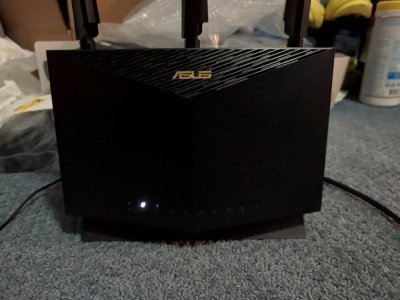
However my sisters AX86S has an issue only the LAN 4 LED is on.
Any button presses do nothing does anyone know how to fix this?
Thanks :) PXL_20251229_155031689.MV.jpg
 

Similar threads

Latest threads

Support SNBForums w/ Amazon

If you'd like to support SNBForums, just use this link and buy anything on Amazon. Thanks!

Sign Up For SNBForums Daily Digest

Get an update of what's new every day delivered to your mailbox. Sign up here!
Back
Top