What's new
  • SNBForums Code of Conduct

    SNBForums is a community for everyone, no matter what their level of experience.

    Please be tolerant and patient of others, especially newcomers. We are all here to share and learn!

    The rules are simple: Be patient, be nice, be helpful or be gone!

Release Asuswrt-Merlin 3006.102.6 is now available

should i be worried about these lines
Dec 14 09:46:57 kernel: enet_ioctl_compat_ethctl:L1773 No PHY type PHY_TYPE_UNKNOWN at address 19 has been found.
 
Anyone have this visual issue after updated to 3006.102.6 with BE92U?
 

Attachments

  • ASUS Merlin.png
    ASUS Merlin.png
    19.9 KB · Views: 63
Yes, that’s a new,y enforced limit. But those priorities don’t do anything anyway unless you’re using Traditional QoS.
See what you have:
Code:
nvram get qos_rulelist | tr '<' '\n'
Ironically, I had (have) more than 32. Since I hit this limit, not only will it not let me *add* any new items, it also won't let me change / remove any to get under the 32 limit. It just gets stuck with that pop-up window saying "32" regardless of anything I want to do. Any advice on how to get *under* the limit, so I can turn Traditional QOS back on and have it be relevant for me again?

PS. Weeks now since the 102.6 upgrade and *ZERO* outages that weren't voluntary restarts. Whoo hoo! <3

Thanks!
 
Did you clear browsercache?
Thanks. Tried with Edge browser and it worked. So did clear cache and data on Chrome. Now it works after login.
Edit: Said to soon. Just worked time to time. If close and relogin it goes back as before and have to update browser to make it work. Well no big deal with refresh browser.
 
RT-86u pro. Only issue I have is that GuestPro network interference with some devices. They connect and about 6 hours later a reboot is required to get them to reconnect. If I turn off the guest network, they stay connected and no issues.
 
this is likely a one-off but may be helpful as a post. woke up yesterday to find that i couldn't reach any sites although connected. it was confusing since it seemed to only affect the 'puters. reboots changed nothing but it was weird because my firesticks were just pumping.
it became clear that i had a dns problem. so i did a few resets and started from scratch. after manually loading some basics all was well; after restoring the old config, all stopped. so i reset again and did step-wise saves of the configuration. all was good, till i assigned quad9. stuck again but now i have a clue. btw, reverting back to the isp dns changed nothing! had to reset and restart.
what eventually worked was disabling dnssec before enabling quad 9. according to the ai geniuses dnsec isn't necessary if using quad 9. all i know is that it worked again and i was spent after over 6 hours being down.

commentary: ai is not ready for prime time but with all their dribble, (more wordy than me even) there are learnable moments.

so i'm running again now - seemingly better. a little simpler config w/o dnssec but with quad 9. as an aside, i learned how to get my iots on a vlan. that's new and i'm lovin it!
 
Performed a Fresh install and now the router is incrementing the maximum erase counter every 3 hours. I wrote a script to monitor bad block remaps on another router I had problems getting Asus to RMA and script became part of my custom scripts collection so the max erase counter data is captured just in case. It had been updating every 2-3 weeks. Any idea what changed to cause this and is this significant as far as router lifecycle? This data is part of captured output from ubinfo -a command.
 
Disable IPv6 in your DDNS settings and reboot.
At the weekend I had a period of time where I was able to test the disabled IPv6 DDNS with a reboot. Same issue, WAN shows connected with assigned IP4 and IP6 addresses, but no routing and a WAN restart required. I have added Martineau's WAN check script for now, still none the wiser as to the cause.
 
Mine is as fast as usual.
Try a different browser. My AX86U Pro (running on 388 firmware) is experiencing the same issue as you - very sluggish and slow to respond on Chrome. Using Brave, the GUI is its normal snappy self.
Nope, no issues.

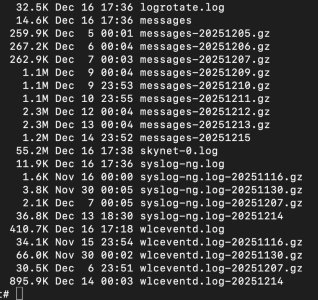
My syslog is 28.2MB - Think that might be why the UI is painfully slow...?

EDIT: My Skynet is 55.2MB too, not sure if this is the cause but will have a look

Screenshot 2025-12-16 at 17.40.48.jpg
 
Last edited:
See what you have:
Code:
nvram get qos_rulelist | tr '<' '\n'
Ok this show's over 32 this way. Is there a way to clear this as the GUI only shows a few set and won't let me make any changes, even back to default....
 
Ok this show's over 32 this way. Is there a way to clear this as the GUI only shows a few set and won't let me make any changes, even back to default....
Code:
nvram set qos_rulelist="<Web Surf>>80>tcp>0~512>0<HTTPS>>443>tcp>0~512>0<File Transfer>>80>tcp>512~>3<File Transfer>>443>tcp>512~>3"
nvram commit
This returns to the default value.
 
Been a few days now and what a difference coming from 3004 (AX88u, 2xAX86u). But have had some minor annoyances that I have yet to conquer.

AX mode on 2.4 Ghz, had in 3004 but don't see my devices connecting with it, or the router displaying it, sure its a niche. The Android tablets I got claimed 2.4 and 5Ghz but when I confronted the Amazon seller, I got'em for free. Using them as fancy monitors for the cameras and doorbell, so not a huge deal. But an annoyance. Goood new for my neighbors, I can scale back to 20Mhz vs 40Mhz.

WPA2/WPA3 does not work the same in 3004 (388.10 with 9.0 being the exception). I build to networks using the custom profile, and set it to use the same subnet as the main for both 2.4Ghz and separately 5Ghz, to mimic the two guest networks on 388 (weren't really guest in 3006 sense). Had to use WPA2 (like we had to with 3004.388.9.0) to get some of the devices on the network (the ones to didn't deal well with Smart Connect) they would not connect with WPA2/WPA3 personal. The GE water heater with Connect Plus that conected fine previously, not so on the BE96u regardless of the security setting in the custom subnet I created to test it or the security setting in the GE SmartHQ app. Again a nuissance, until a crack to code to succesfully connect it.

Logging, had to remove scribe and set the logging levels way down or the https process would ping the router CPU (core it was on) to 100% making the router unusable via the GUI and very unstable. When logging pared back, the cores would run an average of 1% to 5%. Minor nuissance, and scribe is a nice to have to sort the system log into specific sections but I cal deal living without it.

The GUI looks similar but depending on you menu selection, it look very different you can tell what it looked like and what a few areas (like Network).

The comboI have BE96u/2xBT10 vs the AX88/2xAX86u as in Merlin/Stock FW vs all Merlin FW. those incongruities I will just have to get used to, and hopefully they will stabilize over time, one pet peeve are the nodes resetting every time I make a change 🤬

I realize this is sill reletively new and likely buggy, I can deal with that and this isn't a complaint as much as it is an observation

To solve my water heater problem I'll likely repurpose one of the AX86u's as an AP (to manageit separatly) over WiFi (5Ghz backhaul) as the Water Heater uses 2.4Ghz. Worst case if I can;t find the right combination (on the custom network profile I crated for that purpose, maybe turnung off MLO on the main to see if that makes any difference - separate SSID)

5Ghz/160 is more stable (same channels as before) and 6Ghz is running with 6g5/320-1 just fine

Not complaining got a great deal paid less for where I am now than when I bought the AX88 and AX86u's years ago, may add a 8 port multigig switch to the 10Gbe port on the router to get me some 2.5GbE but that's another story.

Overall, whats old is new again, with some minor twists, but it's a work in progress

 
Been a few days now and what a difference coming from 3004 (AX88u, 2xAX86u). But have had some minor annoyances that I have yet to conquer.

AX mode on 2.4 Ghz, had in 3004 but don't see my devices connecting with it, or the router displaying it, sure its a niche. The Android tablets I got claimed 2.4 and 5Ghz but when I confronted the Amazon seller, I got'em for free. Using them as fancy monitors for the cameras and doorbell, so not a huge deal. But an annoyance. Goood new for my neighbors, I can scale back to 20Mhz vs 40Mhz.

WPA2/WPA3 does not work the same in 3004 (388.10 with 9.0 being the exception). I build to networks using the custom profile, and set it to use the same subnet as the main for both 2.4Ghz and separately 5Ghz, to mimic the two guest networks on 388 (weren't really guest in 3006 sense). Had to use WPA2 (like we had to with 3004.388.9.0) to get some of the devices on the network (the ones to didn't deal well with Smart Connect) they would not connect with WPA2/WPA3 personal. The GE water heater with Connect Plus that conected fine previously, not so on the BE96u regardless of the security setting in the custom subnet I created to test it or the security setting in the GE SmartHQ app. Again a nuissance, until a crack to code to succesfully connect it.

Logging, had to remove scribe and set the logging levels way down or the https process would ping the router CPU (core it was on) to 100% making the router unusable via the GUI and very unstable. When logging pared back, the cores would run an average of 1% to 5%. Minor nuissance, and scribe is a nice to have to sort the system log into specific sections but I cal deal living without it.

The GUI looks similar but depending on you menu selection, it look very different you can tell what it looked like and what a few areas (like Network).

The comboI have BE96u/2xBT10 vs the AX88/2xAX86u as in Merlin/Stock FW vs all Merlin FW. those incongruities I will just have to get used to, and hopefully they will stabilize over time, one pet peeve are the nodes resetting every time I make a change 🤬

I realize this is sill reletively new and likely buggy, I can deal with that and this isn't a complaint as much as it is an observation

To solve my water heater problem I'll likely repurpose one of the AX86u's as an AP (to manageit separatly) over WiFi (5Ghz backhaul) as the Water Heater uses 2.4Ghz. Worst case if I can;t find the right combination (on the custom network profile I crated for that purpose, maybe turnung off MLO on the main to see if that makes any difference - separate SSID)

5Ghz/160 is more stable (same channels as before) and 6Ghz is running with 6g5/320-1 just fine

Not complaining got a great deal paid less for where I am now than when I bought the AX88 and AX86u's years ago, may add a 8 port multigig switch to the 10Gbe port on the router to get me some 2.5GbE but that's another story.

Overall, whats old is new again, with some minor twists, but it's a work in progress
Well the Water Heater does connect, gets and IP via DHCP, and then drops and the dreaded WLC_SCB_DEAUTHENTICATE_FOR_REASON err -30

Filtered Syslog (on device MAC) on 3006.102.4 and 102.6 the same attached, any hints welcomed, in case I forgot to try something...
 

Attachments

Well the Water Heater does connect, gets and IP via DHCP, and then drops and the dreaded WLC_SCB_DEAUTHENTICATE_FOR_REASON err -30

Filtered Syslog (on device MAC) on 3006.102.4 and 102.6 the same attached
If your IoT devices are falling off the Wifi, maybe really consider doing a few simple tweaks like I did here?

 
If your IoT devices are falling off the Wifi, maybe really consider doing a few simple tweaks like I did here?

One, one device only @jksmurf and it never fully connects, will review carefully as a quick read covered most of the easy /obvious stuff I did. Sent you a DM, will try a couple of ther things tomorrow and update...
 

Latest threads

Support SNBForums w/ Amazon

If you'd like to support SNBForums, just use this link and buy anything on Amazon. Thanks!

Sign Up For SNBForums Daily Digest

Get an update of what's new every day delivered to your mailbox. Sign up here!
Back
Top