What's new

Release Asuswrt-Merlin 3006.102.7 is now available

Subject: RT-AX86U Pro (3006.102.7): Dual WAN Load Balance broken & Failover requires reboot
  • It feels like the routing table or conntrack is not being properly flushed/updated when WAN settings change in this build.
Has anyone else noticed this behavior on the 3006 branch? Any suggestions on how to force a routing table flush via SSH without rebooting every time would be greatly appreciated.
@Saulus, I also have a RT-AX86U Pro with Load Balance enabled and I agree with at least some of your findings. According to my observations, ip rules are not properly cleaned up when one of the Dual WAN connections is stopped, restarted, etc. Starting with one of the earlier 3006.102.x versions (my guess is .6), the behavior has drastically changed when compared to past versions.

As far as I understand, Dual WAN is closed source, but I'm confirming some of reported issues in case @RMerlin is able to check what is happening to the ip rules after a notify_rc stop_wan_if or a notify_rc restart_wan_if.

Thanks in advance.
 
Can confirm. Missing on my RT-AX86U Pro as well. Both values are set to hidden.

Remember someone else during the alpha 3006.102.7 having a similar issue, but it was while their BE58_Go was in WISP mode. And which was apparently fixed in the 3006.102.7 release version per the change log. (PS: Commit 11a4dfd)
Was there any:
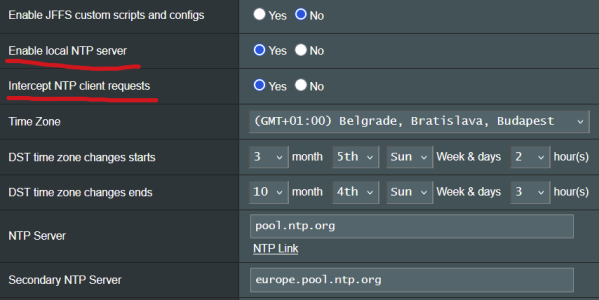
1 - formal resolution to the missing NTP fields issue
-or-
2 - Detailed HTTP editing directions for manually updating the HTML
 
After updating and getting everything setup beside the above issue - Skynet is logging blocks to "ns1.anycastdns.cz" . Is there a component of the new FW that is attempting to connect to this DNS, and if not any advice/info on what else might be causing it?
 
1 - formal resolution to the missing NTP fields issue
Already fixed on my end, will be included in 3006.102.7_2.

Code:
commit f60b078dc89b84f4eb318736ed9bc65d5b6ebd36 (3006.102-wifi6)
Author: Eric Sauvageau <[email protected]>
Date:   Tue Mar 17 15:56:53 2026 -0400

    webui: make isSwMode() case-insensitive, like Wifi 7
    
    Fixes regression that was hiding the ntpd settings.
 
After updating and getting everything setup beside the above issue - Skynet is logging blocks to "ns1.anycastdns.cz" . Is there a component of the new FW that is attempting to connect to this DNS, and if not any advice/info on what else might be causing it?
Probably Unbound doing a recursive lookup for a domain owned by that nameserver.
 
I am not seeing an issue with trying to add a fourth mesh node.
I can't find the cause of the problem.
When I open the QIS_wizard.htm?flag=amas_addNode page, the log shows:

rc_service: cfg_server 4178:notify_rc stop_fw_check
rc_service: cfg_server 4178:notify_rc start_fw_check
rc_service: cfg_server 4178:notify_rc restart_obd_monitor

On both: the problematic router and the router without the error.
 
BE92U crashed again:
Code:
Mar 18 18:49:58 et12 wlceventd: wlceventd_proc_event(685): wl0.6: Auth C4:E7:AE:15:04:72, status: Successful (0), rssi:0
Aug 27 13:23:12 router kernel: rcu: INFO: rcu_preempt self-detected stall on CPU
Aug 27 13:23:12 router kernel: rcu: INFO: rcu_sched detected stalls on CPUs/tasks:
Aug 27 13:23:12 router kernel: rcu: INFO: rcu_bh detected stalls on CPUs/tasks:
Aug 27 13:23:12 router kernel: rcu:     1-...!: (1 ticks this GP) idle=646/0/0x1 softirq=2269949/2269949 fqs=1
Aug 27 13:23:12 router kernel: rcu:     (detected by 2, t=900727322462 jiffies, g=1433229, q=1364)
Aug 27 13:23:12 router kernel: Task dump for CPU 1:
Aug 27 13:23:12 router kernel: swapper/1       R  running task        0     0      1 0x0000000a
Aug 27 13:23:12 router kernel: Call trace:
Aug 27 13:23:12 router kernel:  __switch_to+0xe8/0x170
Aug 27 13:23:12 router kernel:  0xffffff800809bef0
Aug 27 13:23:12 router kernel: rcu: rcu_sched kthread starved for 900726557958 jiffies! g1433229 f0x0 RCU_GP_WAIT_FQS(5) ->state=0x402 ->cpu=0
Aug 27 13:23:12 router kernel: rcu: RCU grace-period kthread stack dump:
Aug 27 13:23:12 router kernel: rcu_sched       I    0    11      2 0x00000008
Aug 27 13:23:12 router kernel: Call trace:
Aug 27 13:23:12 router kernel:  __switch_to+0xe8/0x170
Aug 27 13:23:12 router kernel:  __schedule+0x214/0x5a0
Aug 27 13:23:12 router kernel:  schedule+0x38/0xa0
Aug 27 13:23:12 router kernel:  schedule_timeout+0x15c/0x2a0
Aug 27 13:23:12 router kernel:  rcu_gp_kthread+0x488/0x900
Aug 27 13:23:12 router kernel:  kthread+0x118/0x150
Aug 27 13:23:12 router kernel:  ret_from_fork+0x10/0x24
Oct  2 19:51:28 router chronyd[18069]: Forward time jump detected!
Aug 27 13:23:12 router crond[4792]: time disparity of 15012122 minutes detected
Aug 27 13:23:12 router kernel: rcu:     1-....: (1 ticks this GP) idle=646/0/0x1 softirq=2269949/2269949 fqs=7
Aug 27 13:23:12 router kernel: rcu:     1-...!: (5873 ticks this GP) idle=646/0/0x1 softirq=2264909/2269949 fqs=0
Aug 27 13:23:12 router kernel: rcu:      (t=900727322465 jiffies g=3479825 q=141360)
Aug 27 13:23:12 router kernel: rcu:     (detected by 3, t=900726557977 jiffies, g=-775, q=1)
Aug 27 13:23:12 router kernel: Task dump for CPU 3:
Aug 27 13:23:12 router kernel: swapper/3       R  running task        0     0      1 0x0000000a
Aug 27 13:23:12 router kernel: Call trace:
Aug 27 13:23:12 router kernel:  dump_backtrace+0x0/0x150
Aug 27 13:23:12 router kernel:  show_stack+0x14/0x20
Aug 27 13:23:12 router kernel:  sched_show_task+0x100/0x120
Aug 27 13:23:12 router kernel:  dump_cpu_task+0x40/0x4c
Aug 27 13:23:12 router kernel:  rcu_dump_cpu_stacks+0x90/0xcc
Aug 27 13:23:12 router kernel:  rcu_check_callbacks+0x718/0x810
Aug 27 13:23:12 router kernel:  update_process_times+0x2c/0x70
Aug 27 13:23:12 router kernel:  tick_sched_timer+0x54/0xd0
Aug 27 13:23:12 router kernel:  __hrtimer_run_queues+0x13c/0x1d0
Aug 27 13:23:12 router kernel:  hrtimer_interrupt+0xe4/0x2b0
Aug 27 13:23:12 router kernel:  arch_timer_handler_phys+0x30/0x40
Aug 27 13:23:12 router kernel:  handle_percpu_devid_irq+0x80/0x140
Aug 27 13:23:12 router kernel:  __handle_domain_irq+0x70/0xd0
Aug 27 13:23:12 router kernel:  gic_handle_irq+0x5c/0xc0
Aug 27 13:23:12 router kernel:  el1_irq+0xe8/0x190
Aug 27 13:23:12 router kernel:  cpuidle_enter_state+0x80/0x220
Aug 27 13:23:12 router kernel:  cpuidle_enter+0x18/0x20
Aug 27 13:23:12 router kernel:  do_idle+0x1d8/0x260
Aug 27 13:23:12 router kernel:  cpu_startup_entry+0x24/0x40
Aug 27 13:23:12 router kernel:  secondary_start_kernel+0x13c/0x170
Aug 27 13:23:12 router hostapd: wl1.1: STA 12:be:ff:67:a3:0c WPA: group key handshake completed (RSN)
Aug 27 13:23:12 router hostapd: wl1.1: STA f6:6c:cb:76:8e:81 WPA: group key handshake completed (RSN)
Aug 27 13:23:12 router kernel: tdts_core_ioctl_udb_op_prog_ctrl() fail!

It hadn't done it in a few days but today it happened twice within a few hours. It's still usable at least but somewhat annoying. On `3006.102.7_1-gbeea6c005a`
 
BE92U crashed again:
Code:
Mar 18 18:49:58 et12 wlceventd: wlceventd_proc_event(685): wl0.6: Auth C4:E7:AE:15:04:72, status: Successful (0), rssi:0
Aug 27 13:23:12 router kernel: rcu: INFO: rcu_preempt self-detected stall on CPU
Aug 27 13:23:12 router kernel: rcu: INFO: rcu_sched detected stalls on CPUs/tasks:
Aug 27 13:23:12 router kernel: rcu: INFO: rcu_bh detected stalls on CPUs/tasks:
Aug 27 13:23:12 router kernel: rcu:     1-...!: (1 ticks this GP) idle=646/0/0x1 softirq=2269949/2269949 fqs=1
Aug 27 13:23:12 router kernel: rcu:     (detected by 2, t=900727322462 jiffies, g=1433229, q=1364)
Aug 27 13:23:12 router kernel: Task dump for CPU 1:
Aug 27 13:23:12 router kernel: swapper/1       R  running task        0     0      1 0x0000000a
Aug 27 13:23:12 router kernel: Call trace:
Aug 27 13:23:12 router kernel:  __switch_to+0xe8/0x170
Aug 27 13:23:12 router kernel:  0xffffff800809bef0
Aug 27 13:23:12 router kernel: rcu: rcu_sched kthread starved for 900726557958 jiffies! g1433229 f0x0 RCU_GP_WAIT_FQS(5) ->state=0x402 ->cpu=0
Aug 27 13:23:12 router kernel: rcu: RCU grace-period kthread stack dump:
Aug 27 13:23:12 router kernel: rcu_sched       I    0    11      2 0x00000008
Aug 27 13:23:12 router kernel: Call trace:
Aug 27 13:23:12 router kernel:  __switch_to+0xe8/0x170
Aug 27 13:23:12 router kernel:  __schedule+0x214/0x5a0
Aug 27 13:23:12 router kernel:  schedule+0x38/0xa0
Aug 27 13:23:12 router kernel:  schedule_timeout+0x15c/0x2a0
Aug 27 13:23:12 router kernel:  rcu_gp_kthread+0x488/0x900
Aug 27 13:23:12 router kernel:  kthread+0x118/0x150
Aug 27 13:23:12 router kernel:  ret_from_fork+0x10/0x24
Oct  2 19:51:28 router chronyd[18069]: Forward time jump detected!
Aug 27 13:23:12 router crond[4792]: time disparity of 15012122 minutes detected
Aug 27 13:23:12 router kernel: rcu:     1-....: (1 ticks this GP) idle=646/0/0x1 softirq=2269949/2269949 fqs=7
Aug 27 13:23:12 router kernel: rcu:     1-...!: (5873 ticks this GP) idle=646/0/0x1 softirq=2264909/2269949 fqs=0
Aug 27 13:23:12 router kernel: rcu:      (t=900727322465 jiffies g=3479825 q=141360)
Aug 27 13:23:12 router kernel: rcu:     (detected by 3, t=900726557977 jiffies, g=-775, q=1)
Aug 27 13:23:12 router kernel: Task dump for CPU 3:
Aug 27 13:23:12 router kernel: swapper/3       R  running task        0     0      1 0x0000000a
Aug 27 13:23:12 router kernel: Call trace:
Aug 27 13:23:12 router kernel:  dump_backtrace+0x0/0x150
Aug 27 13:23:12 router kernel:  show_stack+0x14/0x20
Aug 27 13:23:12 router kernel:  sched_show_task+0x100/0x120
Aug 27 13:23:12 router kernel:  dump_cpu_task+0x40/0x4c
Aug 27 13:23:12 router kernel:  rcu_dump_cpu_stacks+0x90/0xcc
Aug 27 13:23:12 router kernel:  rcu_check_callbacks+0x718/0x810
Aug 27 13:23:12 router kernel:  update_process_times+0x2c/0x70
Aug 27 13:23:12 router kernel:  tick_sched_timer+0x54/0xd0
Aug 27 13:23:12 router kernel:  __hrtimer_run_queues+0x13c/0x1d0
Aug 27 13:23:12 router kernel:  hrtimer_interrupt+0xe4/0x2b0
Aug 27 13:23:12 router kernel:  arch_timer_handler_phys+0x30/0x40
Aug 27 13:23:12 router kernel:  handle_percpu_devid_irq+0x80/0x140
Aug 27 13:23:12 router kernel:  __handle_domain_irq+0x70/0xd0
Aug 27 13:23:12 router kernel:  gic_handle_irq+0x5c/0xc0
Aug 27 13:23:12 router kernel:  el1_irq+0xe8/0x190
Aug 27 13:23:12 router kernel:  cpuidle_enter_state+0x80/0x220
Aug 27 13:23:12 router kernel:  cpuidle_enter+0x18/0x20
Aug 27 13:23:12 router kernel:  do_idle+0x1d8/0x260
Aug 27 13:23:12 router kernel:  cpu_startup_entry+0x24/0x40
Aug 27 13:23:12 router kernel:  secondary_start_kernel+0x13c/0x170
Aug 27 13:23:12 router hostapd: wl1.1: STA 12:be:ff:67:a3:0c WPA: group key handshake completed (RSN)
Aug 27 13:23:12 router hostapd: wl1.1: STA f6:6c:cb:76:8e:81 WPA: group key handshake completed (RSN)
Aug 27 13:23:12 router kernel: tdts_core_ioctl_udb_op_prog_ctrl() fail!

It hadn't done it in a few days but today it happened twice within a few hours. It's still usable at least but somewhat annoying. On `3006.102.7_1-gbeea6c005a`
Nothing more that I can do here. I can no longer reproduce it, so I can't provide any addititonnal feedback tot Asus.

Revert back to the sttock firmware, reproduce the problem, they report it to Asus directly..
 
I have uploaded 3006.102.7_1 test builds for all models:


For other models this contains a few fixes (like the Wifi 6 devices missing NTPD settings), updates to curl and wget (from the 102_39848 GPL used by the RT-BE92U), the missing Cake settings for the GT-BE19000AI.

I'm going to leave this up for a few days, eventually 3006.102.7_2 will become the final release.
 
Not sure if this is an Asus required fix or not, but the Wired devices aren't showing up under the Wired Section of the Client List Network tab on my RT-BE92U (3006.102.7_1-gf335826fd2).

1773957084247.png
 
I Confirm NTPD setting are visible again.
 

Attachments

  • 1773966969552.png
    1773966969552.png
    31.3 KB · Views: 30
I have uploaded 3006.102.7_1 test builds for all models:


For other models this contains a few fixes (like the Wifi 6 devices missing NTPD settings), updates to curl and wget (from the 102_39848 GPL used by the RT-BE92U), the missing Cake settings for the GT-BE19000AI.

I'm going to leave this up for a few days, eventually 3006.102.7_2 will become the final release.
Is this an older GPL than the last release?

CC
 
I'm need another set of eye's.

1773977003487.png

Downloaded this and and applied it twice, but it shows up on the Router as Beta1
1773977147392.png


🤷‍♂️ 🤦‍♂️ Giving up and trying again it the morning...

Update: redownloaded, saved in a different directory (named the same nut with a .1) the zip file and the unzipped directory.
3rd times the charm!
1773978321949.png
 
Not sure if this is an Asus required fix or not, but the Wired devices aren't showing up under the Wired Section of the Client List Network tab on my RT-BE92U (3006.102.7_1-gf335826fd2).

View attachment 70793
Yes, that's interesting. In the GT-BE19000AI, the wired devices are also listed under the main network 2.4GHz wifi in the network section. There is no separate wired section at all, not even empty. In the clients list, it shows icon that they are is a wired devices, but there is only a "-" in the Network (SDN) section, as well as in the PHY rate and Access time fields. It is probably intentional, because in the main network -> clients list there are separate wired and wireless tabs.

By the way, in the client list, the PHY rate field of the 6GHz device is also "-" and the Quality RSS is also 0 dBm. This is probably a bug on the Asus side. I tried the last factory fw and there, if I remember correctly, the PHY rate field was already good, but the Quality RSS was not even there. With the newer GPL, wifi insight also works.
 
I'm need another set of eye's.

View attachment 70797
Downloaded this and and applied it twice, but it shows up on the Router as Beta1
View attachment 70798

🤷‍♂️ 🤦‍♂️ Giving up and trying again it the morning...

Update: redownloaded, saved in a different directory (named the same nut with a .1) the zip file and the unzipped directory.
3rd times the charm!
View attachment 70801
Have some coffee.
You were trying to flash RT-BE86U firmware on an RT-BE96U.
 

Similar threads

Latest threads

Support SNBForums w/ Amazon

If you'd like to support SNBForums, just use this link and buy anything on Amazon. Thanks!

Sign Up For SNBForums Daily Digest

Get an update of what's new every day delivered to your mailbox. Sign up here!

Members online

Back
Top