What's new

Release Asuswrt-Merlin 3006.102.7 is now available

speaking of app i just tested and it works locally for my routers but not remotely.. is there something else i should change or lock down in the router interface to further disable it? I dont see any settings. thanks
ONE wrong click in the App ant IT will enable it on the router, thus the avoid reason...!
 
you mean it will enable it remotely (not on local network).. i have an external firewall above my wifi router so assume if it is enabled it wont work.. but again how do i check if it IS enabled for remote.. dont want to take chances and want it disabled.
 
you mean it will enable it remotely (not on local network).. i have an external firewall above my wifi router so assume if it is enabled it wont work.. but again how do i check if it IS enabled for remote.. dont want to take chances and want it disabled.
You can enable it via app no mater the network (local or remote) more easily than breathing; and since you dont know how to check it as bennor, Viktor Jaep and many others said - delete at once and dont use (or risk the consequences)!
 
Last edited:
I completely understand that Merlin doesn't officially support the app, but that doesn't mean it won't work under any circumstances. In my case, using both the BE92 and the BE88 on the latest Merlin firmware, the Android app works flawlessly on my OnePlus 15. I don't use it for heavy configurations—just the occasional AiMesh Client Binding and frequently checking connected devices. The app also switches seamlessly between routers. For basic monitoring, it works great.
At home, the app will talk over your lan to your router but remotely it uses DDNS. Essentially you are posting that login screen you see when you access the GUI, to the entire internet at something like https://asusappuser23b.asuscomm.com.
 
Last edited:
but again how do i check if it IS enabled for remote.. dont want to take chances and want it disabled.
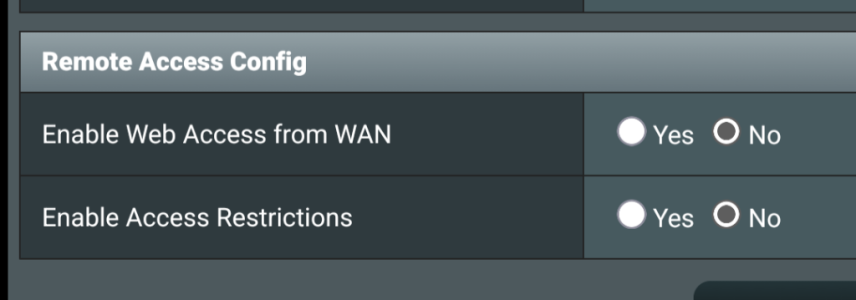
Check this setting at the bottom of the Administration>System page - should be "no" on the top one
Screenshot_20260329-070539.png
 
I completely understand that Merlin doesn't officially support the app, but that doesn't mean it won't work under any circumstances. In my case, using both the BE92 and the BE88 on the latest Merlin firmware, the Android app works flawlessly on my OnePlus 15. I don't use it for heavy configurations—just the occasional AiMesh Client Binding and frequently checking connected devices. The app also switches seamlessly between routers. For basic monitoring, it works great.
I use it for exactly the same purpose over LAN only - checking what’s connected where over my mesh, traffic stats and the occasional commands to reboot.

It is still working for me on AXE1600 on 107_2.

HB
 
Indeed, what I meant is that I only use it on the LAN, basically to check which clients are connected. I have WAN access disabled, so as long as it works, I think it is perfectly fine to use it. Admittedly, this is off-topic for this thread since we are focused on other matters.

The tool is highly useful not only for monitoring connected clients but also, for those of us running AiMesh nodes, to verify that a device roamed correctly. It is great to see that a device did not become a sticky client and successfully connected to the exact AiMesh node it was supposed to. Let's just say I use it simply to marvel at how smoothly everything operates :)
 
Check this setting at the bottom of the Administration>System page - should be "no" on the top one
View attachment 70958
If the SSH or WebUI access over the WAN ever gets enabled, inadvertently or sneakingly, via the phone app, you can set up access restrictions so only your LAN clients, or only a small subset of your most trusted LAN clients, have access to both SSH and WebUI. If you have a VPN server configured and running on your router, you could also restrict access to a subset of your VPN server clients.

Sample screenshot:
SSH_&_WebUI_AccessRestrictions.jpg


Full disclosure: While I have configured the above access restrictions in my own routers and verified the functionality a few years ago using various LAN clients (both inside and outside the restricted subnets), I've never actually tested this over the WAN since both SSH and WebUI are always set up for "LAN Only" access, but theoretically it should work.

Warning: Be very careful because if access restrictions are set incorrectly, you can lock yourself out from accessing the router. So always double-check before you click on the "Apply" button, and always keep a screenshot of the allowed LAN/VPN subnets. This way, you can set up a local laptop with an unrestricted LAN IP address to regain access to the router.

Just my 2 cents.

 
Updated two routers and it's working fine.
Discovered when dst time change. Is it necessary to reset firewall/wan ?

Code:
Mar 29 03:00:26 watchdog: restart_firewall due DST time changed(0->1)
Mar 29 03:00:26 rc_service: watchdog 4021:notify_rc restart_firewall
Mar 29 03:00:26 rc_service: watchdog 4021:notify_rc restart_wan
Mar 29 03:00:26 rc_service: waitting "restart_firewall"(last_rc:restart_autowan) via watchdog ...
 
I noticed that AiProtection is not working on my GT-BE19000Ai. It logs blocked events with the latest official firmware, but no new blocking information appears in the log with 102.7_2. If I reupload the factory firmware, the new blocked entries appear again.
 
Rt-be92U factory reset two new update 102_7_2 been up for four days 16 hours. Only issue is not sure if everybody else is having this issue. https://speed.cloudflare.com/ is a site I like to use, but getting strangely high latency during speed test Speedtest.net and fast.com normally latency, which is for me 28ms or lower sometimes, but on Cloudflare speed test shows up too 60ms not sure why it’s doing that on wire connection not Wi-Fi but on my Wi-Fi device it does do it too, mainly worried about wire devices
 

Similar threads

Support SNBForums w/ Amazon

If you'd like to support SNBForums, just use this link and buy anything on Amazon. Thanks!

Sign Up For SNBForums Daily Digest

Get an update of what's new every day delivered to your mailbox. Sign up here!
Back
Top