What's new

Beta Asuswrt-Merlin 386.1 Beta is now available

Status
Not open for further replies.
64 pages, beta2. What’s the verdict for the ac5300? Upgrade or stay put for now? I’ve got no issues atm.
don’t mind investing some time on a clean reinstall, as long as it’s worth it.
 
Initially my firmware update from 384.19 to beta 3 of this firmware seemed quite uneventful, in other words fine without issue. But then I noted firstly that the logs of the AX88U had entries like...

miniupnpd[1504]: HTTP peer 169.254.107.63 :61264 is not from a LAN, closing the connection

etc
etc

I then noticed that certain devices, the one above I traced to our HP N54L media server in the loft with a static IP of 192.168.1.147, were not being assigned an IP address correctly and so were not able to connect or they were showing as static when the had always been DHCP.
I had to go into the loft and manually resolve the IP issue with the server by rebooting it. Other devices, like our TV in kitchen showed as static when it was DHCP, needed a full power cycle to resolve it. One of our other TV's wasn't able to be assigned an IP address even tho it was set to use DHCP from the router, it kept being failed to be assigned. That needed a power cycle.
Not knowing at the time that a reboot of each device could have sorted this somewhat I WPA hard reset the router and manually applied each of my settings. But the same issue applied with the 169.254.107.63 type assignments within the client list.
Prior to the update from 384.19 I had none of these issues but was reminded in the update notes that a factory reset could be needed if anything strange is noted.

For me tho it was the full power cycle of certain connected devices until the behaviour above was resolved. I am now getting the impression that beta 3 is working fine since power cycling many connected devices.

No mystery, I started to mess with manual assignment, the issue started. Turned it off, issue went away. Had to power off/on a few devices for it to be fixed. All resolved on my end.
 
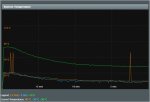
Temps in the 80c - 85c range depennding what the AX88 is doing as a given moment. But I do get these 49c - 76c spikes on the 2.4ghz. They seem random, most of the devices in the home are dual band and are on 5Ghz. The odd thing is that it's always 76c, even actively cooling the AX88 with a mini tower fan with lots of air flow. The temps on the 2.4Ghz dropped 9c to 40c, but the spike is still at 76c.
 

Attachments

  • Router Temp 3.jpg
    Router Temp 3.jpg
    88.1 KB · Views: 224
Last edited:
I have reverted to Asus Stock on my RT-AX86U as it has just had its first public release of version 386 code firmware.
I can confirm for @RMerlin that the following closed source issues have been resolved [did a factory reset after installing Asus stock from Merlin 386.1-b3]

Aimesh 2.0 much improved - less chatter in the logs;
Clients connecting way quicker to WiFi than before [was long delays with 5G and WiFi6];
Guest WiFi on channel 1 for 2.4 and channel 1 of 5G working correctly across the Aimesh nodes;
Lets Encrypt working properly - even get prompt to re-login after certificate confirmation and install complete;
Guest WiFi clients can indeed be viewed in Network Map.
Edit: Forgot to mention that Adaptive QoS now respecting manual speed limits and working well :D.

Very impressed with stock stability so far - but really miss the Merlin Magic which will take this truly awesome router to its full potential.

Appreciate the beta versions you have provided so far - especially given that you had to build out of bits and bobs from all over in the absence of a 386 GPL from Asus. Now that you have the 386 GPL in hand I hope it will be easier for you to pull through the latest stock bits for your stable Merlin release edition. :cool:.
 
Last edited:
Temps in the 80c - 85c range depennding what the AX88 is doing as a given moment. But I do get these 49c - 76c spikes on the 2.4ghz. They seem random, most of the devices in the home are dual band and are on 5Ghz. The odd thing is that it's always 76c, even actively cooling the AX88 with a mini tower fan with lots of air flow. The temps on the 2.4Ghz dropped 9c to 40c, but the spike is still at 76c.

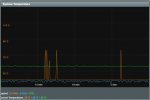
So after having the mini tower fan blowing on high for a couple of hours, still seeing that 2.4 band jump to 76c, but not all the time. AX88 down to 54c-56c from a 80c-85c. 2.4 down to 39c with the spikes to 76c
 

Attachments

  • Router Temp 4.jpg
    Router Temp 4.jpg
    89.7 KB · Views: 188
Will you release a new AC86u (only) build with this change, for those that are worried about high CPU temperatures?

Or should they wait for Beta 4?

Don't know yet, haven't made any specific plan.
 
64 pages, beta2. What’s the verdict for the ac5300? Upgrade or stay put for now? I’ve got no issues atm.
don’t mind investing some time on a clean reinstall, as long as it’s worth it.
I have the ac5300. I initially moved to 361 beta 1 a few weeks ago and had many issues. reverted back to 384.19 which is stable (did a factory reset to revert back). Today I dirty flashed to beta 3. So far all looks good. I have 25 IPs on the network, some ethernet, some on each of the 3 wifi networks. I have 3 other routers, one a wireless client bridge, and two ethernet connected APs. All is working. The network map shows correctly (was an issues with beta 1).
 
So after having the mini tower fan blowing on high for a couple of hours, still seeing that 2.4 band jump to 76c, but not all the time. AX88 down to 54c-56c from a 80c-85c. 2.4 down to 39c with the spikes to 76c

On my AX58U I have also the 2.4GHz temp. spikes to 76°C and then the 2.4 band works very sluggish. Sometimes the temp. returns to normal, and somtimes it stays for hours. The CPU behaves normally with temperature.
With 384.19 I had no temp. problem.
When it stays too long at 76°C, I make a small change in the WiFi parameters and when the GUI returns, the temp. is back to normal.
 
Just upgraded again from 384.19 to latest 386 Stock version on my AX88U - no temperature increase yet but missing the Merlin experience. Will continue monitoring and decide next couple of days if I take another attempt to recent beta. Happy New Year everyone!
 
My feedback, after testing the latest betas:

My conf:
RT-AC88U as main router - 386.1b3
RT-AC68U (netgear r7000 with asus-wrt vortex - 384.19)
RT-AC68U (real one this time) - 386.1b3

I full-reset all those devices a ufter pgrading (from previous stable asuswrt-merlin versions).

All went fine, AImesh 2.0 bringing guest network is great.
Then I started to experience drops in connections, bandwidth, etc.

ONLY on the main router. When the same device is connected to one of the other aimesh node, the bandwidth is ok.
RT-AC88U is unreachable, seems to lag somehow. Nothing special in logs except firewall_restart.
I downgraded to beta2, same issue.

Disabled AIProtection, firewall, and followed the recommendations (disable airtime fairness etc).

Same issue. after few minutes the bandwidth drops, the latency from my device to the main router is really high. (behaviour experienced on many devices).
When changing any wifi parameter that implies a "rebuild" (wifi is rebooted somehow after applying the config): all is back to normal, and then after few minutes the same issue occurs.

I tried to define static channels. so far so good.

Please don't hesitate if I can provide any further information, logs or whatever.

I don't have the temperature issue.

Best
 
Last edited:
@serarien, resetting the routers before upgrading may be necessary for some models/situations. But a full reset after flashing the firmware you want to test is the real work that gets the router to a good/known state and real testing can begin. :)
 
@serarien, resetting the routers before upgrading may be necessary for some models/situations. But a full reset after flashing the firmware you want to test is the real work that gets the router to a good/known state and real testing can begin. :)

Sorry, I'll edit my post: indeed I did reset the routers AFTER the upgrade :)
 
Back on 386 beta 3. Did a services-start script file to run "pwr config --wait on" and the CPU temp is holding at 83-84 C. Cooling fan on order...
I taped a little 5v maker fan to the middle of the right side vents, over the processor, wired it to the usb port and my temps dropped from 84C to 71C. I had been at 80 on Beta2. Probably a good idea anyway.
 
I've been running beta 3 since we resolved the MCU being blanked problem when installing over asus stock.

Everything has been going well with my AC88U, running non-mesh, with about 30 clients with two exceptions:

1. I lost the 5g band once. I turned off 160, and that problem has not reoccurred. I gather from other postings that this may have to do with the auto channel it selects for that high bandwidth.

2. IPV6 seemed to be non-functions in beta 3. I noticed this because of log errors. When I reverted back to ASUS 386 stock, IPV6 came back.

Any ideas how to trouble shoot the issue in beta 3? set it to native, and auto, which populated the proper settings, which works in stock but not the beta.
 
I've been running beta 3 since we resolved the MCU being blanked problem when installing over asus stock.

Everything has been going well with my AC88U, running non-mesh, with about 30 clients with two exceptions:

1. I lost the 5g band once. I turned off 160, and that problem has not reoccurred. I gather from other postings that this may have to do with the auto channel it selects for that high bandwidth.

2. IPV6 seemed to be non-functions in beta 3. I noticed this because of log errors. When I reverted back to ASUS 386 stock, IPV6 came back.

Any ideas how to trouble shoot the issue in beta 3? set it to native, and auto, which populated the proper settings, which works in stock but not the beta.

Typo. That is AX88u
 
Not going above 50c here on the AX58U. Been checking every hour. Just checked now its 47c

Yes, 47°C is the normal temp. for 2.4GHz. So I'm searching for an explanation.
When I do an ifconfig via ssh, i have eth0 to eth5 with the 2.4GHz address, and only eth6 for 5GHz.
Also i have a CFE with version 0.1.0.7, I read most poeple here have a 0.5.0.5.
 
I've been running beta 3 since we resolved the MCU being blanked problem when installing over asus stock.

Everything has been going well with my AC88U, running non-mesh, with about 30 clients with two exceptions:

1. I lost the 5g band once. I turned off 160, and that problem has not reoccurred. I gather from other postings that this may have to do with the auto channel it selects for that high bandwidth.

2. IPV6 seemed to be non-functions in beta 3. I noticed this because of log errors. When I reverted back to ASUS 386 stock, IPV6 came back.

Any ideas how to trouble shoot the issue in beta 3? set it to native, and auto, which populated the proper settings, which works in stock but not the beta.

IPv6 working fine here on beta 3.
 
Status
Not open for further replies.

Similar threads

Latest threads

Support SNBForums w/ Amazon

If you'd like to support SNBForums, just use this link and buy anything on Amazon. Thanks!

Sign Up For SNBForums Daily Digest

Get an update of what's new every day delivered to your mailbox. Sign up here!
Back
Top