What's new

DomainVPNRouting Domain VPN Routing v3.2.3 ***Release***

Hi—quick pre-install question:

Is there a way to route selected domains to a “blackhole” (i.e., drop/null-route DNS or traffic) rather than sending them through an active VPN tunnel? I’d like to experiment with domain-level blocking to see whether it can reduce ads on streaming TV services (e.g., UK Channel 5, Channel 4, ITVX).

If that capability doesn’t exist yet, is it something @Ranger802004 might consider adding (for example, an option to assign specific domains to a sinkhole/blackhole policy instead of a VPN policy)?

Thanks.
 
Hi—quick pre-install question:

Is there a way to route selected domains to a “blackhole” (i.e., drop/null-route DNS or traffic) rather than sending them through an active VPN tunnel? I’d like to experiment with domain-level blocking to see whether it can reduce ads on streaming TV services (e.g., UK Channel 5, Channel 4, ITVX).

If that capability doesn’t exist yet, is it something @Ranger802004 might consider adding (for example, an option to assign specific domains to a sinkhole/blackhole policy instead of a VPN policy)?

Thanks.
Thats a function of DNSmasq in you jffs/config directory, there should be a file call dnsmasq.conf.add

Add either top level domains or a specifc domain, both examples below:

address=/microsoft.com/0.0.0.0
address=/zip/mov/foo/nexus/dad/phd/prof/esq/boo/rsvp/new/day/club/icu/ru/store/top/0.0.0.0

Also, what you are asking seems to be more of a function of Diversion Ad Blocker.
 
Last edited:
Thats a function of DNSmasq in you jffs/config directory, there should be a file call dnsmasq.conf.add

Add either top level domains or a specifc domain, both examples below:

address=/microsoft/0.0.0.0
address=/zip/mov/foo/nexus/dad/phd/prof/esq/boo/rsvp/new/day/club/icu/ru/store/top/0.0.0.0

Also, what you are asking seems to be more of a function of Diversion Ad Blocker.
Thanks.

Correct me if I'm wrong, but as I understandit it, if I have an active VPN connection, that would bypass dnsmasq.conf.add?
 
Thats a function of DNSmasq in you jffs/config directory, there should be a file call dnsmasq.conf.add

Add either top level domains or a specifc domain, both examples below:

address=/microsoft.com/0.0.0.0
address=/zip/mov/foo/nexus/dad/phd/prof/esq/boo/rsvp/new/day/club/icu/ru/store/top/0.0.0.0

Also, what you are asking seems to be more of a function of Diversion Ad Blocker.
This is a better solution for you. I could add a feature that sinkholes as well for ASNs though based on the IP addresses.
 
Dec 23 23:00:48 domain_vpn_routing: Query ASN - ***Error*** Attempt 1 failed to query ASN: AS32934
Dec 23 23:01:05 domain_vpn_routing: Query ASN - ***Error*** Attempt 2 failed to query ASN: AS32934
Dec 23 23:01:21 domain_vpn_routing: Query ASN - ***Error*** Attempt 3 failed to query ASN: AS32934
Dec 23 23:01:37 domain_vpn_routing: Query ASN - ***Error*** Attempt 4 failed to query ASN: AS32934
Dec 23 23:01:54 domain_vpn_routing: Query ASN - ***Error*** Attempt 5 failed to query ASN: AS32934
Dec 23 23:02:10 domain_vpn_routing: Query ASN - ***Error*** Attempt 6 failed to query ASN: AS32934
Dec 23 23:02:27 domain_vpn_routing: Query ASN - ***Error*** Attempt 7 failed to query ASN: AS32934
Dec 23 23:02:43 domain_vpn_routing: Query ASN - ***Error*** Attempt 8 failed to query ASN: AS32934
Dec 23 23:02:59 domain_vpn_routing: Query ASN - ***Error*** Attempt 9 failed to query ASN: AS32934
Dec 23 23:03:16 domain_vpn_routing: Query ASN - ***Error*** Attempt 10 failed to query ASN: AS32934

PING bgp.he.net (72.52.94.234) 56(84) bytes of data.
^C
--- bgp.he.net ping statistics ---
20 packets transmitted, 0 received, 100% packet loss, time 19467ms
 
Error with dual wan

1767994278842.png
 
I just discovered this great routing tool and I'm testing it out on an Asus RT-AC68U with HBOMax.

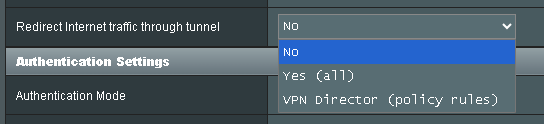
In the VPN client tab of Merlin, should I select No, Yes (all), or VPN Director (policy rules)?

This newbie would appreciate any assistance. Thanks.
 

Attachments

  • Untitled.png
    Untitled.png
    3.8 KB · Views: 12
In the VPN client tab of Merlin, should I select No, Yes (all), or VPN Director (policy rules)?
This depends on your use case, it has nothing to do with the DomainVPNRouting script.
However, since you're most probably routing some domains only through your VPN, so you should go with the third option (VPN Director), as this won't route the whole router (second option) which contradicts the script's concept of routing some domains only. Moreover, you absolutely don't want to disable redirecting traffic to the VPN using the first option (No).
 
This depends on your use case, it has nothing to do with the DomainVPNRouting script.
However, since you're most probably routing some domains only through your VPN, so you should go with the third option (VPN Director), as this won't route the whole router (second option) which contradicts the script's concept of routing some domains only. Moreover, you absolutely don't want to disable redirecting traffic to the VPN using the first option (No).
Thank you. I selected the VPN Director option and am slowly adding domains to handle HBOMax and it's working.
 

Support SNBForums w/ Amazon

If you'd like to support SNBForums, just use this link and buy anything on Amazon. Thanks!

Sign Up For SNBForums Daily Digest

Get an update of what's new every day delivered to your mailbox. Sign up here!
Back
Top