
You are using an out of date browser. It may not display this or other websites correctly.
You should upgrade or use an alternative browser.
You should upgrade or use an alternative browser.
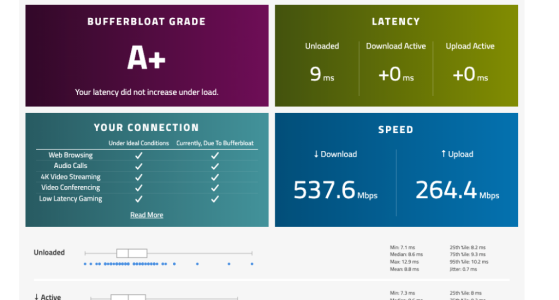
Endgame Bufferbloat Results: RT-AX86U Pro + CAKE SQM (+0ms Active Latency)
- Thread starter Fonpap
- Start date

I’m running a custom JFFS script to handle CAKE SQM, fine-tuned for my 1000/500 FTTH line. Settings are optimized with a strict overhead and manual bandwidth caps to ensure that 0ms deviation.
Without QoS, the line is still fast, but the active latency spikes are noticeable (standard bufferbloat). The goal here wasn't just speed, but "Lab Perfect" consistency for competitive gaming.
I’ll share more details once I finalize some more stress tests!
I thought Cake capped out around 300mbps?
The secret to pushing CAKE past 500Mbps on the RT-AX86U Pro is all about CPU affinity and interrupt handling.
By manually binding the network interface interrupts to specific CPU cores, you prevent a single core from bottlenecking. When you distribute the processing load across all four cores, the router can handle the SQM overhead much more efficiently.
It’s the only way to achieve +0ms active latency and sub-1ms jitter at these speeds.
I’m running a custom JFFS script to handle CAKE SQM, fine-tuned for my 1000/500 FTTH line. Settings are optimized with a strict overhead and manual bandwidth caps to ensure that 0ms deviation.
Without QoS, the line is still fast, but the active latency spikes are noticeable (standard bufferbloat). The goal here wasn't just speed, but "Lab Perfect" consistency for competitive gaming.
I’ll share more details once I finalize some more stress tests!
Without QoS, the line is still fast, but the active latency spikes are noticeable (standard bufferbloat). The goal here wasn't just speed, but "Lab Perfect" consistency for competitive gaming.
I’ll share more details once I finalize some more stress tests!
What are your CAKE settings? What results did you have with QoS disabled? Just curious.
With QoS disabled at full line speed (1000/500 Mbps), I was getting a Bufferbloat Grade A, with +13ms on Download Active and +25ms on Upload Active. While those results were decent, they weren't "Lab Perfect" for my standards.
By utilizing CAKE SQM with an aggressive undershoot (550/275 Mbps) and manually balancing the interrupts across all CPU cores, I managed to lock it at +0ms/+0ms with sub-1ms jitter.
The core of the optimization is this command:
tc qdisc replace dev ppp0 root cake bandwidth 275mbit diffserv3 dual-srchost nat nowash no-ack-filter split-gso rtt 100ms noatm overhead 34 && tc qdisc replace dev ifb4ppp0 root cake bandwidth 550mbit besteffort dual-dsthost nat wash ingress no-ack-filter split-gso rtt 100ms noatm overhead 34 && echo "f" > /proc/irq/$(grep -m1 ppp0 /proc/interrupts | cut -d: -f1)/smp_affinity
To prove the stability of this setup, I ran a concurrent stress test. I executed a 500-packet rapid-fire ping (`ping -i 0.2 -c 500 1.1.1.1`) while simultaneously running the Waveform Bufferbloat test.
The results are solid:
• **Waveform Grade:** A+ (+0ms/+0ms Active Latency)
• **Ping Jitter (Stddev):** A stunning **0.290 ms**
• **Max Ping Spike:** Only **7.005 ms**
Even when pushing 540+ Mbps and hammering the CPU with rapid pings, the RT-AX86U Pro with CPU balancing keeps the connection rock solid. This isn't just a baseline reading; it’s absolute proof of real-world stability.
The results are solid:
• **Waveform Grade:** A+ (+0ms/+0ms Active Latency)
• **Ping Jitter (Stddev):** A stunning **0.290 ms**
• **Max Ping Spike:** Only **7.005 ms**
Even when pushing 540+ Mbps and hammering the CPU with rapid pings, the RT-AX86U Pro with CPU balancing keeps the connection rock solid. This isn't just a baseline reading; it’s absolute proof of real-world stability.
Attachments

What are your CAKE settings? What results did you have with QoS disabled? Just curious.
You're right, sharing is the best way to keep this community great!
My physical line is 1000/500 Mbps FTTH, but for this setup, I have deliberately set CAKE to **550/275 Mbps**. I prefer "statistical perfection" over raw speed for my gaming needs.
**The Setup Details:**
* **Firmware:** Asuswrt-Merlin 3004.388.8_4 (Stable and rock solid).
* **QoS Method:** CAKE SQM via custom JFFS script.
* **CPU Optimization:** I’m using `smp_affinity` to balance the interrupt load across all 4 CPU cores. This is how I manage to push 550 Mbps with CAKE without hitting the typical 300 Mbps CPU bottleneck.
* **Settings:** `bandwidth 275mbit diffserv3 dual-srchost nat nowash no-ack-filter split-gso rtt 100ms noatm overhead 34` (and similar for download).
Without QoS, I get near-gigabit speeds, but the jitter and bufferbloat spikes make the connection feel much less "stable" during heavy use. For me, a flat line at 550 Mbps is better than a jittery one at 1000 Mbps.
I hear both points, and sharing these details is what makes this community great!
@dave14305 My physical line is 1000/500 Mbps FTTH, but for this "Endgame" result, I have deliberately set CAKE to 550/275 Mbps. Without QoS, I get full gigabit speeds, but the jitter and bufferbloat spikes are not worth the trade-off for my specific use case (competitive gaming).
@Tech9 I respect your point of view. Most fiber lines get an A+ with a simple limiter, but the "Lab" goal here wasn't just the grade—it was the near-zero variance (0.290ms stddev) under extreme synthetic stress.
While a basic limiter prevents saturation, it doesn't always handle micro-jitter or CPU interrupt distribution as effectively as a tuned CAKE setup with proper CPU core balancing (smp_affinity). It's definitely a "purist" approach to a non-existent issue for most, but for those of us chasing absolute consistency, this stability is the goal.
Firmware: Asuswrt-Merlin 3004.388.8_4
CAKE Settings: bandwidth 275mbit diffserv3 dual-srchost nat nowash no-ack-filter split-gso rtt 100ms noatm overhead 34
@dave14305 My physical line is 1000/500 Mbps FTTH, but for this "Endgame" result, I have deliberately set CAKE to 550/275 Mbps. Without QoS, I get full gigabit speeds, but the jitter and bufferbloat spikes are not worth the trade-off for my specific use case (competitive gaming).
@Tech9 I respect your point of view. Most fiber lines get an A+ with a simple limiter, but the "Lab" goal here wasn't just the grade—it was the near-zero variance (0.290ms stddev) under extreme synthetic stress.
While a basic limiter prevents saturation, it doesn't always handle micro-jitter or CPU interrupt distribution as effectively as a tuned CAKE setup with proper CPU core balancing (smp_affinity). It's definitely a "purist" approach to a non-existent issue for most, but for those of us chasing absolute consistency, this stability is the goal.
Firmware: Asuswrt-Merlin 3004.388.8_4
CAKE Settings: bandwidth 275mbit diffserv3 dual-srchost nat nowash no-ack-filter split-gso rtt 100ms noatm overhead 34

dave14305
Part of the Furniture
What is the irq for your ppp0 interface? The firmware will do some smp_affinity updates on boot, so just curious how it was set before.
CAKE will still only use one core, but if it's now an idle core, that helps.
You say you use a custom jffs script. Is QoS even enabled in the firmware GUI, or do you manage it 100% in your script? Is flow cache disabled so CAKE will still see the unique individual flows?
CAKE will still only use one core, but if it's now an idle core, that helps.
You say you use a custom jffs script. Is QoS even enabled in the firmware GUI, or do you manage it 100% in your script? Is flow cache disabled so CAKE will still see the unique individual flows?
Good questions, Dave. I want to be precise here:
1. **QoS Management:** I have QoS **Enabled** in the ASUS GUI, set to "Cake/Bandwidth Limiter" so the system initializes the qdisc correctly. However, my JFFS script (`firewall-start`) runs afterward to apply my specific "aggressive undershoot" values (550/275) and custom Cake arguments.
2. **Flow Cache:** This is the most important part. To make sure CAKE sees the unique individual flows as you mentioned, my script manually runs `fc disable` and `runner disable`. Without disabling hardware acceleration, the bufferbloat results wouldn't be this consistent.
3. **The ppp0 Interface:** I checked the IRQ for the ppp0 interface and used `smp_affinity` to bind it to a specific core. Moving the interrupt handling away from the core that handles the general system overhead was the final piece of the puzzle for the 0.290ms jitter.
4. **Firmware:** Running on 3004.388.8_4, which has been extremely stable for this manual approach.
It's a "hybrid" setup: GUI for the foundation, and the script for the fine-tuning and CPU balancing.
1. **QoS Management:** I have QoS **Enabled** in the ASUS GUI, set to "Cake/Bandwidth Limiter" so the system initializes the qdisc correctly. However, my JFFS script (`firewall-start`) runs afterward to apply my specific "aggressive undershoot" values (550/275) and custom Cake arguments.
2. **Flow Cache:** This is the most important part. To make sure CAKE sees the unique individual flows as you mentioned, my script manually runs `fc disable` and `runner disable`. Without disabling hardware acceleration, the bufferbloat results wouldn't be this consistent.
3. **The ppp0 Interface:** I checked the IRQ for the ppp0 interface and used `smp_affinity` to bind it to a specific core. Moving the interrupt handling away from the core that handles the general system overhead was the final piece of the puzzle for the 0.290ms jitter.
4. **Firmware:** Running on 3004.388.8_4, which has been extremely stable for this manual approach.
It's a "hybrid" setup: GUI for the foundation, and the script for the fine-tuning and CPU balancing.

anotherengineer
Senior Member
So hardware acceleration IS disabled?Good questions, Dave. I want to be precise here:
1. **QoS Management:** I have QoS **Enabled** in the ASUS GUI, set to "Cake/Bandwidth Limiter" so the system initializes the qdisc correctly. However, my JFFS script (`firewall-start`) runs afterward to apply my specific "aggressive undershoot" values (550/275) and custom Cake arguments.
2. **Flow Cache:** This is the most important part. To make sure CAKE sees the unique individual flows as you mentioned, my script manually runs `fc disable` and `runner disable`. Without disabling hardware acceleration, the bufferbloat results wouldn't be this consistent.
3. **The ppp0 Interface:** I checked the IRQ for the ppp0 interface and used `smp_affinity` to bind it to a specific core. Moving the interrupt handling away from the core that handles the general system overhead was the final piece of the puzzle for the 0.290ms jitter.
4. **Firmware:** Running on 3004.388.8_4, which has been extremely stable for this manual approach.
It's a "hybrid" setup: GUI for the foundation, and the script for the fine-tuning and CPU balancing.
Yes, Hardware Acceleration (Runner/Flow Cache) is explicitly disabled in the script. Since I am using CAKE SQM on a 500/250 FTTH line, Hardware Acceleration must be off for the CPU to properly manage every packet and eliminate Bufferbloat (+0ms).
To handle the CPU load, the script also implements RPS/RFS steering to offload processing from Core 1 to Cores 2, 3, and 4. This keeps the latency at A+ levels even under full load.
To handle the CPU load, the script also implements RPS/RFS steering to offload processing from Core 1 to Cores 2, 3, and 4. This keeps the latency at A+ levels even under full load.
To make this work perfectly, the settings in the ASUS QoS GUI must match the script’s parameters:
1. QoS Mode: Set to CAKE in the GUI.
2. Bandwidth: Set to the same values as the script (550 Down / 275 Up).
3. Overhead: Must be set to 34 (for VDSL/FTTH PPPoE) in the WAN packet overhead field in the GUI.
The logic is simple: I let the ASUS GUI initialize the CAKE qdiscs first, and then my JFFS script runs to apply the Core Steering (RPS/SMP Affinity) and fine-tune the qdisc parameters. This combination is what delivers the rock-solid +0ms Bufferbloat at 500+ Mbps
#!/bin/sh
sleep 20
# Disable Hardware Acceleration to allow CAKE to work
fc disable 2>/dev/null
runner disable 2>/dev/null
echo 65536 > /proc/sys/net/core/rps_sock_flow_entries
# Core Steering: Offloading from Core 1 to Cores 2, 3, 4 (Mask 'e')
for iface in eth0 ppp0; do
if [ -d "/sys/class/net/$iface/queues" ]; then
for q in /sys/class/net/$iface/queues/rx-*; do
echo e > $q/rps_cpus 2>/dev/null
echo 32768 > $q/rps_flow_cnt 2>/dev/null
done
fi
done
# IRQ Steering: Moving ppp0/eth0 interrupts away from Core 1
for irq in $(grep -E 'ppp0|eth0' /proc/interrupts | cut -d: -f1); do
echo e > /proc/irq/$irq/smp_affinity 2>/dev/null
done
# Applying CAKE settings (550/275 for a 500/250 line)
tc qdisc del dev ppp0 root 2>/dev/null
tc qdisc del dev ifb4ppp0 root 2>/dev/null
tc qdisc del dev ppp0 handle ffff: ingress 2>/dev/null
tc qdisc add dev ppp0 handle ffff: ingress
tc filter add dev ppp0 parent ffff: protocol all u32 match u32 0 0 action mirred egress redirect dev ifb4ppp0
tc qdisc replace dev ppp0 root cake bandwidth 275mbit diffserv3 dual-srchost nat nowash no-ack-filter split-gso rtt 100ms noatm overhead 34
tc qdisc replace dev ifb4ppp0 root cake bandwidth 550mbit besteffort dual-dsthost nat wash ingress no-ack-filter split-gso rtt 100ms noatm overhead 34
logger "LAB_PERFECT_ACTIVE"
1. QoS Mode: Set to CAKE in the GUI.
2. Bandwidth: Set to the same values as the script (550 Down / 275 Up).
3. Overhead: Must be set to 34 (for VDSL/FTTH PPPoE) in the WAN packet overhead field in the GUI.
The logic is simple: I let the ASUS GUI initialize the CAKE qdiscs first, and then my JFFS script runs to apply the Core Steering (RPS/SMP Affinity) and fine-tune the qdisc parameters. This combination is what delivers the rock-solid +0ms Bufferbloat at 500+ Mbps
#!/bin/sh
sleep 20
# Disable Hardware Acceleration to allow CAKE to work
fc disable 2>/dev/null
runner disable 2>/dev/null
echo 65536 > /proc/sys/net/core/rps_sock_flow_entries
# Core Steering: Offloading from Core 1 to Cores 2, 3, 4 (Mask 'e')
for iface in eth0 ppp0; do
if [ -d "/sys/class/net/$iface/queues" ]; then
for q in /sys/class/net/$iface/queues/rx-*; do
echo e > $q/rps_cpus 2>/dev/null
echo 32768 > $q/rps_flow_cnt 2>/dev/null
done
fi
done
# IRQ Steering: Moving ppp0/eth0 interrupts away from Core 1
for irq in $(grep -E 'ppp0|eth0' /proc/interrupts | cut -d: -f1); do
echo e > /proc/irq/$irq/smp_affinity 2>/dev/null
done
# Applying CAKE settings (550/275 for a 500/250 line)
tc qdisc del dev ppp0 root 2>/dev/null
tc qdisc del dev ifb4ppp0 root 2>/dev/null
tc qdisc del dev ppp0 handle ffff: ingress 2>/dev/null
tc qdisc add dev ppp0 handle ffff: ingress
tc filter add dev ppp0 parent ffff: protocol all u32 match u32 0 0 action mirred egress redirect dev ifb4ppp0
tc qdisc replace dev ppp0 root cake bandwidth 275mbit diffserv3 dual-srchost nat nowash no-ack-filter split-gso rtt 100ms noatm overhead 34
tc qdisc replace dev ifb4ppp0 root cake bandwidth 550mbit besteffort dual-dsthost nat wash ingress no-ack-filter split-gso rtt 100ms noatm overhead 34
logger "LAB_PERFECT_ACTIVE"

Tech9
Part of the Furniture
My physical line is 1000/500 Mbps FTTH
I can guarantee someone with the same bandwidth and quality ISP line and the same model router running latest stock Asuswrt with NAT acceleration enabled by default will have better user experience 99% of the time due to the following:
- there is no way to fix bad ISP line on user's end
- the ISP already applies QoS on all shared residential lines
- no bandwidth 0.3-0.5Gbps restriction (≥50% loss in this case)
- no firmware features restriction (3004 vs 3006 in this case)
- no need to install custom firmware (full featured ASUS App?)
- no need to expose to vulnerabilities with Nov 2004 firmware
- no need to waste time with Waveform (or other similar) website
- no need to waste time in fixing what is not broken in first place
- they can freely use other available features in firmware (the "perfection" may disappear the moment other firmware feature starts actively using the same core, assumed 100% available all the time)
Thanks for sharing your work and experience.
dave14305
Part of the Furniture
Do you really find eth0 in the interrupts list, or just ppp0?grep -E 'ppp0|eth0' /proc/interrupts
That waveform test is unreliable.I have multiple fiber ISP lines and they will all show A+ on this test with simple bandwidth limiter below line saturation. Your "lab" test is broken, fixing non-existent issue.
I can get A or A+ without any QoS but I can change that score to B or C by just changing my cable modem.
Also, I do not see the benefit of allowing software to do something instead of hardware.
Seems to me you would just be adding latency as software always adds latency compared to hardware.
Last edited:
Similar threads

- Replies
- 5
- Views
- 3K


Similar threads
| Thread starter | Title | Forum | Replies | Date |
|---|---|---|---|---|
| S | DNS Director only partially redirecting hardcoded DNS (Pi-hole setup) – mixed Google/Cloudflare results | Asuswrt-Merlin | 14 |
Similar threads
-
SDNS Director only partially redirecting hardcoded DNS (Pi-hole setup) – mixed Google/Cloudflare results
- Started by SocratesBackup
- Replies: 14
Latest threads
-
RT-AC3200 recovery / rescue mode - ignore bad internet instructions.
- Started by vibroverbus
- Replies: 2
-
Release ASUS GT-AX11000 Pro Firmware version 3.0.0.6.102_37421 (2026/03/30)
- Started by fruitcornbread
- Replies: 0
-
Release ASUS RT-AX92U Firmware version 3.0.0.4.388_23807 (2026/03/30)
- Started by fruitcornbread
- Replies: 0
-
RT-AC66U B1 Media Bridge DHCP bug remains
- Started by vibroverbus
- Replies: 5
-
Random "Server not found" issues with DoT enabled on RT-AX86U Pro
- Started by wiremonkey
- Replies: 6
Support SNBForums w/ Amazon
If you'd like to support SNBForums, just use this link and buy anything on Amazon. Thanks!
Sign Up For SNBForums Daily Digest
Get an update of what's new every day delivered to your mailbox. Sign up here!