What's new
  • SNBForums Code of Conduct

    SNBForums is a community for everyone, no matter what their level of experience.

    Please be tolerant and patient of others, especially newcomers. We are all here to share and learn!

    The rules are simple: Be patient, be nice, be helpful or be gone!

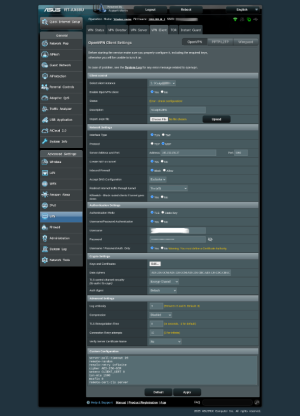
Solved Proton VPN got off the grid after several tries to upgrade from 3004.388.10 to 3004.388.10_2 and back.

user_20240830

Occasional Visitor
Well, subject says it all.
My specs are:
RT-AX68U with 3004.388.10_2 .
Got totally lost VPN as it got lost on the way from 3004.388.10 which was running smooth.
Might be some ISP tricks at the same time.
I've stepped down to 3004.388.10 but that didn't work out for me.
Then I did Factory Reset.
Don't know were to dig actually.
Most probably I got messed up with settings restoration on the way to upgrade.
One very strange thing that I noticed is RAM use has reduced by 10% down to 62% only.
While previously with or without VPN use it kept to occupy up to 75% RAM.
Since there's no way to use old settings reserve file I got to fill up everything manually: WAN settings, WiFi settings, etc.
I'm still able to browse Internet but only with ISP permitted URLs which are extremely narrowed.
The only way for me to browse Internet is to use one freely available VPN.
But I got limited traffic over there and can't afford to use it for couple of days.
Got very important communication to attend soon.
Any Proton VPN specialists around here?
A helping hand is greatly appreciated.
 

Attachments
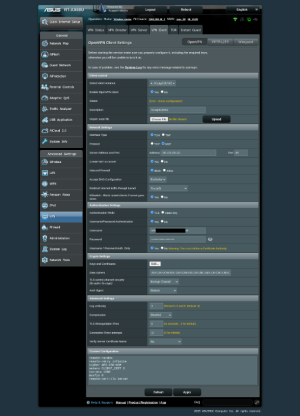
  • 2025-11-08 19.17.55 192.168.249.1 2b7e9c5931ea.png
    2025-11-08 19.17.55 192.168.249.1 2b7e9c5931ea.png
    143.9 KB · Views: 140
  • 2025-11-08 11.09.54 192.168.249.1 688dc2dcbc76.png
    2025-11-08 11.09.54 192.168.249.1 688dc2dcbc76.png
    141.2 KB · Views: 111
Last edited:
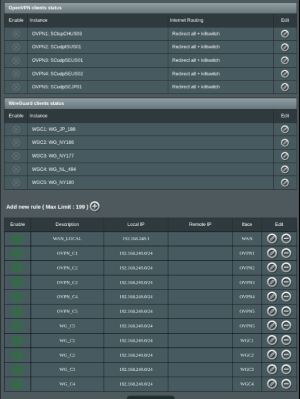
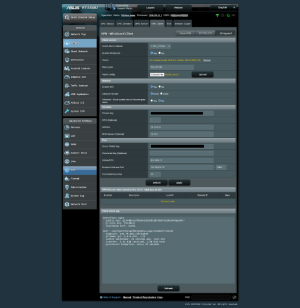
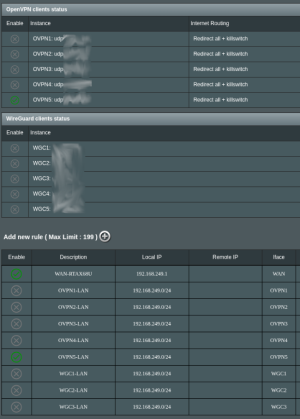
Based on the second screenshot, you are not redirecting anything through the VPN - the rule list is empty. With WireGuard, you must configure rules within VPN Director.
 
Based on the second screenshot, you are not redirecting anything through the VPN - the rule list is empty. With WireGuard, you must configure rules within VPN Director.
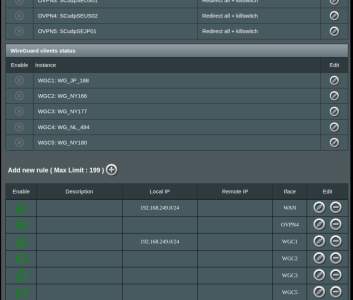
Like this one?
I keep getting ISP IP only.
No VPN in use this way...
 

Attachments

  • Screenshot From 2025-11-08 20-41-26.png
    Screenshot From 2025-11-08 20-41-26.png
    165.7 KB · Views: 94
Last edited:
Like this one?
I keep getting ISP IP only.
No VPN in use this way...
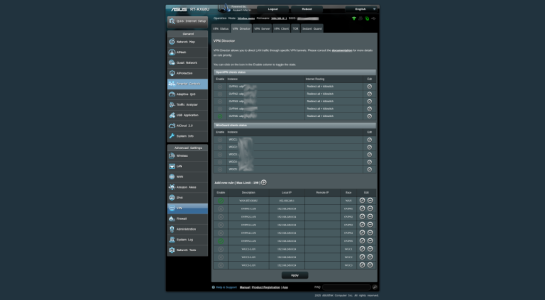
Your first rule, which has the highest priority (because it targets WAN) tells it to redirect everything through your ISP. Change that to only redirect the router itself (192.168.249.1).

Your VPN rule tells it to redirect through WireGUard client 1, but your screenshot shows you are using client 4. You need to fix that to redirect through the correct VPN.

Also remove all those other empty rules.
 
Your first rule, which has the highest priority (because it targets WAN) tells it to redirect everything through your ISP. Change that to only redirect the router itself (192.168.249.1).

Your VPN rule tells it to redirect through WireGUard client 1, but your screenshot shows you are using client 4. You need to fix that to redirect through the correct VPN.

Also remove all those other empty rules.
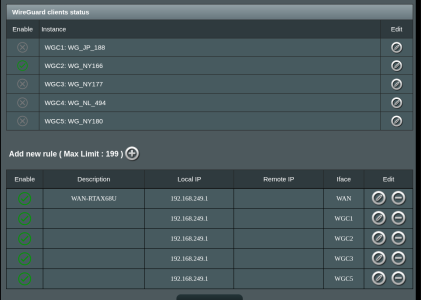
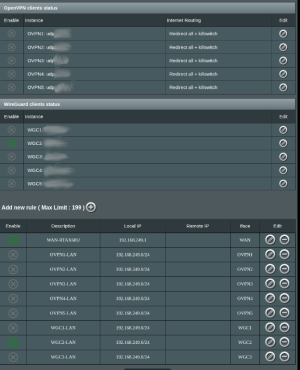
I've 'Local IP' like this.
Still ISP IP is there. But is it even correct to assign all WG clients in a row?
It might be WireGuard by itself creating connection problem. Though in 3004.388.10 I used only OpenVPN-UDP.
That way I had no rules at all.
The only thing that connected properly.
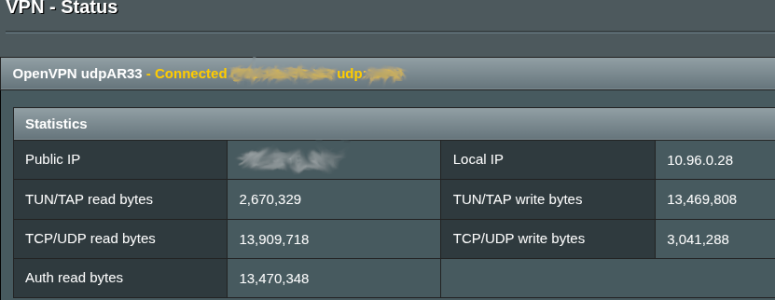
Most of a sudden VPN Status shows no connection established.
 

Attachments

  • Screenshot From 2025-11-08 21-01-34.png
    Screenshot From 2025-11-08 21-01-34.png
    92 KB · Views: 80
Last edited:
I've 'Local IP' like this.
Still ISP IP is there. But is it even correct to assign all WG clients in a row?
It might be WireGuard by itself creating connection problem. Though in 3004.388.10 I used only OpenVPN-UDP.
That way I had no rules at all.
The only thing that connected properly.
Most of a sudden VPN Status shows no connection established.
Those rules make no sense. You need to follow my instructions:

1) Remove ALL rules
2) Create one rule: Local: 192.168.249.1 -> WAN
3) Create one rule: Local 192.168.1249.0/24 -> WGC4

What this does:

- If the traffic comes from the router, go through the ISP, and end there
- Or alse, if the traffic comes from the whole LAN, then go through WireGuard client 4, and there.

This is obviously for WireGuard client 4, which according to your screenshot isn't even started - you started WireGuard client 2. You need to decide WHICH client you use, create a rule specifically for that client, and have only that rule enabled in addition to the router exception rule. You cannot have different rules that overlap, only the first matching rule gets used. And having multiple clients connected at the same time make no sense either, unless you intend to have specific LAN devices through specific clients, in which case you need device-specific rules.
 
Done that.
Got WG connected back.
But no internet traffic allowed by ISP and I got stuck in never ending request to any server: "This site can't be reach" ...
So I had to switch off WG completely.
Very strange though my additional free VPN successfully goes via both modes OVPN and WG.
But traffic is the limit.
Hope to bring back OVPN. In previous Firmware I used to leave only one single OVPN Client enabled and that was it!
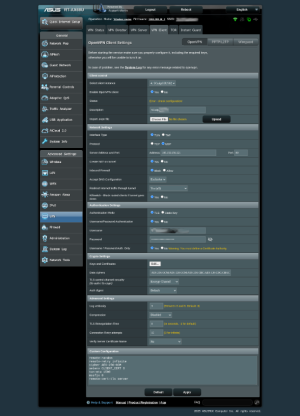
But have no idea how to do that now as I continue to receive "Error - check configuration".
Left URL to this post to Proton VPN Support.
Hope they will study screenshots.
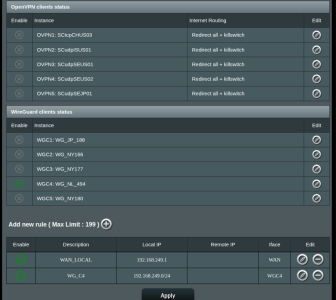
Last one is the table I hope to be correct because this is the sequence I expect it to run.
And one more thing - this weird 10% less RAM in use bothers me a lot...
 

Attachments

  • Screenshot From 2025-11-08 21-45-11.png
    Screenshot From 2025-11-08 21-45-11.png
    161 KB · Views: 67
  • Screenshot From 2025-11-08 22-10-45.png
    Screenshot From 2025-11-08 22-10-45.png
    145.3 KB · Views: 75
Last edited:
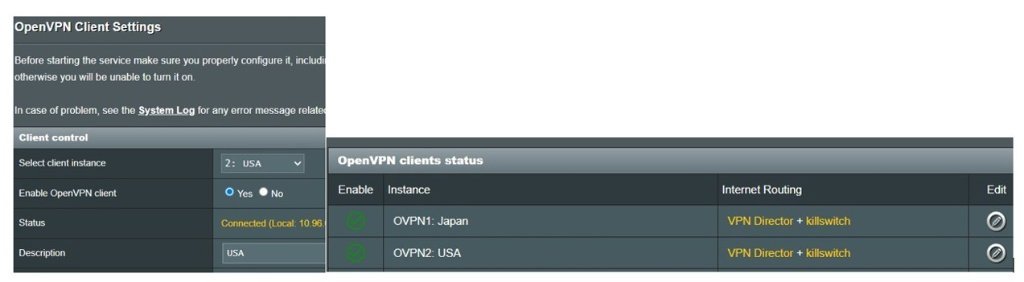
Eric is absolutely right.

I'm familiar with the message "Error - check configuration"
(you can only choose one country with a free account.)

I have two ProtonVPNs connected to two "guest networks"
and also running two scripts.

First:
one that generates a ping every 5 minutes and sends some traffic to trick the both connections into thinking there's online traffic.
Second:
when a VPN goes down (checks for no ping), this guest network/VPN is automatically restarted.
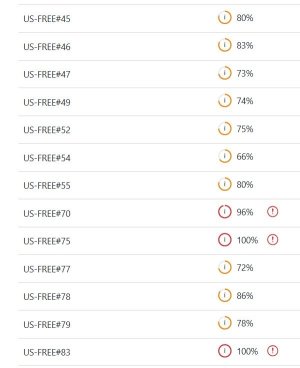
when a protonvpn server is overloaded (100% load > you can check this on the proton site) i notice they disconnect some (inactive) connections.

I'm using the latest Merlin firmware, so this works just fine, and therefore has nothing to do with it.
so check your rules and follow RMerlin instructions
 

Attachments

  • openVPN .jpg
    openVPN .jpg
    31 KB · Views: 56
  • vpn load .jpg
    vpn load .jpg
    42.2 KB · Views: 64
But have no idea how to do that now as I continue to receive "Error - check configuration".
As a troubleshooting step, if you haven't done so already, download a different Proton VPN server endpoint configuration and import it into the router replacing your existing one that is generating the error. Then test if the issue continues.

As RMerlin and others indicated check your VPN Director settings. Remove all the settings and start from scratch with just one VPN client end point and the client rules for it. Typically when you have VPN problems VPN Director rules is the first thing to check, review and adjust.

For additional context if you are using any third party addon scripts on the router, or are you using any DNS sink holes like Pi-Hole on the local network, you should indicate what you are using and how they're configured..
 
  • Like
Reactions: fsb
...and also running two scripts.
Could you give us a hint on both script details like here ? Or directly in forum somewhere? Not sure if it is allowed to upload a bunch of script attachments down here though.
I'm using the latest Merlin firmware, so this works just fine, and therefore has nothing to do with it.
so check your rules and follow RMerlin instructions
I'm just happy with his firmware.
I mean 3004.388.10_2. It makes my heart sing!
It couldn't be better than this.
Or could it?
download a different Proton VPN server endpoint configuration and import it into the router replacing your existing one that is generating the error.
On Proton server there's like tons of these config files. To try each and every of them takes enormous amount of time.

Which could be good thing taking into consideration poster signature who likes your post very much :)
Hi there 'fsb' !
Those attachment edits dedicated to your service!

I'm dumb enough to adjust VPN settings as a 'Hard Core Firewall Pro' and to be frank I got a bit confused by this particular documentation .
It requires sufficient Firewall Rules knowledge which me personally lack :(
I understood it literally as :
Code:
Rules with a WAN destination
Rules with an OpenVPN 1 destination
Rules with an OpenVPN 2 destination
...
Rules with an OpenVPN 5 destination
Rules with a WireGuard 1 destination
Rules with a WireGuard 2 destination
...
Rules with a WireGuard 5 destination
Those rules make no sense. You need to follow my instructions:
I greatly appreciate it Sir!
To clarify this topic I have to describe how it got solved.
After a couple of days I have been trying to re-connect my VPN by any mean possible.
Those efforts were futile.
One thing which I mentioned before was amount of RAM in use. 65% against normal 75% - 77% when VPN connection was successfully enabled prior to that.
This morning I was playing with LAN clients to establish VPN tunnel bypassing router and succeeded.
Then I rushed to my laptop to find that and RAM use went up back to normal 75% with only single client using VPN tunnel.
I understand that client establishing VPN tunnel connect has zero part in router RAM use but that gave me a hope to bring everything back.
So I removed all the 'Rules' from 'VPN Director' completely leaving none existent.
Then I did successful connection to the SAME server my client was connected last.
After which router got it from there.

Which brings me to thought this was all Proton VPN failure as a service.
Going to the 'Download *.ovpn config files I saw hundreds of old configurations been completely removed!
Their Support Team has a major deficiency following R&D upgrades to servers' configuration files.

Following notice is to Proton VPN Support concern only:

'Dear Proton VPN Support member' , please don't be angry.
I'm trying to improve your business by showing real bugs in your Company inner communications.
Counting on your 'Bug Tracking' prize guys!
Please make a sort of info tag on your app which at least will inform users to cross check their config files validity the moment they got cancelled on server side!
Which will be completely useless for me as I don't use Windows, pardon me!
And other clients do not have any current VPN server state information given by app interface.

End of notice.

Once again - Thanks to all commentators!

P.S. Guys! Don't forget to save full configuration for old Firmware in case of accident like this to make life easier during step-down / step-up in Firmware!
 

Attachments

  • Screenshot From 2025-11-10 09-27-08.png
    Screenshot From 2025-11-10 09-27-08.png
    47.9 KB · Views: 46
Last edited:
  • Like
Reactions: fsb
On Proton server there's like tons of these config files. To try each and every of them takes enormous amount of time.
Yes Proton VPN has many VPN server connection points for the various countries it supports. You don't need to try every single one, nor was I suggesting you try every single one. Just select a different one from the list than your existing one, download it's config file, add it to the router and test as a troubleshooting step.
 
Yes Proton VPN has many VPN server connection points for the various countries it supports. You don't need to try every single one, nor was I suggesting you try every single one. Just select a different one from the list than your existing one, download it's config file, add it to the router and test as a troubleshooting step.
The thing is -in heavily censored areas like mine it's never ending struggle with ISP.
Taking last century switchboard operators as an example it reminds me of Russian Revolution period with Red Navy visiting them daily and giving head shot for random "Hello Girl".
Next morning you wake up to start search for a replacement only to find that it will repeat tomorrow in continuous loop... :(
What a time we live!

This rises a question: how to ease up process of next server selection for Web interface here on our mutual platform?

It took me 45 minutes to fill up gap of 5 Servers for OpenVPN only.
I did it hard way. Switch off VPN and open direct line with ISP. Pick up mobile and start select country by country single server which could be connected to. Revert to router. Enter the settings for operational server. A bit too much isn't it?

Going back to rules assignment.
If I understood it right each rule should be enabled only the moment corresponding OpenVPN or WG Server is in use. Thus switching the server should be followed by changing the rules table and to enable/disable idle server off / on ?
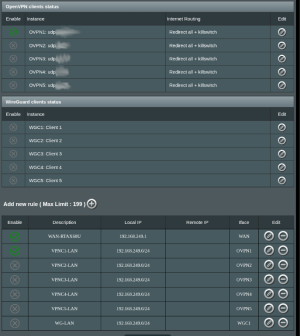
Like in a screenshot below - to switch from 'VPNC1' to 'VPNC2' one has to change rule table from 'VPNC1-LAN' to 'VPNC2-LAN' leaving 'WAN-LAN' rule enabled.
Correct?
 

Attachments

  • Screenshot From 2025-11-11 07-50-11.png
    Screenshot From 2025-11-11 07-50-11.png
    158.5 KB · Views: 47
Last edited:
The thing is -in heavily censored areas like mine it's never ending struggle with ISP.
Taking last century switchboard operators as an example it reminds me of Russian Revolution period with Red Navy visiting them daily and giving head shot for random "Hello Girl".
Next morning you wake up to start search for a replacement only to find that it will repeat tomorrow in continuous loop... :(
What a time we live!

This rises a question: how to ease up process of next server selection for Web interface here on our mutual platform?

It took me 45 minutes to fill up gap of 5 Servers for OpenVPN only.
I did it hard way. Switch off VPN and open direct line with ISP. Pick up mobile and start select country by country single server which could be connected to. Revert to router. Enter the settings for operational server. A bit too much isn't it?

Going back to rules assignment.
If I understood it right each rule should be enabled only the moment corresponding OpenVPN or WG Server is in use. Thus switching the server should be followed by changing the rules table and to enable/disable idle server off / on ?
Like in a screenshot below - to switch from 'VPNC1' to 'VPNC2' one has to change rule table from 'VPNC1-LAN' to 'VPNC2-LAN' leaving 'WAN-LAN' rule enabled.
Correct?
Hope someone will take a look at my screenshot and correct me on the rules.
I did set up OVPN and WG for all 5+5 Clients slots.
OpenVPN happens to be operational.
WG - doesn't.
I haven't got Public IP from WG.
But what is the reason?
 

Attachments

  • Screenshot From 2025-11-16 01-06-00.png
    Screenshot From 2025-11-16 01-06-00.png
    141.3 KB · Views: 33
  • Screenshot From 2025-11-16 00-57-36.png
    Screenshot From 2025-11-16 00-57-36.png
    163.5 KB · Views: 50
Last edited:
Hope someone will take a look at my screenshot and correct me on the rules.
I did set up OVPN and WG for all 5+5 Clients slots.
OpenVPN happens to be operational.
WG - doesn't.
I haven't got Public IP from WG.
But what is the reason?
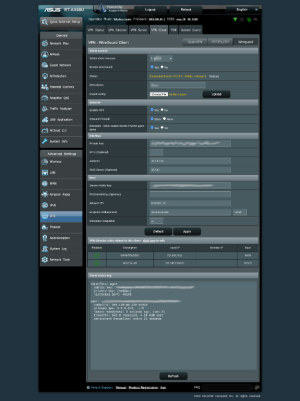
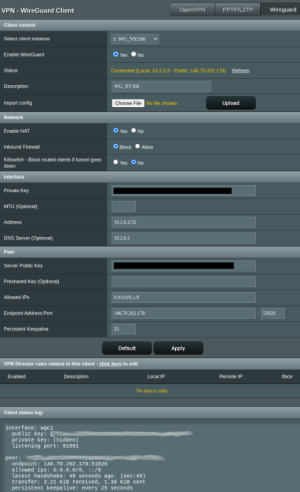
Post readable screenshots of your WireGuard setting(s). Your screenshot is hard to read and cannot make out certain settings.

A suggestion if you haven't done so already as a troubleshooting step. Remove ALL the VPN Director Rules and setup just one single rule for WireGuard and see if it works.

As another troubleshooting step, redownload a different Proton VPN WireGuard conf file and add it to the router, then test if it gets an IP address.

Do you have any additional addon scripts running? Are you using a DNS sinkhole like Pi-Hole or similar?

ProtonVPN free Wireguard working for me currently on a RT-AX86U Pro running 3006.102.5 firmware.
 
Post readable screenshots of your WireGuard setting(s). Your screenshot is hard to read and cannot make out certain settings.

A suggestion if you haven't done so already as a troubleshooting step. Remove ALL the VPN Director Rules and setup just one single rule for WireGuard and see if it works.

As another troubleshooting step, redownload a different Proton VPN WireGuard conf file and add it to the router, then test if it gets an IP address.

Do you have any additional addon scripts running? Are you using a DNS sinkhole like Pi-Hole or similar?

ProtonVPN free Wireguard working for me currently on a RT-AX86U Pro running 3006.102.5 firmware.
Here comes some WG settings.
Your suggestion was the first thing I did.
There were no rules at all when I initiated WG clients and got a 'Public IP'. Operational one. The thing is - it remains bypassed by all clients in my LAN: PC, mobile, etc. as they get 'ISP IP' instead of 'Public IP'.
That urged me to implement rules. And I have difficulties to make them include all clients included in my LAN. Though router seems to get 'Public IP' - no problem.
Not sure about DNS sinkhole but I had no any additional tweaks made to 'AsusWRT-Merlin' - only OpenVPN, WG clients' settings made.
Your last sentence approves that I'm not entirely ready to translate proper 'Public IP' into my LAN.
To write here I have to use OpenVPN which gets limited by ISP drastically and only 1.6% of servers are operational at the moment.
Rest are completely banned.
 

Attachments

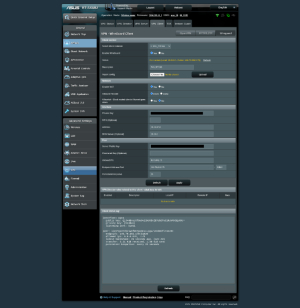
  • 2025-11-08 19.17.55 192.168.249.1 2b7e9c5931ea.png
    2025-11-08 19.17.55 192.168.249.1 2b7e9c5931ea.png
    146.2 KB · Views: 31
  • 2025-11-08 18.34.21 192.168.249.1 aa48e70f61d6.png
    2025-11-08 18.34.21 192.168.249.1 aa48e70f61d6.png
    145.6 KB · Views: 30
  • 2025-11-08 11.09.54 192.168.249.1 688dc2dcbc76.png
    2025-11-08 11.09.54 192.168.249.1 688dc2dcbc76.png
    141.3 KB · Views: 23
  • 2025-11-20 14.09.20 192.168.249.1 1516ad7c4414.png
    2025-11-20 14.09.20 192.168.249.1 1516ad7c4414.png
    142.4 KB · Views: 32

Similar threads

Latest threads

Support SNBForums w/ Amazon

If you'd like to support SNBForums, just use this link and buy anything on Amazon. Thanks!

Sign Up For SNBForums Daily Digest

Get an update of what's new every day delivered to your mailbox. Sign up here!
Back
Top