What's new

Release RT-AX86U Pro Firmware Version 3.0.0.6.102_37421 (2026/03/24)

Intrepid

Regular Contributor
ASUS RT-AX86U Pro Firmware version 3.0.0.6.102_37421
Version 3.0.0.6.102_37421 59.15 MB 2026/03/24

Download: https://www.asus.com/us/supportonly/rt-ax86u_pro/helpdesk_bios/

Bug Fixes and Enhancements
- Improved WiFi roaming behavior to reduce temporary disconnections in some scenarios.
- Improved roaming compatibility for certain client devices.
- Improved App Remote Connection stability in certain scenarios to prevent unexpected connection drops.
- Improved AiMesh onboarding reliability, addressing cases where the onboarding process could stall and fail to complete.
- Fixed an issue where the guest network client list might not display correctly in certain scenarios.
- Fixed an issue with Web history display.
- Fixed an issue where the app could not remove offline devices.
- Fixed an issue where specific IPv6 configuration flows could cause IPv6 connectivity problems on the main network.
- Fixed an issue where enabling System Diagnostics and staying on a specific page could cause repeated reboots.

Security Fixes
- Enhanced input validation and protection to reduce the risk of command injection and SQL injection.
- Hardened environment variable handling.
- Hardened protections around specific logging/command composition flows to reduce potential injection risks.
- Patched a command injection risk in a specific network diagnostic function.

We recommend upgrading to this version to maintain best protection.

NOTE: Be advised this firmware update turns ON "Auto Firmware Upgrade" under Administration > Firmware Upgrade without consent, even if it was off before the update.
 
Last edited:
All is well here after a day of operation.
 
IMPORTANT INFORMATION: Be advised this firmware update turns ON "Auto Firmware Upgrade" under Administration > Firmware Upgrade without consent, even if it was off before the update.
Did you do a dirty flash over existing firmware? Did you get any Asus "notice" dialog boxes asking one to agree or accept after flashing the firmware post firmware flashing?

When doing a reset one of the dialog boxes that pops up on the initial QIS page is one dealing with firmware/security updates. If you accept them the auto update feature will be enabled. Buried in the notice when you decline it tells you they'll still push and update if they feel it's warranted even if you have the auto update disabled.
 
IMPORTANT INFORMATION: Be advised this firmware update turns ON "Auto Firmware Upgrade" under Administration > Firmware Upgrade without consent, even if it was off before the update.
And, this is a real problem? Maybe it is a feature you should enable.
 
Did you do a dirty flash over existing firmware? Did you get any Asus "notice" dialog boxes asking one to agree or accept after flashing the firmware post firmware flashing?

When doing a reset one of the dialog boxes that pops up on the initial QIS page is one dealing with firmware/security updates. If you accept them the auto update feature will be enabled. Buried in the notice when you decline it tells you they'll still push and update if they feel it's warranted even if you have the auto update disabled.
I have no interest in manually re-entering my complex configuration from scratch. No, I did not read the entire notice this time. At one time I did and accepting it was necessary to use certain features like AI Protection. So, like most people, you accept the terms. Anyway, I was just pointing out the change.
 
Hey, was curious if anyone had any status on the original RT-AX86U? I haven't seen any updates in quite a while, nor have I seen anything about it being EOL, or end of support yet. Since I still have mine (but no longer in use), is it time to get rid of it, or should I hold onto it? Is Asus going to continue to provide updates ? Thanks. I've been checking this site on a regular basis for any info before asking.
 
Hey, was curious if anyone had any status on the original RT-AX86U?

You know very well there is no active ASUS representatives on this forum. There is no one here to satisfy your curiosity.

is it time to get rid of it, or should I hold onto it?

Since you are not using it - get rid of it. Right now it provides zero value to you and its potential resale value goes down.
 
You know very well there is no active ASUS representatives on this forum. There is no one here to satisfy your curiosity.


Since you are not using it - get rid of it. Right now it provides zero value to you and its potential resale value goes down.
I know as a whole there are no official Asus Representatives here. However as @RMerlin keeps track of which devices are in official support, or, are getting near of end of life, he would have been able to possibly give a reasonable response. Plus I was only looking at the ASUSWRT official section, so it's also possible information could have been posted elsewhere on the forum, that I wasn't looking. As far as resale, my particular router is the Gundam limited edition. I was looking into it's resale a while back and saw info suggesting the special editions hold their value longer over the standard versions.
 
I know as a whole there are no official Asus Representatives here. However as @RMerlin keeps track of which devices are in official support, or, are getting near of end of life, he would have been able to possibly give a reasonable response. Plus I was only looking at the ASUSWRT official section, so it's also possible information could have been posted elsewhere on the forum, that I wasn't looking. As far as resale, my particular router is the Gundam limited edition. I was looking into it's resale a while back and saw info suggesting the special editions hold their value longer over the standard versions.
Off topic. What does any of that, including asking about the status of the RT-AX86U unit, have to do with the RT-AX86U Pro 3.0.0.6.102_37421 firmware?

Anyway, back on topic. Not experiencing any issues with 3.0.0.6.102_37421 after two days on the RT-AX86U Pro. Basic setup, nothing flashy, no AiMesh.
 
Off topic. What does any of that, including asking about the status of the RT-AX86U unit, have to do with the RT-AX86U Pro 3.0.0.6.102_37421 firmware?

Anyway, back on topic. Not experiencing any issues with 3.0.0.6.102_37421 after two days on the RT-AX86U Pro. Basic setup, nothing flashy, no AiMesh.
I asked on this thread because many of the regulars have both, and since there wasn't a recent thread about the other currently. It made sense to toss out a quick question to see if anyone knew. And besides, with the exception of the slight CPU spec bump and the newer firmware branch it's the same router at its core.
 
And besides, with the exception of the slight CPU spec bump and the newer firmware branch it's the same router at its core.

No, different hardware device. Please, open separate thread for questions about your router model.
 
Meanwhile back on topic. As mentioned by @PunchCardBoss in the RT-AX88U Pro Firmware Version 3.0.0.6.102_37421 (2026/03/24). It appears several Guest Network Pro features are either added or finally working in the 3006.102_37421 firmware on the RT-AX86U Pro.

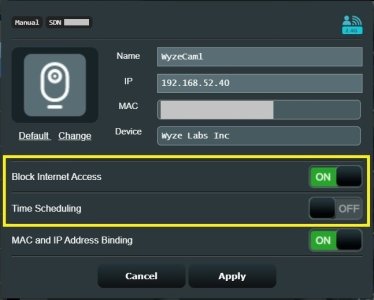
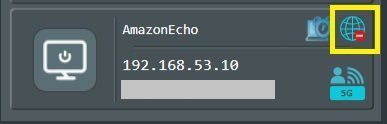
Guest Network Pro client options Block Internet Access and Time Scheduling appear to be selectable and working now. Tested block internet access for a specific Guest Network Pro client and it appeared to work and prevent internet access to/from the specific client.

ClientOptions.jpg

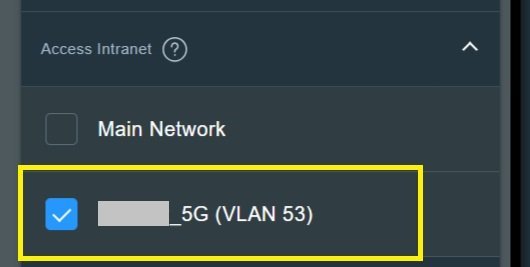
Under the Guest Network Pro profile, Access Intranet now appears to let the user select other Guest Network Pro profiles/VLANs, in addition to selecting the Main LAN. Example that follows is the Advanced Intranet option for one Guest Network Pro profile/VLAN (52) showing my second Guest Network Pro profile/VLAN (53) as selectable.

GuestNetworkProSDNAccessIntranet.jpg

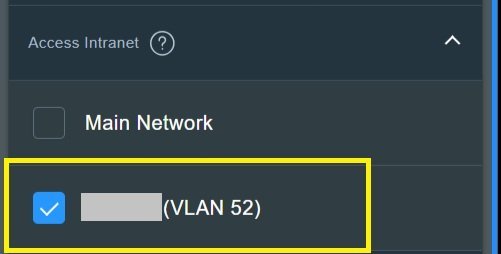
Edit to add: Quick and dirty test with Access Intranet on VLAN 52 set to only access VLAN 53 (as indicated in prior graphic), clients on each VLAN could ping clients on the other VLAN. In other words a VLAN 52 client could ping a VLAN 53 client and a VLAN 53 client could ping a VLAN 52 client. Neither VLAN could ping Main Network. Also, when selecting the other VLAN in the Access Intranet section it will adjust the other VLAN so it too selects the first VLAN. In example above in VLAN 52's Access Intranet, I selected VLAN 53. When applied in VLAN 53 the Access Intranet option for VLAN 52 was selected automatically. See following example from VLAN 53 with VLAN 52 enabled under Access Intranet.

GuestNetworkProSDNAccessIntranetvlan53.jpg

I do not have HA (Home Assistant) server or HA integration so cannot comment if someone has an HA server on one VLAN that clients on second/additional VLAN's could access the HA server on a different VLAN. Have not tested if it is possible to replicate Asus-Merlin YazFi's one-way to Guest Network feature with this Access Intranet option. This, once Asus-Merlin GPL catches up, could help those who have been using iptables scripting to allow one VLAN to talk to another VLAN.
 
Last edited:
It appears several Guest Network Pro features are either added or finally working in the 3004.102_37421 firmware on the RT-AX86U Pro.
Nice write up thank you. Watching with interest as I’m sure @penguin22 is too.
 
More commentary on on the Network Map > Client popup for Guest Network Pro clients.

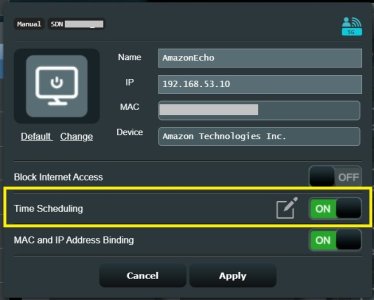
When selecting Time Scheduling for a Guest Network Pro client on the Client popup, when hitting Apply the user is taken to the Time Scheduling page where they can configure the time scheduling for the specific Guest Network Pro client. A quick and dirty test of Time Scheduling showed that it did work to block a specific Guest Network Pro client from the internet at the time specified in the Parental Controls > Time Scheduling section. The time scheduling block is indicated by the third image below.

Time_Scheduling_1.jpg
Time_Scheduling_2.jpg
Time_Scheduling_3.jpg
 
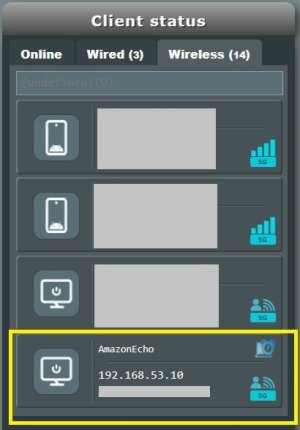
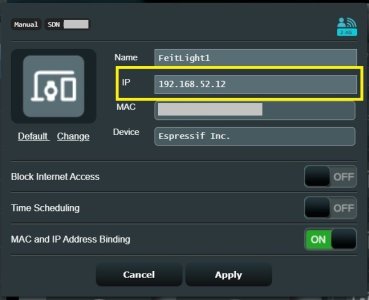
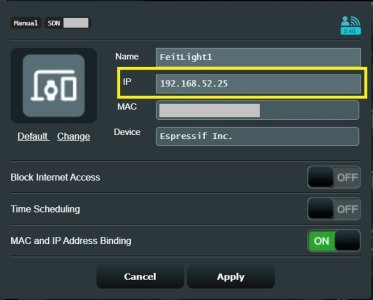
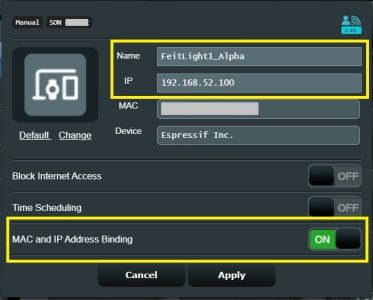
Not sure when Asus fixed or added the ability for the Network Map > Clients information popup field editing, but one can now change the IP address for a Guest Network Pro clients in the popup Client dialog. If I remember right most of the options on that Guest Network Pro Client popup dialog were not editable or changeable in early 3006 firmware on the RT-AX86U Pro. If an MAC and IP address Binding isn't enabled, when setting the IP address it will enable that setting. One can change the Name for the Guest Network Pro client as well in the Client popup. Changes for the Guest Network Pro client are reflected in the Guest Network Pro > Advanced Settings > Manually Assign IP around the DHCP list section. Some screen captures showing the IP address and Name being changed for a Guest Network Pro client in the Network Map > Client popup dialog window. First two shows the IP address being changed in the IP field.

GNP_Change_IP_1.jpg

GNP_Change_IP_2.jpg

This third image, I previously disabled the MAC and IP Address Binding option and applied the change. Then I changed the IP address to 192.168.52.100 (which enabled the MAC and IP Address Binding option) and changed the Name to Feitlight1_Alpha. The image reflects that change.
GNP_Change_IP_3.jpg

With the Guest Network Pro Access Intranet setting. If one sets access to another VLAN. If they access that second VLAN and uncheck the first VLAN's Access Intranet it will in turn uncheck the second VLAN's selection in the first VLAN's Access Intranet section where one first made the selection. Basically, it appears one cannot have a "one-way to guest" between VLAN's with the Access Intranet feature as it currently stands (at least in my quick and dirty testing).
 

Latest threads

Support SNBForums w/ Amazon

If you'd like to support SNBForums, just use this link and buy anything on Amazon. Thanks!

Sign Up For SNBForums Daily Digest

Get an update of what's new every day delivered to your mailbox. Sign up here!
Back
Top