What's new
  • SNBForums Code of Conduct

    SNBForums is a community for everyone, no matter what their level of experience.

    Please be tolerant and patient of others, especially newcomers. We are all here to share and learn!

    The rules are simple: Be patient, be nice, be helpful or be gone!

RT-BE96U - WiFi Stops Randomly

CaptainBDSC

Occasional Visitor
Hello, first time caller, long time fan... haha...

I recently purchased a refurbed RT-BE96U on Amazon for a "cheap" $370. YAY! (I got it because my RT-AXE7800 got partially bricked during a firmware update. Sending that in for physical repair.)

I set it up as new; meaning I did not try to use the CFG file to import all my previous settings, etc.
I am using the regular firmware: 3.0.0.6.102_39112

Everything seemed fine, I updated the firmware to the latest. It all seemed fine for several hours. Then, boom all the WiFi died. A reboot fixed it, and it stayed online for about 2 days. Crashed again... again a reboot fixed it.

I compared the logs prior to my rebooting, and found this as a similar log entry:

"acsd: acs_update_status(1497): acs get chanspec failed ret code: -19" - from the 1st WiFi crash
"acsd: acs_update_status(1497): acs get chanspec failed ret code: -16" - from the 2nd WiFi crash

Doing a google search, Gemini says is talking about Automatic Channel Selection. Is this accurate, and could it make the whole WiFi system crash?
If I should choose my own channels, which WiFi scanner app is legit to use to try and figure it out? (The apps I have tried, I guess are made for a different country since the channels suggested and the channels I can actually select on Asus routers don't exactly align????)

Could there still be something wrong with the hardware, hench the reason is was sent back and "refurbished"? I have an 11-month warranty thru Amazon so, I guess I can send it back if I should.
 
Last edited:
whole WiFi system crash?

All the bands disappear or just one of them? Select manually the standard 2.4GHz Ch.6 @20MHz, 5GHz Ch.36 @80MHz, 6GHz whatever you use there - test again. If it crashes again after some time - return the router.

which WiFi scanner app is legit

Almost none since they show the environment from a client prospective and don't show channel available bandwidth. You can run the router on Auto for some time, observe and fix the channels per band it uses more often.
 
All the bands disappear or just one of them? Select manually the standard 2.4GHz Ch.6 @20MHz, 5GHz Ch.36 @80MHz, 6GHz whatever you use there - test again. If it crashes again after some time - return the router.
Thank you for replying!
OK. So you are suggesting fixing the channels and bandwidths and see if it stays online?

I am pretty sure all bands crashed as my IoT WiFi network also crashed and most of the things on it can only use 2.4GHz, and all of my laptops and phones seem to prefer 5GHz which were also disconnected. (Oddly, when I was poking around the Web GUI during the WiFi being down, the router itself didn't seem to think anything had been disconnected, as near as I could tell, but I didn't try pinging any of my WiFi devices through the router itself.)
 
Last edited:
So you are suggesting fixing the channels and see if it stays online?

Since I know nothing about your environment and settings - Yes.
 
Hello, first time caller, long time fan... haha...

I recently purchased a refurbed RT-BE96U on Amazon for a "cheap" $370. YAY! (I got it because my RT-AXE7800 got partially bricked during a firmware update. Sending that in for physical repair.)

I set it up as new; meaning I did not try to use the CFG file to import all my previous settings, etc.
I am using the regular firmware: 3.0.0.6.102_39112

Everything seemed fine, I updated the firmware to the latest. It all seemed fine for several hours. Then, boom all the WiFi died. A reboot fixed it, and it stayed online for about 2 days. Crashed again... again a reboot fixed it.

I compared the logs prior to my rebooting, and found this as a similar log entry:

"acsd: acs_update_status(1497): acs get chanspec failed ret code: -19" - from the 1st WiFi crash
"acsd: acs_update_status(1497): acs get chanspec failed ret code: -16" - from the 2nd WiFi crash

Doing a google search, Gemini says is talking about Automatic Channel Selection. Is this accurate, and could it make the whole WiFi system crash?
If I should choose my own channels, which WiFi scanner app is legit to use to try and figure it out? (The apps I have tried, I guess are made for a different country since the channels suggested and the channels I can actually select on Asus routers don't exactly align????)

Could there still be something wrong with the hardware, hench the reason is was sent back and "refurbished"? I have an 11-month warranty thru Amazon so, I guess I can send it back if I should.
We had a similar issue at work today. I disabled the 160hz band from the 5 GHz and that fixed it.

2025-11-11_050909.jpg
 
Well, it crashed again at least for my IoT network. I am not home to verify my normal network. I see this log entry a minute or 2 before my security said the WiFi is down.

"acsd: acs_check_assoc_scb(417): wl0: failed to get scb_assoced"

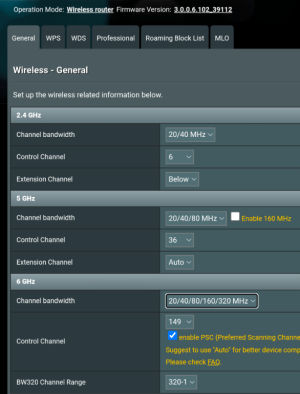
I had selected channels, which then seemed to turn off the DFS?

Restarting with these settings. Should I change anything.
 

Attachments

  • Screenshot_20251111-193223.png
    Screenshot_20251111-193223.png
    152.7 KB · Views: 45
I guess people that don't have a problem wouldn't be here trying to find answers right? Just wondering if this is generally a "bad" router? Wondering if I should send it back and replace it with the same? Roll the dice again... ????
 
I don't have this router and I don't fix my channels/bandwidth... I do have an answer for WiFi analyzer: Network Analyzer Pro by Jiri Techet.

EDIT- I don't suppose you remember the original firmware on it when you updated to the latest? If not I realized you did not mention performing a hard/factory reset after installing the latest firmware: You could simply factory reset the router and retest, or if you don't want to I suggest downgrading to 3.0.0.6.102_38984 then re-upgrading to 3.0.0.6.102_39112. (Doing two in a row seems to help similar to a factory reset)....
 
Last edited:
I don't have this router and I don't fix my channels/bandwidth... I do have an answer for WiFi analyzer: Network Analyzer Pro by Jiri Techet.

EDIT- I don't suppose you remember the original firmware on it when you updated to the latest? If not I realized you did not mention performing a hard/factory reset after installing the latest firmware: You could simply factory reset the router and retest, or if you don't want to I suggest downgrading to 3.0.0.6.102_38984 then re-upgrading to 3.0.0.6.102_39112. (Doing two in a row seems to help similar to a factory reset)....

I did not do a factory reset after the firmware update. Worth a shot!

Last night it randomly rebooted.
 
is it always NOT the best idea to use a CFG file to restore all your network settings after a hard factor reset?
 
is it always NOT the best idea to use a CFG file to restore all your network settings after a hard factor reset?
If you have done or been advised to do a hard factory reset, then it is for the express purpose of clearing the router of all settings, some of which may have been causing issues.

Importing back the CFG will simply replicate the settings that may have been causing those issues. Hence the recommendation to put all the settings back by hand.

Take screencaps of them prior to the hard reset, input the settings back based on the detail in the screenshots.

Write things like SSIDs and complex passwords in a text file and copy paste those back. Delete the text file afterwards if you’re concerned about security. If you use Merlin and have many Manual IP Assignments, try the YazDHCP Addon, great for reimporting them, without issues.
 
Thanks, jksmurf!

As I was re-setting up my router today, I turned on, again, MLO for client side. I do not use it for back haul as I do not have another access point. I have very few clients that could take advantage of MLO, and I don't necessarily need it at this time... What I am getting at is could MLO cause instability for the whole WiFi system?
 
Thanks, jksmurf!

As I was re-setting up my router today, I turned on, again, MLO for client side. I do not use it for back haul as I do not have another access point. I have very few clients that could take advantage of MLO, and I don't necessarily need it at this time... What I am getting at is could MLO cause instability for the whole WiFi system?
I don’t have a BE Wi-Fi 7 class router so don’t have first hand experience of MLO, hopefully others can help with commentary on that.

From the MLO related posts I’ve seen though, my general impression is that it seems to be more miss than hit; many have resorted to even disabling it, waiting for Asus to improve the FW.

In theory it should leverage all bands so if you have two or even three, you’d think it would use the best combination of them at whatever distance the client is from the router radios, but who knows, maybe it’s trying so hard to get the best combination it just flakes out and does none, or vacillates between them to the point it never gets a decent solid reliable connection at all…
 
Should I change anything.

My advice was to test with fixed channels and bandwidth in order to eliminate any ASD interaction or Auto selection. 2.4GHz @20 MHz (not 20/40MHz) and 5GHz @80MHz (not 20/40/80MHz). Your router, you're free to change whatever you want. 🤷‍♂️
 
My advice was to test with fixed channels and bandwidth in order to eliminate any ASD interaction or Auto selection. 2.4GHz @20 MHz (not 20/40MHz) and 5GHz @80MHz (not 20/40/80MHz). Your router, you're free to change whatever you want. 🤷‍♂️
You are correct, I did have variable bandwidths as I review the screen shot I shared... and then had a random reboot last night. But, I could not tell tail signs in the logs why it rebooted. I guess if my hard reset fails again, I can try setting the bandwidths.

For what it it is, (I feel like it is a higher end router) it seems like it should work without a lot of effort or tinkering... still wondering if I have a lemon...
 
WiFi Alliance is developing WiFi 8 with zero increase in throughput over WiFi 7. Does that mean WiFi 7 is inherently unstable? Coming up on 2 years with my GT-BE98 Pro and I need to check if the latest firmware is suffering from channel dropping when I get home as someone on ROG forums says that is happening to his...
 
Also have an RT-BE96U here and find it quite stable. I do manually set bandwidth and the control channel on all bands, though. Pretty simple configuration, as straightforward as I can make it. About 30 clients, some are IoT clients, which go on the IoT network (2.4GHz., WPA2, Wi-Fi 6). I also turn on MLO for my main network, which works great with my Wi-Fi 7 clients, and is compatible with most of my Wi-Fi 6 clients. The few Wi-Fi 6 clients that aren't compatible with MLO go onto the 5GHz. IoT network. No VPN's or VLAN's, just the usual vanilla router things. I do a factory reset after flashing new firmware if I run into problems, or if the release notes say to do that.

Just noticed that you have a refurbished model. Hopefully that isn't why you're having problems, but it could be...I haven't had many problems with refurbished electronics, but it does happen.

Anyways, I'm very happy with the router, sorry that you're having problems.
 
Last edited:

Support SNBForums w/ Amazon

If you'd like to support SNBForums, just use this link and buy anything on Amazon. Thanks!

Sign Up For SNBForums Daily Digest

Get an update of what's new every day delivered to your mailbox. Sign up here!
Back
Top