Not sure what cheap ISP router means, but I see lately residential gateways more capable than some of the recommended models for own router and since they are totally locked down - more secure as well. Exposing hundreds of settings most consumer users don't need or understand and offering access from Internet in between is not necessarily a good thing. If the OP had the ISP gateway - a call to the ISP answers the question and saves this entire discussion. The friend with cheap ISP router and everything working on it is happy.
You take a snip of a sentence that I type
lowly spec'd ISP provided router
It loads so slowly, sigh...
OP seemed frustrated at first (cheap ISP router of the friend), but maybe has calmed down as we're all sitting here challenged....
At least with AT&T it seems I have to set an E911 address in order to enable it. Wonder if the OP has to do that....I think at this point - OP needs to reset his router to factory defaults, and test from there...
FWIW - WiFi calling is not going to work if the VoWiFI application cannot register with the carrier's IMS gateways - some of this might be technical, other might be policy...
Since WiFi calling is all UDP based, it does make things a challenge with collecting trace files, e.g. bits on the wire that are logged...
Do iPhones have a WiFi calling symbol?
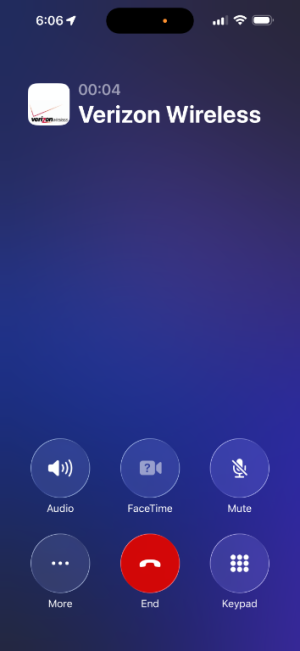
I asked because I didn't see any new icons / symbols regarding this topic on my phone over the ones that are usually there and I'm familiar with. I'll look at the link to see if I've missed anything. Since I can't see the icons in detail without zooming in, I could have missed something. See screenshot below. I checked and wifi calling is enabled, and prefer is also enabled. However, based on the link from Apple, I don't see the other icon it says i'm supposed to see. The only Wifi icon is the one for the typical wifi connection.Seems like Google is not working on your phone either...
Learn the meaning of iPhone status icons
Learn the meaning of iPhone status icons in the status bar at the top of the screen.support.apple.com
![]()
However, based on the link from Apple, I don't see the other icon it says i'm supposed to see.
I think you got me confused with someone else. I wasn't doing this from a friend's place. This was in my own apartment.@iFrogMac - When you were over at your friends, did your iPhone display "Wi-Fi" on the status bar ? Not the usual curly strength symbol for wifi, but in addition "Wi-Fi" ?
Thanks, I don't think mine is working based on your picture. Also, my cell signal is typically not bad, but it jumps and that's why I was trying to get this to work, and why I thought it was working until I read this thread. I'll consult Verizon support s well as other resources to see if I can get it to work just to help balance quality of signal. Also since 611 is internal to the Verizon network, I wonder if it's not the best test, and I need to call a number outside the network.Here's how it shows on my Iphone. It also shows it on the lock screen.
View attachment 70076
We use essential cookies to make this site work, and optional cookies to enhance your experience.