kda
Occasional Visitor
beautifull this report, i liked this, some problems to install, the first time nodes off line, searching problem dropbear, one node with merlin other stock firmware The router with stock firmware worked with dropbear, the other don'tWireless Report for AiMesh
available in AMTM
Manual Github install link:
Code:curl -sfL --retry 3 https://raw.githubusercontent.com/JB1366/Wireless_Report/main/wirelessreport.sh -o /tmp/wirelessreport.sh && sh /tmp/wirelessreport.sh install
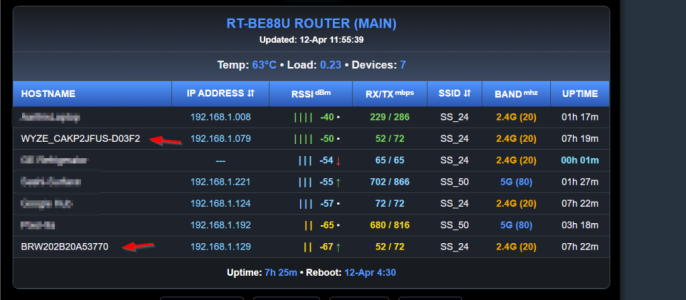
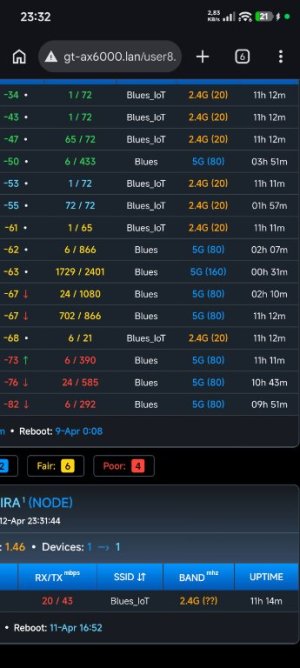
WHAT: Wireless Report gives you an overall snapshot of your wireless network in a sortable/graphical table. The report script installs a tab at the end of the wireless-menu, where you can click headers for sorting/viewing data. a couple of columns are dual viewing, (mac address/ip address) & (SSID/IFACE)
WHY: the reason why I created the script was because ASUS web UI doesn't show AiMesh node information, such as rssi, the main reason I started this, plus its nice to see all wireless devices in one spot. Asus firmware takes way to long to to adjust devices to correct router/node, with the report, I can manually adjust devices easier & faster.
PREREQUISITE: you need to install passwordless SSH to nodes, if one node is detected, script will install, link below:
ASUS-Merlin Router to AIMesh Nodes - SSH Key Setup: Password(#19)-Passwordless(#16) or use Curl(#30)
NON-PREREQUISITE: but helps with pretty looking HOSTNAMES
YazDHCP - YazDHCP v1.2.5 [2026-Mar-22] - Feature expansion of DHCP assignments (increasing limit on the number of DHCP reservations)
View attachment 71160
View attachment 71161
any questions, please feel free to reach out.
Oke then back to stock firmware, hm doesn't work to get this router back to stock firmware of asus, but suddenly i looked on wireless report all nodes online.
It works and i'm very happy about this program.
Dropbears works too
RT-AX88U, RT-AX58U (merlin), RP-AX58 (asus firmware)