What's new

[ 3006.102.8 alpha Build(s) ] available build(s)

Hi there
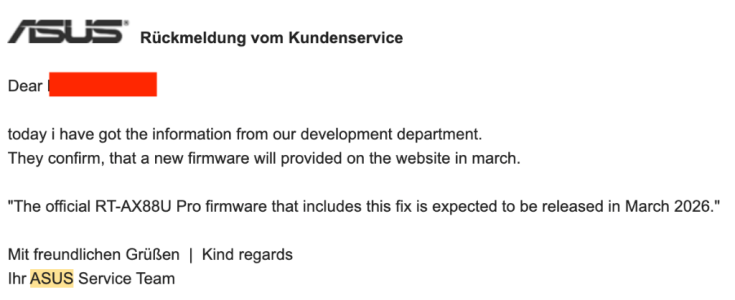
Any chance we can include the new GPL's, esp. for the RT-AX88U Pro. I was working with Asus for about 5 months on this update because there is a serious flaw in the way DHCP leases were being issued when Guest Network Pro is active. This causes a lot of devices to disconnect as soon as Guest Network Pro is active and they do not reconnect until it is switched off. This is especially true for Sonos devices, devices such as Fitbit scales, Lifx bulbs and more IOT devices.


Attachments

  • Screenshot 2026-04-09 at 09.56.32.png
    Screenshot 2026-04-09 at 09.56.32.png
    18.9 KB · Views: 34
  • Screenshot 2026-04-09 at 09.56.07.png
    Screenshot 2026-04-09 at 09.56.07.png
    89.1 KB · Views: 34
Any chance we can include the new GPL's, esp. for the RT-AX88U Pro.
From post #6 earlier in the discussion:

RMerlin's response on GPL expectation in the 3006.102.7 release thread.
There are no GPL changes in 3006.102.7 beside the GT-BE19000AI (because my previous release was based on much earlier code for that model) and the RT-BE92U in 102.7_2 (because of the stability issues in the previous GPL for that model). I won't be getting updated GPLs until late April or early May.
 
Hi there
Any chance we can include the new GPL's, esp. for the RT-AX88U Pro. I was working with Asus for about 5 months on this update because there is a serious flaw in the way DHCP leases were being issued when Guest Network Pro is active. This causes a lot of devices to disconnect as soon as Guest Network Pro is active and they do not reconnect until it is switched off. This is especially true for Sonos devices, devices such as Fitbit scales, Lifx bulbs and more IOT devices.

Since you have been working with ASUS on this matter. why dont you ask them about it? As usual, this has been touched on a few times and merlin has been explaining himself that he also need to wait for the GPL from ASUS as well.
 
Some experiences with GT-BE19000AI.
Checking the page caching, it has disappeared in some places. Where I looked before, when turning SSH on/off, the good setting appears after apply now. However, for example, in Settings->LAN->DHCP Server, if I change the client name in the "Client Name (MAC Address)" field in the pop-up window, after "apply" it shows the modified name. But after "apply" at the bottom of the page, the old name appears again until I manually refresh the page.Sometimes you have to press the buttons twice (apply, cancel,...), because it does nothing at first. There is a delay in entering data, (passwords, other input fields,...) You have to check again, because characters are randomly missing.

I tried OpenVPN in several configurations, only LAN access worked, there was no internet through it, even though "Client will use VPN to access" was set to "both". A small typo, in the generated .ovpn file the Asuswrt-Merlin and OpenVPN version numbers are swapped: # Config generated by Asuswrt-Merlin 2.5.0, requires OpenVPN 102.8 or newer.

I created a VPN client configuration (NordVPN/OpenVPN). I set the "Redirect Internet traffic through tunnel" to "VPN director / Guest network". I assigned it to a created Guest network, but it did not use it. If I added the client to the VPN director, it did. In both cases, the own provider's ipv6 was leaked, not only ipv4 was used (which was correctly the vpn provider's ip). It works fine using the NordVPN desktop app or the browser plugin, with those only having an IPv4 connection.

It seems that the enabled Ai protection does not work. "Malicious sites and infected device blocking" shows 0 results, but there were results with the factory fw, and there is a page that it did not load with, but now it does.

The wifi insight on the dashboard does not work, although it is good in the newer factory one, with a newer gpl. Hopefully they will make it available soon and manage to merge the code.
 
Since you have been working with ASUS on this matter. why dont you ask them about it? As usual, this has been touched on a few times and merlin has been explaining himself that he also need to wait for the GPL from ASUS as well.
He's just saying the fix he's been working with Asus on has been released in the official firmware in March update releases, so he's just looking for this to be implemented in the next Merlin release too.
 
You could do that. After decrypting it, write the decrypted key through the webui in the "Server Key" field. The PEM header should NOT mention "encrypted".
I manage to decrypt server.key and seems to working now
Q: when first time start server is all key generated automatic?
and what happens if there is already keyset after updating software?

-----BEGIN RSA PRIVATE KEY-----
Proc-Type: 4,ENCRYPTED
DEK-Info: AES-256-CBC,ABABABABABABABABABABABABABABABABA
<server.key>
-----END RSA PRIVATE KEY-----

-----BEGIN RSA PRIVATE KEY-----
<server.key>
-----END RSA PRIVATE KEY-----
 
when first time start server is all key generated automatic?
Key/certs that are required will be. The static key will only be generated if :

1) You enable a mode that requires one (tls-auth/tls-crypt/tls-crypt-v2
2) There isn't already an existing static key of the correct type

Key/certs are generated at server start. That's why the server must already be up and running in tls-crypt v2 mode before you can generate client keys from the webui.
 
In the "Settings->LAN->DHCP server" section, the previously entered names suddenly disappeared from the "Host Name (Optional)" field. It has happened twice already. The names entered in the "Client Name (MAC Address)" field remained.
I noticed that a device (which is an internet radio) is not able to connect via DHCP. The connection is established, but it does not receive an IP address, even though it is fixed on the router. If I manually configure the connection on the radio, enter the same IP that is fixed on the router, then everything works fine. I also noticed this with the previous FW. Then I tested it with the factory FW, and auto DHCP worked with it. It is interesting, because only this one device behaves like this.
 
In the "Settings->LAN->DHCP server" section, the previously entered names suddenly disappeared from the "Host Name (Optional)" field. It has happened twice already. The names entered in the "Client Name (MAC Address)" field remained.
I noticed that a device (which is an internet radio) is not able to connect via DHCP. The connection is established, but it does not receive an IP address, even though it is fixed on the router. If I manually configure the connection on the radio, enter the same IP that is fixed on the router, then everything works fine. I also noticed this with the previous FW. Then I tested it with the factory FW, and auto DHCP worked with it. It is interesting, because only this one device behaves like this.
Try entering the Host Name (IP etc.) via Network Map..
 
Try entering the Host Name (IP etc.) via Network Map..
The GT-BE19000AI does not have the usual network map. There is a separate "clients". You can rename the client name there too, but it modifies the "Client Name (MAC Address)" field. It does not disappear after a while. By the way, there is no problem with the input in the "Host Name (Optional)" field either, it remains after apply, but after a while the names simply disappeared.
 
Thank you.
 
I jumped on the alpha bandwagon this time. Just installed alpha1 on my GT-AX6000 main/AP combo. Nothing unusual upon initial use. Site-to-site OVPN working fine with ASUS routers other end. Removed the fast-io directives since they are now ignored.
 
Hi there
Any chance we can include the new GPL's, esp. for the RT-AX88U Pro. I was working with Asus for about 5 months on this update because there is a serious flaw in the way DHCP leases were being issued when Guest Network Pro is active. This causes a lot of devices to disconnect as soon as Guest Network Pro is active and they do not reconnect until it is switched off. This is especially true for Sonos devices, devices such as Fitbit scales, Lifx bulbs and more IOT devices.

And also the BE98Pro- the new release from Asus finally fixes a lot of bugs !
 
And also the BE98Pro- the new release from Asus finally fixes a lot of bugs !
Sorry in advance, not to be offensive or anything but I just had to react.

After having a Regular Contributor ask the quoted and being answered for the N-th time again the same thing, and and now even a Very Senior Member to ask about new GPLs... 😅
Isn't it clear for ages now that first official FW and GPL in it is not the same thing, second RMerlin often receives GPL that can be newer than one in ASUS FW and with specific patches/fixes in it in plus of Merlin adding and changing it himself to often go ahead off Official releases etc.
And also Merlin himself explaining a thousand times how and when he gets GPLs.

I mean but really, how many more time the same nonsensical and fundamentally wrong question is to be asked...?
 
And also the BE98Pro- the new release from Asus finally fixes a lot of bugs !
This has already been addressed up discussion in post #22. RMerlin already indicated when they're expecting the next round of GPL's from Asus, end of this month or sometime next month. Moreover there are a number of past posts (here, and here, and here, and here, and here) where RMerlin explains how they get the GPL's from Asus, the requirements needed for those GPL's, and why those GPL's may not match what ever Asus themselves publicly publish (GPL or firmware).

Anyway back on topic, the discussion about 3006.102.8 alpha build(s) and any issues with it.
 
This has already been addressed up discussion in post #22. RMerlin already indicated when they're expecting the next round of GPL's from Asus, end of this month or sometime next month. Moreover there are a number of past posts (here, and here, and here, and here, and here) where RMerlin explains how they get the GPL's from Asus, the requirements needed for those GPL's, and why those GPL's may not match what ever Asus themselves publicly publish (GPL or firmware).

Anyway back on topic, the discussion about 3006.102.8 alpha build(s) and any issues with it.
Right but this issue is the firmware is so unstable as it currently is with the current GPL at least with multiple BE98Pros in an Aimesh environment - This GPL seems to have fixed a lot of these problems:
  • Devices will suddenly stop having internet access even though they’re still showing as connected to the SSID.
  • Random disconnects with “connected but no internet.” - randomly losing all internet access from all devices (wifi and LAN)
  • Noticeable packet loss.
  • Frequent stalls where internet just stops working momentarily, as if the router is choking on throughput.
When you spend like 2000 dollars on multiple of these BE98Pros - I have 6 total - 4 in my house and two in my partners house, and if you look on the forum my post on this was all the way back in September 2025: MY Post - My frustration isn't with @RMerlin but with the fact for months I haven't been able to use this equipment reliably thats why I'm kinda growing inpatient ! I also have had better success with my GT-AX11000 Pro's and my very old XT8's then this 699.99 router... Now there might be a better GPL and I gotta still wait till end of month or even next month. I wish I could just use the stock firmware but because I use the script VPNRouting it isn't feasible to do that. Plus I have always loved the features that you can do with @RMerlin firmware.
 

Similar threads

Latest threads

Support SNBForums w/ Amazon

If you'd like to support SNBForums, just use this link and buy anything on Amazon. Thanks!

Sign Up For SNBForums Daily Digest

Get an update of what's new every day delivered to your mailbox. Sign up here!
Back
Top