What's new

ASUS AX88U causes problems for others using internet if one device continuously do a 100G file txr

May I ask anyone can recommend a better Router known for ease of use, high performance with best SQM available to handle the bufferbloat?
 
Here's a crazy suggestion, that will probably get laughed at here. Maybe try a VPN service and use VPN Director for that one user to use it exclusively. This could solve the isp throttle problem (they won't know what the data is, so no special rules) and it becomes the VPN provider's problem to limit the bandwidth of the user, not yours. Win-win?
 
Thank you Rung but I am afraid I dont know how to setup such. Do you have a reference page or discussion topic which I can refer to?
Also, FlexQOS is behaving like CAKE. If you use FlexQOS, it cut your internet speed by 50%.
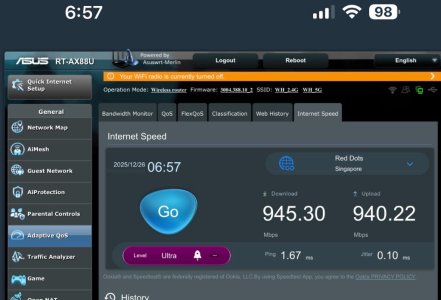
This is speedtest by using ASUS build-in test when FlexQOS is disabled and enabled
The download speed almost HALF of it.

Then, I go to https://bufferbloat.libreqos.com/ to do the test where ASUS FlexQOS is enabled vs disabled. The result is same. GradeC

Question: Can we confirm FlexQOS will also downgrade the internet speed by HALF for download but not the upload ?

Best Regards,
WH
 

Attachments

  • IMG_5371.jpeg
    IMG_5371.jpeg
    84.1 KB · Views: 21
  • IMG_5372.jpeg
    IMG_5372.jpeg
    80.7 KB · Views: 20
It's just a crazy idea and was hoping for someone to shoot it down. I wouldn't recommend subscribing to a VPN service like NordVPN just to try it out. You can search VPN client discussions on this board to learn more. Usual protocols are either OpenVPN or Wireguard, depending which the provider supports.
 
Ok noted. Temporary, I am removing this ASUS AX88U Router and replace with TPLink to try. At least when doing the bufferbloat test using TPLink router, it gives me a C grade. Using ASUS... it is giving me a D or F grade :(
 
FlexQOS is behaving like CAKE. If you use FlexQOS, it cut your internet speed by 50%.
This is speedtest by using ASUS build-in test when FlexQOS is disabled and enabled
The download speed almost HALF of it.
Download shaping is only active on the br0 LAN interface, so a speedtest run on the router only goes through the wan interface, so there isn’t a way for Adaptive QoS or FlexQoS to limit download when running the router’s speedtest.

The most likely explanation would be that the router CPU was overloaded during the test, but I wouldn’t expect the upload to hit full speed if that were true.
May I ask anyone can recommend a better Router known for ease of use, high performance with best SQM available to handle the bufferbloat?
I really like the GL.inet MT6000 Flint 2 running regular OpenWrt 24.10 firmware with the original sqm-scripts package.
 
I am using AX88U, Adaptive QoS. It cannot solve bufferbloat issue. Bufferbloat will come in when there is one user doing a big download. If you download 100M filesize, it dont cause problem. Problem come when it is 100G file. It will cause VoIP, Gaming, Whatsapp come to a standstill ... Basically halt everyone.
When Adaptive QoS (flexQoS) used, I've compared the speed. NAT acceleration isnt off but the speed CUT into half. I do not know why. I've tried a few time and it exhibit the same. When testing speed, huge download of files are not happening.

It is my conclusion that ASUS only strength is Wifi strength is better.
For Router... I think we have to look for other sources that can support openwrt... (Havent tested but it seems openwrt been getting good feedback about QoS). If anyone here know which router is best for bufferbloat , please let me know. Need RJ45 to support 2.5G or higher if I am looking for a change. Thank you guys very much
 
Need RJ45 to support 2.5G or higher if I am looking for a change.

Nothing on the consumer market will do proper SQM for 2.5GbE speeds.
 
Hi @Tech9, The AX86U PRO has the 2.5Gbps ethernet. My Optical modem from Telco/ISP is 10G. My subscribed plan is 3Gbps.
Are you saying if I use the AX86U PRO, it will still the same ? All the feedback and testing in this thread been using AX88U (WAN is 1Gbps only) connecting to a 10G optical modem.

Would MikroTik Cloud Router be able to handle proper SQM ?
 
Read post #26 again and make sure your ISP is not throttling you before you invest in hardware. What most ISP call "Unlimited" plan may not actually be unlimited. Good luck!
 
Thank you @Tech9 but I’ve done the bufferbloat test and it show poor grade. Which website can we use to test that isolate isp ?
 
I’ve done the bufferbloat test

The common website most people use for bufferbloat testing has to be declared as malicious. A lot of people have wasted time and money on new equipment for no reason. You have to call your ISP first before anything else. Explain them that your problem is and see what they are going to say. Don't be surprised if they offer you more expensive Business account for your needs.
 
I summarize what I've found. Brothers, please see anything wrong, correct me.

1. I started with AX88U. WAN=1Gbps, all ports are 1Gbps each.
2. Merlin QOS only shape traffic at the WAN side. ISP dont care about priority tag. QoS only let the router to decide who to send out to the WAN first.
3. If I have a device that do a huge download that consume 1Gbps on the LAN1 , my devices LAN2 (actually my LAN2 is a wireless AP. So many devices connect to it) will have problem. Almost stall.
4. Merlin QoS disabled, internet speed test is around 800Mbps. When QoS enabled with flexQOS, internet speed drop to 500mbps. This does not solve the problem since Merlin QOS shape traffic at the WAN side. Nothing to do on the LAN. Bufferbloat will still happen since WAN speed <= total LAN speed. Here WAN=1Gbps and LAN1=1Gbps and LAN2=1Gbps
It is weird that when I limit the the http (web surf) to 80% (which the device in LAN1) of the download speed, I still see it uses almost the full 100% (at that time when flexQOS was enabled, the internet speed test is around 500mbps). I have to put it to 50% before it limit it at 300mbps or so). It still not solve issue. It just less happening.
5. Now I upgrade my ISP speed from 1Gbps to 3Gbps. I change the AX88U to AX11000 which has the 2.5Gbps WAN. Now WAN bandwidth >= total LAN speed which is MAX at 2Gbps. So, this bufferbloat due to router should never happen even without QoS enabled. If bufferbloat still happen, it is likely ISP which bro @Tech9 said.
6. For (5), I have not aggressively tested it yet. When no QoS enabled, "internet speed" in the QoS section of the AX11000 GUI, I get around 2Gbps for both upload and download. If QoS is enabled (adaptive QoS using FlexQoS), the internet speed drop drastically back to 500Mbps. So I decided not to use any QoS especially FlexQoS.
7. Now, I am going to disable QoS and let it run for few days to see any problem again. In my understanding, if I only have LAN1 and LAN2 connected which is total 2Gbps at worst case but my WAN is 2.5Gbps... no way the router will get bufferbloat. I google to find out that if LAN1 do huge download, it has no way to affect LAN2 since they are on different physical interface.
Devices connected to LAN2 (my LAN2 is connected to wireless AP) will not have bufferbloat issue due to congestion at LAN1 and since WAN speed >= total of LAN1+LAN2, no way its due to router problem. If this setup still have problem, it is likely point to ISP. @Tech9 , do you agreed with my analysis ?

Thank you guys for the help.

P/S: Some people said when in multi Gbps, no need QoS. I think now I understand ... When WAN bandwidht >= total LAN bandwidth, there is no way for bufferbloat to happen at the router. If QoS is still enabled in this case, it only help those gaming with better latency but with or without QoS, it should never have stall other devices.
When WAN bandwidth >= total LAN bandwidth, I decided to turn off QoS for testing first. For AX11000 with the latest merlin firmware, enabling will cause internet speed drop to 500mbps... so no way to use flexQoS. I think it will only make things worst. Maybe flexQoS only beneficial for slower WAN speed.

P/S: I also feedback this to ISP and still waiting for them to reply to confirm if they throttle it instead of my router problem.
 
Last edited:
@Tech9 , do you agreed with my analysis ?

No, because you've said the same issue happens even if you cap the large download speed to 100Mbps, it's intermittent and only happens after some time. I asked you twice to verify with your ISP if ~6TB monthly traffic is something they allow on their residential plans, you never did.

Your last post introduces hardware changes. Router from RT-AX88U to GT-AX11000 plus unknown wireless AP. No information whatsoever how you test bufferbloat and your understanding of what QoS actually does is a bit blurred. Test with your current setup for some time and see what happens.
 
No matter what your link rate speeds are on the ports/cables, the cpu/firmware still has to be able to keep up with the LAN ==> WAN and WAN ==> LAN packet rate for both streams. There will always be buffering between the CPU and the Switch chip to the LAN ports.
 
No, because you've said the same issue happens even if you cap the large download speed to 100Mbps, it's intermittent and only happens after some time. I asked you twice to verify with your ISP if ~6TB monthly traffic is something they allow on their residential plans, you never did.

Your last post introduces hardware changes. Router from RT-AX88U to GT-AX11000 plus unknown wireless AP. No information whatsoever how you test bufferbloat and your understanding of what QoS actually does is a bit blurred. Test with your current setup for some time and see what happens.
Thank you @Tech9. Infact I already raised this to ISP. They havent get back to me yet. I've updated my message above to make it more clear. Thank you guys for the help.
The reason I introduce new hardware is because my ISP said that they provide customer with a default router and if I'm not using that default router, it could point to my router issue. At that time, I decided to plug in their default router (TPLink with 2.5Gbps WAN to the ONR =Optical Network Router). When I plug in, I dont experience any other problem for about 1wk+. I then decided to use my existing one (AX11000 which I already have that I used it as a AIMESH node) to try... I am still monitoring this...
 
Last edited:
No matter what your link rate speeds are on the ports/cables, the cpu/firmware still has to be able to keep up with the LAN ==> WAN and WAN ==> LAN packet rate for both streams. There will always be buffering between the CPU and the Switch chip to the LAN ports.
@degrub, may I understand for AX11000 where the WAN is 2.5G, by using the internet speed testing, I can get 2Gbps both download/upload. However, if I turn on FlexQoS, the internet speed testing drop down again to 500mbps or so. This is the case for AX88U where the WAN is 1G too. Are you saying the AX88U and AX11000 CPU is not powerful enough to handle such multi-git interface ? I apologize if I didnt get the meaning.
 
Are you saying the AX88U and AX11000 CPU is not powerful enough

Both routers have 1:1 hardware as CPU/RAM, the difference is in port controllers and number of radios. Both depend heavily on NAT acceleration for throughput above 300-350Mbps WAN-LAN. Anything affecting NAT acceleration will impact the performance. The built-in speed test is CPU limited and may not be accurate. Both routers run very similar 3004 firmware and if there is an issue it most likely affects both.

When I plug in, I dont experience any other problem for about 1wk+

If this is the case run for some time the ISP provider Gateway with Wi-Fi disabled and your ASUS routers in AP Mode and observe the behavior. In case you don't have Ethernet wires to each ASUS router AiMesh also has AP Mode configuration option including wireless.
 
Last edited:

Latest threads

Support SNBForums w/ Amazon

If you'd like to support SNBForums, just use this link and buy anything on Amazon. Thanks!

Sign Up For SNBForums Daily Digest

Get an update of what's new every day delivered to your mailbox. Sign up here!
Back
Top