
What's new
  • SNBForums Code of Conduct

    SNBForums is a community for everyone, no matter what their level of experience.

    Please be tolerant and patient of others, especially newcomers. We are all here to share and learn!

    The rules are simple: Be patient, be nice, be helpful or be gone!

Release Asuswrt-Merlin 3006.102.6 is now available

ChatGPT - first error.
If you truly meant the Reset button, it isn't reset to factory but only reset config (partial at that) - only WPS button reset is a true reset (as via GUI with the checkbox ticked to clear all).

So I would Reset that properly again before any next step...
ChatGPT, you're right. I know this isn't the best way to solve problems 😁.
The problem with writing to the USB happened even before I discovered that the GUI wasn't working. I always connected via Tailnet and used SSH to check if the scripts were up to date and possibly do an update.
Since I'm not advanced, I didn't know how to fix the script update problem myself, so I asked an AI, and with just one command it managed to make the drive writable again. The script update went fine. It was only yesterday that I discovered the GUI wasn't working and started dealing with it.
I put a new USB into the router and by holding the reset button I assumed everything got wiped. I set up the router from scratch.
Okay, so you're recommending a reset using the WPS button. Then set up the router again and finally go into AMTM – format the USB and then install everything else?
 
ChatGPT, you're right. I know this isn't the best way to solve problems 😁.
The problem with writing to the USB happened even before I discovered that the GUI wasn't working. I always connected via Tailnet and used SSH to check if the scripts were up to date and possibly do an update.
Since I'm not advanced, I didn't know how to fix the script update problem myself, so I asked an AI, and with just one command it managed to make the drive writable again. The script update went fine. It was only yesterday that I discovered the GUI wasn't working and started dealing with it.
I put a new USB into the router and by holding the reset button I assumed everything got wiped. I set up the router from scratch.
Okay, so you're recommending a reset using the WPS button. Then set up the router again and finally go into AMTM – format the USB and then install everything else?
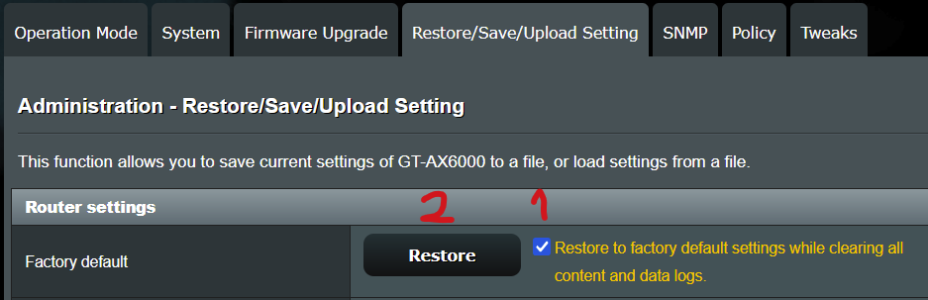
Yes, as first step reset properly. If you now have GUI aces do it from there.

After if still issue, use as recommended an external SSD in enclosure with adequate cable length.
 

Attachments

  • 1764770521543.png
    1764770521543.png
    36.8 KB · Views: 16

Latest threads

Support SNBForums w/ Amazon

If you'd like to support SNBForums, just use this link and buy anything on Amazon. Thanks!

Sign Up For SNBForums Daily Digest

Get an update of what's new every day delivered to your mailbox. Sign up here!
Back
Top