
What's new
  • SNBForums Code of Conduct

    SNBForums is a community for everyone, no matter what their level of experience.

    Please be tolerant and patient of others, especially newcomers. We are all here to share and learn!

    The rules are simple: Be patient, be nice, be helpful or be gone!

Release Asuswrt-Merlin 3006.102.6 is now available

ChatGPT - first error.
If you truly meant the Reset button, it isn't reset to factory but only reset config (partial at that) - only WPS button reset is a true reset (as via GUI with the checkbox ticked to clear all).

So I would Reset that properly again before any next step...
ChatGPT, you're right. I know this isn't the best way to solve problems 😁.
The problem with writing to the USB happened even before I discovered that the GUI wasn't working. I always connected via Tailnet and used SSH to check if the scripts were up to date and possibly do an update.
Since I'm not advanced, I didn't know how to fix the script update problem myself, so I asked an AI, and with just one command it managed to make the drive writable again. The script update went fine. It was only yesterday that I discovered the GUI wasn't working and started dealing with it.
I put a new USB into the router and by holding the reset button I assumed everything got wiped. I set up the router from scratch.
Okay, so you're recommending a reset using the WPS button. Then set up the router again and finally go into AMTM – format the USB and then install everything else?
 
ChatGPT, you're right. I know this isn't the best way to solve problems 😁.
The problem with writing to the USB happened even before I discovered that the GUI wasn't working. I always connected via Tailnet and used SSH to check if the scripts were up to date and possibly do an update.
Since I'm not advanced, I didn't know how to fix the script update problem myself, so I asked an AI, and with just one command it managed to make the drive writable again. The script update went fine. It was only yesterday that I discovered the GUI wasn't working and started dealing with it.
I put a new USB into the router and by holding the reset button I assumed everything got wiped. I set up the router from scratch.
Okay, so you're recommending a reset using the WPS button. Then set up the router again and finally go into AMTM – format the USB and then install everything else?
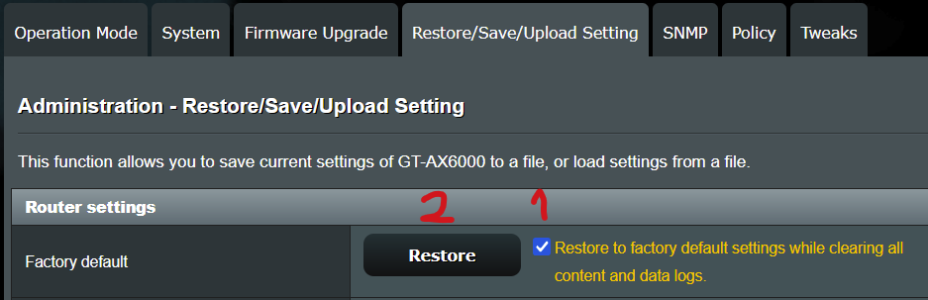
Yes, as first step reset properly. If you now have GUI access do it from there.

After if still issue, use as recommended an external SSD in enclosure with adequate cable length.
 

Attachments

  • 1764770521543.png
    1764770521543.png
    36.8 KB · Views: 81
Last edited:
Does anyone else consistently get weird issues with the GUI? On this version and the previous, i've had pages load where it looks like it was from a previous firmware, have to refresh the page a couple times for the real one to appear. This one takes the cake though, what is this? RT-AX86U Pro


View attachment 69321
Clear your browsers cache. Close browser. Re launch and it should be fixed

CC
 
First of all, big thanks to Merlin for all of his work :)

So, running the latest since it came out, here's my findings:

WAN takes longer to connect, complains about ISP DHCP. I've been busy debugging other things so not looked at the logs yet.
Happens every reboot.
---
Clients list, some devices are completely missing, after a reboot, they may (or may not) appear, but there's been missing ones every time.

The devices are online, can be accessed by their regular IP. Bit weird. I didn't notice until today when I added new stuff and wanted to give them a recognisable name. They're not vlan or guest, in some cases just regular wired devices (though the ones I've seen (or not lol) have been on the other side of the mesh... Could be an Asus issue...
---
Also today, suddenly multiple sites weren't available - 404, a reboot remedied this.

Could be related to skynet or division, or perhaps imesh. Again it's something I need to explore when I finish my seemingly endless work.
----
Just posting this here in case I'm not the only one (or maybe I am :p).

Anyone else?

Add: BE88U with USB SSD as main, and an AX88U as a mesh node via wired backhaul. Both running Merlin. Currently only 35 devices (that are showing in the client list:/)
 
Last edited:
@northumberland:
Please add a signature so we can see on what model and setup you refer.
 
A +1 to the rcu issue on BE92U. I've had it from the very start. I think I had a thread about it initially. It got progressively better and yes, 102.5 was pretty good but 102.6 definitely seems to have messed things up some more too. I also have a script for the date. At times the date goes haywire but it didn't reboot and then all hell broke loose (certificates were no longer valid ...)

I've also tried clean reboot, etc. It's totally random. SOmetimes it works fine for a day or two but sometimes it reboots twice in under 15 minutes. It's quite annoying. I also don't think this is a merlin thing but more an asus thing. Has anyone had success reporting it to them?
 
I am getting a lot of lost wifi connections from some devices and these corresponding errors in the log. Any ideas why? In this case a Samsung A56 5G. I have replaced the macaddress with XX
Code:
Dec  5 15:30:47 wlceventd: wlceventd_proc_event(645): wl1.1: Deauth_ind XX:XX:XX:XX:XX, status: 0, reason: Previous authentication no longer valid (2), rssi:-70
Dec  5 15:30:47 hostapd: wl1.1: STA XX:XX:XX:XX:XX IEEE 802.11: disassociated
 
ChatGPT - first error.
If you truly meant the Reset button, it isn't reset to factory but only reset config (partial at that) - only WPS button reset is a true reset (as via GUI with the checkbox ticked to clear all).

So I would Reset that properly again before any next step...
sorry, but i'm still stuck on a button-push reset not being a full reset as that's certainly new news to me!
  1. with the "chatgpt" reference, was that the source? and
  2. can we trust the sw reset "Restore" function on the "Administration -> Restore/Save/Upload Setting" page to do a full reset on the device?
i just need to know what to use here. btw, while they can be quite informative, the ai bots (chatgpt5, copilot, gemini) are notoriously error prone with tech info among other.
 
Hey all, I'm probably outdated here, I have a question: RT-AX86U, my previous version was 3004 and after installing the latest update, it still shows as 3004.388.10_2, not 3006?

1764961173298.png
 
sorry, but i'm still stuck on a button-push reset not being a full reset as that's certainly new news to me!
There are several types of resets.
[Wireless Router] How to reset the router to factory default setting?
[Wireless Router] When Standard Reset Isn’t Working: Hard Factory Reset - Models list

When using the router GUI to perform a factory default reset, there are two methods. A factory default restore and a factory default restore with initialization.

The WPS hard factory reset or the factory default restore with initialization will reset to factory default and also clear all the data log for AiProtection, Traffic Analyzer, and Web History.
 
sorry, but i'm still stuck on a button-push reset not being a full reset as that's certainly new news to me!
  1. with the "chatgpt" reference, was that the source? and
  2. can we trust the sw reset "Restore" function on the "Administration -> Restore/Save/Upload Setting" page to do a full reset on the device?
i just need to know what to use here. btw, while they can be quite informative, the ai bots (chatgpt5, copilot, gemini) are notoriously error prone with tech info among other.
No news, old stuff...
No, AI is NEVER a reference for me for anything - god forbid I am that dumb or gullible! 😅 (Hope the AI bubble bursts soon same as mining and other stupidities...)
People here on the forum and on other places are source to me, and even then not everyone's opinions; just the smart and knowledgeable ones when recognized (not hard when you read and pay attention) - as true knowledge is never easy, quick or simple.

Yes you can trust it via GUI being the same as by button (WPS one) + what bennor said.
 
Last edited:
A +1 to the rcu issue on BE92U. I've had it from the very start. I think I had a thread about it initially. It got progressively better and yes, 102.5 was pretty good but 102.6 definitely seems to have messed things up some more too. I also have a script for the date. At times the date goes haywire but it didn't reboot and then all hell broke loose (certificates were no longer valid ...)

I've also tried clean reboot, etc. It's totally random. SOmetimes it works fine for a day or two but sometimes it reboots twice in under 15 minutes. It's quite annoying. I also don't think this is a merlin thing but more an asus thing. Has anyone had success reporting it to them?
I haven't reported it to Asus as I haven't been able to come up with a reproducible setup, I did create a thread that covers some of my troubleshooting steps. If you want to compare router setup and reboot script, feel free to direct message me.
 

Latest threads

Support SNBForums w/ Amazon

If you'd like to support SNBForums, just use this link and buy anything on Amazon. Thanks!

Sign Up For SNBForums Daily Digest

Get an update of what's new every day delivered to your mailbox. Sign up here!
Back
Top