What's new

Beta Asuswrt-Merlin 3006.102.7 Beta is now available

Status
Not open for further replies.
I had a few issues with the GT-BE19000AI version with this beta. Around 36 to 48 hours after flashing this beta, I lost the wired connections to my Synology NAS and Raspberry Pi. They both showed connected on the GUI dashboard, but they both had to be rebooted to restore their internet connections. Roughly 24 hours later, the Adguard Home instance running on the AI Board quit working. AdGuard Home container showed running normally in Portainer, but I could not connect to the internet through Adguard Home. I rebooted the AI Board and it started working again. There have been several stock firmware revisions released over the last few months for this router, so it could just be an issue with this particular GPL. I have loaded stock firmware version 3.0.0.6.102_40425 to see if I have similar issues before my return window closes.

 
I had a few issues with the GT-BE19000AI version with this beta. Around 36 to 48 hours after flashing this beta, I lost the wired connections to my Synology NAS and Raspberry Pi. They both showed connected on the GUI dashboard, but they both had to be rebooted to restore their internet connections. Roughly 24 hours later, the Adguard Home instance running on the AI Board quit working. AdGuard Home container showed running normally in Portainer, but I could not connect to the internet through Adguard Home. I rebooted the AI Board and it started working again. There have been several stock firmware revisions released over the last few months for this router, so it could just be an issue with this particular GPL. I have loaded stock firmware version 3.0.0.6.102_40425 to see if I have similar issues before my return window closes.

did you take any special steps to ensure your adguardhome container instance was able to communicate between your local networks? I know asuswrt merlin by default doesn't come preconfigured to ensure your firewall automatically knows to allow your local network talk to your docker adguardhome instance. Also, this may even require you to create additional routing rules. Portainer is good for managing the adguardhome instance and establishing the interfaces, but I am not sure if it always properly manages the routing rules, or the necessary firewall rules given all the times your firewall may restart during normal operations. You may need some kind of hook in firewall-start, service-event, wan-event, and even nat-start to ensure your adguardhome rules are always persistently in the firewall or routing tables. My advice to you is, do not seek help for your dockerized adguardhome instance here inside the asuswrt-merlin beta firmware thread, instead seek help for ensuring you have everything for you adguardhome instance configured properly. I am not saying you don't, I am just saying this is a user configuration, and not something managed by the firmware itself.
 
Last edited:
Beta 1 running stable:
1771069604126.png
 
I noticed in the change log and this thread " "REMOVED: AiCloud support, due to security reasons.". Anyone aware of what security issue prompted the need to remove AICloud support in this version?
 
I noticed in the change log and this thread " "REMOVED: AiCloud support, due to security reasons.". Anyone aware of what security issue prompted the need to remove AICloud support in this version?
This has been going on for years, with one thing after another. @RMerlin finally cut the cord...
 
Anyone aware of what security issue prompted the need to remove AICloud support in this version?
All of them:
 
Anyone aware of what security issue prompted the need to remove AICloud support in this version?
Here are two recent Asus product security advisories. One can search for older ones.


Not sure what you are reporting here since AiCloud is being removed in this release.
Hey RMerlin, I am not reporting an issue. I am trying to gain additional insight / context for the decision to remove AICloud with this release. Is this not the proper thread to inquire?
 
Hey RMerlin, I am not reporting an issue. I am trying to gain additional insight / context for the decision to remove AICloud with this release. Is this not the proper thread to inquire?
 
I cannot reproduce your issue. My laptop is currently connected to a LAN port of an RT-BE92U, and I can get my full fibre Gbps when running a speedtest (940/940).
Hello RMerlin,

Thank you for looking into it. Now that I have all the facts, I can resolve the issue. Either disable the DNS Director or add the client to the NO Redirections Rule.

TLDR;

To deep-dive into what's going on, I monitored the process and observed that bcmsw_rx (Broadcom Switch Receiver) consumed the max CPU while running speedtest (on my Google Nest Router, and on the RT-BE92U router).

In version 3006.102.5_0, the introduction of new SDN (Software Defined Networking) and VLAN isolation code has created a conflict that "breaks" the hardware shortcut, forcing the bcmsw_rx process to manually handle the traffic.
Release note:
The release notes for 3006.102.5_0 highlight a specific fix:
"Fixed: OpenVPN server set to 'Internet only' would fail to block LAN access (invalid firewall rule from SDN was bypassing it)."
bcmsw_rx is the driver process that receives those "orphaned" packets from the switch. When it hits 100% or high usage, it acts as a bottleneck, capping your speed (often exactly to the 150–300 Mbps range you are seeing).

"FIXED: DNSDirector 'Router' mode would not always work properly with IPv6 (now uses REDIRECT instead of DNAT... this was also necessary for improved Guest Network support)."

Code:
RT-BE92U-3F50:/tmp/home/root# iptables -nvL | grep
-i SDN
448 88303 SDN_FI all -- * * 0.0.0.0/0 0.0.0.0/0
135K 150M IPSECSSDN all -- * * 0.0.0.0/0 0.0.0.0/0
982 207K SDN_FF all -- * * 0.0.0.0/0 0.0.0.0/0
Chain IPSECSSDN (1 references)
Chain SDN_FF (1 references)
0 0 SDN_IA all -- * * 0.0.0.0/0 0.0.0.0/0
Chain SDN_FI (1 references)
Chain SDN_IA (1 references)

So when I disabled DNS Director, it worked as expected. Then I enabled speed cap again to 150 Mbps. 2nd time, I have added a specific rule to
1771175874532.png

and its works fine.
 
Hey RMerlin, I am not reporting an issue. I am trying to gain additional insight / context for the decision to remove AICloud with this release. Is this not the proper thread to inquire?
My reply was to KevTech.
 
bcmsw_rx is the driver process that receives those "orphaned" packets from the switch. When it hits 100% or high usage, it acts as a bottleneck, capping your speed (often exactly to the 150–300 Mbps range you are seeing).
That's part of the Broadcom SDK, I have no control over it.

In any case, there are a number of stability issues currently present in the RT-BE92U firmware. I had my test router frequently freeze for a few seconds during my latest tests, and also either reboot or have its clock revert back to 1918. after these freezes I also experienced random reboots with Asus' own latest firmware, so I know the problem isn't specific to Asuswrt-Merlin.

I'm checking if Asus has any fixes they could provide before the Chinese holidays, otherwise I will simply skip on the RT-BE92U in this release and wait for them to provide more stable code.
 
works fine on gt-ax11000 pro , over alpha 2 to beta 1,with docsis 3.1 moddm i get yhe full 2080 mbps download and 120mbps upload
 
That's part of the Broadcom SDK, I have no control over it.

In any case, there are a number of stability issues currently present in the RT-BE92U firmware. I had my test router frequently freeze for a few seconds during my latest tests, and also either reboot or have its clock revert back to 1918. after these freezes I also experienced random reboots with Asus' own latest firmware, so I know the problem isn't specific to Asuswrt-Merlin.

I'm checking if Asus has any fixes they could provide before the Chinese holidays, otherwise I will simply skip on the RT-BE92U in this release and wait for them to provide more stable code.
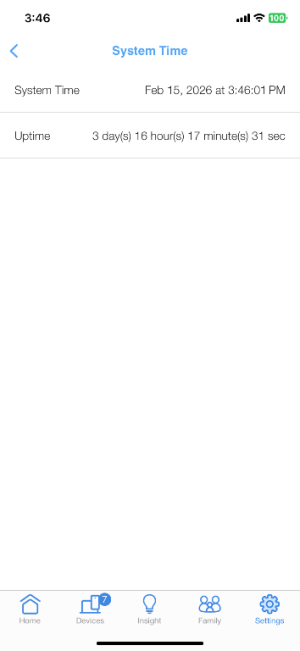
I use rt-be92u running the new beta 1 up time 3 days 16 hours no known issues may I ask are you running MLO if on can make the router really unstable?
 

Attachments

  • IMG_1304.png
    IMG_1304.png
    25.6 KB · Views: 53
Status
Not open for further replies.

Similar threads

Latest threads

Support SNBForums w/ Amazon

If you'd like to support SNBForums, just use this link and buy anything on Amazon. Thanks!

Sign Up For SNBForums Daily Digest

Get an update of what's new every day delivered to your mailbox. Sign up here!
Back
Top