What's new

Release Asuswrt-Merlin 3006.102.7 is now available

The MLO settings in Network settings have nothing to do with AImesh, as far as I'm aware.
Well on my BE96U you have to have MLO turned on in the MLO menu AND have to have the "Front haul" switch for the network settings enabled for clients to use it. Thus, indicates at least with my router model or with the firmware that MLO is primarily being used for mesh backhauls. My comments on having it on in the MLO menu but then not enabling it for front haul was brought forth because it solved a LOT of weird issues I was having with connections. Why that is, honestly, I do not know but I now recommend for anyone with a Wi-Fi 7 router and ASUS to have the feature on even if they are not actively using it. Someone in this forum recommended it to me when I was having all kinds of odd issues and it fixed them. This is why I infer that MLO at least for this firmware is intended to be a mesh backhaul because you must explicitly turn it on for the front haul clients. However, personally, from testing using normal 320Mhz is more stable and mostly faster than MLO because they have not figured out the data scheduler portion so that one connection can be all send, and other all receive. The iteration of MLO we have is no better than a "backup" connection, unfortunally. Most companies are already working on "Wi-Fi 8" because of the sheer mountain of work needed to make MLO work the way it was advertised. There is a hardware component to it as well meaning that anyone who bought current generation MLO capable hardware will not be able to truly use it as advertised because these routers don't have the hardware. Anyways sorry, were getting off topic. My post was meant to help a user in this thread that's having weird issues like I was and admitted to having MLO fully disabled. Here is a decent article on what im speaking about. We only have the basic MLO modes available to us. https://www.rtings.com/router/learn/research/wifi-7-mlo

Thinking a bit more about this I guess there could be specific use cases in which a "mesh" was not being used but a backhaul still is but since these were made and advertised to home / house-based consumers they would have to have a significantly large house / properly to want to have "separate" Wi-Fi APs.

1774519716359.png
1774519824674.png
 
Last edited:
For the RT-AX88U Pro and almost all other Asus routers? No. No change in the GPL. Only the RT-BE92 got a new GPL. See the change log RMerlin posted one page back for Asus-Merlin 3006.102.7_2:
So wait, it wont fix this?

When can we expect this fix to be included?

Bug Fixes and Enhancements
- Improved WiFi roaming behavior to reduce temporary disconnections in some scenarios.
 
So wait, it wont fix this?

When can we expect this fix to be included?

Bug Fixes and Enhancements
- Improved WiFi roaming behavior to reduce temporary disconnections in some scenarios.
No, unfortunately not. I think your questions are best answered by @bennor ‘s prior post which succinctly answers what happens with GPLs.

 
Do you still have this issue? Any long term fixes or workarounds you are aware of?
I am worried about being away and the whole network going down because the light flickered for two seconds.

I use UPS (pure sine wave) and DC battery backups. I'm afraid this started when I needed a tech to come out and fix my fiber line connections to the gateway.

Amazon has the DC type for sale if you are looking for them, including hard to find 12V ones.
 
I used to have issues upgrading until I realized the "required manual reboot" isn't required. At all. Never did anything for me except to prevent an upgrade from working. Just ignore the prompt to do the reboot, wait a little while, and it will be upgraded just fine. And yes I am also doing this on a GT-AXE16000.
Thanks for the reminder! This might be noted in the notes??
 
Thanks for the reminder! This might be noted in the notes??
The specific wording is "we strongly recommend". I would assume if required they could do it via a command in the code and you'd be forced to re-setup your router... There's an option in the Web GUI (and I think App)...
 
interesting comment

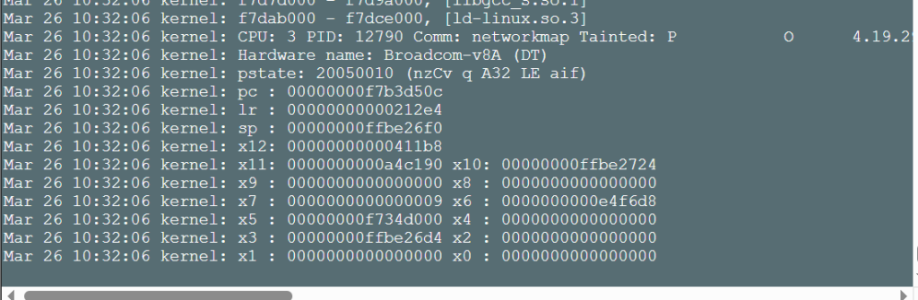
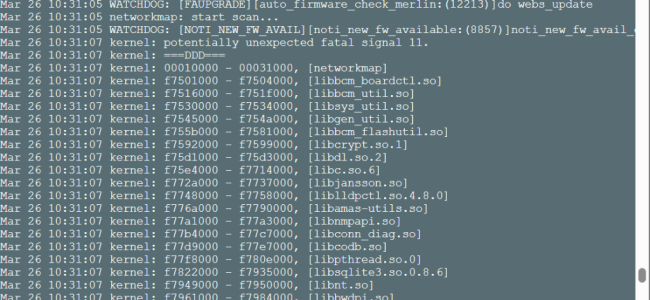
Went to upgrade my rt-be88u and accidentially picked the whats new text file.
As normal it rebooted and didnt upgrade..
But when i re-did it (dirty) i started getting kernal crashes constantly.

I then downgraded to older 7.0 release still getting crashes.
I did a factory reset and restored a backup i had on 7.0 .. work fine..
I then redid theupgrade (dirty) to 7.2 .. stll working fine.

So some issue with erroring out trying to upgrade with the wrong file obviously corruped someth? no idea?
 

Attachments

  • Screenshot 2026-03-26 103216.png
    Screenshot 2026-03-26 103216.png
    202.7 KB · Views: 27
  • Screenshot 2026-03-26 103203.png
    Screenshot 2026-03-26 103203.png
    296.6 KB · Views: 29
Eric,

I was informed by Asus hat the new .260 firmware for the GT-BE98PRO specifically has a fix for a security leak that would allow Bots to infect the router. Does this .7.2 firmware contain that fix?

CC
 
Eric,

I was informed by Asus hat the new .260 firmware for the GT-BE98PRO specifically has a fix for a security leak that would allow Bots to infect the router. Does this .7.2 firmware contain that fix?

CC
This is way too vague, this doesn`t tell me anything.

If the issue was in AiCloud for instance, then I don`t care - I completely removed AiCloud a few releases earlier.
 
This is way too vague, this doesn`t tell me anything.

If the issue was in AiCloud for instance, then I don`t care - I completely removed AiCloud a few releases earlier.
I aked why the .249 was taken down and replaced with the .260 Release.

Moderator stated:
"I was correct about security issues. ASUS has confirmed the new firmware was for security against a bot that will take over your router. "

Maybe in these release notes:
Security Enhancements:
Strengthened input sanitization mechanism.
Enhanced system API validation for stronger protection consistency.
Strengthened command handling and system resource access controls.
Improved system logging and security event recording mechanisms.

CC
 
After upgrading to 3006.102.7_2 I noticed backup failures from my DirectAdmin servers. Everything else works great.
It seems the upgrade changed the setting to enabled for TLS support. And yes I know it is unsecure but unfortunately DirectAdmin only supports Secure FTP for 'Admin Backup and Restore', second screenshot. So I have to keep this unchecked.

1774618034851.png


1774618211806.png
 
Maybe in these release notes:
Again, all are generic "we improved security" mentions, so I have no idea what the changes are, when they were applied by Asus, or what their importance are. These notes are partly written by an AI summarizing the changes between two releases. So sometimes, a changelog entry just summarizes multiple minor changes.

As already mentionned multiple times, there was no new GPL in 102.7 and 102.7_2 except for the GT-BE19000AI and RT-BE92U. I don't know at what exact point in time any of these changes were made by Asus, so they may already have been implemented in the previous GPL, they may not have been yet, and they may be irrelevant to Asuswrt-Merlin if for example they are related to AiCloud. I don't know.

Asuswrt-Merlin is developped in parallel to Asus. I will have fixes that their last firmware release may lack. They will have fixes that my last firmware release may lack. And there may be fixes that are either trivial/non important, or may possibly not apply at all. People need to stop asking me the same questions over and over with every single new firmware release from Asus. People may very well ask Asus: "Hey, does your new firmware include this fix from Asuswrt-Merlin's last release? How about the OpenSSL security fixes from the latest Asuswrt-Merlin release?".

People must stop trying to compare the two release schedules. We are not developping together, we each develop separately. One side will always be ahead of the other side in terms of fixes, and this goes both ways. Sometimes one side will share a fix with the other side. But most of the time, they will just happen when they happen. They can't happen simultaneously as one side does not dictate the release schedule of the other side.

I'm sorry for the long rant, but I am now really tired of having to answer these same questions with every new release from Asus, so this will be the last time I will answer this one.
 
Just loaded 102.7_2 to the BE88U and everything came online perfectly. Also installed all recent updates released by ASUS for the nodes and will continue to monitor for stability, though following the BE86U update from 2 weeks ago, today is the first restart of any router/node in 2-weeks with no stability issues at all in that time.

AiMesh router
RT-BE88UCurrent Version : 3006.102.7_2
AiMesh Node
RT-BE82U
Location : Home
Current Version : 3.0.0.6.102_39254-gc155c5b_1531-g93455_BB0B
RT-BE86U
Location : Home
Current Version : 3.0.0.6.102_39260-g3547d94_1525-g8972c_BB0B
RT-BE58 Go
Location : Home
Current Version : 3.0.0.6.102_39125-g4fa73b5_1317-g6ef7a_BB0C
 
Purchased an ASUS RT-BE58 Go for vacations/backup and decided to upgrade its original firmware to Merlin V3006_102.7_2 FW.

After setting it up in basic Wireless Router mode, and being able to login to to the GUI, I went to Advanced Settings | Administration | Firmware Upgrade | AiMesh router and chose "Upload" for the file "RT-BE58_GO_3006_102.7_2_nand_squashfs.pkgtb" from the unzipped file.

It started to "Applying Settings" and then kicked me back to the Main Login page.

After reading the readme.txt file, it said to run the command "nvram set DOWNGRADE_CHECK_PASS=1" via SSH for the first time upgrading to Merlin FW, and I did that, and then reran the upload, same thing happened.

I have restarted and rebooted the router, unplugged and plugged the router back in, even used a different browser (Chrome & Firefox), and the same issue each time. Even tried the old firmware file "RT-BE58_GO_3006_102.6_0_nand_squashfs.pkgtb", still no go.

Anybody else have this issue with the RT-BE58 Go?

ASUS just released new firmware today "ASUS RT-BE58 GO Firmware Version 3.0.0.6.102_39125",, so I downloaded their new firmware, extracted their files from the zip, hashed the files, and tried to firmware upgrade the new file, same error as Merlin firmware "It started to "Applying Settings" and then kicked me back to the Main Login page."

So I ran the the firmware check update in the software, which found the new firmware from ASUS, so I ran the install and it worked, and updated the RT-BE58 Go to V3.0.0.6.102_39125.

I then went to install Merlin's ASUS firmware "RT-BE58_GO_3006_102.7_2_nand_squashfs.pkgtb" file and "It started to "Applying Settings" and then kicked me back to the Main Login page."

Any thoughts of what else I can try @RMerlin ? (If this needs to be moved to a seperate thread please do so).
 

Similar threads

Support SNBForums w/ Amazon

If you'd like to support SNBForums, just use this link and buy anything on Amazon. Thanks!

Sign Up For SNBForums Daily Digest

Get an update of what's new every day delivered to your mailbox. Sign up here!
Back
Top