What's new

Asuswrt-Merlin 380.58 is now available

I suspect that there may be a problem with the 380.58 build for ac66r when using the ac66u version? I have just tried the 380.59 Alpha 1 and it manages to start up without a problem (though I don't like using the alpha versions, but the .58 build just won't start (only in recovery mode) on my ac66r unit. Any ideas?
 
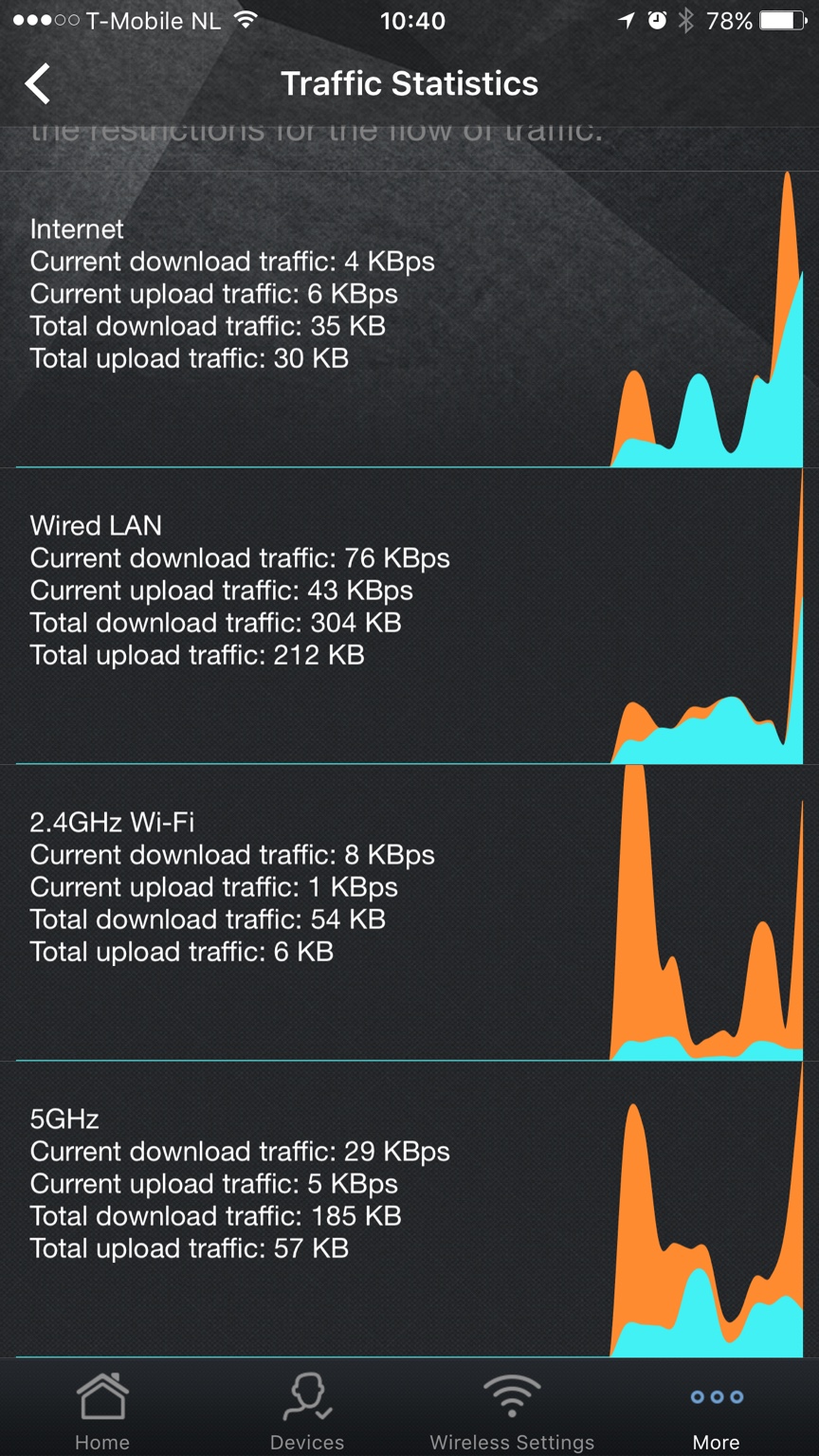
how come i never see any internet traffic

Sent from my SM-G925W8 using Tapatalk
working fine on ac66u

trafficgraph.jpg
 
I'm on 87u.

Sent from my SM-G925W8 using Tapatalk

Maybe you should send a request to Asus since this thread is about Merlin FW for Asus routers and not Asus app?
 
Working here, no issues.
Anyone having problem upgrading from 380.57 to 380.58 on RT-AC66R? I tried standard upgrade, restoring to default then upgrade, upgrading to an official Asus firmware then upgrading but everytime it upgrades, it just puts me in recovery mode. So I am back down to 380.57.

Regards,

YES!!
My RT-AC66w is at firmware 380.57_0 I've downloaded RT-AC66U_380.58_0.zip from both the main Mediafire host and the sourceforge mirror1, unzipped with peazip and my router will not load the new RT-AC66U_380.58_0.trx.

Every time I get the error message:
Code:
Firmware upgrade unsuccessful. This may result from incorrect image or error transmission. Please check the version of firmware and try again.
 
Maybe you should send a request to Asus since this thread is about Merlin FW for Asus routers and not Asus app?
Because I am on Merlins latest firmware and it is not just the app. It's the same way in the Web interface. I've asked this question a few times now and never got a response so I posted a picture. ... because we all know pics get noticed.

 
Last edited:
The configuration for the VLAN WAN Port is gone. LAN / IPTV / Manuel Config/

Known issue of the GPL code on which 380.58 is based, Asus fixed it in a later release.
 
Because I am on Merlins latest firmware and it is not just the app. It's the same way in the Web interface. I've asked this question a few times now and never got a response so I posted a picture. ... because we all know pics get noticed.


Your screen shot is of the Ethernet WAN, not the Wireless 5GHz tab. Also in your previous screen capture of the Asus App, it looks like you haven't scrolled down to get to the 5Ghz section. I've tested with my AC87U and both the web interface and the iOS app show the 5GHz traffic when there is a 5GHz client generating traffic.
 
YES!!
My RT-AC66w is at firmware 380.57_0 I've downloaded RT-AC66U_380.58_0.zip from both the main Mediafire host and the sourceforge mirror1, unzipped with peazip and my router will not load the new RT-AC66U_380.58_0.trx.

Every time I get the error message:
Code:
Firmware upgrade unsuccessful. This may result from incorrect image or error transmission. Please check the version of firmware and try again.
Unplug every USB drive from the router, reboot and try again
 
Works fine for me, what web browser are you using? Any errors?
Any browser. Again it's only wan/Internet traffic not showing. I'm wondering if it's got something to do with how i setup vlans to get rid of my fiberop router. But now that the iptv gui is gone i don't want to mess with it. I'm wondering if the wan is looking at the wrong vlan number

Sent from my SM-G925W8 using Tapatalk
 
Last edited:
Any browser. Again it's only wan/Internet traffic not showing. In wondering if it's got something to do with how i setup vlans to get rid of my fiberop router. But now rust the iptv gui is gone i don't want to mess with it. I'm wondering if the wan is looking at the wrong vlan number

Sent from my SM-G925W8 using Tapatalk

Make sure NAT acceleration is disabled, as it can mess up with a lot of traffic monitoring.

It might also possibly be a problem related to VLANs if you're using one. The GPL on which 380.58 is based has a few issues related to VLANs.
 
Make sure NAT acceleration is disabled, as it can mess up with a lot of traffic monitoring.

It might also possibly be a problem related to VLANs if you're using one. The GPL on which 380.58 is based has a few issues related to VLANs.
Nat acceleration is off. Must be vlans

Sent from my SM-G925W8 using Tapatalk
 
I have a quite complex setup on my AC56U, including OpenVPN client + server, several scripts for P2P and routing, entware, rtorrent, printer, USB drive.
Now the question which I'm sure will be a really noobie one, plz bear with me on the answer.

I consider upgrading to this release, coming from 378.54, as I've read that now the 2 CPU cores are used for the VPN. Problem I face, is what will happen with JFFS,, entware, etc, as numbered above. I'll give it a go at saving settings via the NVRAM tool, but will the rest need saving, mounting, etc., on its own?.

Could anyone please kindly enlighten me?. I always go all the way to start from scratch when updating FWs to avoid any issue, but got so much time invested in this one that I'm really wary!.

PS: Can anyone confirm the dual core usage for the VPN encryption, and if out of it throughput improves?.

Thanks in advance!
 
Anyone had hard lockups on 380.58 on arm models?

I did a factory default today on my ac88u set everything up fully, took a backup

then enabled qos rules and traffic monitoring (as i usually dont use that stuff just wanted to try it out)

left it torrenting at around 100mbit came back 10 hours later
no internet and no reply from a ping on the router lan ip from any device in the house

power cycled the router (from traffic stats it seemed to last 4 hours or so)

I have never had a hard lockup before in the 2 years or so on my ac66u
the fist day with the ac88u hard lockup

hope its a one off..
 

Similar threads

Support SNBForums w/ Amazon

If you'd like to support SNBForums, just use this link and buy anything on Amazon. Thanks!

Sign Up For SNBForums Daily Digest

Get an update of what's new every day delivered to your mailbox. Sign up here!

Members online

Back
Top