What's new

Release Asuswrt-Merlin 386.2 is now available

Status
Not open for further replies.
I’m experiencing the same thing but with wireless and especially Apple TV. Same log message and the Apple TV report every 5-10 mins that it’s not connected to the network. This started after upgrading my AX88U to 386.2
I’ve experienced it before last year at one point with the previous tree firmware.... not sure of the exact firmware version though.


Apr 21 20:00:55 kernel: C8:D0:83:E0:63:D3 not mesh client, can't update it's ip
Apr 21 20:01:00 kernel: C8:D0:83:E0:63:D3 not mesh client, can't update it's ip
Apr 21 20:01:05 kernel: C8:D0:83:E0:63:D3 not mesh client, can't update it's ip
Apr 21 20:01:10 kernel: C8:D0:83:E0:63:D3 not mesh client, can't update it's ip
Apr 21 20:01:14 kernel: C8:D0:83:E0:63:D3 not mesh client, can't update it's ip
Apr 21 20:01:34 kernel: C8:D0:83:E0:63:D3 not mesh client, can't update it's ip
Apr 21 20:01:40 kernel: C8:D0:83:E0:63:D3 not mesh client, can't update it's ip
Apr 21 20:01:45 kernel: C8:D0:83:E0:63:D3 not mesh client, can't update it's ip
Apr 21 20:01:50 kernel: C8:D0:83:E0:63:D3 not mesh client, can't update it's ip

Merlin stated these messages are debug messages that are internal to the Asus code so he can no disable them. He also stated they are not an indication of a problem.
 
To those of you with Apple TV problems, they are multicast devices and as such you want to enable IGMP snooping in Wireless Professional. You should also have Multicast Rate set to "Auto". This is particularly important if you are using mesh or have switches that support Multicast and the switches should also have IGMP enabled. Be aware that if you have a multicast device on your network with a pore signal making it runs at a low speed, this will slow down all devices in the multicast group. In general, multicast can be quite problematic on wireless networks, particularly ones with more than one AP (router).

Morris
 
Hi, how is it working with GT-AX11000? I'm considering buying it but want to make sure it works just as perfect as RT models
 
Hello,

I'm not really sure where this question belong,

I have a AX86U running FW-386.2.2

recently (even with FW-386.2) i noticed sometimes webUI is not showing all Addon tabs. such as scMerlin for example. Random reboots load up all the add-on tabs.
even though these are now shown in web ui i can access them if i use the https://192.168.1.1:8443/user9.asp for example. all addons are visible in amtm but you would see something like
WebUI for scMerlin is available at:
WebUI page not found
scMerlin was used as an example i have missing addon tabs for ntpMerlin, spdMerlin, connmon, Vnstat

I did try a full factory reset and reconfiguration without using the backup with no luck.

Any tips to further troubleshoot?

Thanks agin for all the great work everyone's doing.
 
Hello,

I'm not really sure where this question belong,

I have a AX86U running FW-386.2.2

recently (even with FW-386.2) i noticed sometimes webUI is not showing all Addon tabs. such as scMerlin for example. Random reboots load up all the add-on tabs.
even though these are now shown in web ui i can access them if i use the https://192.168.1.1:8443/user9.asp for example. all addons are visible in amtm but you would see something like
WebUI for scMerlin is available at:
WebUI page not found
scMerlin was used as an example i have missing addon tabs for ntpMerlin, spdMerlin, connmon, Vnstat

I did try a full factory reset and reconfiguration without using the backup with no luck.

Any tips to further troubleshoot?

Thanks agin for all the great work everyone's doing.
make sure you have latest updates for all addons using amtm. If you have unbound installedmake sure you update the GUI tab as well. After you do that reboot the Router
 
Currently on 386.1_2, when I first installed this firmware I disabled the trend micro Ai protection just to make sure things were stable. I actually forgot to enable it again!

Is the Ai protection still considered a good thing to have enabled or does it cause more trouble than it's worth?

I will install 386.2_2 later today.

Thanks
 
Last edited:
Better to install RMerlin v386. 2_2 instead.
 
@MvW, we won't know until @telUK confirms (one way or the other). Either way, it will help future readers of this thread. :)
 
Either way, it will help future readers of this thread.

If it wasn't for you, it would be total chaos around here and we would all be helpless, seeking in the dark, hoping to find changelogs, tutorials and useful tips & tricks ;)

@telUK Which firmware version did you just install? Please let us know. Oh, I so hope he's already had his portion of database maintenance...
 
Hi, how is it working with GT-AX11000? I'm considering buying it but want to make sure it works just as perfect as RT models
When you have solid data, please share it! I'm thinking down the same avenue...
 
@MvW, we won't know until @telUK confirms (one way or the other). Either way, it will help future readers of this thread. :)
If it wasn't for you, it would be total chaos around here and we would all be helpless, seeking in the dark, hoping to find changelogs, tutorials and useful tips & tricks ;)

@telUK Which firmware version did you just install? Please let us know. Oh, I so hope he's already had his portion of database maintenance...

Lol:D, it wasn't a typo, not been following the threads since I installed 386.1_2.

Not installed yet, might do it next week now, been quite happy on current firmware, up time of 44 days here.
 
Currently on 386.1_2, when I first installed this firmware I disabled the trend micro Ai protection just to make sure things were stable. I actually forgot to enable it again!

Is the Ai protection still considered a good thing to have enabled or does it cause more trouble than it's worth?

I will install 384.2 later today.

Thanks

@telUK, I hope it's a typo! (See your original post number 553, last sentence). :)
 
Thanks @RMerlin for the doing this firmware for this model! Running on 386.2 on my Asus GT-AX11000 everything seems to be working fine, but after the 2nd day I get this random WiFi Reboot . Let me know if I could PM you my Syslog since I really can't figure out if I'm doing something wrong or the router itself has a problem, since this issue was present during the stock firmware. Thanks again and stay safe!
 

Attachments

  • Screen Shot 2021-04-24 at 1.05.58 PM.jpg
    Screen Shot 2021-04-24 at 1.05.58 PM.jpg
    329.2 KB · Views: 312
  • Screen Shot 2021-04-24 at 1.07.16 PM.jpg
    Screen Shot 2021-04-24 at 1.07.16 PM.jpg
    298.9 KB · Views: 308
Thanks @RMerlin for the doing this firmware for this model! Running on 386.2 on my Asus GT-AX11000 everything seems to be working fine, but after the 2nd day I get this random WiFi Reboot . Let me know if I could PM you my Syslog since I really can't figure out if I'm doing something wrong or the router itself has a problem, since this issue was present during the stock firmware. Thanks again and stay safe!

Use a service like pastebin and post your syslog here (redact any private stuff). Plenty of folks here willing to help.
 
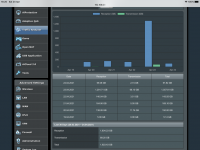
running 386.2 on my ac86u for a few weeks now. I did a clean install and set everything up from scratch. I’ve noticed that I get spikes on the traffic analyser page. This has happened a few times now. This impacts the total download figures for the day. E.g once it said I did 600gb for a single day. On the attached screenshot it says I’ve done 1.2tb yesterday Which is obviously incorrect. Has anyone else experienced this? I know there was a fix for the hnd models but I never had this issue on previous versions. any ideas?
 

Attachments

  • D68FD219-90D2-4141-BF8B-52DD9D0A6A78.png
    D68FD219-90D2-4141-BF8B-52DD9D0A6A78.png
    140.7 KB · Views: 204
  • 4F9DAE45-90EA-47EC-ADAC-CFE22B750487.png
    4F9DAE45-90EA-47EC-ADAC-CFE22B750487.png
    159.3 KB · Views: 193
Thanks @RMerlin for the doing this firmware for this model! Running on 386.2 on my Asus GT-AX11000 everything seems to be working fine, but after the 2nd day I get this random WiFi Reboot . Let me know if I could PM you my Syslog since I really can't figure out if I'm doing something wrong or the router itself has a problem, since this issue was present during the stock firmware. Thanks again and stay safe!
Everything related to wifi is outside of my control.
 
Status
Not open for further replies.

Similar threads

Latest threads

Support SNBForums w/ Amazon

If you'd like to support SNBForums, just use this link and buy anything on Amazon. Thanks!

Sign Up For SNBForums Daily Digest

Get an update of what's new every day delivered to your mailbox. Sign up here!
Back
Top