What's new

Release Asuswrt-Merlin 386.2 is now available

Status
Not open for further replies.
Until today I never knew I could filter by band in that view, but I also can confirm your findings. RT-AC86U running 386.2.

View attachment 32805
I knew you could filter by band, but until today I didn't know that was a search box that you could enter search terms into. And although I'm seeing the same issue (undefined for 5ghz, and 5ghz for 2.4ghz), I didn't know about it until today because on mine, the shade of grey of the text is so close to the background, I can hardly see it. But I can clearly see it in the screen caps in this thread.
Capture.PNG
 
Skynet will do just fine. Log in with an SSH session, type

Code:
amtm

and you'll find the option to install Skynet (and many other usefull scripts).
One question, is it necessary to install amtm on the usb or is it no longer needed and does it work directly on the router?
 
One question, is it necessary to install amtm on the usb or is it no longer needed and does it work directly on the router?
a usb key or ssd is required as you need to create a swap file.
 
Just upgraded my AC86U from 386.1 > 386.2 and noticed all the Icon now blank

Anyone else have this problem or know how to resolve

Thanks


Screenshot 2021-04-05 at 23.54.20.png
 
Just upgraded my AC86U from 386.1 > 386.2 and noticed all the Icon now blank

Anyone else have this problem or know how to resolve

Thanks


View attachment 32847
That's a common problem. From the changelog:
Code:
  - NOTE: due to changes in how custom device icons are handled,
          first time you boot with 386.2 you need to either
          shift-reload the main index page, or clear your
          browser cache.
 
That's a common problem. From the changelog:
Code:
  - NOTE: due to changes in how custom device icons are handled,
          first time you boot with 386.2 you need to either
          shift-reload the main index page, or clear your
          browser cache.

Cool sorted thanks 8-)
 
Updated 386.1>386.2 first on AC86U node. Good so far.
After rebooting and attempting a dirty upgrade to my main AX86U I was greeted by the Factory setup page.
Tried a reboot with no usb attached but all settings were wiped.
Uploaded my saved cfg/jffs files and everything back again.

Be sure to save those backup files if you're not planning to do a full clean install.
 
I have a RT-AC68U that is constantly connected to VPN server. It was made to allow remote connection to the router and home network because router has no white IP. The router runs 386.1.2.
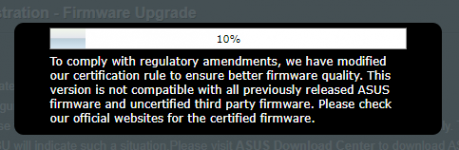
With release of 386.2 I have tried to update the firmware remoteley. The following screen appears:
Б.png
However the process continues and at the end the message was shown saying "update is successful, please reboot your router manually" (or something like that - standard message).

I've tried to reboot and to update the firmware several times - no success: it reboots but the firmware was still old.

Today I am at home and I updated the firmware without any problems mentioned above. By the way the reboot was automatic.

Any ideas why remote update scenario was not successful?
 
Dear all,
Behind the router of my ISP (NAT ) with sambashare 192.168.1.X , I am using the RTAC86U via NAT as a subnet 192.168.2.x . It is working fine with the current setup and I have no problem to access the samba share on the first NAT of my ISP.

But if I am choosing Cake as QOS , I found, that the transfer from the subnet 192.168.2.x to the NAT network 192.168.1.x is restricted in speed . I am only getting transfer rates about 400 kb/s.
After switching of the QOS completely I got transfer rates about 4mb/s with the same testfile.
Could that behavior be related to Cake ? And if so, is it possible to configure cake to allow higher transfer rates for this procedure ?

Thanks a lot.

Hugo
 
Add me to the list of folks who successfully upgraded, in my case from 386.1_0 to 386.2_0 on an AC86U. Cleared/refreshed the browser cache, and all the new images loaded like the OP notes said.

The only issue I have found so far is a minor graphical/UI one in Client Status:
  1. Chose to filter wireless devices by 2.4G, yet the "search bar" brings up the 5G details
  2. Chose to filter wireless devices by 5G, and the "search bar" brings up "undefined" details
  3. Wait a few seconds after #2, the Wired tab completely disappears, then reappears after a few more seconds
  4. if you go elsewhere in the UI and come back, you can repeat the issue at will
View attachment 32795 View attachment 32796

Upgraded firmware yesterday, waited until today to ensure things "settled", rebooted router, cleared/refreshed browser cache, and the graphical/UI issue persists.
I can confirm that I see exactly the same behavior in my RT-AX88U running FW 386.2. Anyway, the search bar still works as a search bar, so it is only a "cosmetic" issue with the text inside.
Until today I never knew I could filter by band in that view, but I also can confirm your findings. RT-AC86U running 386.2.

View attachment 32805

I am on stock FW (3.0.0.4.386_42095) and this happens, so not Merlin specific.
 
Dirty update after a reboot on AX3000 (386.1_2 > 386.2_0). Everything works fine, no problem whatsoever, as usual.

Thanks RMerlin !
 
There’s a natural tendency to post in case of some issues, but on a brighter note, let me report a smooth (though dirty) upgrade of 3 x AC66U_B1 :cool:
 
Is there anyone get this kernal panic? Every time I click Adaptor QoS, I got
Unable to handle kernel NULL pointer dereference at virtual address 00000000
pgd = 80004000
[00000000] *pgd=00000000
Internal error: Oops: 17 [#1] PREEMPT SMP
last sysfs file: /sys/class/net/vlan1/brport/port_no
CPU: 0 Tainted: P (2.6.36.4brcmarm #1)
PC is at set_skb_tuples+0x354/0x438 [tdts_udbfw]
LR is at set_skb_tuples+0x304/0x438 [tdts_udbfw]
pc : [<7f1ecd6c>] lr : [<7f1ecd1c>] psr: 20000113
sp : 8042bb20 ip : 00000000 fp : 8042bb58
r10: 8042bb5e r9 : 9e2dc270 r8 : 8042bb6e
r7 : 00000004 r6 : 9e2dc1e0 r5 : 9e98c000 r4 : 8042bb58
r3 : 00000051 r2 : 00000000 r1 : 0000dd5d r0 : 00000000
Flags: nzCv IRQs on FIQs on Mode SVC_32 ISA ARM Segment kernel
Control: 10c53c7d Table: 579b004a DAC: 00000017

and them

Kernel panic - not syncing: Fatal exception in interrupt
[<8005727c>] (unwind_backtrace+0x0/0xf8) from [<80321dc0>] (panic+0x74/0x1a0)
[<80321dc0>] (panic+0x74/0x1a0) from [<80054958>] (die+0x1ac/0x1dc)
[<80054958>] (die+0x1ac/0x1dc) from [<8005870c>] (__do_kernel_fault+0x64/0x84)
[<8005870c>] (__do_kernel_fault+0x64/0x84) from [<8005887c>] (do_page_fault+0x150/0x1ec)
[<8005887c>] (do_page_fault+0x150/0x1ec) from [<800503a4>] (do_DataAbort+0x30/0x9c)
[<800503a4>] (do_DataAbort+0x30/0x9c) from [<803e9eec>] (__dabt_svc+0x4c/0x60)
Exception stack(0x8042bad8 to 0x8042bb20)
bac0: 00000000 0000dd5d
bae0: 00000000 00000051 8042bb58 9e98c000 9e2dc1e0 00000004 8042bb6e 9e2dc270
bb00: 8042bb5e 8042bb58 00000000 8042bb20 7f1ecd1c 7f1ecd6c 20000113 ffffffff
[<803e9eec>] (__dabt_svc+0x4c/0x60) from [<7f1ecd6c>] (set_skb_tuples+0x354/0x438 [tdts_udbfw])
[<7f1ecd6c>] (set_skb_tuples+0x354/0x438 [tdts_udbfw]) from [<7f1ed0b0>] (hookfn_common.clone.7+0x260/0x69c [tdts_udbfw])
[<7f1ed0b0>] (hookfn_common.clone.7+0x260/0x69c [tdts_udbfw]) from [<803df820>] (nf_iterate+0x94/0xb

There are a lot of message in the log, I only show part of it. Entire debug log is attached.

My router is RT-AC5300. This kernal panic happened in last version too but in last version I did not get all the debug detail. It only showed "Unable to handle kernel NULL pointer dereference at virtual address 00000000" in last version so I did not report it.

As long as I don't access Adaptor QoS page, the router is working fine.

Any suggestion to avoid this?
Thanks
 

Attachments

Dirty upgraded from 386.1_2. No issues so far. Thanks, Merlin!
 
I can confirm that I see exactly the same behavior in my RT-AX88U running FW 386.2. Anyway, the search bar still works as a search bar, so it is only a "cosmetic" issue with the text inside.
This looks to be an array index off-by-one bug in client.asp, so I expect it would show up in stock Asus firmware based on 386.42095. Ah, look....

I am on stock FW (3.0.0.4.386_42095) and this happens, so not Merlin specific.
It looks like it should be a simple fix.
 
Status
Not open for further replies.

Similar threads

Latest threads

Support SNBForums w/ Amazon

If you'd like to support SNBForums, just use this link and buy anything on Amazon. Thanks!

Sign Up For SNBForums Daily Digest

Get an update of what's new every day delivered to your mailbox. Sign up here!
Back
Top