What's new

Release Asuswrt-Merlin 386.2 is now available

Status
Not open for further replies.
Here are the only log items reported after update with 'notice' set as log level:
Apr 2 18:18:09 kernel: gro disabled
Apr 2 18:18:13 avahi-daemon[1801]: WARNING: No NSS support for mDNS detected, consider installing nss-mdns!
Apr 2 18:18:16 lld2d[941]: packetio_recv_handler: mis-matched sequence number: got 1, expecting 6; ignoring
Apr 2 18:18:26 kernel: SHN Release Version: 2.0.1 f45bb18
Apr 2 18:18:26 kernel: UDB Core Version: 0.2.20
Apr 2 18:18:26 kernel: sizeof forward pkt param = 192
Apr 2 18:18:29 kernel: ERR[qos_start:3363] qos_ops is not registered!
Apr 2 18:18:29 kernel: ioctl_iqos_op_switch(1) fail!
Apr 2 18:18:40 crond[831]: time disparity of 1531753 minutes detected

None of these seem to be causing problems, but the time disparity is one I don't understand. The router time settings follow...

On the Admin/System page:
Enable local NTP server set to 'No"
DST dialog set correctly
pool.ntp.org Primary
time.nist.gov Secondary

I tried finding answers, but not a lot of help was available. Should these parameters be correcting the time disparity? Otherwise, is this a significant error? If so, what's the fix?
Thanks in advance!
 
Apr 2 18:18:40 crond[831]: time disparity of 1531753 minutes detected

Every device has it's own factory time and date, which is hardcoded and shown in your logfile before actual time is synced. In my case it's May 5 7:00:00 at boot, for both routers in my signature. When crond is started and your routers' system time is synced with NTP, crond just reports that it has detected a time disparity. After syncing, all is fine and it will act according to actual time.
 
Here are the only log items reported after update with 'notice' set as log level:
~
Apr 2 18:18:40 crond[831]: time disparity of 1531753 minutes detected

None of these seem to be causing problems, but the time disparity is one I don't understand. The router time settings follow...

On the Admin/System page:
Enable local NTP server set to 'No"
DST dialog set correctly
pool.ntp.org Primary
time.nist.gov Secondary

I tried finding answers, but not a lot of help was available. Should these parameters be correcting the time disparity? Otherwise, is this a significant error? If so, what's the fix?
Thanks in advance!
Just out of curiousity what year do you see when you go to:

Advanced Settings>>System Log>>General Log>>System Info>>System Time
 
Last edited:
Just out of curiousity what year do you see when you go to:

Advanced Settings>>System Log>>General Log>>System Info>>System Time
Tue, Apr 06 14:07:56 2021
* Daylight savings time is enabled in this time zone.
So, the time is correct and the log entry is not pertinent...Got it!
 
Every device has it's own factory time and date, which is hardcoded and shown in your logfile before actual time is synced. In my case it's May 5 7:00:00 at boot, for both routers in my signature. When crond is started and your routers' system time is synced with NTP, crond just reports that it has detected a time disparity. After syncing, all is fine and it will act according to actual time.
Thanks to all! That makes sense...
 
Tue, Apr 06 14:07:56 2021
* Daylight savings time is enabled in this time zone.
So, the time is correct and the log entry is not pertinent...Got it!
A "time disparity of 1531753 minutes" equals 1063 days, 17 hours, 13 minutes, which is slightly less than 3 years. Typical default/starting clock time set by manufacturer has been reported by most either May 04, or May 05 of a given year. So yours must be in 2018.

As the months and years go on, and as you reboot/restart you will see a increasing time disparity reported by crond when your system clock syncs to the current date.
 
Hi folks,
First, a HUGE thanks to everyone who is helping to develop and support this ASUS-Merlin firmware. I've been running it for several years now without any problems and I love it. I recently upgraded from 384.19 to 386.2 and I'm seeing some slowness on my RT-AC5300. I wish I could be more specific, but my entire family is now experiencing general slowness with streaming media and remote school/work virtual meetings. I have experienced it myself on Webex with both the video and audio streams. With 384.19 we were able to run 4 people all in separate virtual meetings without any hiccup, but ever since the firmware update to 386.2 over the weekend it's become noticeably slower and jumpy. I just did a speed test while other folks were doing remote meetings and I got 70Mbps down + 45Mbps up through the router and over my cheap Verizon FIOS connection (100+100), so I don't think it's a Verizon issue.

Regarding my configuration, I am not using any Wifi mesh, all my devices connect directly to my single RT-AC5300 router. I am running a guest network on 2.4GHz channel 1 and I'm using YazFi to run 2 VPNs that are linked to "5GHz-2" SSID channels 1 & 2. I updated YazFi to the latest version 4.2.0 just to be safe but didn't see any improvement in the slowness that we're experiencing on the non-VPN wifi channels. I also tried experimenting a little bit with the Adaptive QoS settings but haven't noticed any obvious improvements. Perhaps I should try Cake...

Still, I can't help but feel that something changed from 384.19 to cause this slowness and that better QoS may only be a band-aid on the actual problem. I'm happy to provide more info if folks have suggestions for what would helpful to further debug the possible cause(s). I'm new to this forum so I'm not quite sure how to proceed. I can post a System Log if folks can tell me the best place to put it so I don't clog up this forum. I don't see any obvious errors, but I'm not good at reading those logs. Thanks very much.
 
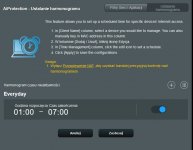
I've found an issue with parental control - it blocks access (sometimes fully, sometimes wifi shows question mark, but some apps still work) outside of blocking hours.

Migrated yesterday from 386.2 with full reset and manual config. Time zone is configured properly and system is showing the correct time.
 
I've found an issue with parental control - it blocks access (sometimes fully, sometimes wifi shows question mark, but some apps still work) outside of blocking hours.

Migrated yesterday from 386.2 with full reset and manual config. Time zone is configured properly and system is showing the correct time.

Can you provide an example of what you set and which app so we can test it?
 
Hello,

I am using guest network #1 (2.4Ghz, without AiMesh) and I am experiencing a problem with disabling intranet access.
Just after a reboot it is possible to reach a guest network device from the main LAN. Before to do this you needed YazFI.
Also the devices in the guest network do not see each other anymore (as if the AP in isolated mode).

Then if I make a setting change in another section, for example in the Wifi settings, just after the application of the settings, it is no longer possible to join the devices of the guest network (as it should be the case just after a reboot when the intranet access is disabled).

Do you reproduce this malfunction on your side?

If I put the devices on the guest network n°2 will I solve this problem (no, I don't test anymore. I ask your opinion first. My router is stable after long hours of fine configuration and X hard reset)?

Also, is it possible to have an option in the guest network menus to voluntarily activate the one way LAN -> guest network access (without having to install YazFi, which I find, causes side effects)?

Thank you.
 
A dirty upgrade from 386.1_2 yesterday.
No issues or problems at all.
Thanks again Merlin!
 
Yay, another wonderful release! Dirty upgrade from beta 3 to 386.2 final, with no issues at all. I've let both router and AiMesh Node settle for 10-15 minutes, did a power cycle and started everything back up. Everything works flawlessly, not in a single error in syslog.

Thanks for your continuous efforts, Eric and to the others involved in providing these great updates voluntarily time after time again. Thank you so much, your efforts are much appreciated.
Did you first upgrade the node first and then the router? Did you use the upgrade from within the admin UI where it checks for the upgrade, downloads it, and then applies it to the device?
 
Did you first upgrade the node first and then the router? Did you use the upgrade from within the admin UI where it checks for the upgrade, downloads it, and then applies it to the device?
1. Yes
2. No (I downloaded the firmware files separately. because I always like to have a copy on my ssd for easy rollback and prefer to check the SHA256 hash manually.
 
Hi @RMerlin - I just tried to turn off download shaping in Cake by setting the bandwidth value to zero ( 0 ). Unfortunately the field validation doesn't allow this despite the error message saying that 0 is a valid entry.
Bug in the validator method - fixed.
 
AX86U flashed dirty and also tried clean flash and for some reason FTP with tls enabled via wan just doesn't work. I enter correct credentials and it doesn't open. Disabling tls works fine. Lan works fine also. Seen this is an issue from the past. Any fix available?
Works for me on my RT-AX86U. What does the log tell you when you try to connect?
 
Hi folks,
First, a HUGE thanks to everyone who is helping to develop and support this ASUS-Merlin firmware. I've been running it for several years now without any problems and I love it. I recently upgraded from 384.19 to 386.2 and I'm seeing some slowness on my RT-AC5300. I wish I could be more specific, but my entire family is now experiencing general slowness with streaming media and remote school/work virtual meetings. I have experienced it myself on Webex with both the video and audio streams. With 384.19 we were able to run 4 people all in separate virtual meetings without any hiccup, but ever since the firmware update to 386.2 over the weekend it's become noticeably slower and jumpy. I just did a speed test while other folks were doing remote meetings and I got 70Mbps down + 45Mbps up through the router and over my cheap Verizon FIOS connection (100+100), so I don't think it's a Verizon issue.

Regarding my configuration, I am not using any Wifi mesh, all my devices connect directly to my single RT-AC5300 router. I am running a guest network on 2.4GHz channel 1 and I'm using YazFi to run 2 VPNs that are linked to "5GHz-2" SSID channels 1 & 2. I updated YazFi to the latest version 4.2.0 just to be safe but didn't see any improvement in the slowness that we're experiencing on the non-VPN wifi channels. I also tried experimenting a little bit with the Adaptive QoS settings but haven't noticed any obvious improvements. Perhaps I should try Cake...

Still, I can't help but feel that something changed from 384.19 to cause this slowness and that better QoS may only be a band-aid on the actual problem. I'm happy to provide more info if folks have suggestions for what would helpful to further debug the possible cause(s). I'm new to this forum so I'm not quite sure how to proceed. I can post a System Log if folks can tell me the best place to put it so I don't clog up this forum. I don't see any obvious errors, but I'm not good at reading those logs. Thanks very much.
As I have two perfectly running AC5300's I assume it is somehow in your configuration. Have you done a full reset on the AC5300 (NVRAM erase, JFFS format etc etc)? User L&LD has made a nice write-up how to do it properly (https://www.snbforums.com/members/l-ld.24423/#about) and do not restore any configuration). Follow his instructions/procedures (at least the nuclear reset, NVRAM erase and M&M configuration steps). Take some time for it and add one by one the typical configurations that you want and evaluate. Leave QoS out of the equation. Run 2.4Ghz Guests on the second instance. (there are some known issues with the first one (the most left in the guest wifi configuration screen).

Last but not least: if you have apple devices: reset network settings on the apple devices and make a new connection once the router is fine).
 
Can you provide an example of what you set and which app so we can test it?
I have set up the non-internet hours as usual, i the AIprotection > parental control > schedule. My kid's devices are blocked from internet for the night.
Now, all those devices, while connected to wifi, report no internet access even during the day and asks for account login and the wifi icon shows a question mark.
Same setup was working just fine on the previous stable release.
 

Attachments

  • Przechwytywanie1.JPG
    Przechwytywanie1.JPG
    62.7 KB · Views: 221
Went from 384.11_2 to 386.2 yesterday on my AC66U_B1.

Factory reset before and after the update.

One day later, CPU1 is stuck at 100% and I got a loop of this in the log :

Apr 7 06:13:51 rc_service: check_watchdog 329:notify_rc restart_watchdog
Apr 7 06:20:51 check_watchdog: [check_watchdog] restart watchdog for no heartbeat
Apr 7 06:20:51 rc_service: check_watchdog 329:notify_rc restart_watchdog
Apr 7 06:27:51 check_watchdog: [check_watchdog] restart watchdog for no heartbeat
Apr 7 06:27:51 rc_service: check_watchdog 329:notify_rc restart_watchdog
Apr 7 06:34:51 check_watchdog: [check_watchdog] restart watchdog for no heartbeat
Apr 7 06:34:51 rc_service: check_watchdog 329:notify_rc restart_watchdog
Apr 7 06:41:51 check_watchdog: [check_watchdog] restart watchdog for no heartbeat
Apr 7 06:41:51 rc_service: check_watchdog 329:notify_rc restart_watchdog
Apr 7 06:48:51 check_watchdog: [check_watchdog] restart watchdog for no heartbeat
Apr 7 06:48:51 rc_service: check_watchdog 329:notify_rc restart_watchdog
Apr 7 06:55:51 check_watchdog: [check_watchdog] restart watchdog for no heartbeat

Any ideas?

I will shutdown the router and see if it comes back in a day or two.

Thanks,

Brad
 
Dirty upgrade of all 3 units from 386.1_2 to .2 Running well for 4 days.
Thanks again all.
 
Status
Not open for further replies.

Similar threads

Latest threads

Support SNBForums w/ Amazon

If you'd like to support SNBForums, just use this link and buy anything on Amazon. Thanks!

Sign Up For SNBForums Daily Digest

Get an update of what's new every day delivered to your mailbox. Sign up here!

Members online

Back
Top