Then I obviously expressed myself wrong, sorry. I am aware that the dcd tainted crash has been around for years. But my question was: do you know of a (preferably newer) firmware that doesn't include this crash yet?
If it takes 24 hours to become a problem have both Skynet and Diversion on and wait till it happens again. In the terminal run top and post the output.
I enabled Skynet and Diversion. Monday evening I ran the statistics update of Diversion from my iPad, I thought everything went okay until I opened up my laptop and found that it couldn't connect. I took the iPad and that one too couldn't connect. Remembering what you asked me to post, I tried every device in house, but alas none could connect. Not the wired nor wifi, not via SSH nor the webinteface. Only thing to do was reboot. I decided to install 388.2_2 hopefully the dnsmasq change would fix it. Then I went to bed.
This Tuesday morning everything went ok, I could still connect. I also challenged the router by running the statistics update of Diversion, but nothing out of the ordinary happened. All day I could connect with any device. Then my wife came home, picked up her iPad and voilà no wifi. I tried other devices and the only device that still had a connection was my iPhone. Unfortunately I don't have a terminal app on it, but I could open the web interface and open the scMerlin page that also shows the top running apps, so I made a screenshot:
After I disabled Diversion via the webinterface all other devices, including my wife's iPad were instantly reconnected.
Is it a memory thing? Then why don't I have any problems with 388.1?
Thank you for your help in trying to solve this mystery @thelonelycoder
Edit: I was able to capture some of my logfile from around the time the problem started.
So, how do I go about clearing jffs without a full on wipe, I don't really want to full on wipe I'd rather just clear the jffs partition like I was able to do. I don't see what the issue was removing it.
@aex.perez Interesting observation (I'm just going from my memory) but didn't the older AiMesh firmware(s) use to allow us to actually set the Wired Ethernet backhaul? The newer firware allows: Auto & 5G My Point is... Auto would still be inclusive of radio AKA WiFi-Mesh (Good intent would be...
@aex.perez Interesting observation (I'm just going from my memory) but didn't the older AiMesh firmware(s) use to allow us to actually set the Wired Ethernet backhaul? The newer firware allows: Auto & 5G My Point is... Auto would still be inclusive of radio AKA WiFi-Mesh (Good intent would be...
Sorry, that's just too much hassle for some people. I don't think people want to be starting from scratch and wasting time if they install the wrong scripts etc and trying to minimise downtime. Not a good direction really.. If it ain't broke don't fix it is my motto.
updated the AX-1100 Pro with 388.2-2 all working well update went well no problems just amazing how I have never had a problem updating Merlin FW . I can still remember bricking routers doing a simple FW upgrades.
No. The issue is so random that I don`t even know how many years ago it started appearing - it does not happen to everyone, and not everyone has it crashing for the same reason. It's simply software that is very poorly written by Trend Micro, causing it to crash whenever it encounter something it does not expect, such as virtual network interfaces created by Diversion.
That option never existed on that model, and if you ever saw it, it was shown by mistake since selecting it wasn`t doing anything.
Too many settings are now stored in the JFFS partition, an option to reformat it makes no sense today, as it will end up deleting portions of your router configuration. For instance that would cause you to lose every DHCP static reservations.
If you need to "reset" your custom scripts, then just go into the /jffs/scripts/ and remove the content.
if you do a full wipe can´t you just run a saved config file to restore settings ? I used to do that but in the past 5 years have had no reason to do so . Been a while since my brain has worked properly , not sure this is still applicable
Can you do so? Yes. Should you do so is another question. There may be cases where the old settings were the cause of an issue, by saving a config file then importing it after doing a hard factory reset or a "full wipe" may simply reintroduce the issue back into the router settings. To compound the possibility for issues, people will sometimes import saved config files from different routers (like AC to AX or between router class models) or from older firmware to newer firmware (or the reverse) because they don't want to take the time to manually reconfigure their router because "reasons".
Not importing a saved config file and instead manually reconfiguring the router is one of the basic troubleshooting steps, particularly after doing a hard factory reset as a troubleshooting step.
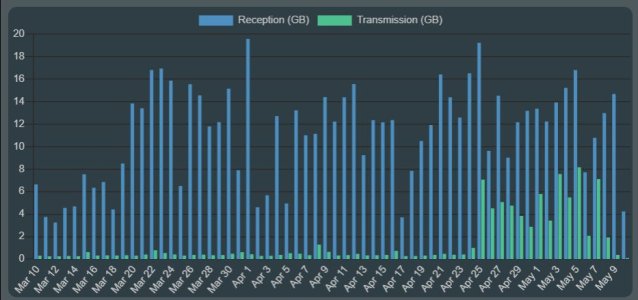
The issue I noted earlier in this thread (comment 375 on p19) related to RT-AX86U traffic analyzer data apparently including transmit volume internal to the network appears resolved with 388.2_2.
I enabled Skynet and Diversion. Monday evening I ran the statistics update of Diversion from my iPad, I thought everything went okay until I opened up my laptop and found that it couldn't connect. I took the iPad and that one too couldn't connect. Remembering what you asked me to post, I tried every device in house, but alas none could connect. Not the wired nor wifi, not via SSH nor the webinteface. Only thing to do was reboot. I decided to install 388.2_2 hopefully the dnsmasq change would fix it. Then I went to bed.
I was about to upgrade but saw your comment....
I will do but need more time. I am busy and can't be disturbed and/or not having everything running fine. (working from home, my employer would not accept me being unavailable by my fault)
As I said, I will report back here my tests results.
no mesh, sky.., diversion, so a simple upgrade here - and all's well. qos always worked but i just do the basics - tm won't get any additional data from me. i'd like to be able to speedtest through the vpn connection again though. when that was there, it was useful.
on another point, i have one lg tv "ac" client that doesn't like dfs 100. in fact with dfs enabled, it can take awhile for it to even "see" all the available ap's much less connect, no matter what channel. weird. but no worries since all's well with dfs disabled.





 . . . so, life's good.

