What's new

Can MikroTik handle 1Gbps QOS?

Yowie

Occasional Visitor
Trying to find a new router in the $250 range to replace ASUS BE86U that can handle gigabit QOS. Current line gets 1.2mbps down/120mbps up. The ASUS can't handle it at all, all the QOS settings cut the speed in half and the QOS does nothing. Some people claim QOS is broken on these routers? The problem with XFINITY is bufferbloat. Any time anyone watches a stream in the house, the ping gets spikey. The ping spikes 20-60ms. Baseline is around 19m, it spikes up to 80ms, some very rare times I've seen it spike 200ms just watching NetFlix.

I was looking at the MikroTik RB5009UPr+S+IN. Would this be able to handle my speeds and QOS without cutting speeds down to 500-600mbps? I don't mind cutting to around 900mbps, as I know you have to cut some. Would this be able to handle Smart QOS and standard QOS? From my scenario above, I would likely only need regular QOS? Nobody downloads large sustained files in the house. If anyone has any opinions or alternatives to the MikoTik they would recommend, I'd appreciate some help, thanks.
 
Maybe try an inexpensive GliNet travel router like the ones discussed on the forum to verify it is not the ISP, Netflix, local wifi/lan , or the client ?
Or repurpose an existing PC with PfSense/OpenSense on an x86 machine ?
 
Maybe try an inexpensive GliNet travel router like the ones discussed on the forum to verify it is not the ISP, Netflix, local wifi/lan , or the client ?
Or repurpose an existing PC with PfSense/OpenSense on an x86 machine ?

Don't want to run a PC as a router, power consumption would probably be a lot higher. I believe Microtek above idles around 7w and don't think a dedicated PC will come close to that. Under load it would be even worse.

I've already confirmed it's bufferbloat by disconnecting everyone from network and monitoring as I browse/stream on 1 system allowed through. Ping is stable when no streams/browsing.
 
Some people claim QOS is broken on these routers?

Yes. The only option for such WAN-LAN speed with QoS on ASUS routers is Adaptive QoS and it's broken on all ASUS BE-class routers using Trend Micro bwdpi engine for this feature.

I was looking at the MikroTik RB5009UPr+S+IN. Would this be able to handle my speeds and QOS without cutting speeds down to 500-600mbps?

Unlikely with Marvell 1.4GHz CPU. Some users report Ubiquiti UCG-Fiber with Qualcomm 2.2GHz CPU can do >Gigabit with FQ-CoDeL AQM (similar to Traditional QoS on ASUS) and Application prioritizing (similar to Adaptive QoS on ASUS), but I can confirm since I don't have the device. The price is $280.
 
Yes. The only option for such WAN-LAN speed with QoS on ASUS routers is Adaptive QoS and it's broken on all ASUS BE-class routers using Trend Micro bwdpi engine for this feature.


Unlikely with Marvell 1.4GHz CPU. Some users report Ubiquiti UCG-Fiber with Qualcomm 2.2GHz CPU can do >Gigabit with FQ-CoDeL AQM (similar to Traditional QoS on ASUS) and Application prioritizing (similar to Adaptive QoS on ASUS), but I can confirm since I don't have the device. The price is $280.

Do you really need a more powerful cpu to handle microbursts? It's around 4-12mbps that causes the spikes. Seems my issue is priority, not throughput. I don't care about advanced QOS when maxing out the line, as this never happens in the household. Nobody downloads large files, outside maybe someone getting a new phone and having to sync photos from cloud which is once every few years. I find it pathetic a $250 router can't handle such a basic task I've described if what you say is true.
 
Your router can't do even 500Mbps WAN-LAN unless some NAT acceleration technique is used. This is valid for all home AIO routers, done by design with performance/efficiency in mind. Anything doing true packet processing has to go through the CPU. If you need >Gigabit processing you also need a fast CPU, something like x86 N100 or better. I honestly don't understand your issue because I have 4x residential ISP lines in use, some of them with much smaller bandwidth, and none of them have common household Internet use issues including multi-user online streaming. I always use whatever the ISP provides as gateway/modem and my own equipment after. As hardware specs in theory my equipment is even weaker than your AIO router (UCG-Ultra gateways, Wi-Fi 6 access points). The only QoS I have active is on one backup ADSL line. 🤷‍♂️
 
Trying to find a new router in the $250 range to replace ASUS BE86U that can handle gigabit QOS. Current line gets 1.2mbps down/120mbps up. The ASUS can't handle it at all, all the QOS settings cut the speed in half and the QOS does nothing. Some people claim QOS is broken on these routers? The problem with XFINITY is bufferbloat. Any time anyone watches a stream in the house, the ping gets spikey. The ping spikes 20-60ms. Baseline is around 19m, it spikes up to 80ms, some very rare times I've seen it spike 200ms just watching NetFlix.

I was looking at the MikroTik RB5009UPr+S+IN. Would this be able to handle my speeds and QOS without cutting speeds down to 500-600mbps? I don't mind cutting to around 900mbps, as I know you have to cut some. Would this be able to handle Smart QOS and standard QOS? From my scenario above, I would likely only need regular QOS? Nobody downloads large sustained files in the house. If anyone has any opinions or alternatives to the MikoTik they would recommend, I'd appreciate some help, thanks.
Try to cut the line in 2 pipes of 500Mbps each.
Assign HTTPS, DNS and VoIP on 1 pipe and enable QoS on it.
Assign everything else on the other pipe without any QoS.
I hope your CPU can handle this approach.
 
How exactly you cut one ISP connection into two "pipes"?
 
And how you install OPNsense on an ASUS RT-BE86U router? If OPNsense is the router OS of choice it runs on x86 hardware and proper CPU selection to handle the entire bandwidth is not an issue, no?
 
Better internet is where to spend $20 extra per month: You’re going to have buffering until your up&down speeds are closer to each other. Hardware on your end won’t matter til then.
 
Maybe try an inexpensive GliNet travel router like the ones discussed on the forum to verify it is not the ISP, Netflix, local wifi/lan , or the client ?
Or repurpose an existing PC with PfSense/OpenSense on an x86 machine ?

Thanks for the suggestion, I ended up going with one of the non-travel models and this fixed my issue.

Your router can't do even 500Mbps WAN-LAN unless some NAT acceleration technique is used. This is valid for all home AIO routers, done by design with performance/efficiency in mind. Anything doing true packet processing has to go through the CPU. If you need >Gigabit processing you also need a fast CPU, something like x86 N100 or better. I honestly don't understand your issue because I have 4x residential ISP lines in use, some of them with much smaller bandwidth, and none of them have common household Internet use issues including multi-user online streaming. I always use whatever the ISP provides as gateway/modem and my own equipment after. As hardware specs in theory my equipment is even weaker than your AIO router (UCG-Ultra gateways, Wi-Fi 6 access points). The only QoS I have active is on one backup ADSL line. 🤷‍♂️

I'm not sure what you're talking about, the router I replaced the ASUS with gets 900mbps with no hardware accel, with hardware accel on, I get about 1.2gig. So looks like the information you're providing is wrong. And I don't care what you have setup, every ISP is different, Fiber also handles buffer bloat issues better than DOCSIS. If I'm complaining about latency spikes, you should not be talking about streaming movies being fine, etc - that is not a latency sensitive workload. With your alleged expertise, I think distinguishing between the two should be obvious. You can watch a Netflix stream with 200ms and notice nothing wrong. If you have latency sensitive needs, that is unacceptable when your baseline is 20ms. Thanks for your input, Mr. Expert. 💩
 
This is totally fine with me. Don't worry about it.

I knew I'd get a quick reply back out of you! I got one for you too, though, don't worry.

Your router can't do even 500Mbps WAN-LAN unless some NAT acceleration technique is used.

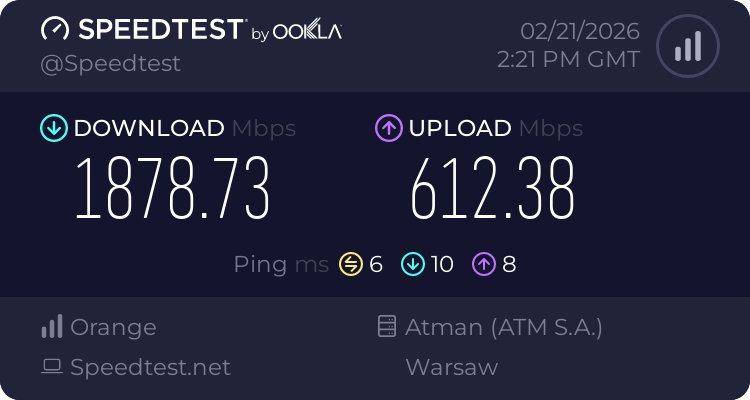
Here you go buddy, hardware accel off with SQM-Cake enabled:

1771680504077.png
 
Here you go buddy

Here you go, after recent update:

1771682486683.png


1771682561828.png


It was capping at around 550Mbps before. Qualcomm quad-core ARMv8 hardware. Not a home AIO router though. The ASUS router you had before can't get there even on most recent firmware. Our hardware can't get much over this number as well. I see some newer hardware gateways can do >2Gbps with no NAT acceleration now. The technology is evolving. Glad you are happy with what you get.

Anger management issues? Have a beer! 🍻
 
Here you go, after recent update:

View attachment 70440

View attachment 70441

It was capping at around 550Mbps before. Qualcomm quad-core ARMv8 hardware. Not a home AIO router though. The ASUS router you had before can't get there even on most recent firmware. Our hardware can't get much over this number as well. I see some newer hardware gateways can do >2Gbps with no NAT acceleration now. The technology is evolving. Glad you are happy with what you get.

Anger management issues? Have a beer! 🍻

You said no home router can do over 500mbps without hardware accel, now it's "I see some newer hardware gateways can do >2Gbps with no NAT acceleration".

I don't care for the back and forth, my last reply. Enjoy your beers, I think you had too many of them. 😂
 
I see some newer hardware gateways can do >2Gbps with no NAT acceleration now.
Test from LAN - 99% CPU load on UCG Fiber for 1.8-2 Gbps without acceleration. Test directly from the gateway gives a higher score.
18872746508.png
 
You said no home router can do over 500mbps without hardware accel

My numbers are from UCG-Ultra Gateway, @Piotrek is showing UCG-Fiber Gateway.

What home router is your number from? You forgot to share the make and model number.
 

Support SNBForums w/ Amazon

If you'd like to support SNBForums, just use this link and buy anything on Amazon. Thanks!

Sign Up For SNBForums Daily Digest

Get an update of what's new every day delivered to your mailbox. Sign up here!
Back
Top