What's new

DomainVPNRouting Domain VPN Routing v3.2.4 ***Release***

Hi—quick pre-install question:

Is there a way to route selected domains to a “blackhole” (i.e., drop/null-route DNS or traffic) rather than sending them through an active VPN tunnel? I’d like to experiment with domain-level blocking to see whether it can reduce ads on streaming TV services (e.g., UK Channel 5, Channel 4, ITVX).

If that capability doesn’t exist yet, is it something @Ranger802004 might consider adding (for example, an option to assign specific domains to a sinkhole/blackhole policy instead of a VPN policy)?

Thanks.
 
Hi—quick pre-install question:

Is there a way to route selected domains to a “blackhole” (i.e., drop/null-route DNS or traffic) rather than sending them through an active VPN tunnel? I’d like to experiment with domain-level blocking to see whether it can reduce ads on streaming TV services (e.g., UK Channel 5, Channel 4, ITVX).

If that capability doesn’t exist yet, is it something @Ranger802004 might consider adding (for example, an option to assign specific domains to a sinkhole/blackhole policy instead of a VPN policy)?

Thanks.
Thats a function of DNSmasq in you jffs/config directory, there should be a file call dnsmasq.conf.add

Add either top level domains or a specifc domain, both examples below:

address=/microsoft.com/0.0.0.0
address=/zip/mov/foo/nexus/dad/phd/prof/esq/boo/rsvp/new/day/club/icu/ru/store/top/0.0.0.0

Also, what you are asking seems to be more of a function of Diversion Ad Blocker.
 
Last edited:
Thats a function of DNSmasq in you jffs/config directory, there should be a file call dnsmasq.conf.add

Add either top level domains or a specifc domain, both examples below:

address=/microsoft/0.0.0.0
address=/zip/mov/foo/nexus/dad/phd/prof/esq/boo/rsvp/new/day/club/icu/ru/store/top/0.0.0.0

Also, what you are asking seems to be more of a function of Diversion Ad Blocker.
Thanks.

Correct me if I'm wrong, but as I understandit it, if I have an active VPN connection, that would bypass dnsmasq.conf.add?
 
Thats a function of DNSmasq in you jffs/config directory, there should be a file call dnsmasq.conf.add

Add either top level domains or a specifc domain, both examples below:

address=/microsoft.com/0.0.0.0
address=/zip/mov/foo/nexus/dad/phd/prof/esq/boo/rsvp/new/day/club/icu/ru/store/top/0.0.0.0

Also, what you are asking seems to be more of a function of Diversion Ad Blocker.
This is a better solution for you. I could add a feature that sinkholes as well for ASNs though based on the IP addresses.
 
Dec 23 23:00:48 domain_vpn_routing: Query ASN - ***Error*** Attempt 1 failed to query ASN: AS32934
Dec 23 23:01:05 domain_vpn_routing: Query ASN - ***Error*** Attempt 2 failed to query ASN: AS32934
Dec 23 23:01:21 domain_vpn_routing: Query ASN - ***Error*** Attempt 3 failed to query ASN: AS32934
Dec 23 23:01:37 domain_vpn_routing: Query ASN - ***Error*** Attempt 4 failed to query ASN: AS32934
Dec 23 23:01:54 domain_vpn_routing: Query ASN - ***Error*** Attempt 5 failed to query ASN: AS32934
Dec 23 23:02:10 domain_vpn_routing: Query ASN - ***Error*** Attempt 6 failed to query ASN: AS32934
Dec 23 23:02:27 domain_vpn_routing: Query ASN - ***Error*** Attempt 7 failed to query ASN: AS32934
Dec 23 23:02:43 domain_vpn_routing: Query ASN - ***Error*** Attempt 8 failed to query ASN: AS32934
Dec 23 23:02:59 domain_vpn_routing: Query ASN - ***Error*** Attempt 9 failed to query ASN: AS32934
Dec 23 23:03:16 domain_vpn_routing: Query ASN - ***Error*** Attempt 10 failed to query ASN: AS32934

PING bgp.he.net (72.52.94.234) 56(84) bytes of data.
^C
--- bgp.he.net ping statistics ---
20 packets transmitted, 0 received, 100% packet loss, time 19467ms
 
Error with dual wan

1767994278842.png
 
I just discovered this great routing tool and I'm testing it out on an Asus RT-AC68U with HBOMax.

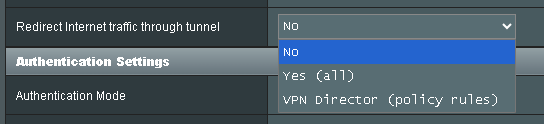
In the VPN client tab of Merlin, should I select No, Yes (all), or VPN Director (policy rules)?

This newbie would appreciate any assistance. Thanks.
 

Attachments

  • Untitled.png
    Untitled.png
    3.8 KB · Views: 77
In the VPN client tab of Merlin, should I select No, Yes (all), or VPN Director (policy rules)?
This depends on your use case, it has nothing to do with the DomainVPNRouting script.
However, since you're most probably routing some domains only through your VPN, so you should go with the third option (VPN Director), as this won't route the whole router (second option) which contradicts the script's concept of routing some domains only. Moreover, you absolutely don't want to disable redirecting traffic to the VPN using the first option (No).
 
This depends on your use case, it has nothing to do with the DomainVPNRouting script.
However, since you're most probably routing some domains only through your VPN, so you should go with the third option (VPN Director), as this won't route the whole router (second option) which contradicts the script's concept of routing some domains only. Moreover, you absolutely don't want to disable redirecting traffic to the VPN using the first option (No).
Thank you. I selected the VPN Director option and am slowly adding domains to handle HBOMax and it's working.
 
I have a bit difficulty getting the script to work. I use Asus Merlin 386.12.4 on my RT-AC86U.

I am trying to get the script to work on Svtplay.se. I am behind CG-NAT at my ISP so I added "DNS=8.8.8.8" in the config file of the script to make sure the script does not use the DNS from my ISP. I have managed to get the script so Svtplay thinks that I am running through a VPN (there is a text string on top of the website that says that one is abroad otherwise, no it is gone), however I cannot stream shows that can only be viewed in Sweden (the website is complaining on technical issues for the shows that can only be viewed in Sweden).

When I am checking the route table i get the following (masking my vpn ip). I do not see any added routing tables due to the script. Am I missing something or should it not be added there?
Code:
admin@RT-AC86U-F1D8:/tmp/home/root# ip route show table ovpnc1
default via 10.8.0.1 dev tun11
8.8.4.4 via 192.168.10.1 dev eth0 metric 1
8.8.8.8 via 192.168.10.1 dev eth0 metric 1
10.8.0.0/24 dev tun11 proto kernel scope link src 10.8.0.3
XX.YY.ZZ.XXX via 192.168.10.1 dev eth0
127.0.0.0/8 dev lo scope link
192.168.1.0/24 dev br0 proto kernel scope link src 192.168.1.1
192.168.10.0/24 dev eth0 proto kernel scope link src 192.168.10.136
192.168.10.1 dev eth0 proto kernel scope link
192.168.50.0/24 via 10.8.0.1 dev tun11 metric 500
admin@RT-AC86U-F1D8:/tmp/home/root#

The ipset list seems to be populated so the issue is not there.
Code:
admin@RT-AC86U-F1D8:/tmp/home/root# ipset list DVR-SVTPlay-v4 | grep -oE '([0-9]{1,3}\.){3}[0-9]{1,3}'
151.101.1.6
151.101.193.6
3.33.226.205
2.18.173.40
151.101.65.6
151.101.129.6
2.23.89.41
13.248.174.171
admin@RT-AC86U-F1D8:/tmp/home/root#
 
Last edited:
You should consider testing with a single device. Meaning, do not use the script at all. Ensure you are connected to a Swedish VPN Server, then in VPN Director, set that one device (or all your devices doesn't matter) to route over VPN then try launching to see if works first.

Then when you are refining and keeping all of you clients OUTSIDE of the VPN, but want to route this specific domain and associated domains INSIDE the VPN you will have to some investigating.

Just because you route a single domain Svtplay.se inside a vpn via the script doesn't necessarily mean you can play as that domain maybe streaming content from CDN's that are not part of the domain. The way to capture those additional domains/ip's would be launch Svtplay.se and play a video from a browser (chrome) use ipvfoo extension to display the server IP address, with a realtime summary of IPv4, IPv6, and HTTPS information across all page elements. You may have to do some reverse IP look ups on which CDN's they belong to and such as cloudflare, and add those associated domains to the script.
 
I have a bit difficulty getting the script to work. I use Asus Merlin 386.12.4 on my RT-AC86U.

I am trying to get the script to work on Svtplay.se. I am behind CG-NAT at my ISP so I added "DNS=8.8.8.8" in the config file of the script to make sure the script does not use the DNS from my ISP. I have managed to get the script so Svtplay thinks that I am running through a VPN (there is a text string on top of the website that says that one is abroad otherwise, no it is gone), however I cannot stream shows that can only be viewed in Sweden (the website is complaining on technical issues for the shows that can only be viewed in Sweden).

When I am checking the route table i get the following (masking my vpn ip). I do not see any added routing tables due to the script. Am I missing something or should it not be added there?
Code:
admin@RT-AC86U-F1D8:/tmp/home/root# ip route show table ovpnc1
default via 10.8.0.1 dev tun11
8.8.4.4 via 192.168.10.1 dev eth0 metric 1
8.8.8.8 via 192.168.10.1 dev eth0 metric 1
10.8.0.0/24 dev tun11 proto kernel scope link src 10.8.0.3
XX.YY.ZZ.XXX via 192.168.10.1 dev eth0
127.0.0.0/8 dev lo scope link
192.168.1.0/24 dev br0 proto kernel scope link src 192.168.1.1
192.168.10.0/24 dev eth0 proto kernel scope link src 192.168.10.136
192.168.10.1 dev eth0 proto kernel scope link
192.168.50.0/24 via 10.8.0.1 dev tun11 metric 500
admin@RT-AC86U-F1D8:/tmp/home/root#

The ipset list seems to be populated so the issue is not there.
Code:
admin@RT-AC86U-F1D8:/tmp/home/root# ipset list DVR-SVTPlay-v4 | grep -oE '([0-9]{1,3}\.){3}[0-9]{1,3}'
151.101.1.6
151.101.193.6
3.33.226.205
2.18.173.40
151.101.65.6
151.101.129.6
2.23.89.41
13.248.174.171
admin@RT-AC86U-F1D8:/tmp/home/root#
Usually due to additional domains needed such as CDNs, etc.
 
I would like to share the problems I faced and the solutions to these problems.

Problems:

  • When adding multiple ASNs, the script stopped at AS16509 (Amazon/AWS) and exited. With the help of Gemini, it was decided to make some changes:
    Code:
    addIPV4S="$(/opt/bin/grep -vxFf /tmp/${IPSETPREFIX}-${QUERYASN}-addv4.tmp /tmp/${QUERYASN}-IPv4.tmp)"
    became
    Code:
    addIPV4S="$(/opt/bin/grep -vxFf /tmp/${IPSETPREFIX}-${QUERYASN}-addv4.tmp /tmp/${QUERYASN}-IPv4.tmp || test $? -eq 1)"
  • was
    Code:
    removeIPV4S="$(/opt/bin/grep -vxFf /tmp/${QUERYASN}-IPv4.tmp /tmp/${IPSETPREFIX}-${QUERYASN}-removev4.tmp)"
  • became
    Code:
    removeIPV4S="$(/opt/bin/grep -vxFf /tmp/${QUERYASN}-IPv4.tmp /tmp/${IPSETPREFIX}-${QUERYASN}-removev4.tmp || test $? -eq 1)"
  • I have a lot of large ASNs . The script updates them simultaneously with policies . ASNs don't change as frequently as policies . I didn't think it made sense to update the ASNs on the router every 15 minutes. I tried to separate these updates: policies every 15 minutes, and ASNs once a day.
  • nano /jffs/scripts/domain_vpn_routing.sh
  • Press Ctrl + W (search)
  • Enter : cru a setup_domain_vpn_routing
  • Press Enter
  • You will be taken to a line that looks like this:
  • cru a setup_domain_vpn_routing "*/$INTERVAL * * * * $SHELLPATH querypolicy all #setup_domain_vpn_routing#"
  • In this line, replace the word all with the name of your policy (for example, VPN (that's what I named one of my policies)).
  • It was ... $SHELLPATH querypolicy all #setup_domain_vpn_routing#"
  • It became ... $SHELLPATH querypolicy VPN #setup_domain_vpn_routing#"
  • (If there are several policies, you can enter them separated by spaces or leave the most important one).
  • Now add a heavy task to your wgclient-start once a day:
  • cru a DVR_Full_Daily "0 4 * * * /jffs/scripts/domain_vpn_routing.sh querypolicy all"
  • A this one line comment #
  • #sh /jffs/scripts/domain_vpn_routing.sh querypolicy all # domain_vpn_routing_queryall
Now my RT-BE88U router updates its domain list every 15 minutes. The update takes no more than 2 seconds. And once a day (at night), it completely updates (about 100 seconds).

I also enabled ASN cache use in the script and set a 200-second delay before powering on. Now, after a reboot, it quickly restores the ASN . I also implemented another feature: I have many ASNs . One of them is Google's AS15169. After adding it, there is a risk of WebRTC leaks . I added the stun.l.google.com domain to the WAN policy. Now there is no WebRTC leak . However, the order in which the WAN policy and the ASN policy are loaded is important. I had to make additions to /jffs/scripts/firewall-start using Gemini.

P.S. The author of the script did a great job and I am very sorry that I cannot thank him financially (payment systems do not work in my country).
 
Last edited:
***Multiple releases have been published***

***Production Update Channel***
v3.2.4 - 03/19/2026
Fixes:
- Fixed an issue that was preventing ASN API requests to work due to BGPView service being shut down. Implemented a fix to use bgp.he.net and will expand later iterations to make an option to pick an API site.

***Beta Update Channel***
v3.2.5-beta1 - 03/19/2026
Fixes:
- Fixed exit issue with empty outputs in query domain and ASN functions.
- Fix to make domain rules priority over ASN rules for being marked by iptables rules. ***Recommend to reboot for rules to be properly ordered or restart firewall service.***
- Fixed when nslookup is used for querying a domain it would input the DNS Server as a queried IP address.
 

Latest threads

Support SNBForums w/ Amazon

If you'd like to support SNBForums, just use this link and buy anything on Amazon. Thanks!

Sign Up For SNBForums Daily Digest

Get an update of what's new every day delivered to your mailbox. Sign up here!
Back
Top