What's new

MerlinAU MerlinAU v1.6.0 - The Ultimate Firmware Auto-Updater

Three words: integration with ntfy... Please?

(Ups, that was four 😅)

How did I know this request was coming? 😂
Probably, because I also saw this thread: 'Push notifications from router to phone' https://www.snbforums.com/threads/push-notifications-from-router-to-phone.96667/

What I'll say is MerlinAU is pretty functional with email notifications for now, if I do add it, it would be a lower priority feature addition.
But i'll consider it! It's not been ruled out just yet.
 
Last edited:
How did I know this request was coming? 😂
Probably, because I also saw this thread: 'Push notifications from router to phone' https://www.snbforums.com/threads/push-notifications-from-router-to-phone.96667/

What I'll say is MerlinAU is pretty functional with email notifications for now, if I do add it, it would be a lower priority feature addition.
But i'll consider it! It's not been ruled out just yet.
I'm hosting a ntfy instance for everything, including my homeserver nerd notifications and Ubuntu torrenting downloads 🌝

Yesterday, a wild Merlin update appeared and I remembered it'd be helpful if I received it also via ntfy 😅
 
Hi mates, it's my first time using MarlinAu to update from 3006.102.6 to 3006.102.7 I would like to do from CLI (by ssh) which steps should I follow ? Thanks in advance.

1772195462863.png
 
Hi mates, it's my first time using MarlinAu to update from 3006.102.6 to 3006.102.7 I would like to do from CLI (by ssh) which steps should I follow ? Thanks in advance.

View attachment 70533

RIght now, looking at your screenshot, your looking at the WebUI, not the SSH/CLI window. (Just for clarification)

So steps from the WebUI:
if you want to do it manually right this second, you would check the "bypass postponed days" and then click "F/W update check".

Otherwise if you want to schedule it after hours, wait until the postpone period is over. Your settings identify it is postponed 15 days, so it will fire the update automatically by March 16th as it says in the top in yellow.

On the CLI by SSH, just select option. (1) to do it manually, or again, wait or adjust the schedule for automatic installation overnight.

Thanks!
 
MerlinAU 1.6.0 Released!

What's Changed/Fixed?:

PR: [ #549 ] - Support for New AMTM Functionality

  • Added code to support "Automatic Script Updates" via AMTM. This new functionality requires the latest AMTM version (yet to be released).
  • (Thanks @Martinski4GitHub )
PR: [ #550 ] - BUG FIX: Update Node Email Titles
  • Fixed a bug which caused the subject title for email notification to not match the body of the email notification.
  • This was specifically for setups with multiple nodes connected, because this is a summery email (one email) for multiple nodes with an update, the solution is to just remove the node names from the title.
PR: [ #551 ] - Message Improvement
  • Just a very minor change to add syslog message to show the add-on version number at startup.
  • (Thanks @Martinski4GitHub )
PR: [ #553 ] - Maximum Lock Timeout for AMTM Call
  • Set the Maximum LOCK Timeout to a short value so that the AMTM call returns quickly when the script LOCK already exists.
  • (Thanks @Martinski4GitHub )
PR: [ #554 ] - Added F/W Update Lock File
  • Added a mutually exclusive, non-blocking FLOCK mechanism in MerlinAU so that whenever AMTM initiates script updates or MerlinAU starts an F/W Update, each one can check the FLOCK mutex to make sure only one of them can perform its intended operation without "stepping on each other's toes" and avoid any possible corruption of a script update.
  • (Thanks @Martinski4GitHub )
As always, we highly recommend you update ASAP as this includes functional improvements and little bug fixes.
Thanks!
 
Last edited:
Hello SNB Community,

This project is hosted on our GitHub

Changelog and release notes: Here

Summery:
We're pleased to RE-introduce the add-on for Asuswrt-Merlin: MerlinAU (Merlin AutoUpdate).
MerlinAU.sh is a versatile shell script designed to automate the firmware update process for ASUS routers running Asuswrt-Merlin firmware.
This tool is designed to streamline the firmware update procedure by automatically detecting your router model, fetches the latest firmware, and offers options for installation making your router maintenance simpler and smoother than ever.

WebUI:
View attachment 69314

CLI Shell Script:
View attachment 69313
View attachment 69312
View attachment 69311
View attachment 69310

What's MerlinAU All About?

MerlinAU is a sophisticated and comprehensive script designed for Asus routers running Asuswrt-Merlin firmware.
It's a collaborative effort by @ExtremeFiretop (myself) and @Martinski W. It offers an extensive range of features:
  1. Automatic router model detection and Automatic update detection.
  2. Automatically install updates to your router with the latest firmware from the Asuswrt-Merlin repository.
  3. Logic to customize scheduled cron jobs for automated firmware update checks.
  4. Notifications for new MerlinAU updates and download the latest version of MerlinAU
  5. User configurable wait periods. Wait for a set duration after a new firmware release.
  6. Menu switch to enable or disable automatic update checking within MerlinAU.
  7. A routine to cleanly uninstall the script, removing all related files and settings.
  8. Maintains logs for its update checks and flash operations which can be viewed from the logs menu
  9. Includes functions for cleanup tasks pre-flash and post-flash.
  10. A visual indicator before starting the firmware update.
  11. Checks the changelogs for very obvious red flags and prompts for approval.
  12. Menu option and notifications to pre-approve the changelog verification if enabled with risks before the flash.
  13. Ability to download the latest changelog notes for manual review from the logs menu.
  14. Functions to check and manage available memory for firmware update operations.
  15. Compatible with ROG and non-ROG routers; select ROG or Pure Build for ROG routers.
  16. Backup the new firmware version to the USB drive. (If USB is selected for storage)
  17. Email notifications if you configured email options in AMTM.
  18. Automatic backup with BACKUPMON if installed.
  19. Allow or Block Alpha/Beta upgrades to Production versions of the same cycle. (388.6.alpha1 or 388.6.beta1 --> 388.6.0)
  20. Automatically stops all Entware services before the flash if running.
  21. Automatically stops diversion if installed and running before the flash.
  22. Unmounts any physically attached storage via USB as the last step before the flash.
  23. AiMesh Node Update Check from Primary Router. (No Flashing from Primary, MerlinAU needs to be on each node for flashing)
  24. Automatically remove any loaded cron jobs from third party scripts.
  25. Menu switch to keep Tailscale or ZeroTier VPN access active while flashing over SSH in the advanced menu.

What update mechanism does MerlinAU use to Auto-Update?

MerlinAU actually implements a curl update mechanism. Curl can simulate almost all behaviors of the browser through get/post.
While hnd-write is unsafe and unpredictable, we instead use curl to simulate a browser for the router to upload the firmware through it's own GUI, which is the safest way. As discussed on the forums in length here.

Essentially the router logins to it's own WebUI like a person does, and uploads the firmware through the WebUI.
Doing this insures that the firmware checks done by the router when uploading a firmware via the webUI are not skipped, and the router can follow it's regular update process from there.

This has been tested extensively on the following devices since 388.4

SUPPORTED MERLIN MODELS: (Multi-image models) - i.e. Any model that uses a .w or a .pkgtb file​

  • GT-BE19000AI
  • GT-BE98_PRO
  • GT-AX6000
  • GT-AXE16000
  • GT-AX11000
  • GT-AXE11000
  • GT-AX11000_PRO
  • GT-AC2900
  • RT-BE96U
  • RT-BE92U
  • RT-BE88U
  • RT-BE86U
  • RT-BE58_GO
  • RT-AX88U_PRO
  • RT-AX88U
  • RT-AC86U
  • RT-AC2900
  • RT-AX86U
  • RT-AX86U_PRO
  • RT-AX86S
  • RT-AX68U
  • RT-AX58U V1
  • RT-AX56U
  • RT-AX3000 V1
  • XT12

SUPPORTED GNUTON MODELS (Multi-image models) - i.e. Any model that uses a .w or a .pkgtb file​

  • GT-BE98
  • DSL-AX82U
  • TUF-AX3000 V1
  • TUF-AX3000 V2
  • TUF-AX5400
  • RT-AX5400
  • RT-AX82U V1
  • RT-AX82U V2
  • RT-AX58U V2
  • RT-AX92U
  • RT-AX95Q
  • RT-AXE95Q
All tests were successful on all subsequent firmware updates, the firmware upgraded correctly, and no issues with compatibility with other addons were identified.

UNSUPPORTED MERLIN MODELS: (Single image models) - i.e. Any model that uses a .trx file​

Blocked due to being single image models.
  • RT-AC87U (Blocked)
  • RT-AC56U (Blocked)
  • RT-AC66U (Blocked)
  • RT-AC3200 (Blocked)
  • RT-AC88U (Blocked)
  • RT-AC5300 (Blocked)
  • RT-AC3100 (Blocked)
  • RT-AC68U (Blocked)
  • RT-AC66U_B1 (Blocked)
  • RT-AC68UF (Blocked)
  • RT-AC68P (Blocked)
  • RT-AC1900 (Blocked)
  • RT-AC1900P (Blocked)
  • RT-N66U (Blocked)
  • RT-N16 (Blocked)

UNSUPPORTED GNUTON MODELS: (Single image models) - i.e. Any model that uses a .trx file​

Blocked due to being single image models.
  • DSL-AC68U (Blocked)

How to Get MerlinAU

AVAILABLE THROUGH AMTM!
MerlinAU is also available for download on our GitHub repository here: https://github.com/ExtremeFiretop/MerlinAutoUpdate-Router

Installation and update information are provided on the same github page.
For any questions please visit our FAQ on Github here

PLEASE READ ALL THE DETAILS AND BACKUP BEFORE STARTING!

Post-Install Notes for MerlinAU Users

  • Confirm your entered crons with Crontab.guru here: https://crontab.guru/ and review the below FAQ questions in the second post.
  • After installing or updating MerlinAU, it's recommended to review the new settings and adjust them as per your preference.
  • If using a USB drive for firmware storage, ensure it's properly connected and mounted.
## NOTE: It is highly recommended to configure backups using BACKUPMON
For any additional questions the FAQ was moved to Github here: https://github.com/ExtremeFiretop/MerlinAutoUpdate-Router/wiki before posting.

We're eager to hear your feedback and experiences with MerlinAU. Your suggestions and comments are invaluable in making MerlinAU even better!
MerlinAU is available under the GNU General Public License version 3 (GPL-3.0).

## Contribution
- Before any contributions, please review: https://github.com/ExtremeFiretop/MerlinAutoUpdate-Router/blob/main/CONTRIBUTING.md
- Also please review the: https://github.com/ExtremeFiretop/MerlinAutoUpdate-Router/blob/main/CODE_OF_CONDUCT.md

Thank you, and enjoy a hassle-free firmware updating experience with MerlinAU!

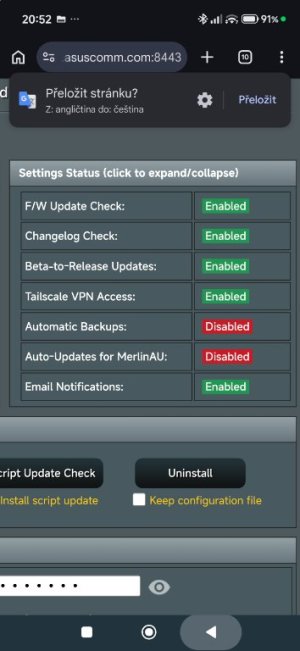
If disable au in this addon and use amtm new version auto update in addon are updates disabled but amtm show as enabled

Both script I have last version
 

Attachments

  • Screenshot_2026-03-22-20-53-00-084_com.android.chrome.jpg
    Screenshot_2026-03-22-20-53-00-084_com.android.chrome.jpg
    43.9 KB · Views: 9
Last edited:
If disable au in this addon and use amtm new version auto update in addon are updates disabled but amtm show as enabled

Both script I have last version

They are 2 separate features...
We disable "Amtm updates" if Auto-Updates for the script is enabled within the MerlinAU script itself.

"Amtm updates" only becomes available if you disable Auto-Updates in the MerlinAU script itself.
 
Jsou to 2 oddělené funkce...
„Aktualizace Amtm“ zakážeme, pokud jsou automatické aktualizace skriptu povoleny v samotném skriptu MerlinAU.

„Aktualizace Amtm“ budou k dispozici pouze v případě, že v samotném skriptu MerlinAU zakážete automatické aktualizace.
I don't know if is clearly for users from description in ssh or ui
 
oh i see. was wondering how come i keep getting this error. so means everything will be ok after RMerlin updated his website i assume?

Correct. We validate the firmware file downloaded matches the sha256 signature posted publicly.

That way we rule out download corruption as well as file tampering before attempting to flash.

However this is the first time in years that I've seen RMerlin release firmware and not update his website. I would say it's a rare oversight or mistake.

Once the website is updated, MerlinAU firmware verification will pass and everything will function as expected.
 
Last edited:
It's a CMS caching issue. While my deployment script does purge the Cloudflare cache through the API, my website has some custom modules that I wrote to dynamically display version/hash values on the website from data files that my deployment uploads. I forgot to purge the CMS cache after deploying, it should be fine now.
 
It's a CMS caching issue. While my deployment script does purge the Cloudflare cache through the API, my website has some custom modules that I wrote to dynamically display version/hash values on the website from data files that my deployment uploads. I forgot to purge the CMS cache after deploying, it should be fine now.

Ah ha! I can confirm everything appears correctly now.

I figured you were using a script to do the site updates, I just wasn't sure what went wrong this time specifically.

I appreciate you coming in and fixing it for us.
 
by the way, how can i update my node using merlinau? or how do i install it at the node?

You would connect to the node over SSH using the nodes IP address.

And run the command "amtm" and install it from AMTM, so mostly the same way you do on your primary router.
 
You would connect to the node over SSH using the nodes IP address.

And run the command "amtm" and install it from AMTM, so mostly the same way you do on your primary router.
Assuming your nodes support Merlin... fortunately, my 3 nodes at one location and 1 node at another all do :-).
 

Similar threads

Support SNBForums w/ Amazon

If you'd like to support SNBForums, just use this link and buy anything on Amazon. Thanks!

Sign Up For SNBForums Daily Digest

Get an update of what's new every day delivered to your mailbox. Sign up here!
Back
Top