

r80xcore
Regular Contributor
MerVLAN VLAN Manager – Simple and Powerful VLAN Management


LATEST CHANGELOG (often condensed, full log: main | dev
IMPORTANT!
MerVLAN is an addon for Asuswrt-Merlin that adds a graphical VLAN manager inside the web UI (LAN section).
It’s built for AP-mode deployments and helps you tag/bridge VLANs for:
Status
Supported Topologies
SSH key behavior
Requirements
Key Features
Limitations / Notes
Install
Only install if you’re comfortable with beta software (and factory reset recovery if needed).
SSH into the AP and run:
To run the newest dev version, run this command instead:
The UI will appear under LAN → MerVLAN.
Update
Run on the main AP:
for dev version, run:
Or Update via the GUI
Updater keeps settings/SSH keys, refreshes files, and re-syncs nodes (if configured).
Uninstall
From `/jffs/addons/mervlan`:
Logs & Debugging
Links / Support
See `changelog.txt` for full version history.
See `LICENSE` for license details.
LATEST CHANGELOG (often condensed, full log: main | dev
mervlan v0.52.94 dev
hw_probe.sh v0.50
- Override identity resolution — each node reads IS_NODE/NODE_ID and
applies its own override from the shared settings.json.
- Node override propagation on the main router updates node LAN port
counts without needing SSH, so the UI refreshes immediately.
- Added support for the following models:
GT-AX6000, RT-AX86U_PRO, RT-AX92U
settings.json
- New "Hardware_Override" section with per-device override sub-objects.
save_settings.sh v0.50
- Override keys are separated and written into the nested
Hardware_Override section via two-level JSON helpers.
service-event-handler.sh v0.51
- New hwprobe_vlanmgr action for on-demand hardware profile refresh.
mervlan.asp v0.50
- hwprobe_vlanmgr added to policy sets. New MVM_hwprobe() wrapper.
index.html v0.52.94
- Updated version header.
- Full APMO modal with tab navigation, validation, and state management.
- Save pipeline extended for override keys with verification polling.
- UI-side override enforcement on every settings load.
- Fixed table rebuild issues when hardware values change.
- Two save flows: normal "Save" and chained "Save & Apply".
IMPORTANT!
If you are updating from v0.52.5 or earlier, you must transition via the CLI. See this
MerVLAN is an addon for Asuswrt-Merlin that adds a graphical VLAN manager inside the web UI (LAN section).
It’s built for AP-mode deployments and helps you tag/bridge VLANs for:
- Per-SSID VLAN assignment
- Per-LAN-port VLAN assignment (access ports)
- (Experimental) Trunk ports for daisy-chained APs
- Syncing VLAN config to other APs/nodes over SSH
MerVLAN is not a router or managed switch. You still need a VLAN-aware upstream firewall/switch for routing, DHCP, and policy.
Status
- Public beta – expect bugs and occasional breaking changes.
- AP-mode only (main and any nodes/APs must be running as APs, not router mode).
Supported Topologies
- Single unit: 1x Asuswrt-Merlin AP running MerVLAN.
- AiMesh: 1x main Merlin AP + up to 5 AiMesh nodes (Ethernet backhaul only for VLAN tags).
- Standalone AP nodes: 1x Merlin “controller” AP + up to 5 standalone AP units (non-AiMesh), synced over SSH.
SSH key behavior
- AiMesh: the main AP typically shares its SSH keys with AiMesh nodes automatically.
- Standalone AP nodes (non-AiMesh): you must install the same public key on each unit (same method as the main AP) so MerVLAN can sync and run commands remotely. Only main needs to install MerVLAN.
Requirements
- Asuswrt-Merlin firmware with addon support (on every device that will tag VLANs).
- AP-mode on all participating units.
- JFFS enabled (persistent storage).
- SSH enabled on main + any standalone AP nodes.
- Ethernet backhaul only between VLAN-aware nodes/APs (Wi-Fi backhaul cannot preserve VLAN tags).
- Mandatory: VLAN-aware upstream device (managed switch + router/firewall such as OPNsense/pfSense/etc).
Key Features
- UI-driven VLAN config inside the Merlin GUI.
- SSID ↔ VLAN mapping and LAN port ↔ VLAN mapping.
- (Experimental) Trunk ports for Ethernet daisy-chain.
- Multi-node sync over SSH (push config/scripts to nodes).
- SSID-agnostic VLAN mapping:
On multi-node setups, MerVLAN applies mappings only to SSIDs present on each AP, allowing different nodes to advertise different SSIDs while preserving VLAN behavior. - Self-healing: hooks re-apply VLAN wiring after reboot and certain system events.
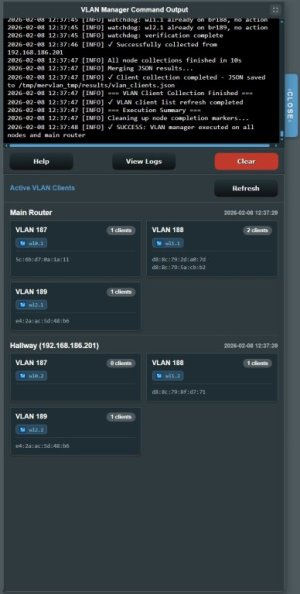
- Built-in logs + UI-visible command output for debugging.
- Advanced Port Mapping Override (APMO):
- New manual GUI WAN/LAN port mapping override system.
- Lets users define custom ethernet port assignments per device when
auto-detection gets the layout wrong or the model is not yet supported.
Limitations / Notes
- VLAN usage is practically limited by SSID slots your hardware supports.
- Some models have guest SSID/mesh quirks (certain SSIDs may only broadcast on the main node).
- Wi-Fi backhaul cannot carry VLAN tags (Ethernet only for VLAN-aware nodes).
- MerVLAN does not provide routing/firewall/DHCP.
Install
Only install if you’re comfortable with beta software (and factory reset recovery if needed).
SSH into the AP and run:
Code:
mkdir -p /jffs/addons/mervlan && /usr/sbin/curl -fsL --retry 3 "https://raw.githubusercontent.com/r80xcore/mervlan/refs/heads/main/install.sh" -o "/jffs/addons/mervlan/install.sh" && chmod 0755 /jffs/addons/mervlan/install.sh && /jffs/addons/mervlan/install.sh full
Code:
mkdir -p /jffs/addons/mervlan && /usr/sbin/curl -fsL --retry 3 "https://raw.githubusercontent.com/r80xcore/mervlan/refs/heads/dev/install.sh" -o "/jffs/addons/mervlan/install.sh" && chmod 0755 /jffs/addons/mervlan/install.sh && /jffs/addons/mervlan/install.sh dev fullThe UI will appear under LAN → MerVLAN.
Update
Run on the main AP:
Code:
/jffs/addons/mervlan/functions/update_mervlan.sh update main
Code:
/jffs/addons/mervlan/functions/update_mervlan.sh update devUpdater keeps settings/SSH keys, refreshes files, and re-syncs nodes (if configured).
Uninstall
From `/jffs/addons/mervlan`:
- Standard (keep addon data):
Code:./uninstall.sh - Full (remove addon dirs + temp workspace):
Code:./uninstall.sh full
- Standard (keep addon data):
Logs & Debugging
- Primary log directory: `/tmp/mervlan_tmp/logs`
- Common logs:
- `vlan_manager.log` – VLAN apply pipeline, heal checks, and node execution
- `cli_output.log` – commands executed from the UI and installer
- Logs are also accessible via the UI under `view logs` in info.
- Bug reports: please include relevant log files (or excerpts) when reporting issues — missing logs make problems much harder to diagnose.
Links / Support
See `changelog.txt` for full version history.
See `LICENSE` for license details.
Attachments
Last edited:


