What's new

Need Help Setting Up 3 VLANs (Home, Guest, IoT) on ASUSWRT-Merlin (RT-AC86U)

utte

New Around Here
I'm trying to set up three isolated networks (VLANs) on an ASUS RT-AC86U running ASUSWRT-Merlin 386.10_0:

  • br0 (Home) – default LAN
  • br1 (Guest) – for guests, works fine
  • br2 (IoT) – this one is problematic
My goal:

Each VLAN should have:

  • A separate subnet and DHCP range
  • Internet access
  • Isolation (IoT → no access to br0/home or br1/guest)
What I’ve done:

Activated second guest network in GUI and called IoT then also done.

  1. Created the bridge and interface:
Bash:
brctl addbr br2
brctl addif br2 wl0.2
ifconfig br2 192.168.20.1 netmask 255.255.255.0 up
  1. Configured dnsmasq for br2 (in /jffs/configs/dnsmasq.conf.add):
INI:
interface=br2
dhcp-range=192.168.20.100,192.168.20.200,255.255.255.0,12h
dhcp-option=br2,3,192.168.20.1
dhcp-option=br2,6,1.1.1.1,8.8.8.8

3. Enabled firewall rules (in /jffs/scripts/firewall-start):
Bash:
#!/bin/sh
iptables -I INPUT -i br2 -p udp --dport 67 -j ACCEPT
iptables -I INPUT -i br2 -p udp --dport 68 -j ACCEPT
Made the script executable.

Verified rules are inserted manually and persist when run.

Interface br2 shows up fine in iptables after manual run.

  1. Verified bridge membership:
Bash:
# brctl show
br2 has wl0.2 attached
  1. Checked interface mode (problem):
Bash:
wl -i wl0.2 status
Mode: Managed

Despite setting:

Bash:
nvram set wl0.2_mode=ap
nvram commit

and running:

Bash:
wl -i wl0.2 down
wl -i wl0.2 ap 1
wl -i wl0.2 up
…the mode stays as Managed.

Problem:

  • wl0.2 refuses to stay in AP mode — it always returns to Managed.
  • No DHCP traffic seen on wl0.2 (tcpdump -i wl0.2 port 67 or 68 shows nothing).
  • Clients can't connect or get IPs on IoT SSID.
Questions:

  1. What’s forcing wl0.2 to stay in Managed mode?
  2. How can I persistently set it to AP mode for VLAN use?
  3. Is there a better way to isolate wireless SSIDs into VLANs on ASUSWRT-Merlin?
I also have RT-AX86U PRO (That I could use if it has better support)
 
Welcome. Edit: After rereading your initial post. Are you using the RT-AC86U as an AiMesh or AP node to the RT-AX86U Pro?

If the RT-AC86U is a stand alone router, not AiMesh and not an AP node. Have you given any consideration to using the addon script YazFi to accomplish what you seek?

Also note that Asus-Merlin 386.10 is is extremely out of date (10-Mar-2023). You should strongly consider updating that router to the last Asus-Merlin firmware for it, 386.14_2 (17-Nov-2024).
https://sourceforge.net/projects/asuswrt-merlin/files/RT-AC86U/Release/

Note that you really cannot do true VLAN easily (if at all) on the AC series of routers. There is some discussion and attempts here to do so in the following discussion:
Edit to add: The RT-AX86U Pro can do VLAN and likely do what you seek easily and without all the scripting using it's Guest Network Pro Profile option when the 3006.102.x firmware is loaded on the router. However, as discussed in a number of other topics the Guest Network Pro/VLAN feature of the 3006 firmware doesn't typically flow down to non 3006 firmware Asus routers setup in AiMesh or AP mode.

Any particular reason why you are using the RT-AC86U and not the RT-AX86U to accomplish what you seek?
 
Last edited:
I have just bought the RT-AX86U. But thought of practice first little on my RT-AC86U to be able to restore internet when family gets home. However maybe that was an bad idea if its easier to make it work on RT-AX86U.

I use it as an router to access internet. Thanks for remind me to update the firmware.

Thanks for the answer I will try some more and might come back with more questions. I get a lot of help from ChatGTP also, but feelt it was lacking this info.
 
@utte, Avoid ChatGTP or other AI programs when it comes to asking questions about complex router configurations or scripting in Asus-Merlin firmware. It is often wrong on the details. Use the forum search feature to find a wealth of information in this forum on Asus routers and how to configure them.

Note that the RT-AX86U is a different router than the RT-AX86U Pro. The RT-AX86U Pro supports the 3006 firmware and it's VLAN/Guest Network Pro feature. The RT-AX86U does not support 3006 firmware and it's associated features.
 
Thanks! The RT-AX86U Pro GUI was much simpler. As you said, I got almost everything working the way I wanted straight out of the box.

The only thing I haven’t managed to fix is assigning static IP addresses via DHCP based on MAC addresses. It only works for my main network. For the guest and IoT VLANs, I’m unable to do it.

The problem is that I can only specify static IP addresses within the range 192.168.1.2 to 192.168.1.254. But for VLAN 2, I want to use 192.168.2.1 to 192.168.2.254, and for VLAN 3, 192.168.3.1 to 192.168.3.254.

DHCP hands out the correct IP addresses dynamically on each VLAN, but when I try to bind a MAC address to a specific IP, it doesn’t work—probably because the static IP has to be in the 192.168.1.x range. As a result, the device just gets an IP assigned dynamically instead.

Is this possible to achieve?
 
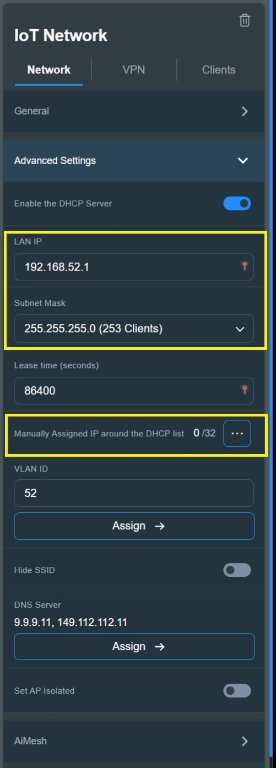
How to set manual IP reservations and different IP address subnets for Guest Network Pro profiles has been discussed in the past. There are two ways to do so. First is, when creating the Guest Network Pro profile you need to disable the option "Use same subnet as main network". Once that option is disabled you can configure the IP address subnet range for the Guest Network Pro profile. The Profiles typically default to 192.168.52.x, 192.168.53.x and so on. From there you can assign a manual IP address to each Guest Network Pro client by using the Advanced > Manually assign IP addresses around the DHCP list option. See attached image.

Second method when, Use same subnet as main network is set to disabled, for Guest Network Pro client manual IP addresses is to use /jffs/configs/dnsmasq-x.conf.add or dnsmasq-sdn.postconf file. Personally I use dnsmasq-x.conf.add (ex: dnsmasq-1.conf.add and dnsmasq-2.conf.add) to set Guest Network Pro Profile manual IP address reservations. See my post at the following link for an example of how I have my reservations setup:
https://www.snbforums.com/threads/a...-4-is-now-available.94651/page-26#post-958305
 

Attachments

  • SDN.jpg
    SDN.jpg
    28.9 KB · Views: 145
Last edited:
Thanks! The RT-AX86U Pro GUI was much simpler. As you said, I got almost everything working the way I wanted straight out of the box.

The only thing I haven’t managed to fix is assigning static IP addresses via DHCP based on MAC addresses. It only works for my main network. For the guest and IoT VLANs, I’m unable to do it.

The problem is that I can only specify static IP addresses within the range 192.168.1.2 to 192.168.1.254. But for VLAN 2, I want to use 192.168.2.1 to 192.168.2.254, and for VLAN 3, 192.168.3.1 to 192.168.3.254.

DHCP hands out the correct IP addresses dynamically on each VLAN, but when I try to bind a MAC address to a specific IP, it doesn’t work—probably because the static IP has to be in the 192.168.1.x range. As a result, the device just gets an IP assigned dynamically instead.

Is this possible to achieve?
It is possible using the GUI to assign different subnets to VLAN1 & VLAN2 and then as bennor explains assign static IPs in these subnets to specific devices. I have done it and it works perfectly. What I don't believe is possible is to use a different subnet for any guest network beyond the first two using the GUI.

Also, the language in the instructions to assign static IPs around the range of the DHCP pool doesn't seem to work or at least it hasn't for me since there doesn't seem to be a setting allowing you to set a limited range of IPs to assign automatically as you can do with your primary network. I have tried setting a scope of less other than a full /24 and then assign static IPs for specific IPs that were outside that scope and that didn't work. In any case just using the full /24 and assigning static IPs from that pool works for me and the router deals with it.
 
What I don't believe is possible is to use a different subnet for any guest network beyond the first two using the GUI.
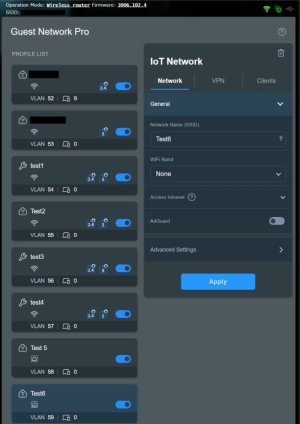
May depend on the router. Did a quick and dirty test on a RT-AX86U Pro running Asus-Merlin 3006.102.4 and was able to setup a total of six Guest Network Pro WiFi Profiles. See attached image. Each configured with Use same subnet as main LAN set to disabled. And each having their own unique IP address range. On four of the six I changed the IP address to something other than 192.168.52.x, 192.168.53.x, etc.
Code:
br52 inet addr:192.168.52.1  Bcast:192.168.52.255  Mask:255.255.255.0
br53 inet addr:192.168.53.1  Bcast:192.168.53.255  Mask:255.255.255.0
br54 inet addr:192.168.200.1  Bcast:192.168.200.255  Mask:255.255.255.0
br55 inet addr:192.168.150.1  Bcast:192.168.150.255  Mask:255.255.255.0
br56 inet addr:192.168.20.1  Bcast:192.168.20.255  Mask:255.255.255.0
br57 inet addr:192.168.30.1  Bcast:192.168.30.255  Mask:255.255.255.0
br58 inet addr:192.168.54.1  Bcast:192.168.54.255  Mask:255.255.255.0
br59 inet addr:192.168.55.1  Bcast:192.168.55.255  Mask:255.255.255.0
Didn't do any other testing other than initial setup.

Trying to add a seventh Guest Network Pro WiFi profile the system blocked creation indicating; "The WiFi interface has reached the maximum. (2.4GHz / 5GHz)". The GUI does allow me to create additional Profiles, with IP addresses, provided I set WiFi band to "None". Created two of these types of Profiles as a test. Didn't experiment to see exactly how many of these types of non WiFi Profiles can be created.
 

Attachments

  • SDN.jpg
    SDN.jpg
    41.6 KB · Views: 142
It is possible using the GUI to assign different subnets to VLAN1 & VLAN2 and then as bennor explains assign static IPs in these subnets to specific devices.
Just a caveat on this. I would be interested to see if you hit a limit as I did. I never got to the maximum of 32. RMerlin noted this was due to memory.

I ended up using @bennors dnsmasq-x.conf.add approach.

I went a step further having some fun with hostnames and icons, originally for YazDHCP for the Primary Assignments but works for Guests as well.
 
Last edited:
@utte, Avoid ChatGTP or other AI programs when it comes to asking questions about complex router configurations or scripting in Asus-Merlin firmware. It is often wrong on the details. Use the forum search feature to find a wealth of information in this forum on Asus routers and how to configure them.

Note that the RT-AX86U is a different router than the RT-AX86U Pro. The RT-AX86U Pro supports the 3006 firmware and it's VLAN/Guest Network Pro feature. The RT-AX86U does not support 3006 firmware and it's associated features.
Correct. The AX88U Pro shares the same processor as the initial WIFI 7 BE series thus giving it some future proofing despite being a WIFI generation behind the latest and greatest. That is why I bought it, being a bit cheap to go all out on the BE series at this time.
 
May depend on the router. Did a quick and dirty test on a RT-AX86U Pro running Asus-Merlin 3006.102.4 and was able to setup a total of six Guest Network Pro WiFi Profiles. See attached image. Each configured with Use same subnet as main LAN set to disabled. And each having their own unique IP address range. On four of the six I changed the IP address to something other than 192.168.52.x, 192.168.53.x, etc.
Code:
br52 inet addr:192.168.52.1  Bcast:192.168.52.255  Mask:255.255.255.0
br53 inet addr:192.168.53.1  Bcast:192.168.53.255  Mask:255.255.255.0
br54 inet addr:192.168.200.1  Bcast:192.168.200.255  Mask:255.255.255.0
br55 inet addr:192.168.150.1  Bcast:192.168.150.255  Mask:255.255.255.0
br56 inet addr:192.168.20.1  Bcast:192.168.20.255  Mask:255.255.255.0
br57 inet addr:192.168.30.1  Bcast:192.168.30.255  Mask:255.255.255.0
br58 inet addr:192.168.54.1  Bcast:192.168.54.255  Mask:255.255.255.0
br59 inet addr:192.168.55.1  Bcast:192.168.55.255  Mask:255.255.255.0
Didn't do any other testing other than initial setup.

Trying to add a seventh Guest Network Pro WiFi profile the system blocked creation indicating; "The WiFi interface has reached the maximum. (2.4GHz / 5GHz)". The GUI does allow me to create additional Profiles, with IP addresses, provided I set WiFi band to "None". Created two of these types of Profiles as a test. Didn't experiment to see exactly how many of these types of non WiFi Profiles can be created.
I count 5 2.4s and 5 5s....

Did you ever change the Subnet Mask (field) to something like 255.255.255.50 so you could actually "manually assign IPs around the DHCP range"?
 
I count 5 2.4s and 5 5s....
In that test on a RT-AX86U Pro running 3006.102.4, there were the following Guest Network Pro profiles.
1 x 2.4 GHz WiFi Band
2.4 GHz WiFi Band.jpg

1 x 5 Ghz WiFi Band
5 GHz WiFi Band.jpg

4 x 2.4 GHz/5 Ghz WiFi Band
2.4 GHz - 5 GHz WiFi Band.jpg


Did you ever change the Subnet Mask (field) to something like 255.255.255.50 so you could actually "manually assign IPs around the DHCP range"?
No. Just did a quick and dirty test setting up extra Guest Network Pro profiles.

Currently, for manually assigning Guest Network Pro profile IP addresses to clients, I use YazDHCP:
Prior to YazDHCP being updated to support Guest Network Pro, I used dnsmasq-x.conf file(s) to manually configure IP addresses for the Guest Network Pro profile clients.
 
Maybe that's 1*2.4 plus 4*2.4 and 1*5 plus 4*5. Got to count the combined separately...

Anyways you can adjust the DHCP range by changing the last triplet just an FYI if you didn't already know. I was noticing my TP-Link Deco BE95 would automatically select 192.168 68.1 255.255.252.0, and DHCP range 192.168.68.2 - 162.168.71.254. So going the other way actually limits...
255.255.255.50 would assign roughly 192.168. 50 - 192.168.50.254 via DHCP and you could manually assign below that. (I think)...
 
I'm not sure because the DHCP could assign from 192.168.50.2 - 192.168.50.204 leaving the upper numbers free for manual assignment.

I never got one guest network to pass through the darn managed switch so I didn't even bother tinkering with this...
 
Currently, for manually assigning Guest Network Pro profile IP addresses to clients, I use YazDHCP:
Prior to YazDHCP being updated to support Guest Network Pro, I used dnsmasq-x.conffile(s) to manually configure IP addresses for the Guest Network Pro profile clients.
For the record that’s exactly what I’m doing on two independent networks, YazDHCP being very easy to use.
 
Last edited:
changing the last triplet
No offense but I believe each set of 3 digits in the IP address are called octets btw.
I never got one guest network to pass through the darn managed switch so I didn't even bother tinkering with this...
Yes, you probably saw that in the separate thread on this and I silently followed your headaches on that (this thread is probably not the best place to discuss it though), hope you get it sorted out.

Might be worth revisiting the switch capabailities of AiMesh nodes thread, I had some great help from knowledgeable posters to that thread.
 
I never got one guest network to pass through the darn managed switch so I didn't even bother tinkering with this...
There have been a few other discussions (see forum search) on issues with trying to pass VLAN through switches and or being passed to AiMesh nodes. Some have had success, others haven't. For the switches, it depends on the switch capabilities and management options.
 

Latest threads

Support SNBForums w/ Amazon

If you'd like to support SNBForums, just use this link and buy anything on Amazon. Thanks!

Sign Up For SNBForums Daily Digest

Get an update of what's new every day delivered to your mailbox. Sign up here!
Back
Top