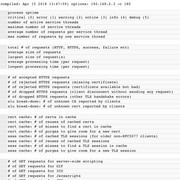
Nice, 12 days... 296... let’s see mine in 12 days.mine is set to -c 500
"sct 296 cert cache: # of certs in cache" and memory usage 6.3% with 3d 13:33 uptime. 413 MB of 512MB RAM is used on my router and I don't care how much RAM is used.
1.92 / 1024.00 MB Swap is used, router is up for more than 12 days.
https://www.linuxatemyram.com/
Nice, 12 days... 296... let’s see mine in 12 days.
Mine is 150 and memory is at 3.968 (1.6%) using the new OpenSSL lib.
But I still find it not enough after 3 and a half day with 15 purge.
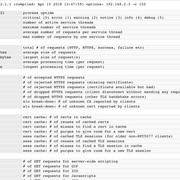
memory usage 6.3% with 3d 13:33 uptime.
Hmmm... whatever... I think I can spare 6mb for that 250 cert... lolFinding the right -c X will be an iterative process. Doesn't hurt to start with a bigger value (for people already using the new openssl lib).
My two instances in load balance mode after 11 days. I'm still on the first issue of 2.1.0. '-c 250' but only used up ~200 slots so far.
n1 is RT56/Entware. n2 is Edgerouter X/Debian.
Memory usage on n1.
![]()
Memory usage on n2.
![]()
Both have same amount of requests. n2 ends up using less memory. This is a surprise to me because memory situation used to be much worse on Debian than Entware.
I did have a new openssl lib on Debian. Seems its effect is even more profound than on Entware.
ould you check if you're on the new openssl lib? 6.3% translates to ~30MB memory usage. That sounds like the old openssl lib.
Lol... see your memory usage drop....I've checked and it was "libopenssl - 1.0.2n-1b"so updated to 1c
I see that even the cert cache increase, not necessarily the memory will move upward.
...
Not consistent.
We use essential cookies to make this site work, and optional cookies to enhance your experience.