What's new

scMerlin scMerlin 2.5.47 - Service and script control menu for Asuswrt-Merlin

Release Notes for scMerlin v2.5.44 production version now available
[2025-Oct-25]


1) FIXED: Added code to check if the DDNS service is enabled before restarting it.
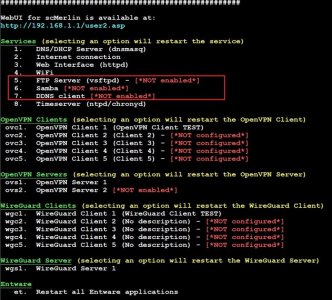
2) IMPROVED: Added code to the SSH CLI menu to show if Samba, FTP, and DDNS services are enabled.
3) Miscellaneous code improvements.

scMerlin_SSH_CLI_Menu_Pg1.jpg


** The fork from @Jack Yaz's scMerlin add-on is now hosted on the AMTM-OSR GitHub repo:
 

Attachments

  • scMerlin_SSH_CLI_Menu_Pg1.jpg
    scMerlin_SSH_CLI_Menu_Pg1.jpg
    142.5 KB · Views: 23
Release Notes for scMerlin v2.5.45 production version now available
[2025-Nov-07]


1) Removed old Tomato JavaScript file references.
2) Miscellaneous code improvements.


** The fork from @Jack Yaz's scMerlin add-on is now hosted on the AMTM-OSR GitHub repo:
 
Can you detect the Samba that is installed from Entware too as running?
 
Can you detect the Samba that is installed from Entware too as running?
I can take a look as time allows. I assume there's an Entware service script (.../init.d/Snn...) associated with it; if so, it can be checked to see if it's currently running. Note that I don't use Samba at all on my router.
 
I can take a look as time allows. I assume there's an Entware service script (.../init.d/Snn...) associated with it; if so, it can be checked to see if it's currently running. Note that I don't use Samba at all on my router.
Yes it is called
Code:
S91smb
 
For every Entware service you have in your setup, you always have the following commands available to execute:
start / stop / restart / check / kill

Just execute the service's script file with your desired command. All Entware service scripts are located at the following folder:
/opt/etc/init.d/

So, in your case particularly, you have the following command to check the SAMBA service:
Code:
/opt/etc/init.d/S91smb check

I think it's not much practical to build your suggested feature into scMerlin, as I don't believe there are that many users who use the SAMBA service from Entware.
Please note that I do use SAMBA but the built-in one, so actually I do understand your needs.
 
Last edited:
Release Notes for scMerlin v2.5.46 production version now available
[2025-Dec-05]


1) IMPROVED: Read the CPU temperature from a different new file available on some BE-class routers, like the RT-BE92U.
The new file was recently "discovered" while @Viktor Jaep and @fr0s7 were troubleshooting a problem with RTRMON running on the RT-BE92U, and @dave14305 pointed out the file to get the CPU temperature from.​


** The fork from @Jack Yaz's scMerlin add-on is now hosted on the AMTM-OSR GitHub repo:
 
Hey @Martinski,
First of all, many thanks to you and everyone involved for the continuing support on scMerlin.

The CLI can look quite cluttered with many "NOT configured" / "NOT enabled" entries (especially for VPN slots). This consumes screen space and also slightly slows down the display of all options (at least on my 13" MacBook). I felt like scMerlin CLI (or myself) needed a quick way to focus on active items without having to delete any configuration, so I went ahead and developed* this feature locally (:
I'm not a professional developer, but a hobbyist and a product owner who understands code and has access to AI coding tools. So, yes, all the work was done by "vibe coding" under my supervision.
Feature Summary
I added a toggle in the Others menu that handles hiding/showing inactive/disabled entries.
  • Inactive Entry Definition: Any entry showing NOT configured or NOT enabled.
  • Key Assignment: i
  • Menu Label: "Show/hide disabled items"
  • Persistence: The setting persists across script exits and reboots.
ZakGC5C.gif

What Changed (High-Level Overview)
  • A menu flag (showDisabledMenuItems) was added and persisted to disk so the preference survives restarts.
  • Rendering for the following menus now skips rows that match the inactive pattern when the flag is off:
    • Services
    • OpenVPN Clients/Servers
    • WireGuard Clients/Servers
  • The Others menu retains the toggle entry and is never filtered.
File(s) Touched
The changes are contained within scmerlin.sh.
  • Added load/save helpers and a persistent state file (MENU_SHOWDISABLED_FILE).
  • Added the showDisabledMenuItems flag and logic to read/write it.
  • Updated menu render loops for:
    • Services
    • OpenVPN Clients
    • OpenVPN Servers
    • WireGuard Clients
    • WireGuard Servers
  • Added input handler to toggle on key i
I'd be happy to share the code with you if you think this is a valuable addition 😇
 
Last edited:
Hey @Martinski,
First of all, many thanks to you and everyone involved for the continuing support on scMerlin.

The CLI can look quite cluttered with many "NOT configured" / "NOT enabled" entries (especially for VPN slots). This consumes screen space and also slightly slows down the display of all options (at least on my 13" MacBook). I felt like scMerlin CLI (or myself) needed a quick way to focus on active items without having to delete any configuration, so I went ahead and developed* this feature locally (:
I'm not a professional developer, but a hobbyist and a product owner who understands code and has access to AI coding tools. So, yes, all the work was done by "vibe coding" under my supervision.
Feature Summary
I added a toggle in the Others menu that handles hiding/showing inactive/disabled entries.
  • Inactive Entry Definition: Any entry showing NOT configured or NOT enabled.
  • Key Assignment: i
  • Menu Label: "Show/hide disabled items"
  • Persistence: The setting persists across script exits and reboots.
What Changed (High-Level Overview)
  • A menu flag (showDisabledMenuItems) was added and persisted to disk so the preference survives restarts.
  • Rendering for the following menus now skips rows that match the inactive pattern when the flag is off:
    • Services
    • OpenVPN Clients/Servers
    • WireGuard Clients/Servers
  • The Others menu retains the toggle entry and is never filtered.
File(s) Touched
The changes are contained within scmerlin.sh.
  • Added load/save helpers and a persistent state file (MENU_SHOWDISABLED_FILE).
  • Added the showDisabledMenuItems flag and logic to read/write it.
  • Updated menu render loops for:
    • Services
    • OpenVPN Clients
    • OpenVPN Servers
    • WireGuard Clients
    • WireGuard Servers
  • Added input handler to toggle on key i
I'd be happy to share the code with you if you think this is a valuable addition 😇
You're absolutely correct about the very cluttered, busy, and looong CLI main menu for scMerlin, especially after having added the WireGuard client and server items, plus the tags for "NOT configured" or "NOT enabled."

To try to fix this clutter, on the weekend following Thanksgiving, I made a separate branch and started taking apart the main menu options into their own sub-menus so that the main menu becomes much shorter, more manageable, and can be shown in one screenful. I was almost done, but then I had to refocus my attention to work on Scribe & uiScribe (I consider them a higher priority item), and I haven't been able to get back to scMerlin and finish that work.

The following screenshots show what I have so far:

scMerlin_SSH_CLI_TopMainMenu.jpg


scMerlin_SSH_CLI_ServicesMenu.jpg


scMerlin_SSH_CLI_OpenVPNMenu.jpg


scMerlin_SSH_CLI_RouterUtilitiesMenu.jpg


scMerlin_SSH_CLI_ToggleOptionsMenu.jpg


I still need a couple of hours to tie up all the loose ends, reconnect the "wires under the hood," and run testing and validation. I'll try to do that sometime this weekend if I can, and then get a BETA development version out the door for user testing (I'm busy today with a couple of honey-do tasks my wife had for me this weekend: put up the Christmas lights on the exterior of the house, and then we'll put up the Christmas tree ;)😜).

Anyway, I hope that taking apart the main menu into sub-menus will provide a better user experience. WRT your proposal to be able to toggle (i.e. hide/show) the inactive/disabled items, I think it's a good idea, and it could be incorporated into the new sub-menus. Something to do for next weekend. :D;)

Thanks a lot for the suggestion.
 
Last edited:
For every Entware service you have in your setup, you always have the following commands available to execute:
start / stop / restart / check / kill
A rather late reply, but this is not always true.

While it is fairly safe to assume that every init.d S script will have a start function (or default to it) whether it supports any other functions is entirely down to the way the script was written. Nothing is enforced. Entware's Samba for example only supports start, stop, restart and reload. Additionally, without modification it is incompatible with asuswrt-merlin.
 
The latest scMerlin 'develop' branch v2.5.47_25120720 version is now available for user testing.

There are significant visual changes to the top CLI Main Menu. All the groups of options were separated and placed into their own sub-menus for improved navigation, better handling, and a more user-friendly experience. Functionality-wise, each feature should have no difference in operation.

To get the latest 'develop' branch v2.5.47_25120720 version, run the following commands:
Bash:
/jffs/scripts/scmerlin develop
/jffs/scripts/scmerlin forceupdate

@underdose,
Please try this latest 'develop' branch version. Hopefully, it should improve the user experience, and perhaps there might no longer be a need for a feature to hide/show the inactive/disabled items. Let me know how it works for you.

Sample screenshots:

scMerlin_v2.5.47_SSH_CLI_Top_MainMenu.jpg


scMerlin_v2.5.47_SSH_CLI_Services_SubMenu.jpg


scMerlin_v2.5.47_SSH_CLI_OpenVPN_SubMenu.jpg


scMerlin_v2.5.47_SSH_CLI_WireGuard_SubMenu.jpg


scMerlin_v2.5.47_SSH_CLI_DevelopHelp.jpg
 
@underdose,
Please try this latest 'develop' branch version. Hopefully, it should improve the user experience, and perhaps there might no longer be a need for a feature to hide/show the inactive/disabled items. Let me know how it works for you.

Looks great, works super fast! Thanks for putting in the effort to improve the UX.

You're right, there's absolutely no need for a show/hide feature anymore, the new structure handles the clutter perfectly.

There's just one minor point, based on my personal usage: I would ideally keep the Services menu items available on the initial screen. I think they are the most used features and should be available instantly. However, that's just based on how I use scMerlin, and I can definitely live without that change.
 
Looks great, works super fast! Thanks for putting in the effort to improve the UX.

You're right, there's absolutely no need for a show/hide feature anymore, the new structure handles the clutter perfectly.

There's just one minor point, based on my personal usage: I would ideally keep the Services menu items available on the initial screen. I think they are the most used features and should be available instantly. However, that's just based on how I use scMerlin, and I can definitely live without that change.
Hmmm... Let me think about this. Nothing is set in stone yet... ;):D
 
I love how much cleaner the interface is. Either with or without Services menu on main page is fine...
 
I love how much cleaner the interface is. Either with or without Services menu on main page is fine...
Yeah, I'm really liking it myself, especially when using my iPad, where the virtual keyboard already takes a good chunk of space on the screen. Now, the much shorter main menu and each sub-menu can be shown in one screenful, and I don't have to scroll up and down to see what's what!! 👍🤟

I'm already planning to do the same type of "CLI main menu cleanup" for several of the other add-ons that have too many items listed on the top main menu (connmon, ntpMerlin, spdMerlin, dn-vnStat would be the top contenders).
 
Release Notes for scMerlin v2.5.47 production version now available
[2025-Dec-12]


1) IMPROVED: Modified the CLI Main Menu to separate groups of options and settings into their own sub-menus.
This is an effort to make the top Main Menu shorter, more manageable, and more user-friendly, and to improve the user experience, as it had become very cluttered, busy, and excessively long, making it impossible to show on a single screen, especially when using small screen displays.​

I decided to make a production release of scMerlin in its current form to make it available to more users so it can get more mileage. If there's an overwhelming demand to change the Main Menu to include a specific sub-menu (e.g. Services), I can take a 2nd look; but, at this point, I'd prefer to focus my attention on other items in my to-do list.

Sample screenshots:

scMerlin_v2.5.47_SSH_CLI_Top_MainMenu.jpg


scMerlin_v2.5.47_SSH_CLI_Services_SubMenu.jpg


scMerlin_v2.5.47_SSH_CLI_OpenVPN_SubMenu.jpg


scMerlin_v2.5.47_SSH_CLI_WireGuard_SubMenu.jpg


scMerlin_v2.5.47_SSH_CLI_RouterUtilities_SubMenu.jpg
 
Well I haven’t installed this yet but lots of trials with my system recently had me curious about an easier way to issue a Wifi restart. The addon scMerlin seems to have a great way to do this and issue many other commands via a nice WebGUI.

I did search this thread for “service restart_wireless” and nothing came up that was obvious, so apologies if I missed that. Simple question, the Wi-Fi restart, presumably it issues that command?

No biggy if too hard basket, but would it be possible (maybe it’s there already?) to have in the WebGUI, a tooltip info hover over the service that states the CLI command you would normally issue via SSH?
 
Well I haven’t installed this yet but lots of trials with my system recently had me curious about an easier way to issue a Wifi restart. sCMerlin seems to have a great way to do this and issue many other commands via a nice WebGUI.

I did search this thread for “service restart_wireless” and nothing came up that was obvious, so apologies if I missed that. Simple question, the Wi-Fi restart, presumably it issues that command?

It uses service restart_wireless
Found here: https://github.com/AMTM-OSR/scMerlin/blob/07e56cf7a58e7129847630b63af9a08632f7b44b/scmerlin.sh#L2790
 
For Information [also contains warnings]:

'service' follows a pattern as follows:

service <action>_<servicename>

Don't miss the underscore in the middle (no spaces either side)

The <action> can include 'restart' and/or 'start' and 'stop'.

[There are variations/exceptions such as 'kill' exists as well as 'stop' as an example of other actions possible for a specific service]

Basically you NEED to understand the service and its possible actions, they are NOT all the same.


This means that you should UNDERSTAND what the service DOES and what it IMPACTS before you start 'playing' with it.
If you don't understand then don't 'play' as it can break things BADLY ... particularly if you are operating remotely.
In extremis you may need to reboot the router to ensure everything starts up in the correct order and all works again.
This is the danger of 'playing' if you cannot physically access the router for a 'reboot' and you 'killed' the ability to 'connect' to it remotely by 'stopping/killing' a needed service !!!

<servicename> is the name of a service running on the router.

i.e. service stop_dnsmasq or service restart_wan ........

'scmerlin' frontends these sorts of commands so you don't have to remember them or mistype them !!! :eek:
 
For Information [also contains warnings]:

This means that you should UNDERSTAND what the service DOES and what it IMPACTS before you start 'playing' with it.
If you don't understand then don't 'play' as it can break things BADLY ... particularly if you are operating remotely.
Not sure what prompted your post, but if this is directed at me, due to the query I posted above then thank you for the warning, I admit to having had a few dim moments over the years, both locally and over a VPN, but ultimately nothing that cannot ultimately be solved by a hard reset; albeit clearly for remote systems I prefer that not to be the outcome in every case.

You would hopefully see from past posts that I am reasonably aware of at least some of the services I restart on a regular basis, service restart_wireless being one of them (service restart_mdns, service restart_leds, service restart_dnsmasq, service restart_httpd being among others).

I felt however that in this instance (and taking on your board your note of caution here) there was some clarity required where the Service Name stated e.g. "Wifi" with a nice Big Restart Button, that the service was indeed the same service restart_wireless command I have issued via SSH on more occasions than I can recall :-).

But again, you are correct to point these out, so the concern is appreciated.
 

Latest threads

Support SNBForums w/ Amazon

If you'd like to support SNBForums, just use this link and buy anything on Amazon. Thanks!

Sign Up For SNBForums Daily Digest

Get an update of what's new every day delivered to your mailbox. Sign up here!
Back
Top