The 11 minute cron is automatically added upon enabling any notification type. Its used to monitor for failed Email attempts and update Router uptime etc
Unfortunately WAN IP change monitoring cannot be enabled without also enabling WAN IP Email notifications, if you want WAN IP changes logged you must enable the Email notifications for it
The 11 minute cron is automatically added upon enabling any notification type. Its used to monitor for failed Email attempts and update Router uptime etc
Unfortunately WAN IP change monitoring cannot be enabled without also enabling WAN IP Email notifications, if you want WAN IP changes logged you must enable the Email notifications for it
I think it would be better if script can allow some customization of cron expression itself... Like every 10 days ... i dont want to write to /jffs every 11 mins or even every hour (which is the the max we can configure using current script).
Altering cron run intervals will directly affect the calculated estimated down time during reboot notifications... ie. you set cron to 10 days when the router comes back up if the last time cron ran was 10 days ago (last time router uptime was recorded) the reboot Email notification will say the router was down for 10 days between powerloss/reboot. If an Email fails to send the script will not try again till next time cron is scheduled to run.
As you're already aware you can edit cron in /jffs/scripts/addons/wicens/wicens_update_conf.wic to 59 mins, or this is the code used to check cron status
Code:
F_cru() {
    case "$1" in
        'check')
            cru l | grep -Fq "$script_name_full" && return 0
            return 1
        ;;

        'create')
            cru a wicens "*/${cron_check_freq} * * * * $script_name_full cron"
            F_log_terminal_ok "Added entry in cron(cru) with ${cron_check_freq}m interval"
        ;;

        'remove')
            if F_cru check ; then
                cru d wicens
                F_log_terminal_ok "Removed entry in cron(cru)"
            else
                F_terminal_check_ok "No entry in cron(cru) to remove"
            fi
        ;;
    esac
    return 0
} # cru
You can manually create any cron interval you want within cru as long as the script path contains /jffs/scripts/wicens.sh cron in your cru entry the script will operate fine, just remember router downtime calculations in reboot emails will be borked and re-attempts wont happen until cron runs again
Altering cron run intervals will directly affect the calculated estimated down time during reboot notifications... ie. you set cron to 10 days when the router comes back up if the last time cron ran was 10 days ago (last time router uptime was recorded) the reboot Email notification will say the router was down for 10 days between powerloss/reboot. If an Email fails to send the script will not try again till next time cron is scheduled to run.
As you're already aware you can edit cron in /jffs/scripts/addons/wicens/wicens_update_conf.wic to 59 mins, or this is the code used to check cron status
Code:
F_cru() {
    case "$1" in
        'check')
            cru l | grep -Fq "$script_name_full" && return 0
            return 1
        ;;

        'create')
            cru a wicens "*/${cron_check_freq} * * * * $script_name_full cron"
            F_log_terminal_ok "Added entry in cron(cru) with ${cron_check_freq}m interval"
        ;;

        'remove')
            if F_cru check ; then
                cru d wicens
                F_log_terminal_ok "Removed entry in cron(cru)"
            else
                F_terminal_check_ok "No entry in cron(cru) to remove"
            fi
        ;;
    esac
    return 0
} # cru
You can manually create any cron interval you want within cru as long as the script path contains /jffs/scripts/wicens.sh cron in your cru entry the script will operate fine, just remember router downtime calculations in reboot emails will be borked and re-attempts wont happen until cron runs again
Thanks for the response. As my requirement is just to send a email when router reboots and dont care about time and all so altering cron expression manually in script will work fine for me.
I think I might need to change in "F_serv_start()" function too correct?
Thanks for the response. As my requirement is just to send a email when router reboots and dont care about time and all so altering cron expression manually in script will work fine for me.
I think I might need to change in "F_serv_start()" function too correct?
Sorry yes, in order to not have to manually create your custom cru(cron) after reboots that function would need to be edited in /jffs/scripts/wicens.sh to be persistent.
Although you will always show a MD5(hotfix) update if ever checking for script updates. At this point if there ever is an update it will be version number change though. I've taken a massive leap and Im currently implementing an Opnsense firewall as my gateway so there likely won't be any further development of this script
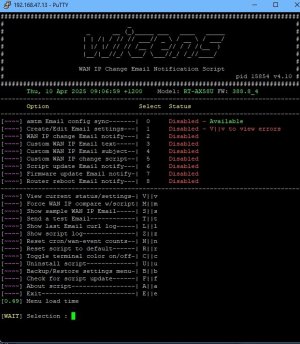
Just had occasion to put WICENS on a Mesh Node, specifically for a Reboot email (8) only, as obviously it doesn't have a WAN IP itself to perform aa WAN IP change (nor did I want that). I have email set up in amtm so I wanted to just sync (0) with that, not edit any settings (1).
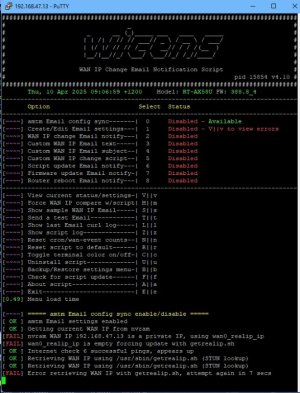
When I pressed (0), enter, it started a a WAN IP check; then failed a couple of times (no WAN IP, as ex[ected) and then went back to the amtm menu.
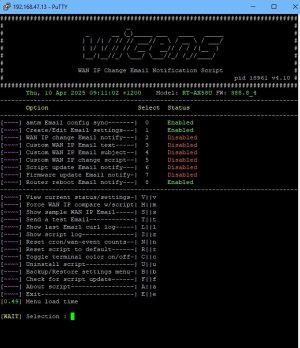
When I went back in it shows Enabled and Enabled for (0) and (1) for the email (which is good), so I could choose (8).
So I got what I wanted in the end, was just a bit ugly getting there, perhaps as a suggestion, defer that WAN IP check until after a user selects that as an option?
So I got what I wanted in the end, was just a bit ugly getting there, perhaps as a suggestion, defer that WAN IP check until after a user selects that as an option?
Yes I noticed the same when implementing my Opnsense box as my gateway (AP mode has the same issue), this should be a matter of commenting out a few lines in the setup. Writing the WAN IP on settings creation is legacy from the V1 days (prior to the option to selectively enable WAN IP notifications). Ill take a look this weekend hopefully.
Yes I noticed the same when implementing my Opnsense box as my gateway (AP mode has the same issue), this should be a matter of commenting out a few lines in the setup. Writing the WAN IP on settings creation is legacy from the V1 days (prior to the option to selectively enable WAN IP notifications). Ill take a look this weekend hopefully.
## 4.11
April 10 2025
* ADDED: cron fully customizable in wicens_update_conf.wic
* ADDED: cron on/off in wicens_update_conf.wic (cron_option 1=on 0=off) (off: cron entries will still be created, script will immediately exit on cron runs)
* NOTE: disabling or editing cron beyond 20 min (default:11min) intervals is not recommended
* ADDED: can disable jffs independent logging in wicens_update_conf.wic (script_log 1=on 0=off)
* ADDED: can change independent log location in wicens_update_conf.wic (script_log_loc)
* CHANGED: don't write WAN IP after Email settings creation
* CHANGED: check if hardware is in router mode for WAN IP notifications
* CHANGED: added menu option for hidden options/other minor appearance tweaks
* CHANGED: core config from v4.1 to v4.2 for cron/logging options
Sorry yes, in order to not have to manually create your custom cru(cron) after reboots that function would need to be edited in /jffs/scripts/wicens.sh to be persistent.
Although you will always show a MD5(hotfix) update if ever checking for script updates. At this point if there ever is an update it will be version number change though. I've taken a massive leap and Im currently implementing an Opnsense firewall as my gateway so there likely won't be any further development of this script
I don’t use Merlin for my home network anymore either but have a lab VLAN set up with a router for continuing development of the scripts I authored. Just an idea for suggestion.
Hello everyone, v4.12 is now available with some noteable changes. There was a substantial amount of code changes so no promises I didn't break something. Let me know if you come across any issues or if there is any appropriate feature requests. Enjoy.
Code:
## 4.12
December 2 2025
* ADDED: custom subjects for all email types wan/reboot/firmware/update @ziiiiiiiii GitHub
* ADDED: custom line of text in EMail body for all types wan/reboot/firmware/update
* ADDED: custom Email message 'to name' (default: wicens user)
* ADDED: support for non-router mode (AP) - ministun
* ADDED: wan ip monitoring for use with script calling on wan ip change (no WAN IP email enabled reqd)
* ADDED: sample Email available for WAN IP/Firmware/Reboot
* CHANGED: custom script on WAN IP change is now called with current_wan_ip as argument @hribcek GitHub
* CHANGED: custom script checked for crlf/executable
* CHANGED: disable terminal word wrap
* CHANGED: custom script cleanup if WAN IP change monitor not enabled
* CHANGED: uninstall - remove script log from non default location
* CHANGED: user config to v4.1 core config to v4.3
* CHANGED: changed some command quoting to fix function list parsing in notepad++
* CHANGED: some case commands back to test statements for debugging
* CHANGED: moved F_alias into F_firmware check for install msg
* CHANGED: status pages v,vv are now multipage
* FIXED: reboot uptime/downtime during retries
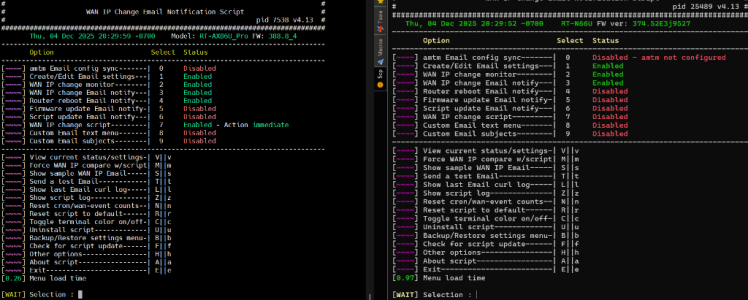
Do you know why the first 2 lines show as disabled even if I enable them ?
[~~~~] WAN IP change monitor--------| 2 Disabled
[~~~~] WAN IP change Email notify---| 3 Disabled
[~~~~] Router reboot Email notify---| 4 Enabled
Because I should stick to my day job Guess I shouldn't put so much faith in shellcheck as it missed this typo for whatever reason, had to dig out my old N66U to debug this as my AX86U/AC86U are in AP mode. Should be fixed with 4.13. For future please check statuses in menu options v and vv to see script dependency statuses.
Apologies for the troubles and thanks for reporting.
Edit: also crazy how much faster the cpu of the AX86U is compared to the best of its time the 'Dark Knight' on a simple script like this
Because I should stick to my day job Guess I shouldn't put so much faith in shellcheck as it missed this typo for whatever reason, had to dig out my old N66U to debug this as my AX86U/AC86U are in AP mode. Should be fixed with 4.13. For future please check statuses in menu options v and vv to see script dependency statuses.
Apologies for the troubles and thanks for reporting.
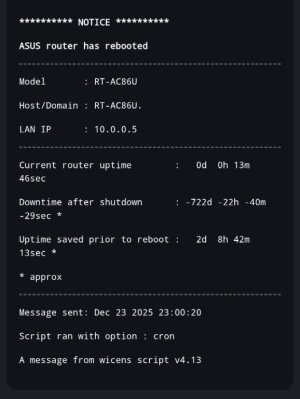
Can you send me the wicens log output? strangely it ran with cron not reboot and your router time would be in the past unless something else is going on... anything is possible with my coding Does the epoch downtime in option vv look right for your current epoch time? I've experienced this a few times in testing and could never track down the issue
Can you send me the wicens log output? strangely it ran with cron not reboot and your router time would be in the past unless something else is going on... anything is possible with my coding Does the epoch downtime in option vv look right for your current epoch time? I've experienced this a few times in testing and could never track down the issue
Ahahah
Don't worry. I didn't save any logs unfortunately. And this was the first and only time it happened. Maybe there was some lock file between power failures, the script didn't save dates correctly, or the NTP didn't update properly when booting and was stuck with an older time.
Many variables in between, and this was an isolated issue.
Let's don't worry for now. If it happens again, I'll get in touch
After some trouble with my router earlier today, but not getting any WICENS (v4.13) emails, I decided to reset its email config and start from scratch.
I enabled amtm email setting and successfully sent a testmail. However, I could not enable WAN IP change / Router reboot / Firmware update Email notify (options 3/4/5), which all failed with this error:
Code:
[FAIL] Error - invalid Email settings, use Main Menu to add settings
Earlier I tried to manually set my config with exactly the same setting as in amtm and then I could not even send the test email.
Are there bugs in the email code, or am I missing something?


 Guess I shouldn't put so much faith in shellcheck as it missed this typo for whatever reason, had to dig out my old N66U to debug this as my AX86U/AC86U are in AP mode. Should be fixed with 4.13. For future please check statuses in menu options v and vv to see script dependency statuses.


 * approx
 Does the epoch downtime in option vv look right for your current epoch time? I've experienced this a few times in testing and could never track down the issue


