What's new

102.7 Alpha Builds available

Updated and everything is working great for the most part on my RT-BE88U (Dirty upgrade but cleared the cache before update), except found a few issues that are showing up in the logs:

networkmap: Error locking /var/lock//usr/networkmap/nmp_conv_type.js.lock: 2 No such file or directory
Jan 23 03:14:20 networkmap: Error unlocking -1: 9 Bad file descriptor

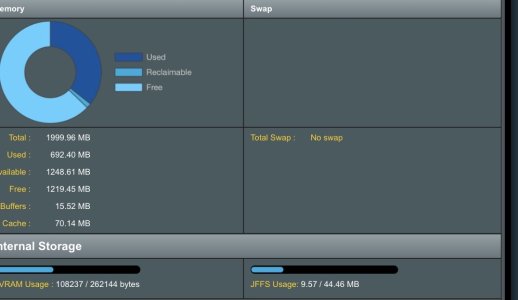
Unsure what this is exactly, not sure if this is related it is it normal for the Swap section not to show anything?

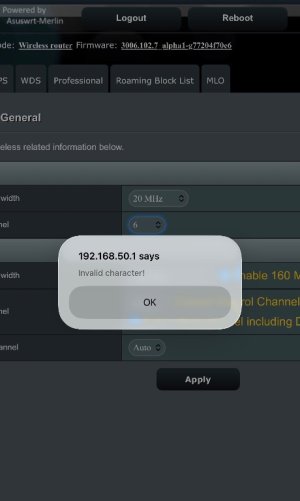
Another bug: When switching channels, this error keeping occurring once in a while.


Other than this, it works flawlessly, wanted to share my findings.
 

Attachments

  • IMG_3338.jpeg
    IMG_3338.jpeg
    59.2 KB · Views: 66
  • IMG_3339.jpeg
    IMG_3339.jpeg
    52 KB · Views: 65
networkmap: Error locking /var/lock//usr/networkmap/nmp_conv_type.js.lock: 2 No such file or directory
Jan 23 03:14:20 networkmap: Error unlocking -1: 9 Bad file descriptor

Unsure what this is exactly, not sure if this is related it is it normal for the Swap section not to show anything?
Both are perfectly normal, not a bug.
 
where is the offical thread from merlin?
This is Alpha firmware which is Pre-beta test builds. In most cases RMerlin doesn't "officially" announce Asus-Merlin firmware until it's either in "Beta" test builds or final "Release" form.
 
Hello,
Flashing to the alpha build completed successfully.
However, I noticed that when “Advertise DNS to clients” is set to NO under Advanced settings under "VPN Server", there is no internet connectivity it used to work fine with 3006.102.6
DNS Director is set "Router"
 
long log file but why did my router reboot this morning
Last thing in the log is related to spdMerlin add-on.
Are you using automatic QoS?
If so set it manually as that has been known to cause crashes.

 
I am seeing the following error messages in my log file in with 3006_102.7_alpha1:

Jan 22 16:09:08 dnsmasq[2704]: Insecure DS reply received for ocsps.ssl.com, check domain configuration and upstream DNS server DNSSEC support
<Snip>

These errors are occurring using quad9 and coming from their Denver POP.
I have used this configuration for several months with no errors.
Changing to Cloudflare "Security" (1.1.1.2) does not exhibit this behavior.
I see that changes were made in the way DNS Director handles IPv6.
Anyone have any ideas?
 
Jan 22 16:09:08 dnsmasq[2704]: Insecure DS reply received for ocsps.ssl.com, check domain configuration and upstream DNS server DNSSEC support
The domain may not have correct DNSSEC signatures.
These errors are occurring using quad9 and coming from their Denver POP.
I have used this configuration for several months with no errors.
Changing to Cloudflare "Security" (1.1.1.2) does not exhibit this behavior.
If you trust Quad9 or Cloudflare to do the DNSSEC validation on your behalf, turn off DNSSEC on the router.
I see that changes were made in the way DNS Director handles IPv6.
This wouldn't involve DNS Director at all. There were several changes in dnsmasq 2.92 related to DNSSEC, however. Maybe it's better at validating now.
 
Just to let you know that I have uploaded a new GT-BE19000AI build. This build is based on a newer GPL version (I was previously using a fairly early version, so it had a number of known issues). This new build also integrates a new version of the Ark engine which should be at least more stable.

AFC should in theory be functionnal - I cannot test it in Canada.

The current plan for 102.7 is to only have this one single GPL update (no time to get 15+ GPLs prepared before the Chinese New Year holiday, and there was very few changes to them anyway). The rest will mostly gain updated components, and the removal of AiCloud.
 
Last edited:
Just curiosity mostly
With access from WAN disabled, Under System Log/Security Update Notification
If I login via HTTPS using my DDNS url: from a wired PC on the Main subnet. I see [info] [LOGIN][https][Web] successed an external IP address
If I login using the APP I see [info] [LOGIN][https][APP] successed one of my internal address assigned to the phone via the subnet I'm on
If I login via HTTP using my DDNS url: from the same wired PC on the Main subnet, I see [info] [LOGIN][http][Web] successed an internal IP address from the Main subnet

Not unique to this Alpha or to Merlin FW, mostly curious if anyone else is seeing this behavior
1769455597027.png

Don't remember ever seeing this behavior under 3004.386 (except under 3004.386.10.0 somewhat a different issue where https and the App were impacted) in my AX88u or 2xAX86u nodes but being new to 3006.102 I have no foundation, and a quick search didn't turn anything up?
 

Latest threads

Support SNBForums w/ Amazon

If you'd like to support SNBForums, just use this link and buy anything on Amazon. Thanks!

Sign Up For SNBForums Daily Digest

Get an update of what's new every day delivered to your mailbox. Sign up here!
Back
Top