What's new

102.7 Alpha Builds available

Status
Not open for further replies.
I have mine turned off when goes to Adaptive Qos page and hit any of tabs when crashing and reboot.
When you click Adaptive QoS in the menu, does the Bandwidth Monitor page load without causing a crash? What happens if you browse directly to the Speedtest URL without visiting the Bandwidth Monitor page first?

So very little has changed in this Alpha for WiFi6 that I can’t imagine how this would induce a crash (I.e. disabling AiCloud, updating dnsmasq, nettle, dropbear, OpenVPN, and a small DNS Director fix).
 
When you click Adaptive QoS in the menu, does the Bandwidth Monitor page load without causing a crash? What happens if you browse directly to the Speedtest URL without visiting the Bandwidth Monitor page first?

So very little has changed in this Alpha for WiFi6 that I can’t imagine how this would induce a crash (I.e. disabling AiCloud, updating dnsmasq, nettle, dropbear, OpenVPN, and a small DNS Director fix).
I can display QoS - WAN/LAN Bandwidth Monitor page and when click on Adaptive QoS it's crashing.
After playing around with Chrome/Firefox and Edge it's suddenly start to working, can run speed test.
it must have been something with chachade stuff, i don't really don't know.

Thanks for your support.
 
Something new since Alpha, a DNSSEC error that I newer had before (and my DNSSEC settings didn't change in quite a while). But of course it might just be a coincidental timing of an Cloudflare issue or my ISP misbehaving...
And it didn't happen with just limetorrents.cc but with others including Google! It is intermittent in nature and not too often.
dnsmasq[5235]: Insecure DS reply received for limetorrents.cc, check domain configuration and upstream DNS server DNSSEC support
 
Something new since Alpha, a DNSSEC error that I newer had before (and my DNSSEC settings didn't change in quite a while). But of course it might just be a coincidental timing of an Cloudflare issue or my ISP misbehaving...
And it didn't happen with just limetorrents.cc but with others including Google! It is intermittent in nature and not too often.
Can't remember the specifics but I've also seen this message.
 
Something new since Alpha, a DNSSEC error that I newer had before (and my DNSSEC settings didn't change in quite a while). But of course it might just be a coincidental timing of an Cloudflare issue or my ISP misbehaving...
And it didn't happen with just limetorrents.cc but with others including Google! It is intermittent in nature and not too often.
dnsmasq 2.92 has multiple DNSSEC changes, and even some DNSSEC patches post-2.92, so maybe it's valid, or maybe it's a bug in dnsmasq. But it does seem like that domain has a bad DS.
Quite possibly this fix:
 
Last edited:
dnsmasq 2.92 has multiple DNSSEC changes, and even some DNSSEC patches post-2.92, so maybe it's valid, or maybe it's a bug in dnsmasq. But it does seem like that domain has a bad DS.
Quite possibly this fix:
Might be the case with dnsmasq being the cause, well will get fixed then in a future release (dnsmasq and then Merlin FW).
Yes the torrent link probably isn't expected to be correct, but the Google one...

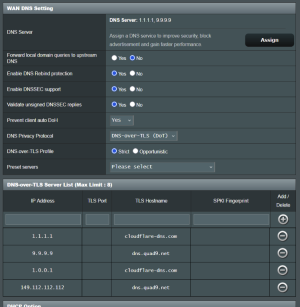
Just for reference my DNSSEC settings (since the introduction of DNSSEC and DOT in the FW):
 

Attachments

  • 1.png
    1.png
    118.6 KB · Views: 92
gt-axe16000 running in ap mode with 2.5gbe connected to 10gbe port.. 3 of 4 wifi bands used (not using 5gz1 as that is reservered for upstairs router)
(backbone to upstairs main router is fiber 10gb connection). iperf perfect at 2.38gb/sec

dirty upgrade from release... no issues at all.. good job.
 
Just for reference my DNSSEC settings (since the introduction of DNSSEC and DOT in the FW):

This is not needed. I see it very often as example configuration on SNB Forums. You have trusted DNS providers upstream and encrypted communication. They do DNSSEC validation for you.
 
This is not needed. I see it very often as example configuration on SNB Forums. You have trusted DNS providers upstream and encrypted communication. They do DNSSEC validation for you.
Oh but it is needed (in my country), because otherwise ISP sniffs all to government before it gets to trusted DNS providers...
 
They eventually see encrypted packets and may cut off your DoT if they want to. They can't alter the packets. You basically run DNSSEC on Quad9 and Cloudflare.
 
I know, but better than nothing! Doubt they will cut DoT, but who knows...
+ VPN when needed.
 
ISP can still see your traffic even though you use dnssec.
Only way to hide traffic from ISP is VPN and Tor.
I know, but that's why I use DNSSEC, DoT and VPN.
Better make it harder! AND safer - multiple reasons...
 
You do whatever you like with your router. The configuration shown in post #86 is unrelated to specific location and ISP history collection. It just doesn't make sense. Same about the comment someone is "sniffing to the government" (whatever it means) encrypted packets between you and your DNS provider. If they can do it the encrypted packets between you and your VPN provider are busted as well.
 
Something new since Alpha, a DNSSEC error that I newer had before (and my DNSSEC settings didn't change in quite a while). But of course it might just be a coincidental timing of an Cloudflare issue or my ISP misbehaving...
And it didn't happen with just limetorrents.cc but with others including Google! It is intermittent in nature and not too often.
I reported this earlier in this thread, but with Quad9 throwing the errors. Changing to Cloudflare "Security" (1.1.1.2) cleared the errors reported in my logs, but seems to be very unusual behavior.
 
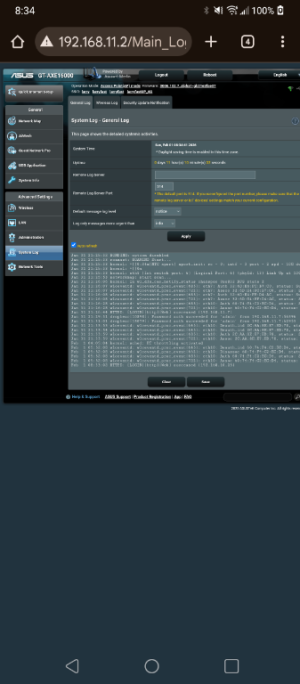
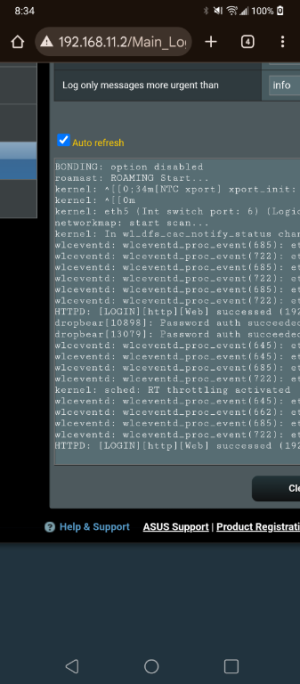
why am I getting a message in the logs about sched rt throttle activated when router is in ap mode.
 

Attachments

  • Screenshot_20260201-083440.png
    Screenshot_20260201-083440.png
    119.8 KB · Views: 48
  • Screenshot_20260201-083432.png
    Screenshot_20260201-083432.png
    122.6 KB · Views: 44
doesn't seem to be i only see it in one of the two routers though so thought it was weird and seemed to be related to wos which obviously is not enabled in ap mode
 
doesn't seem to be i only see it in one of the two routers though so thought it was weird and seemed to be related to wos which obviously is not enabled in ap mode
It's nothing to do with QoS. It's just a kernel message regarding Real Time Scheduling.
 
I also did the update from 102.6 to this alpha build, only on the main AX-11000 pro router.
However with 102.6 the Mesh system behaves like expected, clients get roamed most of the time to the best available Node, with 102.7, only the wired clients are on the nodes, wireless clients seem to be sticking on the main router for some reason, re-connecting the clients has no effect.
Reverting back to 102.6, again wireless clients do roam again to best available node.... mmmm
Some issue with the Mesh system?
 
Status
Not open for further replies.

Similar threads

Latest threads

Support SNBForums w/ Amazon

If you'd like to support SNBForums, just use this link and buy anything on Amazon. Thanks!

Sign Up For SNBForums Daily Digest

Get an update of what's new every day delivered to your mailbox. Sign up here!
Back
Top