S
SocratesBackup
Guest
I’m running into what looks like inconsistent DNS Director behavior on Merlin and I’m hoping someone can sanity-check my setup. Basically, I believe I have a set up DNS Director correctly, but for some reason, it seems to be sending DNS queries to both my Pihole and to the hardcoded DNS at the same time. Which basically means that ads still get shown, and that DNS director is not doing its job.
### Router Info
* Router: **GT-AX11000**
* Firmware: **3004.388.9_2_rog**
* IPv6: **Disabled (Connection Type: Disable)**
* Pi-hole upstream DNS: **1.1.1.1 (Cloudflare)**
Under WAN Settings:
* Prevent client auto DoH : **Yes**
Under Administration:
*Enable JFFS custom scripts and configs: **No**
Unique to my Setup:
*Home Assistant Integration: **Yes** (Works like a charm, but I honestly would not know if it has anything to do with this)
---
## Setup
Setup
### LAN → DHCP Server
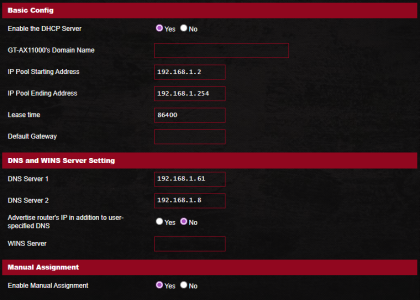
* DNS Server 1 = Pi-hole IP 1 = 192.168.1.61
* DNS Server 2 = Pi-hole IP 2 = 192.168.1.8
* Advertise router’s IP in addition to user-specified DNS = **No**

### LAN → DNS Director
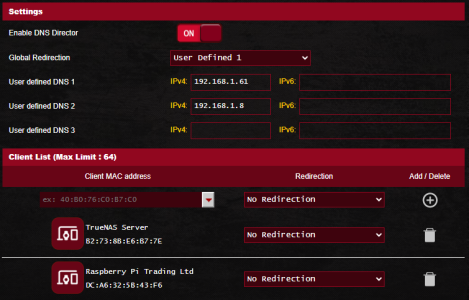
* DNS Director = Enabled
* User Defined 1 = Pi-hole IP
* Global Redirection = **User Defined 1**
* Pi-hole device 1 = **No Redirection**
* Pi-hole device 2 = **No Redirection**

---
## Testing Scenarios
### Scenario 1 – Windows using DHCP (gets Pi-hole DNS)
When Windows is set to automatic DNS:
DNS leak test shows only **Cloudflare**. And this makes sense:
Client → Pi-hole → Cloudflare
Ads are properly blocked and here is the output for What is My DNS Server: https://www.top10vpn.com/tools/what-is-my-dns-server.
```
Windows Settings And DNS web Result for DHCP:

```
---
### Scenario 2 – Windows manually set to 8.8.8.8
DNS Director = No Redirection
Leak test shows only **Google**.
Expected and correct. No ads are blocked because Pihole is not being assigned and DNS is not being redirected.
```
Windows Settings And DNS Leak Result for hardcoded DNS:

```
---
### Scenario 3 – Windows manually set to 8.8.8.8
DNS Director = Global Redirection → User Defined 1 (Pi-hole)
Now leak test shows a **mix of Google and Cloudflare**.
This is the confusing part.
If DNS Director is properly redirecting 8.8.8.8 → Pi-hole, I would expect results identical to Scenario 1 (all Cloudflare).
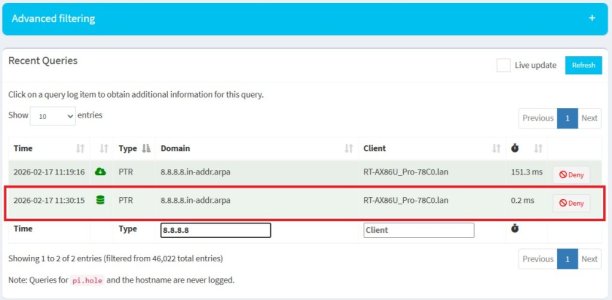
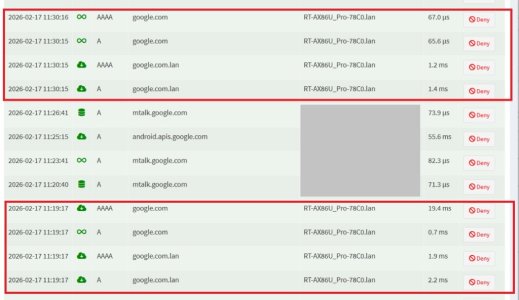
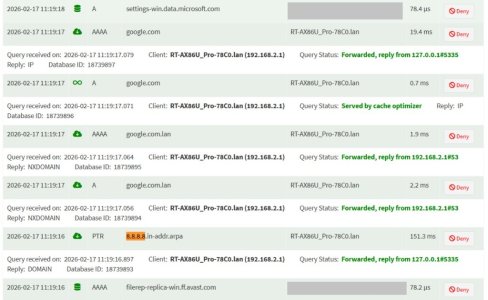
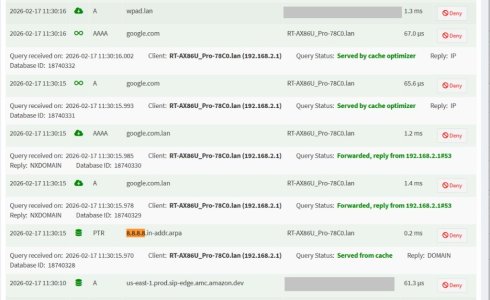
Instead, it appears some queries are still reaching Google. This explains why I continue to see ads. See the results below:
```
Windows Settings And DNS Result for hardcoded DNS with Redirection to Pihole

```
---
## Additional Testing
IPv6 is disabled on the router:
```
IPv6
Connection type: Disable
```
Windows test:
```
nslookup google.com 8.8.8.8
→ Works
nslookup google.com 2001:4860:4860::8888
→ No response
```
So IPv6 does not appear active on the client side.
DoH is disabled in Windows.
---
## What I’m Trying to Understand
1. Is DNS Director supposed to fully prevent hardcoded DNS usage?
2. Does DNS Director only redirect queries but not fully rewrite responses?
3. Is mixed DNS leak output expected behavior in this setup?
4. Is this a known limitation/bug in 3004.388.x?
If anyone running Merlin + Pi-hole + DNS Director can confirm expected behavior, I’d really appreciate it.
###
Router Info* Router: **GT-AX11000**
* Firmware: **3004.388.9_2_rog**
* IPv6: **Disabled (Connection Type: Disable)**
* Pi-hole upstream DNS: **1.1.1.1 (Cloudflare)**
Under WAN Settings:
* Prevent client auto DoH : **Yes**
Under Administration:
*Enable JFFS custom scripts and configs: **No**
Unique to my Setup:
*Home Assistant Integration: **Yes** (Works like a charm, but I honestly would not know if it has anything to do with this)
---
##
Setup### LAN → DHCP Server
* DNS Server 1 = Pi-hole IP 1 = 192.168.1.61
* DNS Server 2 = Pi-hole IP 2 = 192.168.1.8
* Advertise router’s IP in addition to user-specified DNS = **No**
### LAN → DNS Director
* DNS Director = Enabled
* User Defined 1 = Pi-hole IP
* Global Redirection = **User Defined 1**
* Pi-hole device 1 = **No Redirection**
* Pi-hole device 2 = **No Redirection**
---
##
Testing Scenarios### Scenario 1 – Windows using DHCP (gets Pi-hole DNS)
When Windows is set to automatic DNS:
DNS leak test shows only **Cloudflare**. And this makes sense:
Client → Pi-hole → Cloudflare
Ads are properly blocked and here is the output for What is My DNS Server: https://www.top10vpn.com/tools/what-is-my-dns-server.
```
Windows Settings And DNS web Result for DHCP:
```
---
### Scenario 2 – Windows manually set to 8.8.8.8
DNS Director = No Redirection
Leak test shows only **Google**.
Expected and correct. No ads are blocked because Pihole is not being assigned and DNS is not being redirected.
```
Windows Settings And DNS Leak Result for hardcoded DNS:
```
---
### Scenario 3 – Windows manually set to 8.8.8.8
DNS Director = Global Redirection → User Defined 1 (Pi-hole)
Now leak test shows a **mix of Google and Cloudflare**.
This is the confusing part.
If DNS Director is properly redirecting 8.8.8.8 → Pi-hole, I would expect results identical to Scenario 1 (all Cloudflare).
Instead, it appears some queries are still reaching Google. This explains why I continue to see ads. See the results below:
```
Windows Settings And DNS Result for hardcoded DNS with Redirection to Pihole
```
---
##
Additional TestingIPv6 is disabled on the router:
```
IPv6
Connection type: Disable
```
Windows test:
```
nslookup google.com 8.8.8.8
→ Works
nslookup google.com 2001:4860:4860::8888
→ No response
```
So IPv6 does not appear active on the client side.
DoH is disabled in Windows.
---
##
What I’m Trying to Understand1. Is DNS Director supposed to fully prevent hardcoded DNS usage?
2. Does DNS Director only redirect queries but not fully rewrite responses?
3. Is mixed DNS leak output expected behavior in this setup?
4. Is this a known limitation/bug in 3004.388.x?
If anyone running Merlin + Pi-hole + DNS Director can confirm expected behavior, I’d really appreciate it.