What's new

GT-BE19000AI Wifi 7 Issue

ApexAvian

Occasional Visitor
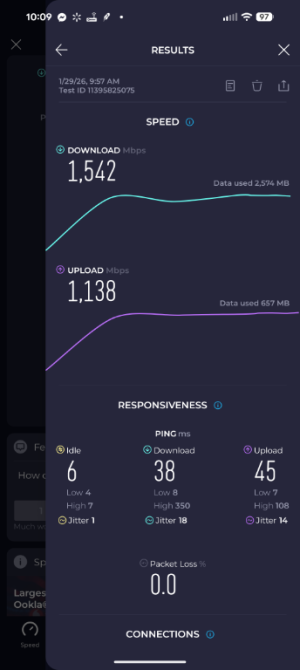
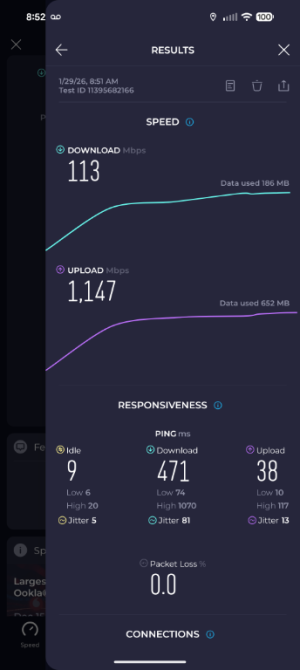
I have been encountering a perplexing issue with wifi 7 devices connected to my GT-BE19000AI. I have the latest firmware installed, AFC enabled, and QOS disabled, but starting yesterday after my google fiber install I began experiencing severely reduced speed and lag with my wifi 7 devices. I'm lucky to get 300Mbps with a 3 gig Google Fiber connection standing next to the router with a 320 MHz Intel BE200 card device. If i force the 6ghz channel bandwidth to 160 MHz, my speeds improve to nearly the max allowed for that bandwidth.

For example the day before I was getting download speed of 905.99 Mbps, the max my old 1 gig AT&T fiber would allow, after the google install and router firmware update I'm only pulling 447.04 Mbps. Wired speeds are fantastic. At 160 MHz, I'm pulling 1,506.94 Mbps.

Any ideas on what could be going on?

I performed a factory reset and rolled back the driver to the previous release, but the problem persisted.
 
Which firmware version specifically?

What is your AFC allowed bandwidth?

MLO enabled or disabled?
 
Which firmware version specifically?

What is your AFC allowed bandwidth?

MLO enabled or disabled?
MLO is enabled but i have not set up a MLO network.
Firmware: 3.0.0.6.102_40383-g12871f8_1514-g9376d_BB0B
I don't see allowed bandwidth but its on standard power.

noise: -85 dBm Channel: 6g5/320-1
BSSID: CC:28:AA:F6:07:E9 Capability: ESS ShortPre RRM
Beacon Interval: 100 msecs
Supported Rates: [ 6(b) 9 12(b) 18 24(b) 36 48 54 ]
Extended Capabilities: Not_Available
MLO: MLD Address: CC:28:AA:F6:07:E9
EHT Capable:
Chanspec: 6GHz channel 31 320MHz (0x7040)
Primary channel: 5
HT Capabilities: 40Mhz SGI20 SGI40
Supported HT MCS :
Supported HE MCS:
20/40/80 MHz:
NSS1 Tx: 0-11 Rx: 0-11
NSS2 Tx: 0-11 Rx: 0-11
NSS3 Tx: 0-11 Rx: 0-11
NSS4 Tx: 0-11 Rx: 0-11
160 MHz:
NSS1 Tx: 0-11 Rx: 0-11
NSS2 Tx: 0-11 Rx: 0-11
NSS3 Tx: 0-11 Rx: 0-11
NSS4 Tx: 0-11 Rx: 0-11
BSS Color: 0x0 Partial BSS Color: false
BSS Color Disabled: false
Supported EHT MCS:
20/40/80 MHz:
NSS1 Tx: 0-13 Rx: 0-13
NSS2 Tx: 0-13 Rx: 0-13
NSS3 Tx: 0-13 Rx: 0-13
NSS4 Tx: 0-13 Rx: 0-13
160 MHz:
NSS1 Tx: 0-13 Rx: 0-13
NSS2 Tx: 0-13 Rx: 0-13
NSS3 Tx: 0-13 Rx: 0-13
NSS4 Tx: 0-13 Rx: 0-13
320 MHz:
NSS1 Tx: 0-13 Rx: 0-13
NSS2 Tx: 0-13 Rx: 0-13
NSS3 Tx: 0-13 Rx: 0-13
NSS4 Tx: 0-13 Rx: 0-13
QBSS Channel Utilization: 0x4 (1 %)

Interference Level: Acceptable
Mode : AP Only
 

Attachments

  • 160Mhz only.png
    160Mhz only.png
    67.8 KB · Views: 17
  • 320Mhz enabled.png
    320Mhz enabled.png
    67.3 KB · Views: 20
Last edited:
The AFC allowed is in the app. (Not sure why I can't find it on the Web GUI but maybe because you need the app to activate it).

-> Settings -> WiFi -> AFC -> 6 GHz Channel Bandwidth

Should look similar:
2832.jpg
 
Okay. I have been forcing the 160mhz through that menu. I uploaded screenshots to the previous reply.
I saw them. There's something causing noise/interference on the channel so ping is so high 1xxx. (Strangely it is usually upload or download, unless you do something seriously wrong like I did recently and put a 2 Amp vs 3 Amp power supply)...
 
I saw them. There's something causing noise/interference on the channel so ping is so high 1xxx. (Strangely it is usually upload or download, unless you do something seriously wrong like I did recently and put a 2 Amp vs 3 Amp power supply)...
Strange that the upload seems fine.
 
Is there a UPS nearby? I recently installed a USB 3.0 HDD but seems it is not causing issues. These are the main sources of noise I have had to deal with. Also even with 2 GB memory it could cause high memory utilization (4 TB HDD) on my prior main GT-BE98 Pro as SMB caches up 95+% of the memory...
 
Strange that the upload seems fine.
Try creating an MLO SSID and connect to it... I believe the Intel BE200 can handle higher throughput.
 
Is there a UPS nearby? I recently installed a USB 3.0 HDD but seems it is not causing issues. These are the main sources of noise I have had to deal with. Also even with 2 GB memory it could cause high memory utilization (4 TB HDD) on my prior main GT-BE98 Pro as SMB caches up 95+% of the memory...
Yes there is. The router and gateway are connected to a UPS. I'll remove it later and see what happens. I'm also going to try the google fiber provided router to see if it improves.
 
Sorry I said it as fact, I suspect there is noise/interference....
 
Didn't the listing above indicate "acceptable" noise floor ?
It can go through the power line. I have a (some Chinese LiFePO4) sine wave UPS, it is maybe 10+ ft away from my BQ16 Pro. I still had strange speed test unless I don't use it or that Isobar with EMF/RFI filter...

If you pardon/ignore the mess I can take a picture...
2834.jpg
 
You could always put a clamp on RF choke on the device end ( or pull a couple out of an old vga cable ;-) ). We used to use those on VGA cables to CRT and LCD panels to dampen any picked up noise. Won't work as well on normal mode noise or jitter in the output of the power supply. They have to catch it in the output stage of the power supply.
 
If enabled, DISABLE all of the AiProtection tabs/settings and reboot router.
If disabling AiProtection features make sure to Withdraw from them as well on the Administration > Policy or Privacy page (or where ever the option is in the GUI).
 
Last edited:
My bet's still on UPS noise until OP tries to remove it and it doesn't help doing so....

Latest firmware _40383 says it resolves the AiProtection speed penalty...
 

Latest threads

Support SNBForums w/ Amazon

If you'd like to support SNBForums, just use this link and buy anything on Amazon. Thanks!

Sign Up For SNBForums Daily Digest

Get an update of what's new every day delivered to your mailbox. Sign up here!
Back
Top