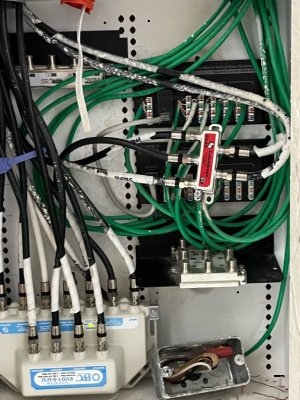
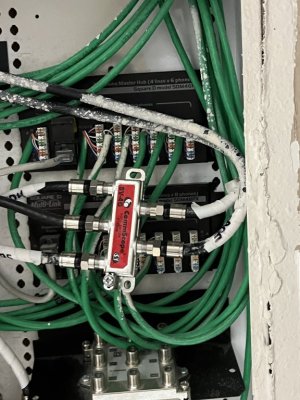
House was built in 2004 so it predates MoCA 1.0 (2006), 1.1 (2007), 2.0 (06/2010), & 2.5 (04/2016). Wire/coax has not been rerun. Comcast service technician changed something (likely splitter) early on during troubleshooting call but unsure what -- it wasn't considered expensive whatever it was (free).
Cable box is located in closet on the other side of wall from office where cable modem is located.
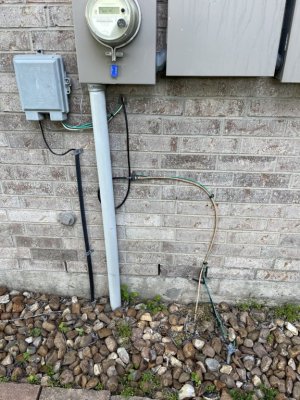
Can't really say much about wiring coming into the house, as it enters on west side of the house and comes up in the closet (east side). There are at least a dozen female wall coax receptacles throughout various rooms of two-story house. Sorry, I'm not a network technician -- do I need one to add MoCA adapters?
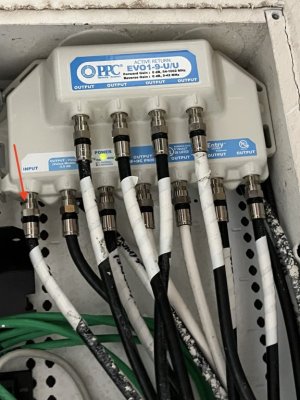
Cable Box: (likely anyway)
PPC EVO1-9-U/U 9 Port Amplifier
SV-4G Commscope Coaxial 5-1000Mhz 4-Way Splitter
* Replace this splitter with
Amphenol ABS314H 4-Way Coaxial Splitter (MoCA 2.5)
Internet:
Motorola MB8611 2.5Gbps DOCSIS 3.1 Cable Modem
- DOCSIS 3.1 (blue)
- 2+ bonded channels down (blue) & up (blue)
- Ethernet link at 1GE (green)
Xfinity (née Comcast) plan: 800 Mbps down / 10 Mbps up
Office Intended step-by-step:
- Disconnect cable modem from wall outlet
- Connect POE filter to office wall coax outlet (if that would work)
- Connect [new spare] short coax cable(1) to other end of POE filter
- Connect other end of coax cable(1) to "IN" port 2-way splitter
- Connect [existing] coax cable(2) from cable modem into one "OUT" port on that 2-way splitter
- Connect [vendor-supplied] coax cable(3) to other "OUT" port on that 2-way splitter
- Connect other end of coax cable(3) to MoCA adapter
- Enable mode switch (mode 2) on MoCA adapter (for DOCSIS 3.1 compatibility)
- Connect [vendor-supplied] Ethernet cable to MoCA adapter
- Connect other end of Ethernet cable to LAN port of ASUS router
- Connect power to MoCA adapter and check that "LAN" light is white
In Kitchen on west side of house:
- Disconnect [unneeded] coax cable(4) from wall outlet
- Remove Xfinity cable adapter box and set aside for return
- Connect [vendor-supplied] coax cable(5) to other MoCA adapter
- Connect [vendor-supplied] Ethernet cable to MoCA adapter
- Connect other end of Ethernet cable to AppleTV (or whatever hardware)
- Connect HDMI cable to both AppleTV and television
- Connect power to both AppleTV and television
- Connect power to MoCA adapter and check that "LAN" light is white
- Wait ~30secs. Afterwards, "MoCA" light should be on as well
- Download "Xfinity Stream" from app store (via AppleTV) and configure appropriately
Is there a specific test to see if the POE is functioning correctly? Have seen some setups with two POEs but couldn't determine if I would too.
Or should I give up? I hate having the Comcast techs come as it's a complete crapshoot as to whether they are competent -- at least I care whether my setup works.