What's new

What are your thoughts on the new AI router GT-BE19000AI?

With first Wi-Fi 8 devices expected to arrive in late 2026 I would wait. Enough beta testing.
 
Hmm...

I moved the GT-BE98 Pro to the den and made it the primary router while changing the BE19000Ai to AP Mode with a static IP. After some thought why not add the BE19000Ai as an AiMesh node, (expecting AFC to stop working). Logged into the Ai router and went to settings, selected the third option for AiMesh node. It warns the router will be reset so it can be added as a node, and I continue. I go to the BE98 Pro and add it. It first backhaul's with 5 GHz, (strange as I have 10 Gb Ethernet Backhaul connected). I click Optimize and it switches to 6 GHz backhaul. I switch preferred backhaul to Ethernet just to check and it works, switch back to Auto and it moves back to 6 GHz.

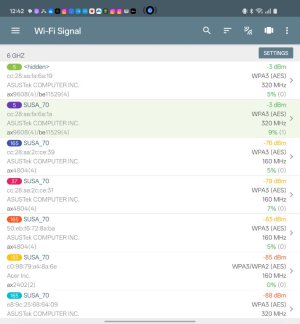
What's the power output of the 6 GHz in the center of the antennae? I know Low Power is -3x dBM, and Standard Power is -3 dBm. Standard Power is still operational!
 

Attachments

  • Screenshot_2026-01-12-12-42-59-81_fd2ed8f87b50af09a5aa19df3e95bf34.jpg
    Screenshot_2026-01-12-12-42-59-81_fd2ed8f87b50af09a5aa19df3e95bf34.jpg
    61.3 KB · Views: 45
Yes, but you need to set it up in router mode, then change the modes. So far I used the settings page to select AP mode, then now AiMesh Node mode. Not sure what the other factory resets do...

I realize I should wait about 24 hours before claiming Standard Power still works. It just has not reset it to Low Power mode until the 24 hour communique with the server either happens, or not.
 
There's a free 3-node business license (so far it is free). I did not read the agreement carefully but I'm not using it for business, nor to make money, so I assume I qualify... So I got Portainer updated after they sent the license (practically immediately)....
 
Unfortunately I've already found that Low Power mode has been restored as an AiMesh node. The 6 GHz LED actually turns a different color when Standard Power is on. Now it is matching the other WiFi LEDs colors, (most of the rest as well)... Power is definitely down at -27 dBm:
2633.jpg
 
Is the additional board available in AP Mode or AiMesh Node configuration?
Yes it is in both cases. There's a DNS name that still works if you set up Portainer in Router mode. It gets an IP address from your DHCP server. I try to find the actual IP in Edge's developer tools just in case the DNS gets deleted. Sometimes it is clearly listed on the Client list, sometimes not...
 
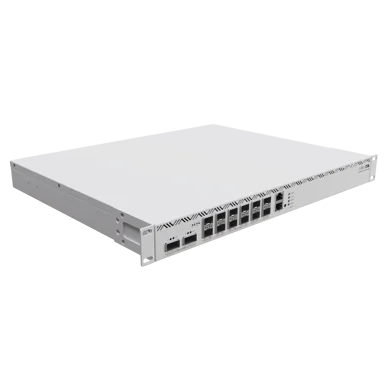
I look at something like this, and I think $899.99 is 1/3 of the price...

 
I look at something like this

There is actually SNB Forum member with very similar Gateway.


I don't know what they are using it for. Local neighborhood ISP or something. 🧐
 
My God the thing, GT-BE19000AI is really ultra-ugly, the outer one a part for the children's room, probably for full-time gaming. But the taste is different for everyone...
 
My God the thing, GT-BE19000AI is really ultra-ugly, the outer one a part for the children's room, probably for full-time gaming. But the taste is different for everyone...

Bot's are a thing... softbank's pepper - did some work on this as a variant/license years back.

Screenshot 2026-03-01 at 5.51.03 PM.png
 
Hi @jzchen ... I was wondering if you could please provide me the wireless interface mappings for the GT-BE19000AI? If you don't know off the top of your head, here's a script that should provide a useful output. Wanted to make sure that RTRMON was compliant with these newer routers. Thank you in advance!

Code:
#!/bin/sh
########################################################################
# Detects router identity, Wi-Fi band-to-interface mappings, and WAN
# interface assignments from NVRAM on Asus-Merlin routers.
#
# Exports the following globals on success:
#   IFNAME_WAN0, IFNAME_WAN1
#   IFNAME_24, IFNAME_24_2, IFNAME_24_3
#   IFNAME_5,  IFNAME_5_2,  IFNAME_5_3
#   IFNAME_6,  IFNAME_6_2,  IFNAME_6_3
########################################################################

detect_wifi_bands() {
    NVRAM="${NVRAM:-nvram}"

    local idx=0
    local max_radios=4
    local nband ifname band_label
    local count_24=0 count_5=0 count_6=0

    # -- Router identity -----------------------------------------------------
    local router_model router_fw

    router_model=$(${NVRAM} get productid 2>/dev/null)
    [ -z "${router_model}" ] && router_model=$(${NVRAM} get model 2>/dev/null)
    [ -z "${router_model}" ] && router_model="Unknown"

    # On 3006.x branch (Wi-Fi 7) routers, the full version must be assembled
    # from firmver (e.g. 3006.102) + buildno (e.g. 7) + extendno (e.g. 0).
    # os_version alone only returns the trailing portion (e.g. 102.7.0).
    local firmver buildno extendno
    firmver=$(${NVRAM} get firmver  2>/dev/null)
    buildno=$(${NVRAM} get buildno  2>/dev/null)
    extendno=$(${NVRAM} get extendno 2>/dev/null)

    if [ -n "${firmver}" ] && [ -n "${buildno}" ]; then
        router_fw="${firmver}.${buildno}${extendno:+.${extendno}}"
    else
        router_fw=$(${NVRAM} get os_version 2>/dev/null)
        [ -z "${router_fw}" ] && router_fw="Unknown"
    fi

    clear
    echo "==========================================" >&2
    echo "  Make:     Asus"                           >&2
    echo "  Model:    ${router_model}"                >&2
    echo "  Firmware: ${router_fw}"                   >&2
    echo "==========================================" >&2

    # -- Wi-Fi bands ---------------------------------------------------------
    echo ""
    echo "Detecting Wi-Fi band-to-interface mappings..." >&2

    while [ "${idx}" -lt "${max_radios}" ]; do

        # No ifname means this radio index doesn't exist; stop scanning
        ifname=$(${NVRAM} get wl${idx}_ifname 2>/dev/null)
        [ -z "${ifname}" ] && break

        # wlX_nband NVRAM key: 1=5GHz, 2=2.4GHz, 4=6GHz
        nband=$(${NVRAM} get wl${idx}_nband 2>/dev/null)

        case "${nband}" in
            2)  # 2.4 GHz
                count_24=$((count_24 + 1))
                band_label="2.4GHz"
                if [ "${count_24}" -eq 1 ]; then
                    IFNAME_24="${ifname}"
                else
                    eval "IFNAME_24_${count_24}='${ifname}'"
                    band_label="2.4GHz-${count_24}"
                fi
                ;;
            1)  # 5 GHz
                count_5=$((count_5 + 1))
                band_label="5GHz"
                if [ "${count_5}" -eq 1 ]; then
                    IFNAME_5="${ifname}"
                else
                    eval "IFNAME_5_${count_5}='${ifname}'"
                    band_label="5GHz-${count_5}"
                fi
                ;;
            4)  # 6 GHz
                count_6=$((count_6 + 1))
                band_label="6GHz"
                if [ "${count_6}" -eq 1 ]; then
                    IFNAME_6="${ifname}"
                else
                    eval "IFNAME_6_${count_6}='${ifname}'"
                    band_label="6GHz-${count_6}"
                fi
                ;;
            *)
                band_label="Unknown (nband=${nband:-<empty>})"
                ;;
        esac

        echo "  wl${idx} -> ${ifname} [${band_label}]" >&2
        idx=$((idx + 1))
    done

    # -- WAN interfaces ------------------------------------------------------
    echo ""
    echo "Detecting WAN interface mappings..." >&2

    local wan_idx wan_ifname wan_proto

    for wan_idx in 0 1; do
        wan_ifname=$(${NVRAM} get wan${wan_idx}_ifname 2>/dev/null)
        wan_proto=$(${NVRAM} get wan${wan_idx}_proto 2>/dev/null)

        # Skip entirely if no interface is assigned (WAN1 absent on single-WAN models)
        [ -z "${wan_ifname}" ] && continue

        eval "IFNAME_WAN${wan_idx}='${wan_ifname}'"
        echo "  wan${wan_idx} -> ${wan_ifname} [${wan_proto:-unknown}]" >&2
    done

    # -- Summary -------------------------------------------------------------
    echo "==========================================" >&2
    echo ""
    echo "Interface Mapping:" >&2
    [ -n "${IFNAME_WAN0}" ] && echo "  WAN0:     ${IFNAME_WAN0}  ($(${NVRAM} get wan0_proto 2>/dev/null))" >&2
    [ -n "${IFNAME_WAN1}" ] && echo "  WAN1:     ${IFNAME_WAN1}  ($(${NVRAM} get wan1_proto 2>/dev/null))" >&2
    [ -n "${IFNAME_24}"   ] && echo "  2.4GHz:   ${IFNAME_24}"   >&2
    [ -n "${IFNAME_24_2}" ] && echo "  2.4GHz-2: ${IFNAME_24_2}" >&2
    [ -n "${IFNAME_24_3}" ] && echo "  2.4GHz-3: ${IFNAME_24_3}" >&2
    [ -n "${IFNAME_5}"    ] && echo "  5GHz:     ${IFNAME_5}"    >&2
    [ -n "${IFNAME_5_2}"  ] && echo "  5GHz-2:   ${IFNAME_5_2}"  >&2
    [ -n "${IFNAME_5_3}"  ] && echo "  5GHz-3:   ${IFNAME_5_3}"  >&2
    [ -n "${IFNAME_6}"    ] && echo "  6GHz:     ${IFNAME_6}"    >&2
    [ -n "${IFNAME_6_2}"  ] && echo "  6GHz-2:   ${IFNAME_6_2}"  >&2
    [ -n "${IFNAME_6_3}"  ] && echo "  6GHz-3:   ${IFNAME_6_3}"  >&2
    echo ""
    echo "==========================================" >&2
    echo ""
}

detect_wifi_bands
 
wireless interface mappings for the GT-BE19000AI
They`re in the standard order:
wl0: 2.4 GHz
wl1: 5 GHz
wl2: 6 GHz

I think the GT-AXE16000 was the only one with things out of order.
 
They`re in the standard order:
wl0: 2.4 GHz
wl1: 5 GHz
wl2: 6 GHz

I think the GT-AXE16000 was the only one with things out of order.
Sadly... it's not just the AXE16000. Asus is a bit all over the place, but it's not a problem. Just doing my due diligence keeping track of these. Luckily, your list of supported models isn't too taxing to keep up with it all. lol :p

Code:
    case "${router_model}" in
        # Four-band routers: 5GHz, 5GHz, 6GHz, 2.4GHz (wl0=5, wl1=5, wl2=6, wl3=2.4)
        GT-AXE16000|GT-BE98)
            IFNAME_5=$(${NVRAM} get wl0_ifname 2>/dev/null)
            IFNAME_5_2=$(${NVRAM} get wl1_ifname 2>/dev/null)
            IFNAME_6=$(${NVRAM} get wl2_ifname 2>/dev/null)
            IFNAME_24=$(${NVRAM} get wl3_ifname 2>/dev/null)
            ;;

        # Four-band routers: 5GHz, 6GHz, 6GHz, 2.4GHz (wl0=5, wl1=6, wl2=6, wl3=2.4)
        GT-BE98_PRO)
            IFNAME_5=$(${NVRAM} get wl0_ifname 2>/dev/null)
            IFNAME_6=$(${NVRAM} get wl1_ifname 2>/dev/null)
            IFNAME_6_2=$(${NVRAM} get wl2_ifname 2>/dev/null)
            IFNAME_24=$(${NVRAM} get wl3_ifname 2>/dev/null)
            ;;

        # Three-band routers: 2.4GHz, 5GHz, 6GHz (wl0=2.4, wl1=5, wl2=6)
        GT-AXE11000|ZenWiFi_ET8|RT-BE96U|RT-BE92U|GT-BE19000AI)
            IFNAME_24=$(${NVRAM} get wl0_ifname 2>/dev/null)
            IFNAME_5=$(${NVRAM} get wl1_ifname 2>/dev/null)
            IFNAME_6=$(${NVRAM} get wl2_ifname 2>/dev/null)
            ;;

        # Three-band routers: 2.4GHz, 5GHz, 5GHz (wl0=2.4, wl1=5, wl2=5)
        GT-AX11000_PRO|GT-AX11000|ZenWiFi_Pro_XT12|ZenWiFi_XT8)
            IFNAME_24=$(${NVRAM} get wl0_ifname 2>/dev/null)
            IFNAME_5=$(${NVRAM} get wl1_ifname 2>/dev/null)
            IFNAME_5_2=$(${NVRAM} get wl2_ifname 2>/dev/null)
            ;;

        # Default two-band routers: 2.4GHz, 5GHz (wl0=2.4, wl1=5)
        *)
            IFNAME_24=$(${NVRAM} get wl0_ifname 2>/dev/null)
            IFNAME_5=$(${NVRAM} get wl1_ifname 2>/dev/null)
            ;;
    esac

 

Latest threads

Support SNBForums w/ Amazon

If you'd like to support SNBForums, just use this link and buy anything on Amazon. Thanks!

Sign Up For SNBForums Daily Digest

Get an update of what's new every day delivered to your mailbox. Sign up here!
Back
Top