aublumberg
Regular Contributor
Any insights if/when this will launch on Amazon US?
Per Asus, they don't currently list Amazon:Any insights if/when this will launch on Amazon US?
changing the BE19000Ai to AP Mode
Yes it is in both cases. There's a DNS name that still works if you set up Portainer in Router mode. It gets an IP address from your DHCP server. I try to find the actual IP in Edge's developer tools just in case the DNS gets deleted. Sometimes it is clearly listed on the Client list, sometimes not...Is the additional board available in AP Mode or AiMesh Node configuration?
Available now on Amazon https://www.amazon.com/ASUS-GT-BE19000AI-Tri-Band-802-11be-Bandwidth/dp/B0FPV9DV1R?tag=snbforums-20Any insights if/when this will launch on Amazon US?
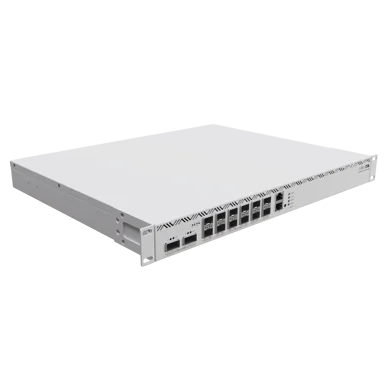
mikrotik.com
I look at something like this
My God the thing, GT-BE19000AI is really ultra-ugly, the outer one a part for the children's room, probably for full-time gaming. But the taste is different for everyone...
#!/bin/sh
########################################################################
# Detects router identity, Wi-Fi band-to-interface mappings, and WAN
# interface assignments from NVRAM on Asus-Merlin routers.
#
# Exports the following globals on success:
# IFNAME_WAN0, IFNAME_WAN1
# IFNAME_24, IFNAME_24_2, IFNAME_24_3
# IFNAME_5, IFNAME_5_2, IFNAME_5_3
# IFNAME_6, IFNAME_6_2, IFNAME_6_3
########################################################################
detect_wifi_bands() {
NVRAM="${NVRAM:-nvram}"
local idx=0
local max_radios=4
local nband ifname band_label
local count_24=0 count_5=0 count_6=0
# -- Router identity -----------------------------------------------------
local router_model router_fw
router_model=$(${NVRAM} get productid 2>/dev/null)
[ -z "${router_model}" ] && router_model=$(${NVRAM} get model 2>/dev/null)
[ -z "${router_model}" ] && router_model="Unknown"
# On 3006.x branch (Wi-Fi 7) routers, the full version must be assembled
# from firmver (e.g. 3006.102) + buildno (e.g. 7) + extendno (e.g. 0).
# os_version alone only returns the trailing portion (e.g. 102.7.0).
local firmver buildno extendno
firmver=$(${NVRAM} get firmver 2>/dev/null)
buildno=$(${NVRAM} get buildno 2>/dev/null)
extendno=$(${NVRAM} get extendno 2>/dev/null)
if [ -n "${firmver}" ] && [ -n "${buildno}" ]; then
router_fw="${firmver}.${buildno}${extendno:+.${extendno}}"
else
router_fw=$(${NVRAM} get os_version 2>/dev/null)
[ -z "${router_fw}" ] && router_fw="Unknown"
fi
clear
echo "==========================================" >&2
echo " Make: Asus" >&2
echo " Model: ${router_model}" >&2
echo " Firmware: ${router_fw}" >&2
echo "==========================================" >&2
# -- Wi-Fi bands ---------------------------------------------------------
echo ""
echo "Detecting Wi-Fi band-to-interface mappings..." >&2
while [ "${idx}" -lt "${max_radios}" ]; do
# No ifname means this radio index doesn't exist; stop scanning
ifname=$(${NVRAM} get wl${idx}_ifname 2>/dev/null)
[ -z "${ifname}" ] && break
# wlX_nband NVRAM key: 1=5GHz, 2=2.4GHz, 4=6GHz
nband=$(${NVRAM} get wl${idx}_nband 2>/dev/null)
case "${nband}" in
2) # 2.4 GHz
count_24=$((count_24 + 1))
band_label="2.4GHz"
if [ "${count_24}" -eq 1 ]; then
IFNAME_24="${ifname}"
else
eval "IFNAME_24_${count_24}='${ifname}'"
band_label="2.4GHz-${count_24}"
fi
;;
1) # 5 GHz
count_5=$((count_5 + 1))
band_label="5GHz"
if [ "${count_5}" -eq 1 ]; then
IFNAME_5="${ifname}"
else
eval "IFNAME_5_${count_5}='${ifname}'"
band_label="5GHz-${count_5}"
fi
;;
4) # 6 GHz
count_6=$((count_6 + 1))
band_label="6GHz"
if [ "${count_6}" -eq 1 ]; then
IFNAME_6="${ifname}"
else
eval "IFNAME_6_${count_6}='${ifname}'"
band_label="6GHz-${count_6}"
fi
;;
*)
band_label="Unknown (nband=${nband:-<empty>})"
;;
esac
echo " wl${idx} -> ${ifname} [${band_label}]" >&2
idx=$((idx + 1))
done
# -- WAN interfaces ------------------------------------------------------
echo ""
echo "Detecting WAN interface mappings..." >&2
local wan_idx wan_ifname wan_proto
for wan_idx in 0 1; do
wan_ifname=$(${NVRAM} get wan${wan_idx}_ifname 2>/dev/null)
wan_proto=$(${NVRAM} get wan${wan_idx}_proto 2>/dev/null)
# Skip entirely if no interface is assigned (WAN1 absent on single-WAN models)
[ -z "${wan_ifname}" ] && continue
eval "IFNAME_WAN${wan_idx}='${wan_ifname}'"
echo " wan${wan_idx} -> ${wan_ifname} [${wan_proto:-unknown}]" >&2
done
# -- Summary -------------------------------------------------------------
echo "==========================================" >&2
echo ""
echo "Interface Mapping:" >&2
[ -n "${IFNAME_WAN0}" ] && echo " WAN0: ${IFNAME_WAN0} ($(${NVRAM} get wan0_proto 2>/dev/null))" >&2
[ -n "${IFNAME_WAN1}" ] && echo " WAN1: ${IFNAME_WAN1} ($(${NVRAM} get wan1_proto 2>/dev/null))" >&2
[ -n "${IFNAME_24}" ] && echo " 2.4GHz: ${IFNAME_24}" >&2
[ -n "${IFNAME_24_2}" ] && echo " 2.4GHz-2: ${IFNAME_24_2}" >&2
[ -n "${IFNAME_24_3}" ] && echo " 2.4GHz-3: ${IFNAME_24_3}" >&2
[ -n "${IFNAME_5}" ] && echo " 5GHz: ${IFNAME_5}" >&2
[ -n "${IFNAME_5_2}" ] && echo " 5GHz-2: ${IFNAME_5_2}" >&2
[ -n "${IFNAME_5_3}" ] && echo " 5GHz-3: ${IFNAME_5_3}" >&2
[ -n "${IFNAME_6}" ] && echo " 6GHz: ${IFNAME_6}" >&2
[ -n "${IFNAME_6_2}" ] && echo " 6GHz-2: ${IFNAME_6_2}" >&2
[ -n "${IFNAME_6_3}" ] && echo " 6GHz-3: ${IFNAME_6_3}" >&2
echo ""
echo "==========================================" >&2
echo ""
}
detect_wifi_bands
They`re in the standard order:wireless interface mappings for the GT-BE19000AI
Sadly... it's not just the AXE16000. Asus is a bit all over the place, but it's not a problem. Just doing my due diligence keeping track of these. Luckily, your list of supported models isn't too taxing to keep up with it all. lolThey`re in the standard order:
wl0: 2.4 GHz
wl1: 5 GHz
wl2: 6 GHz
I think the GT-AXE16000 was the only one with things out of order.
case "${router_model}" in
# Four-band routers: 5GHz, 5GHz, 6GHz, 2.4GHz (wl0=5, wl1=5, wl2=6, wl3=2.4)
GT-AXE16000|GT-BE98)
IFNAME_5=$(${NVRAM} get wl0_ifname 2>/dev/null)
IFNAME_5_2=$(${NVRAM} get wl1_ifname 2>/dev/null)
IFNAME_6=$(${NVRAM} get wl2_ifname 2>/dev/null)
IFNAME_24=$(${NVRAM} get wl3_ifname 2>/dev/null)
;;
# Four-band routers: 5GHz, 6GHz, 6GHz, 2.4GHz (wl0=5, wl1=6, wl2=6, wl3=2.4)
GT-BE98_PRO)
IFNAME_5=$(${NVRAM} get wl0_ifname 2>/dev/null)
IFNAME_6=$(${NVRAM} get wl1_ifname 2>/dev/null)
IFNAME_6_2=$(${NVRAM} get wl2_ifname 2>/dev/null)
IFNAME_24=$(${NVRAM} get wl3_ifname 2>/dev/null)
;;
# Three-band routers: 2.4GHz, 5GHz, 6GHz (wl0=2.4, wl1=5, wl2=6)
GT-AXE11000|ZenWiFi_ET8|RT-BE96U|RT-BE92U|GT-BE19000AI)
IFNAME_24=$(${NVRAM} get wl0_ifname 2>/dev/null)
IFNAME_5=$(${NVRAM} get wl1_ifname 2>/dev/null)
IFNAME_6=$(${NVRAM} get wl2_ifname 2>/dev/null)
;;
# Three-band routers: 2.4GHz, 5GHz, 5GHz (wl0=2.4, wl1=5, wl2=5)
GT-AX11000_PRO|GT-AX11000|ZenWiFi_Pro_XT12|ZenWiFi_XT8)
IFNAME_24=$(${NVRAM} get wl0_ifname 2>/dev/null)
IFNAME_5=$(${NVRAM} get wl1_ifname 2>/dev/null)
IFNAME_5_2=$(${NVRAM} get wl2_ifname 2>/dev/null)
;;
# Default two-band routers: 2.4GHz, 5GHz (wl0=2.4, wl1=5)
*)
IFNAME_24=$(${NVRAM} get wl0_ifname 2>/dev/null)
IFNAME_5=$(${NVRAM} get wl1_ifname 2>/dev/null)
;;
esac

We use essential cookies to make this site work, and optional cookies to enhance your experience.