SOLVED: final solution
Below is the method I tested for using the Asuswrt-Merlin Let's Encrypt certificate on a Raspberry Pi with Jellyfin.
I've added numerous comments so that even beginners (like me) can follow the steps safely.
Thank you for the information I received in this forum.
---
## 1. Passwordless SSH login (required for automation)
This step allows the Raspberry Pi to connect to the router automatically, without asking for a password.
It is essential for cron automation.
Generate an SSH key on the Raspberry Pi:
no pwd (Enter - Enter)
Code:
ssh-keygen -t rsa -b 4096 -f /home/pi/.ssh/id_rsa_router
Try to copy the key to the router:
Code:
ssh-copy-id -p <ROUTER_SSH_PORT> <router_user>@192.168.1.1
### If ssh-copy-id does NOT work on Asuswrt‑Merlin
This is normal. Merlin sometimes rejects ssh-copy-id.
In that case, install the key manually.
Show the public key:
Code:
cat /home/pi/.ssh/id_rsa_router.pub
This prints a long line starting with:
ssh-rsa AAAA...
Copy the entire line (no line breaks, no spaces added).
Paste it into:
Administration → System → Authorized Keys
Save the settings.
Now the Raspberry Pi can log into the router without a password.
---
## 2. Automation Script (sync + convert to PFX)
This script:
- connects to the router
- checks if the certificate changed
- copies the new certificate
- converts it to PFX (required by Jellyfin)
- saves it locally
Create the script:
Paste this (edit the variables to match your setup):
Code:
#!/bin/bash

# -------------------------------
# USER CONFIGURATION SECTION
# -------------------------------

# Router SSH username
REMOTE_USER="router_user"

# Router IP address
REMOTE_HOST="192.168.1.1"

# Path to the Let's Encrypt certificate directory on Merlin
# IMPORTANT:
# Replace YOURDOMAIN_ecc with the actual folder name you see under /jffs/.le/
# Example: myname.asuscomm.com_ecc
REMOTE_CERT_DIR="/jffs/.le/YOURDOMAIN_ecc"

# Certificate and key inside the folder
REMOTE_CERT="$REMOTE_CERT_DIR/fullchain.pem"
REMOTE_KEY="$REMOTE_CERT_DIR/YOURDOMAIN.key"

# Local directory where certificates will be stored
LOCAL_DIR="/home/pi/jellyfin_certs"

# Password for the generated PFX file (Jellyfin requires it)
PFX_PASSWORD="your_pfx_password"

# -------------------------------
# SCRIPT STARTS HERE
# -------------------------------

# Create local directory if missing
mkdir -p "$LOCAL_DIR"

# Get remote certificate hash
# This allows us to detect if the certificate changed
REMOTE_HASH=$(ssh ${REMOTE_USER}@${REMOTE_HOST} "sha256sum ${REMOTE_CERT}" | awk '{ print $1 }')

# Get local certificate hash (if present)
if [ -f "${LOCAL_DIR}/cert.pem" ]; then
    LOCAL_HASH=$(sha256sum ${LOCAL_DIR}/cert.pem | awk '{ print $1 }')
else
    LOCAL_HASH="none"
fi

echo "Remote hash: $REMOTE_HASH"
echo "Local hash:  $LOCAL_HASH"

# Compare hashes
if [ "$REMOTE_HASH" = "$LOCAL_HASH" ]; then
    echo "Certificate unchanged. No action required."
    exit 0
fi

echo "Certificate changed. Updating..."

# Copy updated certificates from the router
scp ${REMOTE_USER}@${REMOTE_HOST}:${REMOTE_CERT} ${LOCAL_DIR}/cert.pem
scp ${REMOTE_USER}@${REMOTE_HOST}:${REMOTE_KEY} ${LOCAL_DIR}/key.pem

# Convert to PFX format (required by Jellyfin)
echo "Converting to PFX..."
openssl pkcs12 -export -out ${LOCAL_DIR}/jellyfin.pfx \
  -inkey ${LOCAL_DIR}/key.pem \
  -in ${LOCAL_DIR}/cert.pem \
  -passout pass:${PFX_PASSWORD}

# Set permissions so Jellyfin can read it
chmod 644 ${LOCAL_DIR}/jellyfin.pfx

echo "Update complete."

# Imposta permessi leggibili da Jellyfin
chmod 644 ${LOCAL_DIR}/jellyfin.pfx

# Riavvia Jellyfin per caricare il nuovo certificato
sudo systemctl restart jellyfin

echo "Done. New certificate exported to jellyfin.pfx and Jellyfin restarted.
Make it executable:
Code:
chmod +x ~/update_cert.sh
---
## 3. DNS and Port Handling
### External access
Forward port 8920 (Jellyfin HTTPS):
WAN → Port Forwarding
External 8920 → Internal 8920 → Raspberry Pi IP
Access Jellyfin externally via:
### Internal access
If you use the LAN IP (e.g., 192.168.1.200), you will get a certificate mismatch.
Fix this by adding a DNS override:
LAN → DNS director→ Manual Assignment / DNS
yourname.asuscomm.com → 192.168.1.200
---
## 4. Cron automation
This runs the script every Monday at 03:00.
Edit crontab:
Add:
Code:
0 3 * * 1 /bin/bash /home/pi/update_cert.sh
for restart JellyFin
add
Code:
pi ALL=NOPASSWD: /bin/systemctl restart jellyfin
---
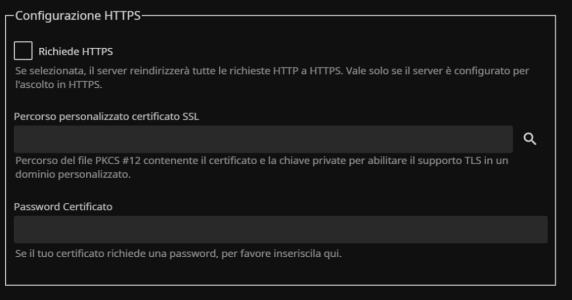
## 5. Jellyfin settings
In Jellyfin:
- Enable HTTPS
- Set port 8920
- Load the file:
jellyfin.pfx