What's new
  • SNBForums Code of Conduct

    SNBForums is a community for everyone, no matter what their level of experience.

    Please be tolerant and patient of others, especially newcomers. We are all here to share and learn!

    The rules are simple: Be patient, be nice, be helpful or be gone!

MerVLAN v0.50 Simple and Powerful VLAN Management **BETA**

r80xcore

Regular Contributor
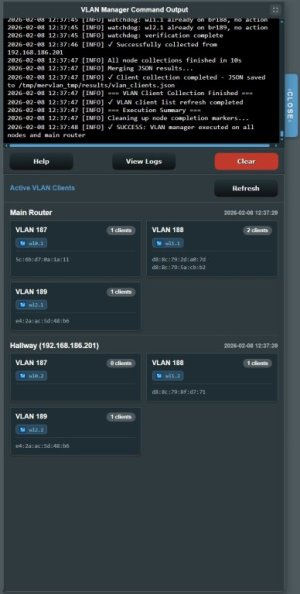
MerVLAN VLAN Manager – Simple and Powerful VLAN Management

1000002311.jpg


# MerVLAN

MerVLAN is an addon for Asuswrt‑Merlin focused on AP-mode deployments. It provides multi-node VLAN management with per-SSID and per‑Ethernet‑port tagging, a lightweight web UI, and boot/service-event integration so changes persist across reboots. Addon is placed under the "LAN" section on the UI.

# Important

Addon is in beta.
Issues might be present.
Please join the discord server or send PM with logs if you run into issues.

Use
Code:
tail -f /tmp/mervlan_tmp/logs/cli_output.log
(also available via the GUI)
and
Code:
tail -f /tmp/mervlan_tmp/logs/vlan_manager.log
(also available via the GUI)
To see and copy relevant logs.

## Features

- Per-SSID and per‑Ethernet‑port VLAN tagging
- Multi-node support: propagate actions to configured nodes over SSH
- Automatic boot integration via services-start and service-event
- Simple web UI served from the router under /www/user/mervlan
- Safe, variant-aware injection/removal for startup scripts (no blind overwrite)
- Structured logging to /tmp/mervlan_tmp/logs and optional syslog tagging
- First-install “full” workflow that lays out directories and downloads the addon

## Requirements

- **Asuswrt-Merlin firmware** with addon support (required on all devices that is supposed to tag VLAN)
- **SSH enabled** on the main AP and standalone AP's (AiMesh-nodes share SSH keys)
- **JFFS enabled** for persistent storage
- (Important!) **AP-mode only for now**
- (Important!) **VLAN-aware upstream device** (e.g., managed switch and/or router such as OPNsense, pfSense, Asus Pro etc.) VLAN routing, rules, and DHCP must be handled **upstream**, MerVLAN only handles tagging and bridging at the AP level for the time being. (Investigations into alternative ways are being done.)
- (Important!) **Ethernet Backhaul ONLY** Wi-Fi backhaul is not capable of preserving VLANs. This is a know limitation and nothing i can affect. (Research of L3 tunneling via Wireguard is being done, but no promises here.)

- Nodes and/or Access Points need to connect to VLAN-aware switches (planned scripts for VLAN-tagged trunks is currently being developed, will need extensive testing. If you want to be a part of this select test, contact me)


## 🌐 Multi-AP / Multi-Model Deployments

- You can connect **multiple APs together**, even if they are **different Asus models**, as long as they all run Asuswrt-Merlin with addon support
- SSH key distribution between units not in AiMesh mode is **manual** for now; a **semi-automated SSH key installer script** is currently in development
- Mixed-model or multi-AP setups require **testing and debugging** to verify correct behavior across firmware variations

## VLAN Behavior (Current State)

- **LAN port VLAN tagging is global** — the same VLAN assignments apply to all APs/nodes
- Support for **per-device LAN port VLAN settings** is in active development
- Until then, if you want different VLAN tags on specific APs, you’ll need to apply manual configuration steps via SSH on each device after deployment

## Known Bugs

  • Can occasionally **overwrite or remove existing content** in `services-start` and `service-event` during install or update Fixed, will be committed in next release. Committed 2025-11-13
  • Specific SSID names can cause misses. Fixed in mervlan_manager.sh v0.47


## Install
Only install if you want to participate in the Beta! Bugs can and will probably be present and you might need to factory-reset in a worst-case scenario.

SSH into the AP and run this command to install the addon. The addon will
be placed under "Tools" in the GUI.

Code:
mkdir -p /jffs/addons/mervlan && /usr/sbin/curl -fsL --retry 3 "https://raw.githubusercontent.com/r80xcore/mervlan/refs/heads/main/install.sh" -o "/jffs/addons/mervlan/install.sh" && chmod 0755 /jffs/addons/mervlan/install.sh && /jffs/addons/mervlan/install.sh full

## Uninstall

- Standard uninstall:
Code:
/jffs/addons/mervlan/uninstall.sh
- Full uninstall (also removes addon directories and temp workspace):
Code:
/jffs/addons/mervlan/uninstall.sh full

## Logs

- Primary log dir: /tmp/mervlan_tmp/logs
- The UI exposes log views via symlinks under /www/user/mervlan/tmp/logs
- Logging behavior, colors, and syslog tagging are configured in settings/log_settings.sh

## License

See LICENSE for details.

The tool was developed on an ASUS XT8 Mesh System, but it is designed to work with most newer (officially supported by Merlin/Gnuton) single access point (AP) mode routers and mesh AP systems.


Limitations
  • The maximum number of VLANs (up to 12) depends on the number of SSIDs your device supports.
    For example, if your router supports only 5 SSIDs, you cannot configure more than 5 VLANs.
  • Mesh functionality is limited by ASUS’s firmware design.
    For instance, some models support nine guest SSIDs but only three (one per band) are mesh-enabled.
    Non-mesh SSIDs can still be assigned VLANs but will only broadcast from the main node.
  • Devices connected to VLANs cannot be bound to specific nodes.
  • VLAN devices use standard band steering, which cannot currently be customized per VLAN.
  • Mesh users: VLAN tagging is only supported when nodes are connected via Ethernet backhaul. This limitation is due to the underlying hardware and wireless driver design—the WiFi backhaul does not support passing VLAN-tagged traffic. It's currently tested with Node - > Switch topology, daisy chaining is not tested and will most likely drop tagged traffic, but Daisy Chaining mode is planned for future release!


Beta Testing


Beta testing will be coordinated via Discord for easier log collection and discussion.
But I also accept PM with logs and issues here.
Join via the link if you want to be a part of the Beta testing on Discord! MerVLAN Discord Link
 
Last edited:
I am interested in following this project, unfortunately the discord invitation link is not valid anymore.
Can you tell me if your VLAN manager also works when the router is setup in ap-mode?
 
I am interested in following this project, unfortunately the discord invitation link is not valid anymore.
Can you tell me if your VLAN manager also works when the router is setup in ap-mode?
Hi!
I will update the link tonight when I'm home, sorry for that.

The vlan manager is specifically made for routers in AP mode as running vlan in router mode generally isn't recommended and can introduce double NAT (as you need another firewall/router routing the vlans.

So if you're running in Ap mode you're hopefully good to go.

I'm currently in the process in porting this program to a real Addon where it's accessible from within the merlin GUI. It probably ready in a week or so. Until then, feel free to try the beta that uses it's own gui and adress.
 
Thanks for getting back at me so promptly.

I was asking because I am exploring the posibility to run an OPNsense mini pc as router/firewall and want to re-use my two Asus routers as access points in combination with VLAN tagging over Wifi and multiple SSID's (Main, Guests, IoT).

I will follow this thread with much interest.
Thanks for investing your time in what promisses to be a great addon.

Keep up the good work.
 
Thanks for getting back at me so promptly.

I was asking because I am exploring the posibility to run an OPNsense mini pc as router/firewall and want to re-use my two Asus routers as access points in combination with VLAN tagging over Wifi and multiple SSID's (Main, Guests, IoT).

I will follow this thread with much interest.
Thanks for investing your time in what promisses to be a great addon.

Keep up the good work.
No problems!

I'm running OPNsense myself and using this addon to tag three different guest networks in mesh and vlan 187,188,189, and it works great. then the plan is to run the untagged as 186 in the switch so everything ends up tagged in opnsense.
 
Mesh users: VLAN tagging is only supported when nodes are connected via Ethernet backhaul.

But... this is not technically Mesh anymore and whoever has Ethernet available may find AP Mode much better with more control per AP and better spectrum utilization with up to 2x higher aggregate throughput to wirelessly connected clients. So when Ethernet is available and there is VLAN capable APs (native or via custom script) this AiMesh option is actually a limitation and has to be avoided.

Thanks for sharing your work! It may save someone money by reusing available hardware.
 
But... this is not technically Mesh anymore and whoever has Ethernet available may find AP Mode much better with more control per AP and better spectrum utilization with up to 2x higher aggregate throughput to wirelessly connected clients. So when Ethernet is available and there is VLAN capable APs (native or via custom script) this AiMesh option is actually a limitation and has to be avoided.

Thanks for sharing your work! It may save someone money by reusing available hardware.
What I mean by that is that the WiFi in these devices does not support vlan trunking which means that the tagged VLAN packets is stripped if they travel from the mesh node using WiFi backhaul. So you need to connect the the mesh nodes via ethernet to a managed switch. Daisy chaining is planned but not something I will start with until everything is up and running.

When setting up mesh you do that via the gui as normal. This addon only tags traffic on the chosen SSID.

So TLDR.
Mesh is supported but only if device is connected via cable. Which honestly is the preffered way anyhow for an AP, especially when using VLAN.

My devices work on mesh VLAN at home.
 
Last edited:
Mesh is supported but only if device is connected via cable.

Some terms mismatch. Mesh is wireless only in networking. Wired mesh is consumer products marketing invention.
 
Some terms mismatch. Mesh is wireless only in networking. Wired mesh is consumer products marketing invention.
Right, when I said device, I meant the other AiMesh nodes, not client devices like phones or laptops. I was probably a bit unclear there.

You’re correct that mesh in enterprise networking usually means a wireless interconnect between access points. But in ASUS AiMesh (and most consumer systems), the term mesh also includes setups that use Ethernet backhaul — it’s still the same AiMesh control layer, just with wired links instead of wireless ones. In other words, one SSID covered by several APs.

So yes, VLAN Manager fully supports AiMesh, but only when the nodes are connected via Ethernet backhaul. That ensures VLAN tags are preserved end-to-end while keeping the roaming benefits without breaking isolation. This setup must use Ethernet backhaul only so VLAN tags travel correctly. Mixed Ethernet + Wi-Fi backhaul can break VLAN isolation.

The key difference is that AiMesh can’t “control” or steer clients on a VLAN-tagged SSID. Those SSIDs still broadcast on all nodes, but AiMesh’s smart-connect and steering logic won’t apply to them. Clients just roam naturally between nodes.
 
Last edited:
But... this is not technically Mesh anymore
Can you please expand on why not? Asus WebGui makes no differentiation as to how nodes are connected. Is there a standardized Mesh definition?
 
There is nothing to expand. Mesh is wirelessly connected re-transmitters. It was invented long before Wi-Fi. Consumer products marketing invented wired mesh. It's a key word. What ASUS (or others on the same market) have in their App or Web GUI is whatever they decided to call specific feature. There are many strictly marketing terms like Game Boost (QoS), Game Accelerator (QoS), OpenNAT (port forwarding), WTFast (some paid VPN service), as well as mimicking common abbreviations like SDN (as per ASUS - Self-Defined Network), Ai/AI (as per ASUS for some products - Always Incredible), etc. Part of the learning curve when moving to more business oriented products comes from technically incorrect terms used in consumer products.
 
I am interested in following this project, unfortunately the discord invitation link is not valid anymore.
Can you tell me if your VLAN manager also works when the router is setup in ap-mode?
Sorry for the delay. I got caught up in work and forgot to send you the link. Here's a new link for you.


The version available there is v0.44 with its own ui on another Web adress. I would suggest you wait until v0.45 is done. It will be installed as an addon and be a part of the official Gui under the "Tools". Has been a learning curve to get it right but it should be finished and ready for use by the weekend.

Full changelog will be available when released as there are a lot of changes under the hood. It's more sturdy, self-contained and most important following the addon api and guidelines as well as a new GUI following the system css.

See you on Discord!
 
MerVLANn v0.46

Changelog:

# execute_nodes.sh v0.45 - v0.46
# Reworked to fix broken paths

# mervlan_boot.sh v0.45 -> v0.46
# Added SSH-propagated node actions (nodeenable, nodedisable, setupenable, setupdisable) so main commands fan out to satellites.
# Hardened template injection logic; corrected service-event-nodes.tpl handling so the main router service handler no longer receives the node variant.

# mervlan_manager.sh v0.45 -> v0.46
# Queue-aware, timed restarts: skip duplicate restart_wireless/switch/httpd via /tmp/rc_service/ps and enforce timeouts.
# Global mkdir lock: prevents overlapping runs from clobbering bridges/interfaces.
# VAP wait cap: wait_for_interface limited to ~63 s (exponential backoff).
# Clean bridge teardown: detach all member ports before brctl delbr.
# Safer delif: ignore empty bridge names and dedupe in remove_from_all_bridges.
# Fail-fast env: exit if CHANGES or LOCKDIR aren’t set.
# Full cmdlines: use ps w so token matching is reliable.
# Cleaned stray braces and adjusted client-refresh conditions in mervlan_manager.sh to Ensured only the main router runs collect_clients.sh

# service-event-handler.sh v0.45 -> v0.46
# Added debounce to deflect multi-clicks or multi-calls.
# Added missing executenodes_vlanmgr

# sync_nodes.sh v0.45 -> v0.46
# Hardened to create all runtime directories remotely before file sync.
# Added missing hw_settings.json, preventing the execution of some scripts.

# service-event-nodes.tpl
# Added TEMPLATE_2 mirroring the service-event-handler.sh on main. Used to prevent accidental writes to the main version.

# var_settings.sh v0.45 -> v0.46
# added several definitions that is used in the updated versions.

# index.html
Updated index.html buttons to send actions through the unified queue, added modal button wiring, and maintained per-action logging/locking.

# mervlan.asp
# Restored action_mode="apply" and built policy-controlled wrappers in mervlan.asp, including sandboxed skip-refresh handling and the shared MVM_trigger pathway.

A lot of other both small and medium bugs fixed in .html .asp and general definitions throughout the scripts.
 
So I'd suggest we just continue in here and maybe you make a final post on the other thread that points at this thread.

One thing that occurred to me is part of the setup involves figuring out the IP addresses of the AiMesh nodes and manually inputting them. Eventually some kind of auto-discovery would be great, if possible, but the bigger question is what happens in the unlikely event the node IP address changes after install/configuration? Those addresses are assigned via DHCP when you add the node under AiMesh so I'm assuming there's still a possibility they could get reassigned by the system itself, of if you remove and then re-add it could change. If the IP changes after install/configuration does this all break?
 
So I'd suggest we just continue in here and maybe you make a final post on the other thread that points at this thread.

One thing that occurred to me is part of the setup involves figuring out the IP addresses of the AiMesh nodes and manually inputting them. Eventually some kind of auto-discovery would be great, if possible, but the bigger question is what happens in the unlikely event the node IP address changes after install/configuration? Those addresses are assigned via DHCP when you add the node under AiMesh so I'm assuming there's still a possibility they could get reassigned by the system itself, of if you remove and then re-add it could change. If the IP changes after install/configuration does this all break?
Solution: Create DHCP reservation for AiMesh nodes.
 
Ok, installed, everything worked this time including generating the SSH key. One question I have is I see Lan 1-5 in the interface but no reference to which piece of hardware this is applying to. If, for example, I set LAN 2 to VLAN ID 53 is that going to cause Lan 2 on each node to tag 53? And what if you have an AiMesh node that has a different number of LAN ports?

Here's another issue:

1762639553997.png
 
Ok, log files are telling me it's because of the same thing @visortgw just said in the other thread, the SSH key hasn't been copied to the nodes. Is there a step I'm missing here where I was supposed to manually install that key somewhere on the nodes?
 
Solution: Create DHCP reservation for AiMesh nodes.
That’s exactly what I do in both my networks and works even when you delete and later re-add the same node. Easy to manage via SSH as IP is fixed. Even comes up with dinky little icons.

Although have you ever noticed they whilst they appear in the log, they don’t ever get assigned names in the system log, wireless log, if you use wireless backhaul…

IMG_2642.jpeg
IMG_2644.jpeg
IMG_2643.jpeg
 
Last edited:
Similar threads

Similar threads

Latest threads

Support SNBForums w/ Amazon

If you'd like to support SNBForums, just use this link and buy anything on Amazon. Thanks!

Sign Up For SNBForums Daily Digest

Get an update of what's new every day delivered to your mailbox. Sign up here!

Staff online

Back
Top