

r80xcore
Regular Contributor
MerVLAN VLAN Manager – Simple and Powerful VLAN Management


LATEST CHANGELOG (often condensed, full log: main | dev
IMPORTANT!
MerVLAN is an addon for Asuswrt-Merlin that adds a graphical VLAN manager inside the web UI (LAN section).
It’s built for AP-mode deployments and helps you tag/bridge VLANs for:
Status
Supported Topologies
SSH key behavior
Requirements
Key Features
Limitations / Notes
Install
Only install if you’re comfortable with beta software (and factory reset recovery if needed).
SSH into the AP and run:
To run the newest dev version, run this command instead:
The UI will appear under LAN → MerVLAN.
Update
Run on the main AP:
for dev version, run:
Or Update via the GUI
Updater keeps settings/SSH keys, refreshes files, and re-syncs nodes (if configured).
Uninstall
From `/jffs/addons/mervlan`:
Logs & Debugging
Links / Support
See `changelog.txt` for full version history.
See `LICENSE` for license details.
LATEST CHANGELOG (often condensed, full log: main | dev
mervlan v0.52.91 - Hotfix
- mervlan_boot.sh: Fixed a critical bug where template injection silently deleted subsequent blocks in services-start. Re-injecting the addon block caused following entries (manager and cron) to be dropped. This resulted in VLANs and health-checks failing to restore on the second reboot. Special thanks to mistermoonlight1 for logs and multi-reboot testing.
mervlan v0.52.9
Notable Features:
Updated Files:
- STP Support: Prevents network loops in multi-node setups. Each node uses a unique, stable bridge ID that persists across reboots. Toggle via General Settings → "STP: On/Off".
- Safer Boot Process: New wrapper prevents router startup delays by running boot operations in the background. Logs are now properly captured in boot_wrap.log, and install checks run only once per boot cycle for speed.
- Trunk Port Improvements (Experimental): Logic rewrite for smarter native (untagged) VLAN handling and automatic cleanup of stale configurations. Includes strict VLAN filtering via ebtables to prevent unauthorized access. Use with caution.
- mervlan_manager.sh: Added STP/bridge MAC management and improved cleanup of old VLAN configs.
- mervlan_trunk.sh: Major rewrite for better native VLAN handling, overlap detection, and strict filtering.
- lib_stp.sh (NEW): Library to ensure consistent bridge IDs across nodes and reboots.
- mervlan_boot_wrap.sh (NEW): Boot-time wrapper managing install, manager, and cron modes with proper error handling.
- mervlan_templates.sh: Updated boot scripts to utilize the new background wrapper.
- sync_nodes.sh: Includes the new library and wrapper in the node synchronization process.
- index.html: UI update; replaced the "Persistent" toggle with the "STP" toggle.
- help.html: Complete overhaul with organized tabs (SSID Setup, LAN Setup, etc.) and direct support links to SNB Forums, Discord, and GitHub.
- General: Standardized headers across all scripts for consistency.
IMPORTANT!
If you are updating from v0.52.5 or earlier, you must transition via the CLI. See this
MerVLAN is an addon for Asuswrt-Merlin that adds a graphical VLAN manager inside the web UI (LAN section).
It’s built for AP-mode deployments and helps you tag/bridge VLANs for:
- Per-SSID VLAN assignment
- Per-LAN-port VLAN assignment (access ports)
- (Experimental) Trunk ports for daisy-chained APs
- Syncing VLAN config to other APs/nodes over SSH
MerVLAN is not a router or managed switch. You still need a VLAN-aware upstream firewall/switch for routing, DHCP, and policy.
Status
- Public beta – expect bugs and occasional breaking changes.
- AP-mode only (main and any nodes/APs must be running as APs, not router mode).
Supported Topologies
- Single unit: 1x Asuswrt-Merlin AP running MerVLAN.
- AiMesh: 1x main Merlin AP + up to 5 AiMesh nodes (Ethernet backhaul only for VLAN tags).
- Standalone AP nodes: 1x Merlin “controller” AP + up to 5 standalone AP units (non-AiMesh), synced over SSH.
SSH key behavior
- AiMesh: the main AP typically shares its SSH keys with AiMesh nodes automatically.
- Standalone AP nodes (non-AiMesh): you must install the same public key on each unit (same method as the main AP) so MerVLAN can sync and run commands remotely. Only main needs to install MerVLAN.
Requirements
- Asuswrt-Merlin firmware with addon support (on every device that will tag VLANs).
- AP-mode on all participating units.
- JFFS enabled (persistent storage).
- SSH enabled on main + any standalone AP nodes.
- Ethernet backhaul only between VLAN-aware nodes/APs (Wi-Fi backhaul cannot preserve VLAN tags).
- Mandatory: VLAN-aware upstream device (managed switch + router/firewall such as OPNsense/pfSense/etc).
Key Features
- UI-driven VLAN config inside the Merlin GUI.
- SSID ↔ VLAN mapping and LAN port ↔ VLAN mapping.
- (Experimental) Trunk ports for Ethernet daisy-chain.
- Multi-node sync over SSH (push config/scripts to nodes).
- SSID-agnostic VLAN mapping:
On multi-node setups, MerVLAN applies mappings only to SSIDs present on each AP, allowing different nodes to advertise different SSIDs while preserving VLAN behavior. - Self-healing: hooks re-apply VLAN wiring after reboot and certain system events.
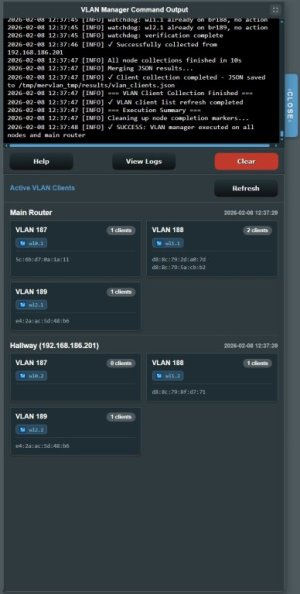
- Built-in logs + UI-visible command output for debugging.
Limitations / Notes
- VLAN usage is practically limited by SSID slots your hardware supports.
- Some models have guest SSID/mesh quirks (certain SSIDs may only broadcast on the main node).
- Wi-Fi backhaul cannot carry VLAN tags (Ethernet only for VLAN-aware nodes).
- MerVLAN does not provide routing/firewall/DHCP.
Install
Only install if you’re comfortable with beta software (and factory reset recovery if needed).
SSH into the AP and run:
Code:
mkdir -p /jffs/addons/mervlan && /usr/sbin/curl -fsL --retry 3 "https://raw.githubusercontent.com/r80xcore/mervlan/refs/heads/main/install.sh" -o "/jffs/addons/mervlan/install.sh" && chmod 0755 /jffs/addons/mervlan/install.sh && /jffs/addons/mervlan/install.sh full
Code:
mkdir -p /jffs/addons/mervlan && /usr/sbin/curl -fsL --retry 3 "https://raw.githubusercontent.com/r80xcore/mervlan/refs/heads/dev/install.sh" -o "/jffs/addons/mervlan/install.sh" && chmod 0755 /jffs/addons/mervlan/install.sh && /jffs/addons/mervlan/install.sh dev fullThe UI will appear under LAN → MerVLAN.
Update
Run on the main AP:
Code:
/jffs/addons/mervlan/functions/update_mervlan.sh update main
Code:
/jffs/addons/mervlan/functions/update_mervlan.sh update devUpdater keeps settings/SSH keys, refreshes files, and re-syncs nodes (if configured).
Uninstall
From `/jffs/addons/mervlan`:
- Standard (keep addon data):
Code:./uninstall.sh - Full (remove addon dirs + temp workspace):
Code:./uninstall.sh full
- Standard (keep addon data):
Logs & Debugging
- Primary log directory: `/tmp/mervlan_tmp/logs`
- Common logs:
- `vlan_manager.log` – VLAN apply pipeline, heal checks, and node execution
- `cli_output.log` – commands executed from the UI and installer
- Logs are also accessible via the UI under `view logs` in info.
- Bug reports: please include relevant log files (or excerpts) when reporting issues — missing logs make problems much harder to diagnose.
Links / Support
See `changelog.txt` for full version history.
See `LICENSE` for license details.
Attachments
Last edited:


