What's new
  • SNBForums Code of Conduct

    SNBForums is a community for everyone, no matter what their level of experience.

    Please be tolerant and patient of others, especially newcomers. We are all here to share and learn!

    The rules are simple: Be patient, be nice, be helpful or be gone!

Possible to disable constant DNS checks to dns.msftncsi.com?

Avrution

Occasional Visitor
Basically title. Once upon a time you could just remove the settings in nvram and it would stop, but that doesn't seem to work anymore.

Code:
dns_probe=0
dns_probe_content=*
dns_probe_host=
dns_probe_timeout=1

Nothing changes. My router is even in AP mode and this still happens. Over 40k+ requests in a month is just unnecessary.

This is on the RT-AX88U running 3004.388.9_2
 
Try Adguard or block it via Windows firewall i suppose.
 
@Avrution
Code:
nvram set dns_probe_host=localhost
Just don't blame me when your router doesn't recover from genuine internet outages or when dual wan doesn't work. ;)
 
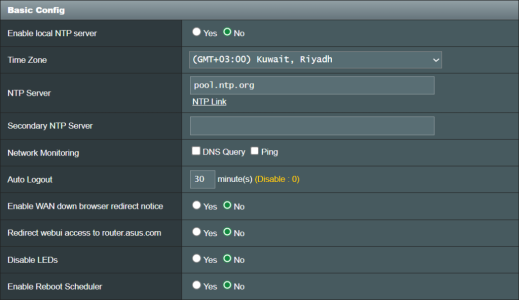
Did you just simply try disabling internet connection detection?

1. Go to page: Administration - System
2. Scroll down to "Basic Config" settings section.
2. Uncheck both options at "Network Monitoring" (DNS Query, and Ping)
3. Submit the change

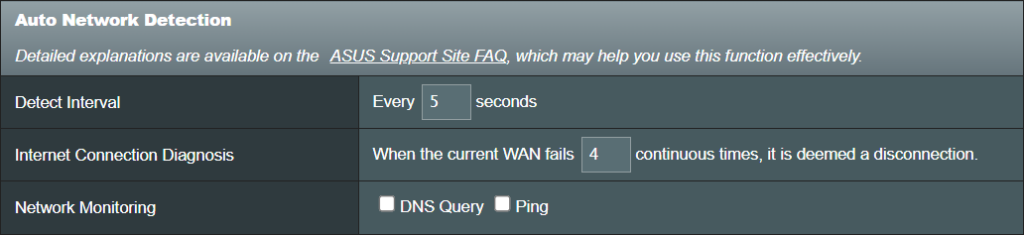
It should reflect automatically in the Dual WAN page too, under "Auto Network Detection" section.
This is on RT-AC68U running Merlin 386.14_2
 

Attachments

  • 2025-09-28_02-40-40.png
    2025-09-28_02-40-40.png
    106.4 KB · Views: 73
  • 2025-09-28_02-45-48.png
    2025-09-28_02-45-48.png
    88.2 KB · Views: 79
Basically title. Once upon a time you could just remove the settings in nvram and it would stop, but that doesn't seem to work anymore.

Code:
dns_probe=0
dns_probe_content=*
dns_probe_host=
dns_probe_timeout=1

Nothing changes. My router is even in AP mode and this still happens. Over 40k+ requests in a month is just unnecessary.

This is on the RT-AX88U running 3004.388.9_2
Or change it to something else?
Google.com maybe. :p
 
@Avrution
Code:
nvram set dns_probe_host=localhost
Just don't blame me when your router doesn't recover from genuine internet outages or when dual wan doesn't work. ;)

Well, remember this is an AP, so it doesn't host internet and the wan port is set to a lan port. If this still pings itself every minute that really isn't much better. I'm trying to get rid of all the extra entries it is making in technitium, which handles the dns.
 
Did you just simply try disabling internet connection detection?

1. Go to page: Administration - System
2. Scroll down to "Basic Config" settings section.
2. Uncheck both options at "Network Monitoring" (DNS Query, and Ping)
3. Submit the change

It should reflect automatically in the Dual WAN page too, under "Auto Network Detection" section.
This is on RT-AC68U running Merlin 386.14_2
Settings don't exist on my router
 
Settings don't exist on my router
Then you need to disable wandog feature through NVRAM settings to achieve the same effect, alongside disabling dns_probe as you already did..

Execute the following command to show your current wandog settings:
Code:
nvram show | grep 'wandog_'

Execute the following two commands to disable wandog:
Code:
nvram set wandog_enable=0
nvram commit
 
Then you need to disable wandog feature through NVRAM settings to achieve the same effect, alongside disabling dns_probe as you already did..

Execute the following command to show your current wandog settings:
Code:
nvram show | grep 'wandog_'

Execute the following two commands to disable wandog:
Code:
nvram set wandog_enable=0
nvram commit
Already seems set that way (might be default for AP mode?)

wandog_delay=0
wandog_enable=0
wandog_fb_count=4
wandog_fb_restart=0
wandog_interval=3
wandog_maxfail=2
wandog_target=
 
might be default for AP mode?)
Yep, double checking is always better.

I guess your best bet right now is to stick to what @ColinTaylor suggested, until someone has a better solution, maybe?
 
Yep, double checking is always better.

I guess your best bet right now is to stick to what @ColinTaylor suggested, until someone has a better solution, maybe?
Went ahead and changed it and will see if that creates new logs or maybe it won't leave the system. I already blocked access to the msftncsi, but would rather just keep things clean by having nothing. Seems like a bit of an oversight on Asus's part, considering AP mode doesn't need an internet check.
 
Don't forget to commit the change suggested by ColinTaylor by running the command
Code:
nvram commit

Went ahead and changed it and will see if that creates new logs or maybe it won't leave the system.
Please let me know about the final result you get
 
Rather than disabling the feature altogether, is there a way to reduce the frequency? In my case it occurs every minute from the node.
 
is there a way to reduce the frequency? In my case it occurs every minute from the node.
Would you help us figuring this out by changing the dns_probe_timeout NVRAM parameter to value 2, to see whether this changes the probing frequency or not. I suspect this value corresponds to the DNS probe interval in minutes.

Execute these two commands in shell to get the change done properly:
Code:
nvram set dns_probe_timeout=2
nvram commit

Please report back as soon as possible.
 
Last edited:
Would you help us figuring this out by changing the dns_probe_timeout NVRAM parameter to value 2, to see whether this changes the probing frequency or not. I suspect this value corresponds to the DNS probe interval in minutes.

Execute these two commands in shell to get the change done properly:
Code:
nvram set dns_probe_timeout=2
nvram commit

Please report back as soon as possible.
No change.

Edit: I've just rebooted router and node. I have to run out and should be back in about 2 hours. Will report back then.
 
Last edited:
No change.
Is it possible for you to do a reboot and check again? Are you using dnsmasq logging for monitoring?
I'm curious about the dns_probe_timeout parameter; as this thread's author reported having around 40k+ probes per month, which correcponds approximately to a single probe each minute just like you reported.

Could you confirm what's the current value of the parameter in your router right now and after a reboot (if possible)?
Code:
nvram get dns_probe_timeout
 
Making a very quick review of the firmware code at the link @dave14305 provided in his latest reply here, I can see that dns_probe parameter is used only to either enable or disable the feature, hence, it should be a 0/1 value only.

Moreover, Ping and DNS Probe monitoring are very much linked to each other in the code, and only dns_probe_timeout along with wandog_interval parameters control the frequecy of the checks. I didn't actually follow the code paths, I just did a very quick review. However, since I have no experience in Asuswrt firmware, an experienced person in the firmware must have much more ability to provide us with a quick clarification much better than my quick review and speculations.

It's important to mention that I figured out there's a parameter named dns_probe_debug you can set to get more output from the probing process.

Use the following commands to set it
Code:
nvram set dns_probe_debug=1
nvram commit

After you're totally done with DNS Probe debugging, you can unset the variable using:
Code:
nvram unset dns_probe_debug
nvram commit
 
Last edited:

Similar threads

Latest threads

Support SNBForums w/ Amazon

If you'd like to support SNBForums, just use this link and buy anything on Amazon. Thanks!

Sign Up For SNBForums Daily Digest

Get an update of what's new every day delivered to your mailbox. Sign up here!
Back
Top