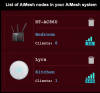
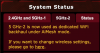
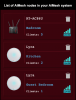
Thank you. Is there any way to change the backhaul bank or force it to use another?
I have the following two screenshots from the GT-AC5300 interface. I am currently seeing 2.4Ghz everywhere but elsewhere I am informed that the second radio of 5Ghz is dedicated to backhaul.
I understand your issue and I don't know the answer to your question, how to control the backhaul band selection. I believe the AiMesh router makes this decision on its own... it should, imo. You can query each node (in your pic) to see if there are more config options on the GT-5300.
Is the 5300 broadcasting all three SSIDs, 2.4, 5.0-1, and 5.0-2?
Are the nodes broadcasting their three SSIDs?
Are the nodes located within range of the router's 5.0-2 band? What's the WiFi signal power level at the node... 70dBm or better?
Have you tried connecting a temporary wired backhaul to see how the node responds?
Did you upload the latest firmware on all routers and then
factory default reset all routers before configuring the AiMesh router and adding the nodes? If not, then I would do that.
Inspect the router Wireless Log to identify any MACs you can attribute to the node wireless backhauls. Three nodes ought to show three 2.4 backhauls and three 5.0 backhauls.
Is it working ok? Have you run a wired PC speedtest.net at the router and at the nodes to compare performance? Maybe the GUI is misreporting the backhaul info.
OE