Let's make the most of what you already got!
And by skimming through your thread that's a pretty weak router and a unstable oversold ISP line. That said, I still believe your Asus router can make your internet experience a whole lot better by following these simple steps (to the letter).
Just to cover the basics. I assume you are running Merlin's latest firmware, and that you've already performed a factory reset with the "Initialize" box checked on the side, and then reconfigured your router from scratch manually (AND NOT READ IN ANY FORM OF BACKUP CONFIG FILE FROM EARLIER). If not, start by doing so now.
I am also assuming that your routers lan side ip adress is 192.168.1.1 in this walk through, if not please adapt to your lans ip range below!
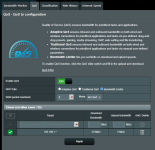
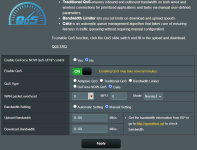
Then you go to your routers Adaptive QOS page -> choose the QOS tab -> Enable QOS -> Choose Bandwidth Limiter ->In the Target field you type in the following: 192.168.1.* (pay attention to the asterix at the end) -> In the upload bandwidth field you type in 5 Mb/s -> In download bandwidth field you type in 25 Mb/s -> and then hit the plus sign to the right -> and then hit Apply.
Give it a few minutes to settle, and then you will see your Asus router make wonders to your internet experience and test results!
The simple trick is all about keeping things well within the limits of your HW (router) and ISP line. If your test results still not close to A+, you will have to lower the up and down speeds even more. That's simply the price you'll pay for a rock steady internet connection given your current HW and unstable ISP.
Best of luck!