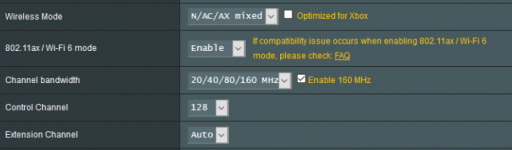
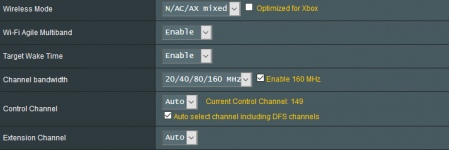
I have almost forgotten that I have this installed and running still on my 'dirty, dirty, dirty...' upgraded RT-AX88U (see my signature). I have seen this script work many times, I don't know why others don't see the same benefits too?
The point is quite straight forward, when channel bandwidth downgrades to 80MHz it doesn't revert back until the wireless radio is reset. This script automates the process. Why pay for a device capable of 160MHz if your never going to utilize it?
I have almost forgotten that I have this installed and running still on my 'dirty, dirty, dirty...' upgraded RT-AX88U (see my signature). I have seen this script work many times, I don't know why others don't see the same benefits too?
Discovered this tool today, installed and it corrected my AX88U setting from 80MHz to 160MHz. Thanks @Adamm !! My view of this script, assists to automate & check Router settings, of the many manual alterations required for your Router environment plus the "AddOns".
IMHO: Would be great to have a tool, that scanned all the common settings plus ones you have to tweak for AddOns, to provide a nice visual output to review for correctness.
Installed and ran this on my AX88U today .. met with the following error when attempting to check channel bandwidth after installation - wl: wl driver adapter not found .. thoughts?
It seemed to install fine, but the command to check bandwidth didn't work. Maybe I need to reboot or something I dunno.
EDIT: Still doesn't seem to work after an install. Still get same error. Can install and start channelhog, but if I try to check bandwidth, I get the error. I can run the commands to check the bandwidth manually pulling them out of the script, but the script isn't quite working for me. Really just wanted to force 160MHz backhaul for my one mesh node that is over wifi, but no biggie really.
I wan't to give another kudos to @Adamm (wherever he may be...).
I have an AX58U running in Media Mode for my entertainment system. Typically (when I even check the AX58U) I see a link rate of 3600Mbps. Once in a while I will notice it drops to 1100Mbps.
On a whim, I installed ChannelHog. Once I added the AX58U to it's test statement it detected I was at 80Mhz and reset the link back to 160Mhz - and it was now back at 3600Mbps link rate.
I know this addon has had it's fair share of debate, but I agree with the statement that "why have a 160Mhz product that doesn't stay there". And, it's only runs once a day in the wee hours of the morning ;-)
I frequently find my channel changing. I pick an 80Mhz size channel in the DFS range, and at some point it switched to use channel 36 instead, which has a lot of interference from Sky Q's mesh.
Could this script be expanded to also detect when the channel changes, and if it does restart the radio?
Maybe my question is stupid, but the 160MHz option is viable only if the router is in AX mode, isn't it? Currently the AX mode and respectively the enable 160 MHz check boxes on my router remain unchecked as I have no AX clients in my network. Most probably such devices will appear soon, but still non-AX devices will be present in my network. So, a mixed client environment will exist for a long time. I remember that when the AX88U appeared there were a lot of compatibility issues with older (non-AX) devices, which is the reason to keep the AX mode off if no AX clients exist in the network.
this script of course helpful in case you want to use 160Mhz but unfortunately it works only once a day at 4.45. Is there an option to add in this script checking each hour?
Or I also found that simple command service restart_wireless change my router to 160Mhz and channel which I choice in settings. Router hold it until next radar detection and then again switch it to another channel and 80Mhz.
So my questions is who can help with the script that checking router automaticaly every one hour and in case of 80Mhz detection send the simple command service restart_wireless.
Thanks in advance
I got a weird problem. I remember seeing the "802.1ax/WiFi 6 mode" option on the Wifi settings. Now I don't see it. I don't know when it disappeared from the GUI so can't say what caused it to go away. I have a AX88 with two AC5000 in a AIMESH, but even with that I remember having the 802.1ax / WiFi 6 option in the gui with previous Merlin releases, on 386.2_4 now. Even though I have 160 MHz or 20/40/80/160 Mhz selected, still only ever see 80 Mhz through ChannelHog, am I missing something?
I got a weird problem. I remember seeing the "802.1ax/WiFi 6 mode" option on the Wifi settings. Now I don't see it. I don't know when it disappeared from the GUI so can't say what caused it to go away. I have a AX88 with two AC5000 in a AIMESH, but even with that I remember having the 802.1ax / WiFi 6 option in the gui with previous Merlin releases, on 386.2_4 now. Even though I have 160 MHz or 20/40/80/160 Mhz selected, still only ever see 80 Mhz through ChannelHog, am I missing something?
Then, maybe a different problem. I can only select "Auto, 149, 153, 157, 161, 165" , anything else only has Auto as an option... I would think that it might be because of the AC5300's but I had the option before even with these same channels... Gonna have to play around a bit maybe some other setting screwed me up...